
Positron
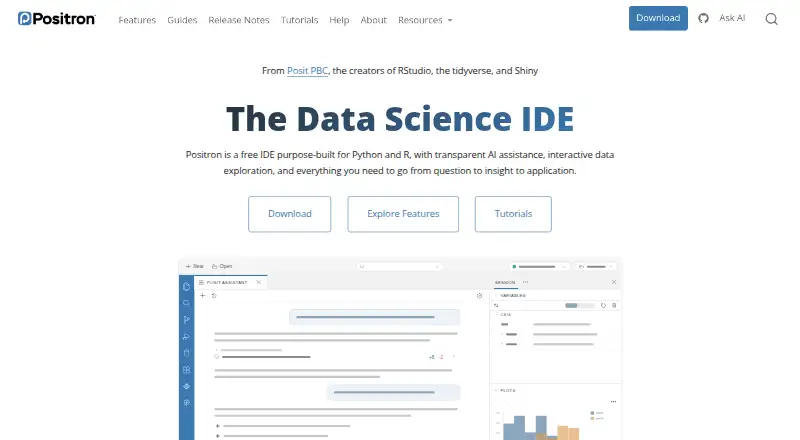
What Positron is
Positron is a data science IDE for Python and R on Linux, macOS, and Windows. Its Data Explorer provides an interactive interface for exploring and manipulating large local or remote datasets. It supports Jupyter notebooks and Quarto for reproducible reports and presentations, with a Connections pane for database connections and a Catalog Explorer. Listed capabilities also include an integrated debugger, advanced code intelligence, remote development, and Python environment tools. Posit Assistant can use a live Python or R session as context, including loaded data, plots, and console history. AI features require users to bring their own model-provider key, and users or organizations pay the provider directly. When using an external provider, Posit says it does not track, collect, or store prompts, code, or conversations entered through those features. Posit does not support code written or generated in Positron. The desktop IDE is free, but publishing projects to Posit Connect requires a subscription. Positron Pro on Posit Workbench is listed for enterprise governance, scalable compute, SSO, and dedicated support.
Who it suits
Positron suits data science work in Python or R, including exploration of local or remote datasets and development of notebooks or reports. Teams needing governance, scalable compute, or SSO can consider Positron Pro on Posit Workbench.
What it does well
- Free desktop IDE supports Python and R.
- Data Explorer handles local or remote datasets.
- Supports Jupyter notebooks and Quarto.
- AI Assistant can use live session context.
What to know first
- AI features require a provider key and direct provider payment.
- Posit does not support code written or generated in the IDE.
- Publishing to Posit Connect requires a subscription.
- Positron Pro requires Posit Workbench.
Limits
The desktop IDE is free, but publishing to Posit Connect requires a subscription. AI features use a bring-your-own-key model, with provider charges paid directly by the user or organization.
Plans
| Plan | Billed and limits | Price |
|---|---|---|
| Positron (Desktop) | Free · Desktop IDE for local computers · Supports R and Python · Posit Connect subscription required to publish there | Free |
| Positron Pro (Posit Workbench) | Talk to sales · Requires Posit Workbench · Enterprise governance, scalable compute, SSO, and dedicated support | On request |
As positron.posit.co lists them, read 2 Oct 2026. The maker's own page has the final word.
Getting started
- Visit the Positron website.
- Download the desktop IDE for Linux, macOS, or Windows.
- Use the IDE with Python or R.
- For AI features, provide a key for your selected model provider.
- For publishing to Posit Connect, obtain a Posit Connect subscription.
Positron is a data-science desktop IDE centered on Python and R, combining coding with interactive data work, notebooks and database access. It suits analysts, researchers and developers who want those tasks in one focused workspace. The free desktop edition is the sensible starting point for individual work, while team governance and some connected services involve separate requirements.
Overview
Positron is purpose-built for data science rather than presented as a universal programming environment. Its Data Explorer lets you inspect and manipulate large local or remote datasets through an interactive interface, and the Connections pane plus Catalog Explorer bring database work into the same environment. That combination is valuable when analysis repeatedly moves between data, code and results.
Jupyter notebook and Quarto support extends the workflow to reproducible reports and presentations. Remote development is supported, so the desktop application can fit work that is not confined to a local machine. Positron is source-available under the Elastic License 2.0, a licensing distinction worth checking for organizations with particular software-policy requirements.
Key features
Python and R development
Both Python and R are supported, with advanced code intelligence, an integrated debugger and Python environment tools. This is a stronger proposition than a basic text editor for people who need structured development around analytical code. Its focus is an advantage for Python-and-R teams, but it is less suitable if your primary work depends on a broader set of languages.
Data, notebooks and databases
The interactive Data Explorer is designed for large local or remote datasets, while database connections and catalog browsing keep data access close to the coding surface. Jupyter and Quarto support reproducible analysis and presentation work, reducing the need to switch applications between exploration and publication.
AI assistance
Posit Assistant can connect to live Python or R sessions and use loaded data, plots and console history as context. It follows a bring-your-own-key model: you or your organization pay the chosen model provider directly. Posit says it does not track, collect or store prompts, code or conversations entered through these AI features when an external provider is used. Posit does not support code written or generated in Positron, including AI-produced code, so teams need their own review and support practices.
Publishing and team deployment
Posit Publisher can publish projects to Posit Connect and Posit Connect Cloud, but publishing to Posit Connect requires a Posit Connect subscription. For organizations, Positron Pro on Posit Workbench adds server-based development, scalable compute, SSO integration, governance tools for environments such as AWS, Databricks and Snowflake, and dedicated support.
Pricing
| Plan | Price | What it includes |
|---|---|---|
| Positron (Desktop) | free | Desktop IDE for local computers, with R and Python support. A Posit Connect subscription is required to publish there. |
| Positron Pro (Posit Workbench) | Custom pricing | Requires Posit Workbench; adds enterprise governance, scalable compute, SSO and dedicated support. |
The desktop plan has no trial because it is free, making it the clear choice for individual developers and teams evaluating the IDE locally. Pro is an enterprise purchase rather than a low-cost upgrade: it is for organizations that need centralized administration and governed, scalable environments. AI costs are outside either plan because model-provider billing is direct, and Connect publishing adds its own subscription requirement.
Platforms
Positron runs on Windows, macOS and Linux. Its desktop format suits local development, while remote development and Workbench address teams working with server-based environments.
Who it's for
Choose Positron if your work combines Python or R development with dataset exploration, database connections, notebooks or Quarto reports. It is particularly well matched to analysts and data-science teams that value a single, specialized workspace. Individual users get the strongest price-to-capability case from the free desktop edition. Organizations needing SSO, governance or scalable compute should assess the Workbench-based Pro offering instead.
Pros and cons
- Pros: Free desktop access to both Python and R; interactive handling of large local or remote datasets; Jupyter, Quarto and database tooling in one IDE; debugger, advanced code intelligence, Python environment tools and remote development; stated non-retention of AI prompts, code and conversations when using an external provider.
- Cons: AI requires your own provider key and separate provider billing; Posit does not support code generated in the IDE, including AI output; Posit Connect publishing requires a subscription; the enterprise Pro edition requires Posit Workbench and custom pricing; Elastic License 2.0 may not fit every licensing policy.
Alternatives
For a wider survey of tools, browse Python IDEs or IDE Software.
- Anvil is the better pick for web-oriented, cloud-hosted applications, offering a free tier with unlimited apps and one developer.
- Eric is a straightforward free option for Linux, macOS and Windows when you want a Python-focused IDE without stated price or usage limits.
- Spyder is a free scientific Python IDE if your work does not require Positron's R support.
- TigerJython is a free choice oriented toward Python education.
- NINJA-IDE is a free GPLv3+ Python IDE, though its listed installers cover Windows and Linux rather than macOS.
- PyCharm suits users who want a general Python IDE with a free tier and an optional Pro subscription at $200 a year per user.
- Pyzo is a free, open-source computing environment for a simpler Python workflow.
- Spyder is another 100% free, open-source option with no paid version.
Verdict
Positron is a strong recommendation for Python-and-R data work that benefits from integrated exploration, databases, notebooks and reports, especially when a free desktop IDE is enough. Look elsewhere if you need built-in AI funding, supported AI-generated code, publishing without a Connect subscription, or a general-purpose IDE outside the Python-and-R domain.
Verdict
Positron brings data exploration, notebooks, database connections, and Python and R tools into a free desktop IDE. AI requires a separately paid provider key, and publishing to Posit Connect requires a subscription.
Questions
How much does Positron cost?
The Positron desktop IDE is free. Positron Pro on Posit Workbench is listed as Talk to sales.
Which operating systems does Positron support?
The desktop IDE supports Linux, macOS, and Windows.
Does Positron include AI assistance?
Posit Assistant can use a live Python or R session, including loaded data, plots, and console history, as context.
How is AI provider billing handled?
Users bring their own provider key and pay their chosen model provider directly.
Is Positron open source?
It is licensed under Elastic License 2.0, which Posit describes as source-available.
Can Positron publish projects?
Posit Publisher can publish projects to Posit Connect and Posit Connect Cloud. Publishing to Posit Connect requires a Posit Connect subscription.
Facts from Positron's own pages
- AI assistance
- Posit Assistant connects to live Python or R sessions and can use loaded data, plots, and console history as context. · positron.posit.co, 2 Oct 2026
- AI privacy
- When using an external model provider, Posit says it does not track, collect, or store prompts, code, or conversations entered through Positron AI features. · positron.posit.co, 2 Oct 2026
- AI provider billing
- Positron AI features use a bring-your-own-key model, and users or their organizations pay their selected model provider directly. · positron.posit.co, 2 Oct 2026
- AI support limit
- Posit does not provide support for code written or generated in Positron, including code produced with AI features. · positron.posit.co, 2 Oct 2026
- Database connectivity
- Positron provides a Connections pane for database connections and a Catalog Explorer. · positron.posit.co, 2 Oct 2026
- Data exploration
- The Data Explorer is described as a way to explore and manipulate large local or remote datasets through an interactive UI. · positron.posit.co, 2 Oct 2026
- Headquarters
- Boston, Massachusetts, United States · positron.posit.co, 28 Sept 2026
- License
- Positron is licensed under the Elastic License 2.0, which Posit describes as source-available. · positron.posit.co, 2 Oct 2026
- Maker
- Posit says RStudio, now Posit, was founded in 2009 to create high-quality open-source software for data scientists. · opensource.posit.co, 2 Oct 2026
- Notebooks and reports
- Positron supports Jupyter notebooks and Quarto for developing reproducible reports and presentations. · positron.posit.co, 2 Oct 2026
- Platforms
- The download page provides desktop installers for Windows, macOS, and Linux. · positron.posit.co, 2 Oct 2026
- Publishing
- Positron can publish projects to Posit Connect and Posit Connect Cloud using Posit Publisher; a Posit Connect subscription is required for publishing to Posit Connect. · posit.co, 2 Oct 2026
- Purpose
- Positron is a data science IDE purpose-built for Python and R. · positron.posit.co, 2 Oct 2026
- Team security
- Positron Pro on Posit Workbench offers server-based development, integration with existing SSO identity providers, and data governance tools such as AWS, Databricks, and Snowflake. · positron.posit.posit.co, 2 Oct 2026
Where Positron stands on Freedom251
- Python IDEs#5 of 26
- IDE Software#22 of 53