
Spyder
What Spyder is
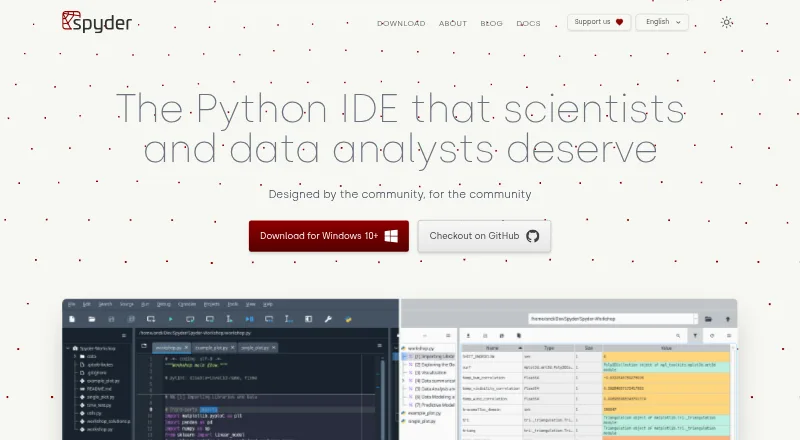
Spyder is a free, open-source scientific Python environment for scientists, engineers and data analysts. Its editor includes code completion, real-time analysis, syntax highlighting and split panels, and can run whole files, selected lines or code cells in an IPython Console. The console adds function calltips, debugger integration, a Variable Explorer and plots. Standalone installers for Windows, macOS and Linux include common scientific libraries such as NumPy, SciPy, Pandas and Matplotlib. Spyder can also connect to local or remote Python kernels. Third-party plugins are supported, though the documentation recommends Conda-based installation for plugin use; standalone plugin installation is still under development. For browser access, Binder offers a functional Spyder session without installation, but code and data are lost when the tab is closed or left. Spyder is free to use, and its documentation says anyone can contribute. The documentation points users to an FAQ, troubleshooting guide, GitHub issue tracker and Google Group for help.
Who it suits
Spyder suits scientists, engineers and data analysts working with Python. It may fit users who want a scientific editor, interactive console and bundled scientific libraries, or who need to connect to local or remote kernels.
What it does well
- Editor supports code completion and real-time analysis.
- Console includes debugger integration and a Variable Explorer.
- Standalone installers include common scientific libraries.
- Can connect to local or remote Python kernels.
- Free and open-source.
What to know first
- Binder session loses code and data when the tab is closed or left.
- Plugin use is recommended with Conda-based installation.
- Standalone plugin installation is under development.
Plans
| Plan | Billed and limits | Price |
|---|---|---|
| Spyder | Free open-source scientific Python IDE | Free |
As spyder-ide.org lists them, read 29 Sept 2026. The maker's own page has the final word.
Getting started
- Visit https://www.spyder-ide.org/ to get started.
- Install the standalone version for Windows, macOS or Linux.
- Use a Conda-based installation if you plan to use third-party plugins.
- For browser access without installation, open a Spyder session through Binder.
Overview
Spyder is a free, open-source scientific Python environment for people working with code, data and analysis. It suits scientists, engineers and data analysts who want an editor and interactive console together, rather than a browser session as their only workspace.
Its editor, execution tools and bundled scientific libraries make it a focused option for Python work. The trade-off is that plugin use favors a Conda-based installation, while Binder sessions do not preserve code or data after you leave.
Key features
The multi-language editor combines code completion, real-time analysis, syntax highlighting and split panels. That mix supports both writing and reviewing code, while the ability to run whole files, selected lines or code cells in an IPython Console makes it practical to move between script execution and incremental work.
The console adds completion, function calltips, debugger integration, a Variable Explorer and plots. Together, these tools make Spyder particularly relevant to interactive scientific analysis, where inspecting variables and results alongside code is useful. Standalone installers include NumPy, SciPy, Pandas and Matplotlib, reducing the need to assemble those common scientific libraries separately.
Spyder can connect to existing local or remote Python kernels through its console tools. It also supports third-party plugins, but the documentation recommends Conda-based installation for plugin use; standalone plugin installation is still under development. That makes Spyder a less straightforward fit for users who expect to add plugins to a standalone installation.
The integrated debugger, test runner and profiler, advanced code intelligence, remote development and Python environment tools round out its development capabilities. Spyder is open source and free to use, and its documentation invites contributions.
Pricing
Spyder is free: its Spyder plan costs nothing and is described as a free, open-source scientific Python IDE. There is no paid tier or free trial to weigh against the core product. That makes it an accessible choice for individual users who need its scientific Python tools without a software subscription.
Platforms
Standalone installers are available for Windows, macOS and Linux. For browser access, Binder provides a functional Spyder session without installation, but code and data are lost when the tab is closed or left. Treat Binder as a temporary way to work, not a persistent workspace.
Who it's for
Spyder is best suited to scientists, engineers and data analysts who work in Python and value interactive execution, scientific libraries and variable inspection in one environment. Its ability to connect to local or remote kernels also suits users who already have Python kernels they want to use. It is a weaker choice for anyone relying on Binder to retain work between sessions or seeking plugin use without a Conda-based setup.
Pros and cons
- Pros: The editor and IPython Console support a range of workflows, from whole-file runs to selected lines and cells.
- Pros: The console’s debugger integration, Variable Explorer and plots support interactive analysis, while standalone installers bundle common scientific libraries.
- Pros: Free, open-source availability and Windows, macOS and Linux installers give users a no-cost desktop option across major platforms.
- Cons: Plugin use favors Conda-based installation, and standalone plugin installation is still under development.
- Cons: Binder loses code and data when a session is left, so it is unsuitable as the only workspace for ongoing work.
Alternatives
Browse Python IDEs to compare other tools in the category. Choose Anvil instead if you want a free forever cloud-hosted plan with unlimited apps, any library, one developer and 50,000 Data Table rows. Eric is another free option for Linux, macOS and Windows, with no stated price or usage limits.
TigerJython is a free alternative for Linux, macOS, web and Windows, maintained by a community focused on computer science education and Python. NINJA-IDE is a free option for Linux and Windows; its macOS download is unavailable. Consider Positron as another free desktop alternative for Linux, macOS and Windows.
PyCharm offers a free plan with one month of Pro included, while its Pro plan costs $200 a year, billed per user per year; choose it if that paid option better suits your needs. Pyzo is a free, open-source computing environment for Linux, macOS and Windows. CodeSkulptor3 is a free browser-based alternative if you want a web-only option.
Verdict
Choose Spyder if you want a free scientific Python environment that brings editing, interactive execution, debugging and common scientific libraries together, with the option to connect to existing kernels. Look elsewhere if you need a persistent browser workspace or plugin installation that does not depend on Conda guidance.
Verdict
Spyder brings code editing, execution and scientific tools into one free Python environment. Browser users should account for Binder's loss of code and data when leaving the session.
Questions
Is Spyder free?
Yes. Spyder is open-source software available free to use.
Which platforms does Spyder support?
Spyder supports Windows, macOS, Linux and web access. Standalone installers are available for Windows, macOS and Linux.
Can I use Spyder in a browser?
Yes. Binder provides a browser-based session without installation. Code and data are lost when the tab is closed or left.
Can Spyder connect to remote Python kernels?
Yes. Its console tools can connect to existing local or remote Python kernels.
Does Spyder support plugins?
Yes, third-party plugins are supported. The documentation recommends Conda-based installation for plugin use; standalone plugin installation is under development.
Facts from Spyder's own pages
- Browser access
- Binder provides a functional browser-based Spyder session without installation; its code and data are lost when the tab is closed or left. · docs.spyder-ide.org, 29 Sept 2026
- Code execution
- The editor can run whole files, selected lines and code cells in an IPython Console. · docs.spyder-ide.org, 29 Sept 2026
- Compatibility
- Spyder can connect to existing local or remote Python kernels through its console tools. · docs.spyder-ide.org, 29 Sept 2026
- Desktop platforms
- Standalone installers are available for Windows, macOS and Linux. · docs.spyder-ide.org, 29 Sept 2026
- Editing
- Its multi-language editor offers code completion, real-time analysis, syntax highlighting and split panels. · docs.spyder-ide.org, 29 Sept 2026
- Extensibility
- Spyder supports third-party plugins, but the documentation recommends Conda-based installation for plugin use while standalone plugin installation is under development. · docs.spyder-ide.org, 29 Sept 2026
- Interactive console
- The IPython Console supports code completion, function calltips, debugger integration, a Variable Explorer and plots. · docs.spyder-ide.org, 29 Sept 2026
- License
- Spyder is open-source software available free to use, and its documentation states that anyone can contribute. · docs.spyder-ide.org, 29 Sept 2026
- Purpose
- Spyder is a scientific environment written in Python for scientists, engineers and data analysts. · docs.spyder-ide.org, 29 Sept 2026
- Scientific integrations
- Spyder’s standalone installers include common scientific libraries such as NumPy, SciPy, Pandas and Matplotlib. · docs.spyder-ide.org, 29 Sept 2026
- Security and compliance
- The opened maker pages provide installation and system requirement guidance but do not state a security certification or compliance standard. · docs.spyder-ide.org, 29 Sept 2026
- Support
- The documentation directs users to its FAQ, troubleshooting guide, GitHub issue tracker and Google Group for help. · docs.spyder-ide.org, 29 Sept 2026
Where Spyder stands on Freedom251
- Python IDEs#11 of 26