TigerJython
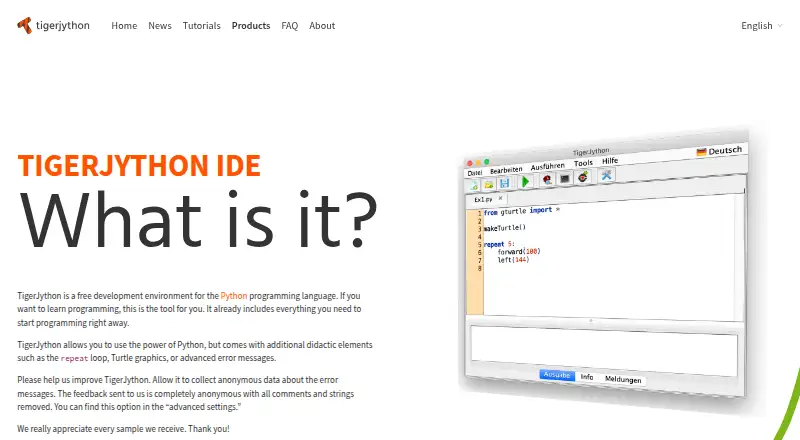
What TigerJython is
TigerJython is a free Python development environment for learning programming, with teaching features such as a repeat loop, Turtle graphics, and enhanced error messages. Its simple editor is intended primarily for novices and deliberately omits projects and workspaces. Libraries cover graphics, game design, databases, and robotics, including devices such as Lego EV3, Raspberry Pi, micro:bit, Calliope Mini, Callibot, and OxoCard. The downloadable IDE runs on Windows, macOS, and Linux and includes a platform-specific Java runtime, so a separate JRE installation is unnecessary. WebTigerPython runs in a browser without installation and includes Turtle graphics and a simple debugger. The IDE can optionally send anonymous error-message feedback; its product page says comments and strings are removed, and the setting is in advanced settings. The TJ Group maintains TigerJython and supports computer science education in schools and teacher use of programming in or across subjects. The maker permits private and educational use free of charge unless a product states otherwise, and provides products as is without warranties.
Who it suits
TigerJython suits programming novices and educators supporting computer science learning in schools or other educational settings. Its libraries also cover robotics devices used in learning projects.
What it does well
- Free for private and educational use.
- Available as a desktop IDE for Windows, macOS, and Linux.
- Browser version needs no installation.
- Libraries cover graphics, games, databases, and robotics.
What to know first
- The editor does not support projects or workspaces.
- The maker provides products as is without warranties.
- Anonymous error-message feedback can be sent if enabled.
Limits
The free plan is for educational or private use. The IDE does not support projects or workspaces, and its code intelligence is basic.
Plans
| Plan | Billed and limits | Price |
|---|---|---|
| TigerJython IDE | Free Python development environment for learning and educational or private use | Free |
As tigerjython.de lists them, read 7 Oct 2026. The maker's own page has the final word.
Getting started
- Open the TigerJython product page.
- Choose the downloadable IDE for Windows, macOS, or Linux, or open WebTigerPython in a browser.
- For desktop use, run the platform-specific download, which includes its Java runtime.
- Use the simple editor and available teaching features to begin learning Python.
- If desired, review the optional anonymous error-feedback setting in advanced settings.
TigerJython is a free Python environment built around teaching programming, with novice-focused editor features and libraries for graphics, games, databases and robotics. It suits learners and educators who want instructional tools more than a general-purpose project workspace. The trade-off is clear: its teaching focus is useful in class, but its intentionally simple workflow will constrain users who need projects or workspaces.
Overview
TigerJython is maintained by the TJ Group, which promotes computer science education and supports teachers using programming in and across subjects. The IDE adds learning-oriented features, including a repeat loop, Turtle graphics and enhanced error messages, to a simple editor designed primarily for beginners. Those choices make it a focused starting point for Python instruction rather than a broad development environment.
Its libraries extend beyond introductory graphics to game design, databases and robotics. Supported devices include Lego EV3, Raspberry Pi, micro:bit, Calliope Mini, Callibot and OxoCard. That breadth gives teachers room to connect programming exercises with different applications, though the product’s deliberate lack of projects and workspaces makes it a poor fit for people who organize larger bodies of code that way.
Key features
- Teaching-oriented tools: The repeat loop, Turtle graphics and enhanced error messages give learners concrete ways to explore code and understand mistakes. That makes TigerJython particularly relevant in teaching, rather than for users seeking a feature-rich professional IDE.
- Broad educational libraries: Graphics, games, databases and robotics libraries support a range of classroom projects, including work with the listed robotics devices. The library coverage is a meaningful strength for educators who want to teach programming through different subject areas.
- Optional diagnostics: The IDE can send anonymous error-message feedback, with comments and strings removed. The option is in advanced settings, so users can choose whether to enable it.
Pricing
TigerJython IDE costs nothing. The free plan is intended for learning and educational or private use, and there is no free trial because the product is free. That makes it a straightforward option for students, teachers and private learners who need its teaching features; there are no paid tiers to compare.
The maker permits private or educational use free of charge unless a product states otherwise, and provides its products as is without warranties. The free-use terms suit classroom and personal learning, but users should account for the absence of warranty coverage.
Platforms
The downloadable IDE is available for Windows, macOS and Linux. Each download includes a platform-specific Java runtime, so a separate JRE installation is unnecessary. The download page lists TigerJython IDE version 2.40 for all three systems, dated September 5, 2024.
WebTigerPython runs in a browser without installation and includes Turtle graphics and a simple debugger. It is the more convenient choice when installing desktop software is impractical, though the browser version’s described tools are narrower than the desktop IDE’s broader library coverage.
Who it's for
TigerJython is best suited to programming novices, teachers and schools that want a Python environment shaped around instruction. Educators can draw on its teaching features and libraries for graphics, games, databases and supported robotics devices. Private learners also get the same free environment without needing to install a separate Java runtime for desktop use.
It is less suited to developers who depend on project or workspace organization. Its simple editor and deliberate omission of those features are reasonable for a learning-focused tool, but a limiting choice for more involved development workflows.
Pros and cons
- Pro: Instruction-specific features, including enhanced error messages and Turtle graphics, support beginner learning rather than assuming an experienced Python workflow.
- Pro: Libraries cover several educational contexts, from graphics and databases to robotics devices such as Raspberry Pi and micro:bit.
- Pro: A browser version avoids installation, while desktop downloads bundle Java to remove a separate JRE setup step.
- Con: There are no projects or workspaces, which makes the IDE a weaker choice for users who need to organize larger or multiple code efforts.
- Con: The maker provides the product as is without warranties, a term worth considering for institutions with formal support requirements.
Alternatives
For more Python IDE options, browse Python IDEs. Consider these alternatives when their platform reach, pricing model or stated focus better matches your workflow:
- Anvil is a better fit if you want a web-based app-building environment with cloud hosting and library installation; its free plan includes unlimited apps and one developer, alongside a 50,000-row Data Table limit.
- Eric is another free desktop Python IDE for Linux, macOS and Windows, with no stated price or usage limits.
- Spyder is a free option across Linux, macOS, Windows and web for users looking for a scientific Python IDE.
- NINJA-IDE is a free GPLv3+ Python IDE with Windows and Linux installers; choose it if those platforms meet your needs, but its macOS download is unavailable.
- Positron is a free desktop option for Linux, macOS and Windows; Posit says its predecessor RStudio was created for data scientists.
- PyCharm suits users who want a freemium IDE with a free plan and a paid Pro tier at $200 a year; the free plan includes one month of Pro.
- Pyzo is a free, open-source computing environment for Linux, macOS and Windows.
- Spyder is a free, open-source option with no paid version, available for Linux, macOS, web and Windows.
Verdict
Choose TigerJython if you are a learner or educator who wants free Python software with teaching features, Turtle graphics and libraries that reach into robotics. Its browser option and Java-bundled desktop downloads reduce setup friction. Look elsewhere if your work depends on projects or workspaces: TigerJython’s deliberate simplicity is its clearest limitation as well as its defining choice.
Verdict
TigerJython focuses on learning rather than project-based IDE workflows, with teaching features and a browser option alongside desktop downloads. Its deliberate omission of projects and workspaces may not suit users seeking those features.
Questions
How much does TigerJython cost?
The listed TigerJython IDE plan is free. The maker permits private and educational use free of charge unless a product states otherwise.
Is there a free plan or trial?
Yes, the plan is free and private and educational use is free of charge. No free trial is offered.
Which platforms does it support?
The downloadable IDE is available for Windows, macOS, and Linux. WebTigerPython runs in a browser without installation.
What does it include for learning?
Teaching features include a repeat loop, Turtle graphics, and enhanced error messages. WebTigerPython also includes a simple debugger.
Who maintains TigerJython?
The TJ Group maintains it. The group promotes computer science education with a focus on Python.
Does TigerJython support robotics devices?
Its libraries include robotics support for devices such as Lego EV3, Raspberry Pi, micro:bit, Calliope Mini, Callibot, and OxoCard.
Facts from TigerJython's own pages
- Anonymous diagnostics
- The IDE can optionally send anonymous error-message feedback; the product page says comments and strings are removed, and the option is in advanced settings. · tigerjython.de, 7 Oct 2026
- Audience
- The TJ Group supports computer science education in compulsory and tertiary schools and supports teachers using programming in or across subjects. · tigerjython.de, 7 Oct 2026
- Browser version
- WebTigerPython runs in a browser without installation and includes Turtle graphics and a simple debugger. · tigerjython.de, 7 Oct 2026
- Desktop platforms
- The downloadable IDE is available for Windows, macOS, and Linux, with a platform-specific embedded Java runtime so a separate JRE installation is unnecessary. · tigerjython.de, 7 Oct 2026
- Download version
- The download page lists TigerJython IDE version 2.40 for Windows, macOS, and Linux, dated September 5, 2024. · tigerjython.de, 7 Oct 2026
- Editor
- The IDE has a simple editor and is designed primarily for programming novices; it deliberately does not support projects or workspaces. · tigerjython.de, 7 Oct 2026
- Headquarters
- Walchstrasse 20, 3073 Gümligen · tigerjython.de, 28 Sept 2026
- Libraries
- Its libraries cover graphics, game design, databases, and robotics with devices including Lego EV3, Raspberry Pi, micro:bit, Calliope Mini, Callibot, and OxoCard. · tigerjython.de, 7 Oct 2026
- Maker
- The product is maintained by the TJ Group, a community promoting computer science education with a focus on Python. · tigerjython.de, 7 Oct 2026
- Purpose
- TigerJython is a free Python development environment designed to help people learn programming. · tigerjython.de, 7 Oct 2026
- Sponsor
- The product page says TigerJython is supported by Klett and Balmer publishers. · tigerjython.de, 7 Oct 2026
- Support
- The TJ Group lists [email protected] for product support and questions. · tigerjython.de, 7 Oct 2026
- Teaching features
- It adds didactic features such as the repeat loop, Turtle graphics, and enhanced error messages. · tigerjython.de, 7 Oct 2026
- Terms
- The maker provides its products as is without warranties and permits private or educational use free of charge unless a product states otherwise. · tigerjython.de, 7 Oct 2026
Where TigerJython stands on Freedom251
- Python IDEs#12 of 26