
QPython
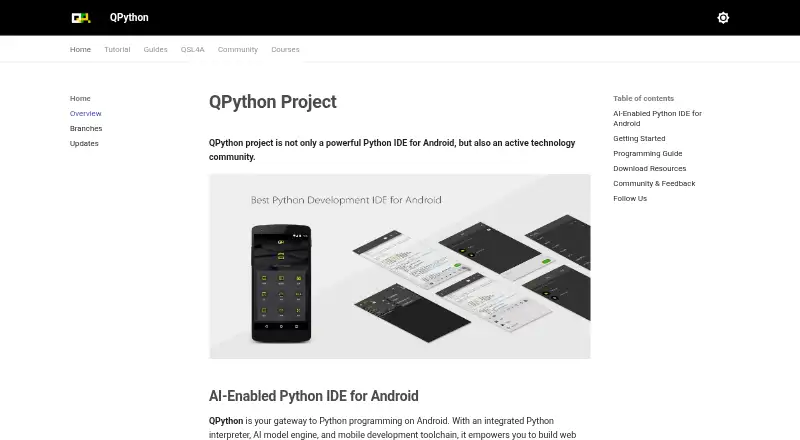
What QPython is
QPython is a free Android Python IDE and programming community with an integrated interpreter, AI model engine, and mobile development toolchain. The standard edition includes an offline Python 3.12 interpreter, an editor with syntax highlighting, and QPYPI plus a custom repository for prebuilt wheel packages. It supports console, SL4A, and webapp projects. QSL4A lets Python scripts access Android features including sensors, camera, Bluetooth, Wi-Fi, location, SMS, storage, and media functions. The maker describes uses such as building web applications, scientific computing, and creating AI-powered apps on a mobile device. AIPyApp can generate and run Python programs from natural-language instructions, but requires an AI API key; named providers include PGPT, OpenAI, and Deepseek. QPython also integrates Ollama for local use of open-source models including Deepseek, Qwen, and Gemma, with offline use described by the maker. The terminal guide covers shell, IPython, and PIP package tasks. QPython Plus requires extensive sensitive permissions and is distributed through special channels rather than app stores.
Who it suits
QPython suits people learning Python or building data science and AI-powered projects on Android. The standard edition includes an offline interpreter, while AI coding through AIPyApp requires an API key.
What it does well
- Free Android Python IDE.
- Standard edition includes offline Python 3.12.
- Supports console, SL4A, and webapp projects.
- QSL4A accesses a range of Android features.
What to know first
- AIPyApp requires an AI API key.
- QPython Plus requires extensive sensitive permissions.
- QPython Plus is not published in app stores.
Limits
The free QPython plan is the standard Android edition. AIPyApp requires an AI API key; QPython Plus requires extensive sensitive permissions and is distributed through special channels.
Plans
| Plan | Billed and limits | Price |
|---|---|---|
| QPython | Android Python IDE; standard edition; plus edition has extended Android permissions | Free |
As qpython.org lists them, read 4 Oct 2026. The maker's own page has the final word.
Getting started
- Visit the QPython website.
- Get QPython for Android.
- Start with the standard edition and its offline Python 3.12 interpreter.
- Choose a console, SL4A or webapp project.
- Use the editor, terminal and package tools as needed.
- For AIPyApp, provide an API key from a supported provider.
Verdict
QPython combines Android Python development tools with options for AI-assisted coding and local model use. The standard and Plus editions differ in permissions and distribution, so users should check which edition they need.
Questions
How much does QPython cost?
The QPython plan is free.
Which platform does it support?
Android.
Does it work offline?
The standard edition includes an offline Python 3.12 interpreter. The maker also describes offline use for local models through Ollama.
Does QPython include AI coding?
AIPyApp can generate and run Python programs from natural-language instructions. It requires an AI API key.
Which AI providers can AIPyApp use?
It supports keys from PGPT, OpenAI, Deepseek and other providers.
How is QPython Plus distributed?
It is not published in app stores and is distributed through special channels.
Facts from QPython's own pages
- AI coding
- AIPyApp can generate Python programs from natural-language instructions and execute the generated program automatically. · qpython.org, 4 Oct 2026
- AI providers
- AIPyApp requires an AI API key and supports keys from PGPT, OpenAI, Deepseek, and other providers. · qpython.org, 4 Oct 2026
- Android APIs
- QSL4A lets Python scripts access Android features including sensors, camera, Bluetooth, Wi-Fi, location, SMS, storage, and media functions. · qpython.org, 4 Oct 2026
- Audience
- The maker presents QPython for people learning Python, building data science projects, or developing AI-powered applications on Android. · qpython.org, 4 Oct 2026
- Distribution limit
- QPython Plus is not published in app stores and is distributed through special channels; the QPython+ community edition is described as still in planning and preparation. · qpython.org, 4 Oct 2026
- Editor and packages
- The standard edition includes an editor with syntax highlighting and QPYPI plus a custom repository for prebuilt wheel packages. · qpython.org, 4 Oct 2026
- Local AI
- QPython integrates Ollama to run open-source language models locally on Android, including Deepseek, Qwen, and Gemma, with offline use described by the maker. · qpython.org, 4 Oct 2026
- Permission handling
- The maker states that QPython Plus will not use its extended permissions in the background without the user's knowledge. · qpython.org, 4 Oct 2026
- Permissions
- The standard edition requires only basic phone permissions, while QPython Plus requires extensive sensitive permissions for capabilities such as SMS, calls, location, camera, and microphone. · qpython.org, 4 Oct 2026
- Product
- QPython describes itself as a Python IDE and programming community for Android, with an integrated Python interpreter, AI model engine, and mobile development toolchain. · qpython.org, 4 Oct 2026
- Python package tools
- The terminal guide describes a shell, IPython interactive interpreter, and PIP client with package installation, upgrade, uninstall, and search functions. · qpython.org, 4 Oct 2026
- Python runtime
- The standard edition includes an offline Python 3.12 interpreter and supports console, SL4A, and webapp projects. · qpython.org, 4 Oct 2026
- Support
- The maker points users to Discord, a Facebook group, a Google Groups newsletter, GitHub issue reporting, and extension requests. · qpython.org, 4 Oct 2026
- Use cases
- The maker says QPython can be used to build web applications, perform scientific computing, and create AI-powered apps on a mobile device. · qpython.org, 4 Oct 2026
Where QPython stands on Freedom251
- Python IDEs#22 of 26