PythonMastery
What PythonMastery is
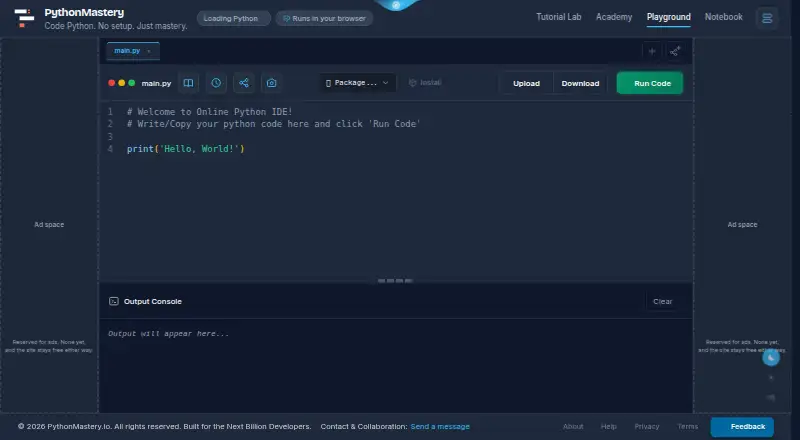
PythonMastery is a free browser-based Python workspace and learning site that runs Python 3.13 through Pyodide and WebAssembly. Its editor needs no installation or account and includes live syntax checks, find and replace, code folding, importable tabs, autosaved history, and a Stop button. NumPy, pandas, Matplotlib, and scikit-learn are built in; the site also says XGBoost, LightGBM, and statsmodels run in the browser. The notebook lets cells share a Python session, displays tables and plots inline, and imports or exports .ipynb files. Python Academy offers learning paths in Python fundamentals, data science, machine learning, AI, and deep learning. Tutorial Lab adds quizzes, quick tests, and exercises in those subjects. Users can share code by URL or embed runnable examples in a webpage or GitHub README, where the code runs in the reader’s browser. The site says code, output, and uploaded datasets are not collected or stored; uploaded files and editor preferences remain in the browser until removed or site data is cleared. The editor and lessons work on phones and tablets.
Who it suits
PythonMastery suits learners and developers who want to write or practice Python in a browser without installing software or creating an account. Its lessons, exercises, and notebook also serve people exploring data science, machine learning, or AI.
What it does well
- Free plan has no paid plans or feature paywalls.
- Runs Python 3.13 in the browser without an account.
- Notebook imports and exports .ipynb files.
- Includes learning paths, quizzes, and exercises.
- Code and uploaded datasets are not collected or stored.
What to know first
- PyTorch and TensorFlow cannot run in its browser environment.
- Uploaded files remain in browser storage until removed or site data is cleared.
Limits
The free plan has no feature paywalls or paid plans. PyTorch and TensorFlow cannot run in the browser environment.
Plans
| Plan | Billed and limits | Price |
|---|---|---|
| Free | No paid plans · No feature paywalls · No account required | Free |
As pythonmastery.io lists them, read 8 Oct 2026. The maker's own page has the final word.
Getting started
- Open the PythonMastery website in a browser.
- Start using the editor without installing software or creating an account.
- Use Python Academy learning paths or Tutorial Lab exercises to study and practice.
- Open the notebook to work with shared-session cells and .ipynb files.
- Share code with a URL or embed it in a webpage or GitHub README.
Verdict
PythonMastery combines a browser Python editor and notebook with learning materials and practice exercises, without requiring an account. Its stated library limits and browser-based file storage are important considerations.
Questions
How much does PythonMastery cost?
The Free plan costs nothing. There are no paid plans or feature paywalls.
Does PythonMastery require an account or installation?
No. The browser editor runs without an installation or account, and the privacy policy says there is no registration or login.
Which Python libraries does it support?
NumPy, pandas, Matplotlib, and scikit-learn are built in. The site says XGBoost, LightGBM, and statsmodels also run in the browser; PyTorch and TensorFlow do not.
Can PythonMastery work with notebooks?
Yes. Notebook cells share a Python session, display tables and plots inline, and support .ipynb imports and exports.
What devices can I use?
The site says its responsive editor and lessons work on phones and tablets in portrait and landscape orientations.
What happens to uploaded files?
Uploaded files and editor preferences are stored in the browser. The privacy policy says uploaded files remain there until removed or browser site data is cleared.
Facts from PythonMastery's own pages
- Analytics and third parties
- The privacy policy names Google Analytics, Google Fonts, FormSubmit, ipapi.co, Open-Meteo, jsDelivr, and the Tailwind CDN, and describes when analytics runs and how to disable it. · pythonmastery.io, 8 Oct 2026
- Browser IDE
- PythonMastery runs Python 3.13 in the browser using Pyodide and WebAssembly, with no installation or account required. · pythonmastery.io, 8 Oct 2026
- Data science libraries
- NumPy, pandas, Matplotlib, and scikit-learn are built in, and the site says XGBoost, LightGBM, and statsmodels also run in the browser. · pythonmastery.io, 8 Oct 2026
- Data storage
- Uploaded files and editor preferences are stored in the user’s browser, and the privacy policy says uploaded files remain there until removed or browser site data is cleared. · pythonmastery.io, 8 Oct 2026
- Editor features
- The editor includes live syntax checking, find and replace, code folding, tabs that can import each other, autosaved history, and a Stop button. · pythonmastery.io, 8 Oct 2026
- Learning content
- Python Academy offers learning paths covering Python fundamentals, data science, machine learning, AI, and deep learning. · pythonmastery.io, 8 Oct 2026
- Maker details
- The site refers to its founder but does not identify the founder’s name, headquarters, or founding date on the opened pages. · pythonmastery.io, 8 Oct 2026
- Notable library limits
- The site says PyTorch and TensorFlow cannot run in its browser environment because neither has a WebAssembly build. · pythonmastery.io, 8 Oct 2026
- Notebook
- The browser notebook has cells that share a Python session, renders tables and plots inline, and supports importing and exporting .ipynb files. · pythonmastery.io, 8 Oct 2026
- Practice
- Tutorial Lab provides quizzes, quick tests, and exercises across Python, data science, machine learning, and AI. · pythonmastery.io, 8 Oct 2026
- Privacy
- The privacy policy says code, execution output, and uploaded datasets are not collected or stored, and that there is no account registration or login. · pythonmastery.io, 8 Oct 2026
- Sharing and embeds
- Users can share code by URL and embed runnable examples in a webpage or GitHub README; the site says embedded code runs in the reader’s browser. · pythonmastery.io, 8 Oct 2026
- Support
- The site provides a feedback form that it says is read by one person, with optional name and email fields and no autoresponder or mailing list. · pythonmastery.io, 8 Oct 2026
- Supported devices
- The site says its responsive editor and lessons work on phones and tablets, including portrait and landscape orientations. · pythonmastery.io, 8 Oct 2026
Where PythonMastery stands on Freedom251
- Python IDEs#18 of 26