LiClipse
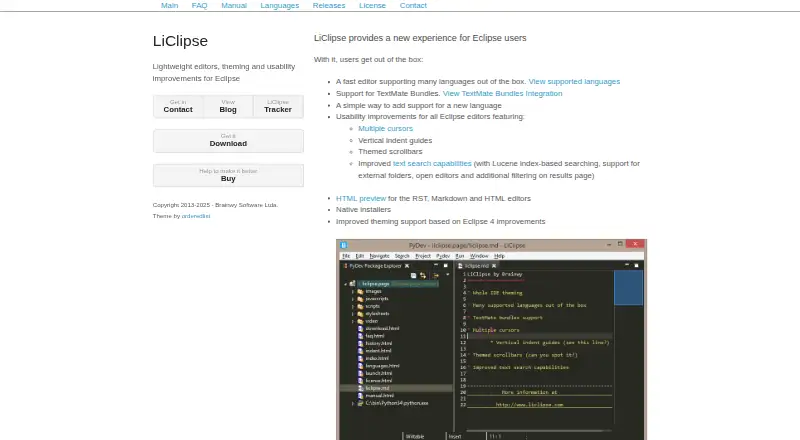
What LiClipse is
LiClipse is a paid set of plugins that extends Eclipse with additional editors, themes, usability changes, bundled plugins, and native installers. It supports Windows, macOS, and Linux, with standalone 64-bit downloads, or installation into an existing Eclipse 4.20-or-later setup running Java 11. Built-in language support covers Python, Java, JavaScript, HTML, CSS, C/C++, Go, Ruby, PHP, Markdown, YAML, and other languages. TextMate bundle files can add further language support. Editing tools include multiple cursors, vertical indent guides, themed scrollbars, and Lucene index-based text search. RST, Markdown, and HTML editors include HTML preview. Bundled components include Eclipse Color Theme, StartExplorer, AnyEdit, and PyDev. LiClipse also lists an integrated debugger and test runner, advanced code intelligence, remote development, and Python environment tools. A 30-day evaluation is available; continued use requires a license. The single-user license costs $99, paid once, while renewal costs $59, paid once.
Who it suits
LiClipse suits Eclipse users who want broader language support, editing improvements, and integrated development tools on Windows, macOS, or Linux. It also fits users who need remote development or Python environment tools.
What it does well
- Supports Windows, macOS, and Linux
- Built-in support for many languages
- Includes debugger and integrated test runner
- Offers Lucene-based text search
- Supports TextMate language bundles
What to know first
- No free plan
- Single-user license costs $99, paid once
- 32-bit standalone versions are unavailable
- New versions require license renewal
Limits
The evaluation lasts 30 days, after which a license is required for continued use. The $99, paid once single-user license covers the purchased software version and same-version updates; newer versions require renewal. Standalone downloads are 64-bit, and the maker suggests an older LiClipse version for 32-bit machines.
Plans
| Plan | Billed and limits | Price |
|---|---|---|
| License renewal | Renewal price shown by the maker; the page does not state a billing interval. · Renewal of an existing license | $59, paid once |
| Single User License | License for the purchased software version; new versions require renewal. · Single user · license does not expire · same-version updates | $99, paid once |
As liclipse.com lists them, read 3 Oct 2026. The maker's own page has the final word.
Getting started
- Visit https://www.liclipse.com/ to get started.
- Choose a 64-bit standalone installer for Windows, macOS, or Linux.
- Alternatively, install through the update site into Eclipse 4.20 or later with Java 11.
- Evaluate the license for up to 30 days, then purchase a license to continue using it.
Verdict
LiClipse adds language coverage, editing controls, previews, and development tools to Eclipse. Its paid license and 32-bit limitation are important considerations before choosing it.
Questions
How much does LiClipse cost?
The Single User License is $99, paid once. Renewal of an existing license is $59, paid once.
Is there a free plan or trial?
There is no free plan. The license allows evaluation without charge for 30 days, after which a license is required for continued use.
Which platforms does LiClipse support?
Native standalone installers are offered for Windows, macOS, and Linux, with 64-bit downloads.
Can I install LiClipse into an existing Eclipse installation?
Yes. Installation through an update site requires Eclipse 4.20 or later and Java 11.
Does LiClipse work with existing Eclipse plugins?
Yes. The maker says LiClipse works with existing Eclipse plugins.
What is included in the license?
A single-user license is for the licensed person and covers the purchased software version, with updates for that version. New versions require renewal.
Facts from LiClipse's own pages
- Bundled plugins
- The product bundles Eclipse Color Theme, StartExplorer, AnyEdit, and PyDev. · liclipse.com, 3 Oct 2026
- Download verification
- The download page provides a SHA256 file for verifying the LiClipse 12.0.1 download. · liclipse.com, 3 Oct 2026
- Editing features
- The product lists multiple cursors, vertical indent guides, themed scrollbars, and improved text search with Lucene index-based searching. · liclipse.com, 3 Oct 2026
- Existing Eclipse installation
- LiClipse can also be installed through an update site into an existing Eclipse installation, which requires Eclipse 4.20 or later and Java 11. · liclipse.com, 3 Oct 2026
- HTML preview
- LiClipse provides HTML preview for its RST, Markdown, and HTML editors. · liclipse.com, 3 Oct 2026
- Integrations
- The maker says LiClipse works with existing Eclipse plugins and can be installed into an existing Eclipse installation. · liclipse.com, 3 Oct 2026
- Languages
- Built-in language support includes Python, Java, JavaScript, HTML, CSS, C/C++, Go, Ruby, PHP, Markdown, YAML, and others. · liclipse.com, 3 Oct 2026
- License limits
- A single-user license is for the licensed person, and a multi-user license is for an organization with a weekly user-count limit matching its licensed seats. · liclipse.com, 3 Oct 2026
- License trial
- The license permits evaluation without charge for 30 days, after which a license must be purchased for continued use. · liclipse.com, 3 Oct 2026
- Notable limitation
- The maker says 32-bit standalone versions are no longer available and suggests using an older LiClipse version for 32-bit machines. · liclipse.com, 3 Oct 2026
- Platform installers
- The maker offers native standalone installers for Windows, Mac OS, and Linux, with listed 64-bit downloads. · liclipse.com, 3 Oct 2026
- Support
- The maker directs bug reports and feature requests to LiClipse Tracker, support questions to Stack Overflow, and release discussions to its Google Groups forum. · liclipse.com, 3 Oct 2026
- TextMate bundles
- LiClipse supports TextMate bundles, allowing users to add language support with a bundle file. · liclipse.com, 3 Oct 2026
- What it is
- LiClipse is a set of plugins that enhances Eclipse with editors, theming, usability improvements, bundled plugins, and native platform installers. · liclipse.com, 3 Oct 2026
Where LiClipse stands on Freedom251
- Python IDEs#24 of 26