
PyBox
What PyBox is
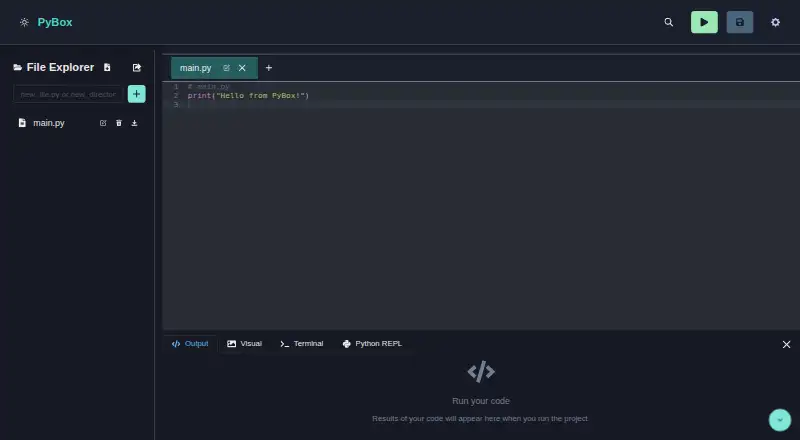
PyBox is a browser-based environment for writing, running, and organizing Python code. Its editor includes syntax highlighting and intelligent autocompletion, and its file explorer supports drag-and-drop, uploads, renaming, deletion, and ZIP export of a project. Users can install Python packages and inspect the installed package list. The interactive Python console supports commands, history, and tab completion, and shares a filesystem synchronized with the editor. PyBox can display Matplotlib plots as well as HTML, images, SVGs, and styled text. It also includes an experimental Bash terminal powered by Wasmer, which the project describes as virtualized for secure execution. PyBox says it uses technologies including Pyodide and Wasmer and is released under the MIT License. The project is available on the web. Running it locally requires Node.js version 14 or later and Yarn or npm. The project lists real-time collaboration, additional programming languages, improved debugging, and Git integration as planned work, and directs questions or issue reports to GitHub Issues.
Who it suits
PyBox may suit Python users who want a browser-based editor, package installation, console, and project file tools. Developers running the project locally need Node.js 14 or higher and Yarn or npm.
What it does well
- Browser-based Python editor with autocompletion.
- Includes package installation and an interactive console.
- Can render plots and display HTML, images, and SVGs.
- Open source under the MIT License.
What to know first
- The Bash terminal is experimental.
- Collaboration is listed as planned work.
- Additional languages and Git integration are listed as planned work.
Limits
The project lists real-time collaboration, additional programming languages, improved debugging, and Git integration as items still to implement. Its Bash terminal is described as experimental.
Getting started
- Open the PyBox website in a browser
- Create or open a Python project in the editor
- Upload or manage files with the file explorer
- Install needed Python packages through the package manager
- Run code in the editor or interactive Python console
Verdict
PyBox combines Python editing, package management, file tools, and an interactive console in a web environment.
Questions
Is PyBox free?
Yes. PyBox uses a free pricing model and is open source under the MIT License.
Which platforms does PyBox support?
PyBox is provided as a web application.
Can PyBox install Python packages?
Yes. Its built-in package manager installs Python packages and displays the installed list.
Does PyBox include a terminal?
Yes. It includes an experimental Bash terminal powered by Wasmer and described as virtualized.
What is needed to run PyBox locally?
Local setup requires Node.js version 14 or higher and Yarn or npm.
Facts from PyBox's own pages
- Editor
- The Python editor offers syntax highlighting and autocompletion. · github.com, 10 Oct 2026
- File management
- The file explorer supports drag-and-drop, and projects can be exported as ZIP archives. · github.com, 10 Oct 2026
- License
- The project is open-source under the MIT License. · github.com, 10 Oct 2026
- Notable limits
- The project lists real-time collaboration, additional languages, enhanced debugging, and Git integration as items to implement. · github.com, 10 Oct 2026
- Package management
- Users can install Python packages and view the installed packages list in the IDE. · github.com, 4 Oct 2026
- Packages
- The built-in package manager can install Python packages and show the installed packages list. · github.com, 10 Oct 2026
- Planned features
- The project lists real time collaboration, additional programming languages, improved debugging, and Git integration as to do items. · github.com, 4 Oct 2026
- Product
- PyBox is a browser-based Python development environment for writing, running, and managing code. · github.com, 10 Oct 2026
- Python console
- Its interactive Python console supports real time commands, command history, tab completion, and a filesystem synchronized with the editor. · github.com, 4 Oct 2026
- REPL
- Its interactive Python console supports command history and tab completion, and shares a synchronized virtual filesystem with the editor. · github.com, 10 Oct 2026
- Requirements
- The repository's setup instructions require Node.js v14 or higher and Yarn or npm. · github.com, 10 Oct 2026
- Support
- The README directs users with issues or questions to GitHub Issues. · github.com, 10 Oct 2026
- Technologies
- The project says it uses technologies including Pyodide and Wasmer. · github.com, 4 Oct 2026
- Terminal
- PyBox includes an experimental Bash terminal powered by Wasmer for secure execution. · github.com, 10 Oct 2026
- Visualizations
- PyBox supports Matplotlib plots and can display HTML, images, SVGs, and styled text in a visual container. · github.com, 10 Oct 2026
Where PyBox stands on Freedom251
- Python IDEs#26 of 26