Freedom251 › Authenticator apps
Entrust Identity App
What Entrust Identity App is
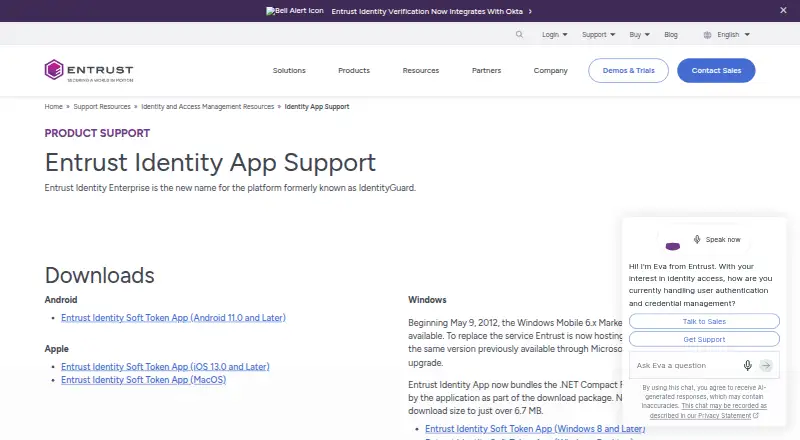
Entrust Identity App provides one-time passcodes for signing in and verification codes for transactions. Users can enter a secure passcode from the app to access websites, VPNs, and other online resources. For transactions, it can display details and generate a corresponding passcode to confirm them. A single app can hold identities from multiple organizations, with separate branding and passcode generation for each. Entrust says its Transaction Notification Service can wake the app and alert users when transaction details are available without using SMS. The app is free to download and listed for Android, iOS, macOS, and Windows, but it must be activated by an organization that has deployed the Identity Enterprise authentication platform. Entrust identifies Identity Enterprise as the new name for the platform formerly known as IdentityGuard. The support page lists iOS 7.0 and later and Android 2.3 and later among supported mobile platforms and versions. Users who need activation help should contact the help desk or help website of the organization they are activating the app for.
Who it suits
It suits people whose employer, bank, healthcare organization, or another organization uses Identity Enterprise. It is not available for independent setup without organizational deployment and activation.
What it does well
- Generates passcodes for websites, VPNs, and other resources.
- Can verify transactions using displayed details and passcodes.
- One app can hold identities from multiple organizations.
- Available for Android, iOS, macOS, and Windows.
What to know first
- Activation requires an organization using Identity Enterprise.
- Activation help is handled by the organization’s help desk or website.
Limits
The app is free to download, but activation requires an organization that has deployed Identity Enterprise.
Plans
| Plan | Billed and limits | Price |
|---|---|---|
| Entrust Identity App | Free to download; activation requires an organization using Identity Enterprise | Free |
As entrust.com lists them, read 9 Oct 2026. The maker's own page has the final word.
Getting started
- Ask the organization that uses Identity Enterprise to activate the app for you.
- Download the Android or Apple mobile app, or the macOS or Windows soft token.
- For Windows, install the package that includes the required .NET Compact Framework component.
- Contact the organization's help desk or help website for activation help.
Entrust Identity App is a mobile authentication app for people whose organization uses Entrust Identity Enterprise. It is best for employees, customers, and members who need to approve sign-ins or verify transactions through that organization; as a free download, it is useful only after organizational activation.
Overview
The app supplies one-time passcodes for signing in to websites, VPNs, and other online resources, and can verify transactions by displaying their details and generating a corresponding passcode. Its defining constraint is also its clearest strength: authentication is tied to an organization’s Identity Enterprise deployment, rather than being a standalone tool a user can set up independently.
Entrust calls Identity Enterprise the successor name for IdentityGuard. The app can hold identities from different organizations, keeping their branding and passcode generation separate. That is practical for someone with several participating accounts, but does not remove the requirement that each identity come from an organization using the platform.
Key features
Sign-in and transaction verification
Users can enter secure one-time passcodes to authenticate to online resources. For transactions, the app displays the relevant details and generates a passcode tied to them, giving the user a way to confirm the transaction rather than simply approve an unspecified prompt.
Push approvals and notifications
Push approvals are supported. Entrust’s Transaction Notification Service can wake the app and alert users when transaction details are ready, without relying on SMS. This supports a mobile approval flow while avoiding SMS delivery, though the organization must have deployed the platform that activates the app.
Multiple organizational identities
A single app can contain identities issued by different organizations, each with its own branding and passcode generation. This is a useful convenience for people using the same app for, say, work and a participating financial institution; it is not a general-purpose account importer.
Pricing
Entrust Identity App: free. The app is free to download, and the free plan has no published user quota or seat cap in its stated terms. Free download does not mean independent access: activation requires an organization running Identity Enterprise. People who cannot get that activation from their employer, bank, healthcare provider, or another organization have no usable standalone plan to fall back on.
Help with activation comes from the help desk or help website of the organization the user is activating for. The app itself is not a substitute for that organization’s authentication deployment.
Platforms
Entrust supports iOS and Android mobile apps, plus soft token downloads for macOS and Windows desktop. The support page identifies iOS 7.0 and later and Android 2.3 and later among supported versions. The Windows download package includes the required .NET Compact Framework component and is just over 6.7 MB.
Who it's for
This is a fit for people whose employer, bank, healthcare organization, or another organization uses Identity Enterprise and directs them to activate the app. It is not the right choice for someone seeking an authenticator they can configure for unrelated services on their own, or for an organization shopping for an identity platform: the app is an endpoint for an existing deployment.
Pros and cons
Pros
- Free to download: there is no app charge, making it straightforward for users whose organization has already provided access.
- Transaction-specific verification: the app can show transaction details and generate a matching passcode, rather than limiting its role to sign-in codes.
- Multiple identities in one app: separate organization-issued identities can be held with distinct branding and passcode generation.
- Desktop options: soft tokens are available for macOS and Windows as well as mobile apps for iOS and Android.
Cons
- Activation depends on an organization: users cannot put the app to work without an Identity Enterprise deployment and organizational activation.
- Limited as a standalone choice: it is not positioned as a general-purpose authenticator for accounts outside participating organizations.
- Activation support is organization-led: users must turn to their organization’s help desk or help website for assistance.
Alternatives
If you are comparing authentication and identity products rather than looking for an app tied to an existing Entrust deployment, these options have different scopes. cidaas offers a free Customer IAM tier with 500 registered users, core authentication functions, and community support, with a billed 30-day trial period. FusionAuth has a free, self-hosted Community plan with unlimited use and core authentication features, making it a distinct option for teams considering self-hosting.
Okta Customer Identity Cloud has a paid Essentials plan at $35 a month, with up to 500 monthly active users, 10 organizations, and standard support; it may suit buyers comparing a priced customer-identity service. authentik offers a free open-source edition with OIDC, SAML, LDAP, SCIM, RADIUS, Kerberos, and proxy support, an option for those seeking a self-hostable identity product.
Google Cloud Identity has a Premium annual/fixed-term plan at $6 a month that includes enterprise security features and automated user provisioning. Ory offers developer and production tiers, including a Production plan at $770 a year. Supabase has a free tier with 50,000 monthly active users, a 500 MB database per project, 5 GB egress, and 1 GB file storage. Authgear describes itself as open source and supports self-hosting or switching to an OIDC-compliant provider.
For broader browsing, see Passkey Authentication Software, Multi-Factor Authentication Software, Identity and Access Management Software, and Authenticator apps.
Verdict
Choose Entrust Identity App if your organization already uses Identity Enterprise and you need its sign-in or transaction-verification flow: it is free to download, supports push approvals, and can keep multiple organization-issued identities in one app. Look elsewhere if you need an authenticator you can adopt independently or are choosing an identity platform, because this app’s usefulness begins with organizational deployment and activation.
Verdict
Entrust Identity App supports sign-in and transaction verification for people whose organization has deployed Identity Enterprise. It is free to download, but organizational activation is required.
Questions
Is Entrust Identity App free?
Yes. It is listed as free to download.
Can I activate it on my own?
No. Activation requires an organization that has deployed Identity Enterprise.
Which platforms are supported?
The app is listed for Android, iOS, macOS, and Windows.
What can the app do?
It provides one-time passcodes for online resources and can verify transactions by displaying details and generating a corresponding passcode.
Can one app hold identities from multiple organizations?
Yes. It can hold multiple organization-issued identities, with separate branding and passcode generation.
Who should I contact for activation help?
Contact the help desk or help website of the organization you are activating it for.
Facts from Entrust Identity App's own pages
- Activation requirement
- The app must be activated by an organization that has deployed the Identity Enterprise authentication platform. · entrust.com, 9 Oct 2026
- Downloads
- Entrust links to mobile apps for Android and Apple devices and soft token downloads for macOS and Windows desktop. · entrust.com, 9 Oct 2026
- Founded
- 1969 · entrust.com, 28 Sept 2026
- Free plan
- Yes · entrust.com, 21 Sept 2026
- Headquarters
- Minneapolis, Minnesota, United States · entrust.com, 28 Sept 2026
- Multiple identities
- One app can hold multiple identities issued by different organizations, with separate branding and passcode generation. · entrust.com, 9 Oct 2026
- One-time passcodes
- Users can enter a secure one-time passcode from the app to log in to websites, VPNs, and other online resources. · entrust.com, 9 Oct 2026
- Product relationship
- Entrust identifies Identity Enterprise as the new name for the platform formerly known as IdentityGuard. · entrust.com, 9 Oct 2026
- Purpose
- The app provides strong authentication and transaction verification on a mobile device. · entrust.com, 9 Oct 2026
- Push approvals
- Yes · entrust.com, 21 Sept 2026
- Support
- Users needing activation help should contact the help desk or help website of the organization they are activating the app for. · entrust.com, 9 Oct 2026
- Supported devices
- The support page lists iOS 7.0 and later and Android 2.3 and later among its supported mobile platforms and versions. · entrust.com, 9 Oct 2026
- Supported platforms
- iOS,Android,macOS,Windows · entrust.com, 21 Sept 2026
- Transaction notifications
- Entrust says its Transaction Notification Service wakes the app and alerts users that transaction details are available, without using SMS. · entrust.com, 9 Oct 2026
- Transaction verification
- The app can display transaction details and generate a corresponding one-time passcode to confirm them. · entrust.com, 9 Oct 2026
- Who it is for
- The app is for people whose employer, bank, healthcare organization, or other organization uses Identity Enterprise. · entrust.com, 9 Oct 2026
- Windows download size
- The Windows download package includes the required .NET Compact Framework component and is just over 6.7 MB. · entrust.com, 9 Oct 2026
Where Entrust Identity App stands on Freedom251
- Authenticator apps#6 of 111
- Multi-Factor Authentication Software#3 of 52
- Passkey Authentication Software#9 of 55
- Identity and Access Management Software#8 of 45
- Authentication Software#7 of 31