Freedom251 › AI Calendar Assistants
Efficio
What Efficio is
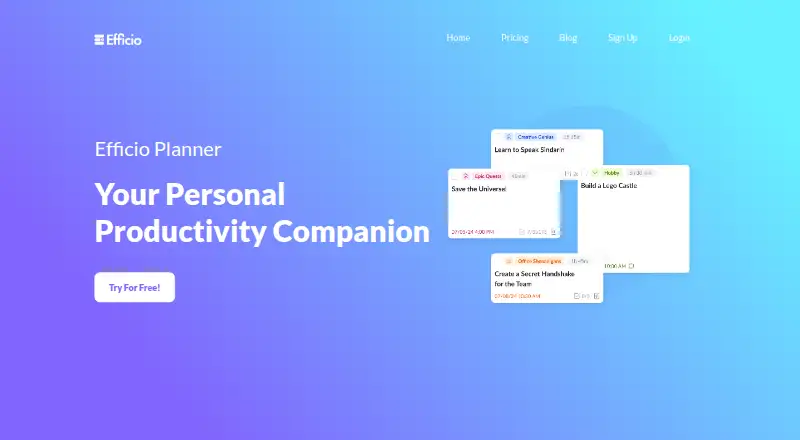
Efficio is a web-based planner and calendar that combines tasks, time-blocking and an AI scheduling assistant. Tasks can include duration, priority, deadlines, descriptions, tags and attached files. Users can create categories with names, descriptions, colors and schedule parameters, then drag tasks onto the calendar to change their timing or duration. Calendar settings include time zones and date and time formats. The AI assistant can assign tasks to categories, sort uncategorized tasks and fill schedule gaps with suitable tasks. Efficio says it syncs with Google Calendar and Microsoft Calendar, and users can register with either Google or Microsoft. The product is in beta testing; the site warns that features may change significantly and user data may be lost, and advises backing up important information. The free beta-tester plan is for volunteers and early adopters until release and includes early access to all features, a calendar and to-do list, enhanced support, feedback and feature voting. The basic monthly plan is $10 a month and is currently unavailable. The basic yearly plan is $96 a year; its page also shows $120, and it is currently unavailable.
Who it suits
Efficio may suit people who plan tasks on a calendar and want AI-assisted scheduling. Its free beta-tester plan is described for volunteers and early adopters.
What it does well
- Tasks can carry deadlines, priorities, tags and attachments.
- The assistant can place tasks into schedule gaps.
- Users can adjust task timing by dragging on the calendar.
- Syncs with Google Calendar and Microsoft Calendar.
- The beta plan includes feedback and feature voting.
What to know first
- Efficio is in beta testing.
- The site warns user data may be lost.
- Basic monthly and yearly plans are currently unavailable.
Limits
The free beta-tester plan is described as early access for volunteers and early adopters until release. The basic monthly and yearly plans are currently unavailable.
Plans
| Plan | Billed and limits | Price |
|---|---|---|
| beta-tester | Early access to all features · Calendar + To-do list · Enhanced Support · Give feedback · Vote for new features · Register and wait for onboarding | Free |
| basic (monthly) | Charged Monthly · Full access to improved planner · Enhanced AI Assistant · Knowledge base · 24/7 Customer Support · Write Reviews · Currently unavailable | $10 a month |
| basic (yearly) | Charged Yearly; page also shows $120 · Full access to improved planner · Enhanced AI Assistant · Knowledge base · 24/7 Customer Support · Write Reviews · Currently unavailable | $96 a year |
As efficio.pro lists them, read 8 Oct 2026. The maker's own page has the final word.
Getting started
- Open https://www.efficio.pro/.
- Sign up with Google or Microsoft.
- Register for the free beta-tester plan and wait for onboarding.
- Add tasks and organize them with categories and calendar time blocks.
- Connect Google Calendar or Microsoft Calendar for sync.
Efficio is a web-based planner that combines time-blocked tasks, calendars and an AI scheduling assistant. It suits people who want deadlines translated into scheduled work, particularly volunteers and early adopters comfortable with beta software. Its appeal is the depth of its planning model; its caution is the beta warning and the current unavailability of both basic plans.
Overview
Efficio treats tasks as work to be scheduled, not merely checked off. Each task can carry a duration, priority, deadline, description, tags and attached files, so planning can account for both urgency and the effort involved. You can drag tasks on the calendar to change their timing and duration, or let automatic scheduling place them in available gaps.
The service is in beta testing. Features may change significantly and user data may be lost, and Efficio advises backing up important information. That makes it unsuitable as the sole repository for irreplaceable work unless you are prepared to keep your own backups.
Key features
Task and category structure
Detailed task fields support more disciplined time estimates than a basic to-do list. Priorities and deadlines provide scheduling signals, while descriptions, tags and files keep context with the work item. Custom categories can have names, descriptions, colors and scheduling parameters, allowing different kinds of work to follow different planning rules.
AI-assisted scheduling
The AI assistant can assign tasks to categories, sort uncategorized tasks and fill gaps in your schedule with suitable tasks. This is useful when your backlog is larger than the time you have and you want the system to propose an order rather than arrange every block manually. The enhanced assistant is reserved for the basic plans, while the free beta-tester plan promises early access to all features.
Calendar controls and sync
You can customize time zones, date and time formats and task parameters, then adjust blocks directly on the calendar. Efficio says it synchronizes with Google Calendar and Microsoft Calendar, and account creation supports Google or Microsoft sign-in. Multiple-calendar support makes it more practical for people who divide personal and work commitments, although the product remains web-only.
Pricing
Beta-tester
The beta-tester plan is free. It includes early access to all features, a calendar and to-do list, enhanced support, the ability to give feedback and vote for new features. You must register and wait for onboarding. It is the logical choice for volunteers and early adopters who want to shape the product, but the beta data-loss warning means it should not replace a backed-up production system.
Basic monthly
The monthly basic plan is listed at $10.00 per month, charged monthly. It includes the improved planner, enhanced AI assistant, knowledge base, 24/7 customer support and the ability to write reviews. The plan is currently unavailable, so the published price is not presently a purchase option.
Basic yearly
The yearly basic plan is listed at $96.00 per year, charged yearly; the page also shows $120. It carries the same feature set as monthly basic and is likewise currently unavailable. If access returns, the annual term would suit someone committed to a full year, but the conflicting displayed amounts warrant checking the checkout total before paying.
Platforms
Efficio supports the web. Its Google and Microsoft calendar synchronization and Google or Microsoft sign-in help it fit browser-based workflows, but there is no stated native mobile or desktop application.
Who it's for
Choose Efficio if you plan around durations, deadlines and available calendar time, and want AI to categorize tasks or fill open periods. It is especially relevant to beta volunteers who value enhanced support and a voice in future features. Look elsewhere if you need a stable, established system, native mobile clients or a paid plan you can activate immediately.
Pros and cons
Pros
- Rich task records: durations, priorities, deadlines, tags, descriptions and files support serious planning.
- Useful automation: AI can categorize work and populate schedule gaps instead of leaving placement entirely manual.
- Flexible calendar handling: time-zone and format controls, drag-to-adjust blocks and Google/Microsoft sync cover varied schedules.
- Free beta access: the beta-tester plan includes the full feature set and enhanced support.
Cons
- Beta risk: significant changes and possible data loss require backups.
- Paid access unavailable: both basic plans are currently unavailable despite published prices.
- Web only: there is no stated native mobile or desktop app.
- Annual price ambiguity: the yearly page shows both $96 and $120.
Alternatives
Open Sunsama is a free option with broad platform coverage, including mobile, desktop, web, API and self-hosting, when device choice matters more than Efficio's beta program.
Routine suits users wanting a freemium planner with a free-forever tier offering three integrations, three custom databases and 250 AI credits.
Amie is worth considering for iOS, macOS or Windows users who want a freemium product with a free plan and trial.
FlowSavvy is a better fit when you need Android, iOS or web access and a defined free tier with limits on scheduling range, repeating tasks and task lists.
General Bots Calendar is the alternative for organizations seeking free, self-hosted calendar software with unlimited users and AGPLv3 source.
DayWise is an Android-focused choice for manual scheduling on its free plan, with paid features including unlimited AI scheduling and auto-rescheduling.
Reclaim AI offers a freemium web and extension experience with a free tier capped at one user, one-week scheduling range, one calendar sync, one scheduling link and five AI agents.
Trevor AI is a web alternative with a free plan limited to one calendar account and a $6-per-month Pro plan for multiple accounts and fuller functionality.
For a wider comparison of this category, see AI Calendar Assistants.
Verdict
Efficio is best for early adopters and time-blocking enthusiasts who want task detail, calendar control and automatic scheduling in one web workspace. Its main reason to choose it is the combination of granular task data and AI that can organize and place work. Its main reason to look elsewhere is the beta's data-loss risk, compounded by basic plans that cannot currently be purchased.
Verdict
Efficio combines task details, calendar controls and AI-assisted scheduling, with sync for Google and Microsoft calendars. It remains in beta, so heed the data-loss warning and note that both basic plans are currently unavailable.
Questions
Is there a free plan?
Yes. The beta-tester plan is free and offers early access to all features, a calendar and to-do list, enhanced support, feedback, and feature voting. Registration is followed by a wait for onboarding.
What are the paid plan prices?
The basic monthly plan is listed at $10.00 per month, and the yearly plan at $96.00 per year; the page also shows $120 for the yearly plan. Both are currently unavailable.
Which platforms does Efficio support?
The listed platform is web.
Which calendars does it sync with?
Efficio says it syncs with Google Calendar and Microsoft Calendar.
How can users sign up?
The site says users can sign up with Google or Microsoft.
What should beta users know about data and changes?
The site warns that features may change significantly and user data may be lost. It advises backing up important information.
Facts from Efficio's own pages
- Account signup
- The site says users can sign up with Google or Microsoft. · efficio.pro, 8 Oct 2026
- AI scheduling
- The AI assistant can assign tasks to categories, sort uncategorized tasks, and fill schedule gaps with suitable tasks. · efficio.pro, 8 Oct 2026
- Beta status
- The site says Efficio is in beta testing and warns that features may change significantly and user data may be lost, advising users to back up important information. · efficio.pro, 8 Oct 2026
- Calendar controls
- Users can customize time zones, date and time formats, and task parameters, and drag tasks onto the calendar to adjust timing and duration. · efficio.pro, 8 Oct 2026
- Categories
- Users can create categories with names, descriptions, colors, and schedule parameters. · efficio.pro, 8 Oct 2026
- Integrations
- Efficio says it syncs with Google Calendar and Microsoft Calendar. · efficio.pro, 8 Oct 2026
- Product
- Efficio describes itself as a time-blocking digital planner and calendar with an AI scheduling assistant, combining tasks, calendar, and time-blocking. · efficio.pro, 8 Oct 2026
- Support
- The beta-tester plan lists enhanced support, while the basic plan lists 24/7 customer support. · efficio.pro, 8 Oct 2026
- Target users
- The beta-tester plan is described as being for volunteers and early adopters until release. · efficio.pro, 8 Oct 2026
- Tasks
- Tasks can include duration, priority, deadlines, descriptions, tags, and attached files. · efficio.pro, 8 Oct 2026
Where Efficio stands on Freedom251
- AI Calendar Assistants#8 of 27