Freedom251 › Document Generation Software

Documentero
What Documentero is
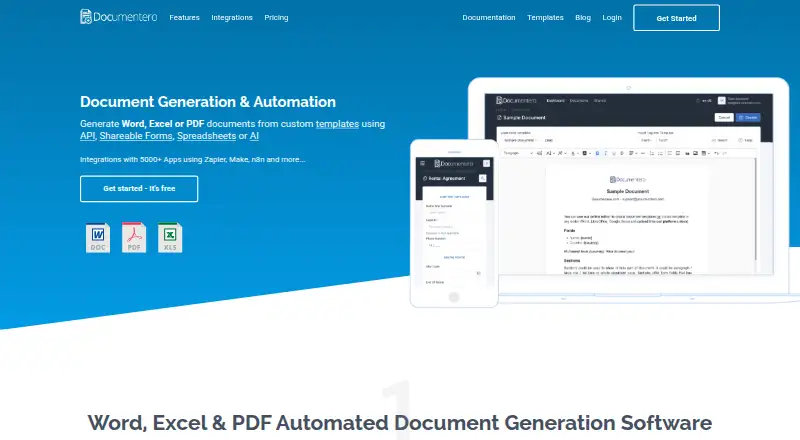
Documentero generates Word, Excel, and PDF documents from custom templates. You can supply data through shareable web forms, spreadsheets, CSV files, Google Sheets, JSON, or its REST API. Templates can be made in .docx or .xlsx using Microsoft Office, Google Docs or Sheets, or LibreOffice. Uploading a template creates a customizable web form, with options for field types, labels, order, required inputs, and conditional fields; forms can also be embedded on a website. For bulk generation, each data row can produce a document. Its API uses a template identifier, account API key, and JSON field data. Documentero advertises connections to 5000+ apps through platforms such as Zapier, Make, n8n, Integrately, and Pabbly Connect. AI-assisted tools include field-content generation, template editing, document-to-template conversion, form configuration, and an MCP server. The free plan includes 50 documents and three templates. Templates and generation data each have a 10MB limit, and templates must be standard .docx or .xlsx files without macros or embedded objects.
Who it suits
Documentero suits teams or individuals who need to create documents from forms, spreadsheet rows, or API data. Its free plan may fit smaller needs, while its listed paid plans offer larger document and template allowances.
What it does well
- Creates DOCX, XLSX, and PDF documents.
- Forms support required and conditional fields.
- Bulk generation can use spreadsheet rows.
- REST API and integrations with 5000+ apps.
- Free plan includes 50 documents and three templates.
What to know first
- Template uploads and generation data are limited to 10MB each.
- Templates cannot include macros or embedded objects.
- Download-link expiry differs between the FAQ and privacy policy.
Limits
The free plan includes 50 documents and three templates. Template uploads and document-generation data each have a 10MB limit; templates must be standard .docx or .xlsx without macros or embedded objects.
Plans
| Plan | Billed and limits | Price |
|---|---|---|
| Free | $0/year · 50 documents /once · 3 templates · Unlimited Pages & Fields · Shareable Forms + Emails · Cloud API Service | Free |
| Premium | $600/year · 2000 documents /month · 50 templates · Unlimited Pages & Fields · Shareable Forms + Emails · Cloud API Service | $169 a month |
| Micro | $600/year · 100 documents /month · 5 templates · Unlimited Pages & Fields · Shareable Forms + Emails · Cloud API Service | $19 a month |
| Mini | $984/year · 300 documents /month · 10 templates · Unlimited Pages & Fields · Shareable Forms + Emails · Cloud API Service | $39 a month |
| Enterprise | $984/year · 10000 documents /month · 100 templates · Unlimited Pages & Fields · Shareable Forms + Emails · Cloud API Service | $399 a month |
| Standard | $0/year · 1000 documents /month · 20 templates · Unlimited Pages & Fields · Shareable Forms + Emails · Cloud API Service | $99 a month |
As documentero.com lists them, read 1 Oct 2026. The maker's own page has the final word.
Getting started
- Visit Documentero on the web.
- Upload a standard .docx or .xlsx template, or prepare one in Microsoft Office, Google Docs or Sheets, or LibreOffice.
- Configure the generated form's fields and conditional behavior, or use spreadsheet data, JSON through the REST API, or AI-assisted tools.
- Use the free plan for up to 50 documents and three templates, or choose a paid plan starting at $19 a month.
- Embed a shareable form on a website if you want users to submit document data there.
Documentero is a cloud service for generating Word, Excel, and PDF files from templates, with form, spreadsheet, and API routes for supplying data. It is a strong fit for teams automating routine documents through more than one input channel. Choose it when those routes and its template allowances match your workflow; look elsewhere if you need approval steps or support for macro-enabled templates.
Overview
Documentero accepts standard .docx and .xlsx templates prepared in Microsoft Word or Excel, Google Docs or Sheets, or LibreOffice. It can produce DOCX, XLSX, and PDF files from CSV, Excel, Google Sheets, JSON, web forms, or its REST API. That range suits both individual submissions and repeatable document production, without requiring every user to edit the source file.
Uploaded templates can generate customizable web forms with configurable field types, labels, ordering, required fields, and conditional fields. Forms can be embedded on a website, while spreadsheet rows can each produce a document. The service does not include approval workflows, so it is a weaker choice when documents must pass through formal review before release.
Key features
Templates, forms, and automation
The API uses a template identifier, an account API key, and JSON field data. That gives application developers a direct route to document generation; teams connecting other services can also use advertised integrations with 5,000+ apps through Zapier, Make, n8n, Integrately, Pabbly Connect, and other platforms. AI-assisted tools cover field-content generation, template editing, document-to-template conversion, form configuration, and an MCP server.
Template compatibility has firm boundaries: only standard .docx and .xlsx files are supported, with macros, embedded objects, and other unsafe elements excluded. The FAQ sets a 10 MB limit for uploaded templates and a separate 10 MB limit for document-generation data, while imposing no page, field, or placeholder-count limit. The lack of count caps is useful for complex templates, but the file-size ceilings and unsupported elements may constrain existing document workflows.
Data handling
Documentero says it does not keep generated documents and customer document data as a separate dataset, while retaining templates and form configurations for active accounts. It encrypts data in transit with HTTPS and at rest within its hosting provider’s infrastructure, and says its Google Cloud resources for account data, templates, and documents are configured in EU regions. Generated-document links have conflicting stated expiry periods: the privacy policy says within 60 minutes, while the FAQ says 10 minutes. That uncertainty matters if recipients may not download promptly, so workflows should not depend on a longer handoff window.
Pricing
The Free plan costs nothing (billed $0/year) and allows 50 documents once, 3 templates, unlimited pages and fields, shareable forms and emails, and cloud API service. It is a useful way to try the core workflow, but the one-time document allowance makes it unsuitable for ongoing production.
Micro costs $19 a month (billed $600/year) and includes 100 documents per month and 5 templates. Mini costs $39 a month (billed $984/year) for 300 documents per month and 10 templates. Both retain unlimited pages and fields, shareable forms and emails, and cloud API service. They suit modest recurring workloads, but the published annual billing figures do not align with the monthly prices, so confirm the term and charge before choosing.
Standard costs $99 a month (billed $0/year) and includes 1,000 documents per month and 20 templates. Premium costs $169 a month (billed $600/year) for 2,000 documents per month and 50 templates. Enterprise costs $399 a month (billed $984/year) for 10,000 documents per month and 100 templates. All three include the same stated unlimited pages and fields, shareable forms and emails, and cloud API service. The higher tiers primarily raise document and template allowances; the annual billing figures again conflict with monthly prices, most notably Standard’s $0/year, so clarify the actual billing terms before committing. No seat allowance is given for these plans.
Platforms
Documentero is available on the web and through an API. The API option is relevant for systems that need to generate documents programmatically; the web service supports form-based and spreadsheet-driven workflows.
Who it's for
Documentero is best suited to teams that need to generate routine documents from reusable Word or Excel templates and want a choice of forms, bulk spreadsheet data, or API input. Its unlimited pages and fields across plans may appeal to users whose templates are long or have many inputs, while the document and template quotas help distinguish occasional use from larger workloads. It is not the right fit for macro-dependent templates, approval-controlled processes, or workflows that require dependable download-link timing.
Pros and cons
- Multiple input routes: forms, spreadsheet rows, JSON, and API data cover both manual submissions and automated batches.
- Forms adapt to templates: configurable and conditional fields, plus website embedding, can bring document generation to users without exposing the template itself.
- Broad file and integration options: DOCX, XLSX, and PDF output, alongside advertised connections to more than 5,000 apps, support varied document workflows.
- Strict template and file constraints: 10 MB limits and the exclusion of macros and embedded objects can block reuse of some existing files.
- No approval workflows: teams needing review gates must arrange them elsewhere.
- Conflicting link expiry and billing terms: the stated download window differs between policy and FAQ, and several annual figures do not square with monthly prices.
Alternatives
For broader choices, browse Document Generation Software or Document Template Management Software. Consider Carbone if its API, self-hosted, or desktop platform options better suit your deployment needs. PandaDoc is another freemium option with web, mobile, and API platforms. CraftMyPDF offers a free allowance of 50 PDFs or images per month and three templates, with API and web access. PDF4me Merge & Split has a free limited-call API tier and a one-time 500-call pack. Adobe PDF Services API offers a free tier of 500 document transactions per month, with paid plans at custom pricing. APITemplate.io has a free allowance of 50 PDFs or images per month and three templates. DocMake offers 1,000 documents per month and unlimited templates on its free plan, with one seat and API access. PDFMonkey is an alternative for a free 20-document monthly allowance with one-day retention and a 30-second generation limit.
Verdict
Choose Documentero if your team needs template-based DOCX, XLSX, or PDF generation through forms, batches, and API workflows, and its monthly document quotas cover your volume. Its flexible input routes are the main reason to choose it. Look elsewhere if your templates rely on macros or embedded objects, you need approval workflows, or uncertain billing and download-link terms are unacceptable.
Verdict
Documentero brings template-based document generation together with forms, bulk data, and API workflows. Check its file limits and plan allowances against the volume and template types you need.
Questions
Does Documentero have a free plan?
Yes. The Free plan costs nothing and includes 50 documents and three templates, with unlimited pages and fields.
What do paid plans cost?
The listed paid plans start with Micro at $19 a month. Mini is $39 a month, Standard $99 a month, Premium $169 a month, and Enterprise $399 a month.
Which platforms does Documentero support?
It is available on the web and through an API.
Can it connect to other apps?
Documentero advertises integrations with 5000+ apps through Zapier, Make, n8n, Integrately, Pabbly Connect, and other platforms.
What templates and outputs does it support?
It accepts standard .docx and .xlsx templates and generates DOCX, XLSX, and PDF files. Templates cannot contain macros or embedded objects.
Does Documentero include approval workflows?
No. Approval workflows are not supported.
Facts from Documentero's own pages
- AI features
- AI-assisted features include field-content generation, template editing, document-to-template conversion, form configuration, and an MCP server. · documentero.com, 1 Oct 2026
- Bulk generation
- Spreadsheet, CSV, Excel, or Google Sheets data can be used to generate multiple documents, with each row representing one document. · documentero.com, 1 Oct 2026
- Data storage
- Documentero says generated documents and customer document data are not stored as a separate dataset, while document templates and form configurations are stored for active accounts. · documentero.com, 1 Oct 2026
- Download expiry
- Generated-document download links expire within 60 minutes according to the privacy policy, while the FAQ says links are valid for 10 minutes. · documentero.com, 1 Oct 2026
- Embeddable forms
- Shareable document-generation forms can be embedded on a website as a widget. · documentero.com, 1 Oct 2026
- Encryption
- Data in transit is encrypted with HTTPS and data at rest is encrypted within the hosting provider's infrastructure. · documentero.com, 1 Oct 2026
- Form builder
- Uploaded templates automatically produce customizable web forms with field types, ordering, labels, required fields, and conditional fields. · documentero.com, 1 Oct 2026
- Hosting region
- Documentero says its Google Cloud resources for account data, templates, and documents are configured in European Union regions. · documentero.com, 1 Oct 2026
- Integrations
- Documentero advertises integrations with 5000+ apps through Zapier, Make, n8n, Integrately, Pabbly Connect, and other platforms. · documentero.com, 1 Oct 2026
- REST API
- The cloud service exposes a RESTful API using a template identifier, account API key, and JSON field data to generate documents. · documentero.com, 1 Oct 2026
- Support
- The privacy policy identifies in-application live chat through Tidio and email support at [email protected]. · documentero.com, 1 Oct 2026
- Template formats
- It supports .docx Word templates and .xlsx Excel templates, including templates prepared in Microsoft Word/Excel, Google Docs/Sheets, or LibreOffice. · documentero.com, 1 Oct 2026
- Template limits
- The FAQ states there is a 10MB limit for document-generation data and a 10MB limit for uploaded templates, with no page, field, or placeholder count limit. · docs.documentero.com, 1 Oct 2026
- Unsupported templates
- The platform only supports standard .docx and .xlsx templates without macros, embedded objects, or other unsafe elements. · docs.documentero.com, 1 Oct 2026
- What it does
- Documentero generates Word, Excel, and PDF documents from custom templates using APIs, shareable forms, spreadsheets, or AI. · documentero.com, 1 Oct 2026
Where Documentero stands on Freedom251
- Document Generation Software#6 of 34
- Document Template Management Software#5 of 25
- Docs Automation#7 of 26