Freedom251 › PDF Creation Software

Carbone
What Carbone is
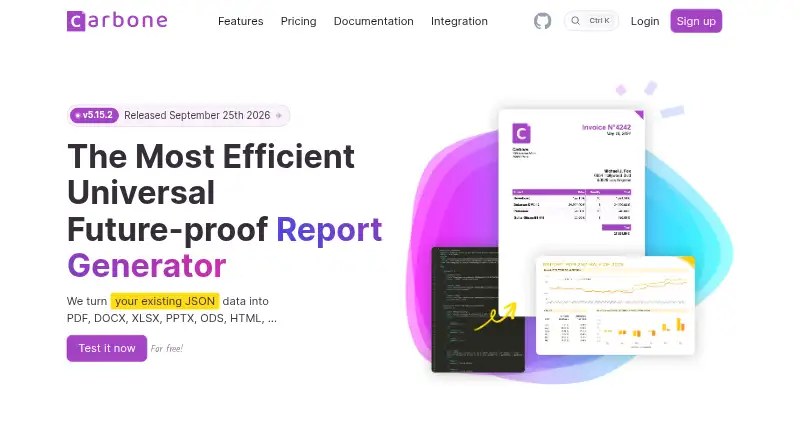
Carbone merges JSON data into document templates to generate files such as PDF, DOCX, XLSX and PPTX. Templates can use DOCX, ODT, ODS, XLSX, XML, Markdown and HTML formats. Its conversion API handles more than 100 formats and supports LibreOffice, OnlyOffice and Chromium. Carbone offers API access and bulk generation, with Cloud, On-Premise, Private Cloud and AWS deployment options. The service also provides an MCP server and an open-source Carbone Skill for connecting AI assistants and generating templates. Cloud Free and On-Premise Free plans are listed, and self-hosted On-Premise use includes a free 30-day trial. Cloud Essential is listed at $29.00 per month. Generated documents are counted for each 1 MB of injected JSON and images, with extra documents beyond a plan allowance invoiced separately. Carbone says Cloud keeps templates for reuse but does not retain submitted JSON or generated files beyond what rendering and delivery require. For on-premise deployments, it says it has no access to customers' templates, data or generated documents.
Who it suits
Carbone suits teams that need to generate documents from structured data, use an API or process batches. Its cloud, self-hosted and other deployment options may fit organizations with different hosting needs.
What it does well
- Generates PDF, DOCX, XLSX and PPTX files
- Conversion API supports more than 100 formats
- API access and bulk generation are available
- Cloud and self-hosted free options are listed
What to know first
- Extra documents beyond plan allowance are invoiced separately
- Documents are counted per 1 MB of injected data
- Cloud Essential is listed at $29.00 per month
Limits
Cloud Essential counts a generated document for each 1 MB of injected JSON and images; documents beyond the plan allowance are invoiced separately. The AWS option charges by usage, with the first 100 documents priced at 0.15 USD each.
Plans
| Plan | Billed and limits | Price |
|---|---|---|
| Free | €0 per month; €0 billed annually · 100 documents/month · 100 templates · 15-day analytics · 1 parallel render | Free |
| Cloud Free | 0 per month · Free plan; document allowance and included templates shown in comparison table | Free |
| On-Premise Community | €0 per year · Community Edition features · unlimited servers and templates | Free |
| On-Premise Free | 0 per year · Free Community Edition; self-hosted | Free |
| Amazon Web Services | Monthly usage-based pricing; first 100 documents $0.15 each, 101–1000 $0.08 each, 1001–10000 $0.03 each, over 10001 $0.008 each · Usage-based per document | $0.15, paid once |
| On-Premise Fit | 1500 per year · Enterprise license; documents counted per 1 MB of injected data | $1,500 a year |
| Advanced | €159 monthly; €149/month billed annually · 20,000 documents/month · 2,000 templates · 90-day analytics · 10 parallel renders | €159 a month |
| Cloud Advanced | 159 per month; 149 per month, billed annually · Documents counted per 1 MB of injected data; extra documents invoiced separately; expert support includes 10 hours per year | $159 a month |
The first 8 of 18 plans, as carbone.io lists them, read 15 Oct 2026. The maker's own page has the final word. Every plan
Getting started
- Visit https://carbone.io/.
- Choose Cloud, On-Premise, Private Cloud or AWS deployment.
- For Cloud, review the Cloud Free option or paid plans starting with Cloud Essential at $29 a month.
- For self-hosted On-Premise use, consider the free Community Edition and listed 30-day trial.
- Prepare JSON data and a supported document template for generation.
Overview
Carbone turns JSON data and reusable templates into generated documents, with API access and cloud or self-hosted deployment options. It suits developers and organizations automating document-heavy workflows; its data-size counting and separately invoiced overages deserve close attention before choosing a plan.
Templates span office and web-oriented formats, and the conversion API handles more than 100 formats. That combination makes Carbone a stronger fit for document pipelines than for teams primarily seeking a ready-made proposal or e-signature workspace.
Key features
Template-driven generation and conversion
Carbone merges JSON into templates to generate files such as PDF, DOCX, XLSX and PPTX. Template formats include DOCX, ODT, ODS, XLSX, XML, Markdown and HTML; listed input formats also include PDF, PPTX, ODP, CSV, TXT, SVG, ODG and IDML. Bulk generation, bulk PDF generation, data merging, API access and fillable form creation broaden its use in automated workflows.
The conversion API supports more than 100 formats and works with LibreOffice, OnlyOffice and Chromium. This is useful when a workflow must handle varied document inputs as well as produce outputs, although the breadth of formats may matter less to teams with a narrow, fixed document pipeline.
AI connections and integrations
An MCP server and open-source Carbone Skill connect AI assistants with template generation. The integration directory includes ChatGPT, Claude, Copilot, Airtable, Bubble, Glide, Make, n8n, Zapier, Odoo and Salesforce. This gives teams several routes to connect document generation to existing tools, without changing the core requirement to supply JSON and templates.
Deployment, privacy and security
Cloud, On-Premise, Private Cloud and AWS deployment options let teams choose between hosted service and infrastructure they control. Carbone says Cloud retains templates for reuse but does not store or log submitted JSON or generated documents beyond what is needed to render and deliver them. For on-premise deployments, it says it has no access to customers’ templates, data or generated documents.
Carbone says its cloud infrastructure is hosted in France by OVHcloud and that it conducts annual security audits. It is working toward SOC 2 compliance, expected before the end of 2026. Teams that require completed SOC 2 compliance should factor that status into their evaluation.
Pricing
Carbone offers free, usage-based, subscription and enterprise-license options. The key billing detail is that a generated document is counted for each 1 MB of injected JSON and images; documents above a plan allowance are invoiced separately. For image-heavy or large-data workloads, the effective document count may therefore exceed the number of files produced.
- Cloud Free: free. The free plan’s document allowance and included templates are shown in the comparison table; the plan is best treated as an entry point rather than an assumed fit for sustained volume.
- On-Premise Free: free, billed 0 per year, for the self-hosted Community Edition. This offers a no-cost way to use a self-hosted edition, but is distinct from the paid enterprise licenses.
- Amazon Web Services: usage-based monthly pricing, with the first 100 documents at 0.15 USD each, 101–1000 at 0.08 USD each, 1001–10000 at 0.03 USD each, and over 10001 at 0.008 USD each. This tiered model suits variable usage, but costs rise with volume and should be estimated against Carbone’s document-counting rule.
- Cloud Essential: $29 a month, or 26 per month billed annually. It includes chat support from 9 AM to 6 PM UTC+2, with asynchronous email responses outside those hours. Documents are counted per 1 MB of injected data, and overages are invoiced separately, so the allowance and expected data size matter.
- Cloud Essential Plus: $95 a month, or 85 per month billed annually. It is listed in the plan comparison table; consider it when assessing the higher cloud tier against your expected allowance and needs.
- Cloud Advanced: $159 a month, or 149 per month billed annually. It uses the same per-1-MB document counting and separate overage invoicing, and includes 10 hours per year of expert support. That support can help teams needing more than standard chat and email assistance, but it does not remove the need to manage quota.
- Cloud Advanced Plus: $295 a month, or 265 per month billed annually. It is listed in the plan comparison table.
- Cloud Advanced Ultra: $595 a month, or 529 per month billed annually. It is listed in the plan comparison table.
- On-Premise Fit: $1,500 a year for an enterprise license, with documents counted per 1 MB of injected data. This is for organizations seeking an enterprise on-premise deployment while retaining usage-based document counting.
- On-Premise Unlimited: $2,940 a year, starting from 2940 per year, for an enterprise lifetime license with unlimited documents shown in the comparison table. It may suit high-volume workloads that favor a fixed document allowance, though the stated price begins at that level.
A free trial is available, and self-hosted On-Premise use includes a free 30-day trial.
Platforms
Carbone supports API, Linux, macOS, Windows, web and self-hosted use. This range accommodates teams integrating an API into software as well as those deploying on their own infrastructure.
Who it's for
Carbone is aimed at teams that need to generate or convert documents from structured data, especially where bulk processing, multiple template formats or deployment control matter. Its customer sectors include finance, healthcare, insurance, legal, public sector, retail, energy, software and telecom. The company began in 2013 under Ideolys and became the independent CarboneIO SAS in May 2021; it is based in Bellevigny, France.
It is less compelling for buyers who want a document workspace centered on authoring, signing or quoting rather than an API-driven generation pipeline. Cloud buyers should also be comfortable forecasting data-size-based counts and possible overage charges.
Pros and cons
- Pros: JSON-to-template generation, bulk output and fillable forms cover several stages of automated document production.
- Pros: More than 100 conversion formats and multiple template types can accommodate varied document workflows.
- Pros: Cloud, AWS and self-hosted choices give teams flexibility over deployment; Carbone also describes distinct data-handling practices for cloud and on-premise use.
- Cons: Counting one document per 1 MB of injected JSON and images makes actual file volume an incomplete guide to quota use.
- Cons: Extra documents are invoiced separately on relevant cloud plans, creating a need to monitor usage and budget for overages.
- Cons: SOC 2 compliance is still in progress, which may rule it out for buyers requiring completed certification.
Alternatives
For a document-generation workflow, compare Document Generation Software; for a mail-merge-centered shortlist, see Mail Merge Software. Teams focused on reusable template administration can also review Document Template Management Software, while PDF-focused buyers can browse PDF Creation Software.
- PandaDoc is another freemium option with a free plan, free trial and Android, API, iOS and web platforms. Its free plan describes a 60-document yearly allowance and two recipients per document; choose it when those stated limits and its platform mix fit better than Carbone’s data-to-template workflow.
- CraftMyPDF offers a free plan with 50 PDFs or images per month, three templates and REST API, Zapier, Make.com and Bubble.io connections. Consider it when that monthly allowance and named integrations are a closer match; unlike Carbone, it has no free trial.
- Documentero has a free tier with 50 documents once, three templates, unlimited pages and fields, shareable forms and emails, and a cloud API service. It is worth comparing for a small one-time document need or shareable-form workflow.
- PDF4me Merge & Split has a free API tier with limited calls and a one-time 25.00 USD Pack 500 for 500 API calls. It is the more targeted option to assess when PDF merging and splitting through an API is the priority.
- Adobe PDF Services API offers a free tier with 500 Document Transactions per month and paid plans at custom pricing. It is an alternative to evaluate when that transaction allowance or a quoted paid plan suits the workload.
- APITemplate.io has a free plan with 50 PDFs or images per month and three templates. Consider it when that stated monthly cap and template count are the relevant comparison points.
- PDFMonkey has a free plan capped at 20 documents per month, with one-day retention and a 30-second generation limit; it excludes external images, fonts, CSS and JS. Those constraints make it a clear option to compare for modest workloads that can work within them.
- QuoteCloud offers a free plan for five quotes per month and one user. It is a more focused alternative to consider for limited quote production.
Verdict
Carbone is a strong fit for developers and organizations that need API-driven document generation, broad format conversion and a choice of cloud or self-hosted deployment. Its breadth and deployment flexibility are the main reasons to choose it. Look elsewhere if your priority is a signing or quoting workspace, or if per-1-MB counting, separately invoiced overages or a still-in-progress SOC 2 effort do not fit your requirements.
Verdict
Carbone covers template-based document generation, conversion and multiple deployment models. Review how its data-size document counting and overage billing fit your expected workload.
Questions
Is Carbone free?
The pricing page lists Cloud Free and On-Premise Free plans. The On-Premise option is a self-hosted Free Community Edition.
What does Cloud Essential cost?
Cloud Essential is $29 a month, or 26 per month billed annually.
Does Carbone offer a trial?
Yes. Self-hosted On-Premise use includes a free 30-day trial.
Which formats can Carbone generate or convert?
It generates files such as PDF, DOCX, XLSX and PPTX from JSON and templates. Its conversion API handles more than 100 formats.
Where can Carbone be deployed?
Pricing options include Cloud, On-Premise, Private Cloud and AWS.
How does Carbone handle customer data?
Carbone says Cloud stores templates for reuse but does not store or log submitted JSON or generated documents beyond what is needed to render and deliver them. For on-premise deployments, it says it has no access to customer templates, data or generated documents.
Facts from Carbone's own pages
- AI generation
- The Carbone Skill lets AI assistants create Carbone templates from natural-language descriptions. · carbone.io, 15 Oct 2026
- AI integrations
- The integration catalog lists ChatGPT, Claude, Cursor, DeepSeek, Gemini, Grok, Llama, Microsoft Copilot and Vibe. · carbone.io, 15 Oct 2026
- AI support
- Carbone offers an MCP server and open-source Carbone Skill for connecting AI assistants and generating templates. · carbone.io, 2 Oct 2026
- Audience
- Carbone says its customers span finance, healthcare, insurance, legal, public sector, retail, energy, software and telecom. · carbone.io, 2 Oct 2026
- Cloud data handling
- Carbone says Cloud stores templates for reuse but does not store or log submitted JSON data or generated documents beyond what is necessary to render and deliver them. · carbone.io, 2 Oct 2026
- Company funding
- Carbone says it reached break-even in December 2023 without external funding. · carbone.io, 15 Oct 2026
- Company history
- Carbone began in 2013 under Ideolys for the Easilys restaurant product and became independent as CarboneIO SAS in May 2021. · carbone.io, 15 Oct 2026
- Company legal identity
- The legal notice identifies CARBONEIO SAS, registered in La Roche-sur-Yon under number 899 106 785, with headquarters at 130 La Sauvagère, Bellevigny, France. · carbone.io, 15 Oct 2026
- Company profile
- LinkedIn lists CarboneIO as a 2–10 employee information-technology services company headquartered in Nantes and founded in 2021. · fr.linkedin.com, 15 Oct 2026
- Compliance status
- Carbone says it is working toward SOC 2 compliance, expected before the end of 2026. · carbone.io, 2 Oct 2026
- Deployment platforms
- Standalone binaries are available for Linux, macOS and Windows, and Docker images are published as carbone/carbone-ee. · carbone.io, 15 Oct 2026
- Deterministic output
- The same template and data are designed to produce byte-identical output for testing, versioning and audit trails. · carbone.io, 15 Oct 2026
- Documentation
- Documentation includes quickstart, template design, API reference, examples, SDK guides, on-premise installation, configuration, licensing and changelog sections. · carbone.io, 15 Oct 2026
- Document conversion
- Its conversion API handles Office, HTML and Markdown conversion to PDF and supports more than 100 document conversions. · carbone.io, 15 Oct 2026
- Founded
- 2013 · carbone.io, 23 Sept 2026
- Headquarters
- Bellevigny, France · carbone.io, 23 Sept 2026
- Hosting
- The pricing page offers Cloud, On-Premise, Private Cloud and AWS deployment options. · carbone.io, 2 Oct 2026
- HTTP API
- The public API uses https://api.carbone.io with bearer API tokens and supports a carbone-version major-version header. · carbone.io, 15 Oct 2026
- Infrastructure limitation
- The embedded Carbone web server does not provide HTTPS, so deployments must terminate TLS through a reverse proxy. · carbone.io, 15 Oct 2026
- Integrations
- Official connectors cover Airtable, Bubble, Glide, Make, n8n, Ninox, Retool, Zapier, HubSpot, Odoo, Pipedrive, Salesforce, DocuSign and Subnoto. · carbone.io, 15 Oct 2026
- Licence
- The Community Edition is open source under Carbone Community License (CCL), while the Enterprise Edition is closed source; the CCL prohibits offering the community software as a document-generator SaaS. · github.com, 15 Oct 2026
- Limit: analytics
- A Capterra review says Carbone has limited advanced analytics despite strong backend integration. · capterra.com, 15 Oct 2026
- Limit: community
- A Capterra reviewer wished for a more active community around extensions and another said community support can be slow. · capterra.com, 15 Oct 2026
- Limit: documentation
- G2’s review summary records eight mentions that documentation is difficult or incomplete for advanced functionality. · g2.com, 15 Oct 2026
Where Carbone stands on Freedom251
- PDF Creation Software#1 of 46
- Document Generation Software#1 of 34
- Mail Merge Software#1 of 27
- Docs Automation#1 of 26
- Document Template Management Software#1 of 25