Freedom251 › Document Automation Software

DocMake
What DocMake is
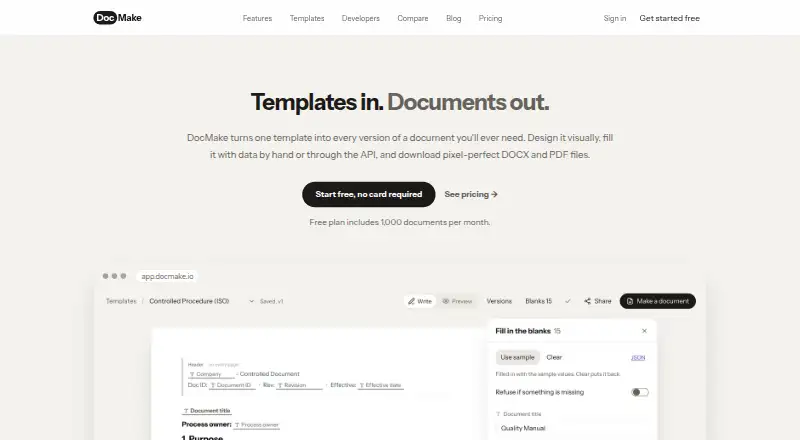
DocMake generates DOCX and PDF files by merging data into reusable templates. Templates are built in a visual, Word-like editor with blanks, conditional sections, and repeatable content. A user can complete a template in the app, send a form link for someone else to fill without an account, or submit JSON through the REST API. The same template can produce native DOCX files and print-accurate PDFs with matching layouts. Existing DOCX files can be imported as editable templates while preserving headings, tables, headers, and footers. AI can draft template content, and templates can be translated into eight languages while retaining their structure and blanks. Team workspaces offer shared templates, per-team API keys, custom fonts, and an audit log. The free plan has no time limit and requires no credit card; it includes 1,000 documents per month, but adds a DocMake footer to documents. When a workspace exceeds its allowance, new documents pause until the next monthly cycle or an upgrade. Pro costs $29 a month and removes the footer.
Who it suits
DocMake suits people or teams that need to generate documents from templates using app forms, shared links, or JSON through an API. Its free plan may fit those within its monthly document allowance who can accept the footer.
What it does well
- Produces DOCX and PDF from one template.
- Imports DOCX while preserving key formatting elements.
- Form links do not require recipient accounts.
- Free plan has no time limit or credit-card requirement.
What to know first
- Free plan documents include a DocMake footer.
- Free plan allows 1,000 documents per month.
- Exceeding an allowance pauses new document generation.
Limits
The Free plan allows 1,000 documents per month, one seat, 20 AI credits per month, 500 API calls per day, and 50 MB of asset storage; its documents include a DocMake footer. Exceeding the document allowance pauses new generation until the monthly cycle resets or the workspace is upgraded.
Plans
| Plan | Billed and limits | Price |
|---|---|---|
| Free | $0 forever · 1,000 documents/month · unlimited templates · 1 seat · 20 AI credits/month · API access, 500 calls/day · 50 MB asset storage · Generated with DocMake footer | Free |
| Pro | $29 per month; $299/year (save 14%) · 10,000 documents/month · unlimited templates · 10 seats · 500 AI credits/month · API access, 50,000 calls/day · 5 GB asset storage · custom branding, no watermark · audit log · priority support | $29 a month |
| Enterprise | Custom · Unlimited documents, seats, AI credits, API calls, and asset storage · SSO · custom branding and audit log · priority support | On request |
As docmake.io lists them, read 4 Oct 2026. The maker's own page has the final word.
Getting started
- Visit the DocMake website.
- Create a free workspace; the plan has no time limit and requires no credit card.
- Build a template in the visual editor or import a DOCX file.
- Generate a document in the app, share a form link, or send JSON through the REST API.
- For team tools or higher allowances, review Pro or Enterprise.
DocMake is a document-generation platform for turning reusable templates and data into editable Word files and PDFs. It suits teams that need a visual authoring workflow alongside forms and API automation. Its strongest case is structured, repeatable document production; the main decisions are whether the free allowance and footer are acceptable and whether Pro’s capacity fits your volume.
Overview
DocMake combines a Word-like visual editor with data-driven generation. Authors can add blanks, conditional sections, and repeatable content without learning a template language. Existing DOCX files can be imported as editable templates while preserving headings, tables, headers, and footers, so organizations can adapt established documents instead of rebuilding them.
There are three input routes: fill a template in the app, send a form link for someone else to complete without an account, or submit JSON through the REST API. One template produces native DOCX and print-accurate PDF output with matching layout. That makes the product useful for both staff-led document work and automated pipelines.
Generation stops when a workspace reaches its monthly allowance. Documents resume after the next monthly cycle or an upgrade, and overages are not silently billed. This predictable behavior helps with cost control but means high-volume workflows need capacity planning.
Key features
Template design and output
The visual editor is a practical advantage for teams that need conditional wording or repeating line items but do not want developers maintaining template syntax. DOCX import further reduces migration effort for Word-based operations. Producing DOCX and PDF from the same source avoids maintaining separate layouts, while the identical layout promise is valuable when an editable deliverable and a final printable copy must agree.
Automation and collaboration
The REST API uses bearer-token authentication, returns rate-limit headers, and documents operations for template management, DOCX import, batch jobs, assets, and usage. Batch generation and JSON input support system-driven production. Team workspaces add shared templates, per-team API keys, custom fonts, and an audit log. An MCP server works with Claude, Cursor, and other MCP clients, including on the free plan, giving those users an additional automation route.
AI and localization
AI can draft template content, and templates can be translated into eight languages while keeping their structure and blanks. Those tools help teams prepare variants, although the plan’s AI-credit limits determine how often they can be used.
Pricing
Free
The Free plan costs nothing, billed $0 forever. It includes 1,000 documents per month, unlimited templates, one seat, 20 AI credits per month, API access with 500 calls per day, and 50 MB of asset storage. Every document carries a small “Generated with DocMake” footer. This is a genuine trial: it has no time limit and requires no credit card, making it suitable for evaluation, personal workflows, and low-volume use. The single seat, modest API allowance, and branded output constrain team deployment.
Pro
Pro costs $29 a month, billed $29 per month, or $299/year with a 14% saving. It raises capacity to 10,000 documents per month, 10 seats, 500 AI credits per month, 50,000 API calls per day, and 5 GB of asset storage. Custom branding removes the footer, and audit log and priority support are included. Pro is the sensible baseline for teams sharing templates or sending documents to customers; the annual term rewards buyers already committed to the service.
Enterprise
Enterprise uses custom pricing and adds unlimited documents, seats, AI credits, API calls, and asset storage, plus SSO, custom branding and audit log, and priority support. It is aimed at organizations whose volume, identity requirements, or governance needs exceed Pro.
Platforms
DocMake is offered through a web app and an API. The form-link workflow also lets external respondents submit information without creating an account.
Who it's for
Choose DocMake if your organization has recurring Word or PDF documents, needs conditional or repeatable sections, and wants staff forms and machine-generated JSON workflows in one system. It is particularly well matched to teams migrating existing DOCX files and to developers who need documented template, batch, asset, and usage endpoints. Look elsewhere if you need native mobile apps, more than one free-plan user, or document volume that cannot tolerate a hard monthly stop.
Pros and cons
- Pros: Visual editing avoids template syntax; DOCX import preserves core Word structure; one template produces matching DOCX and PDF; app, account-free form links, and REST API cover different users; team controls include API keys, custom fonts, and audit logging.
- Cons: Free output has DocMake branding; Free allows only one seat, 20 AI credits monthly, 500 API calls daily, and 50 MB of storage; reaching a quota pauses generation; Pro is required for unbranded team use.
Alternatives
PandaDoc is the better fit when Android and iOS access matter alongside web and API support, and its free plan allows 60 documents per year with two recipients per document.
Docassemble suits users who prefer free, self-hosted software and can handle hosting costs and administration.
PDF4me Merge & Split is worth considering for API-focused PDF merging and splitting with a free tier and one-time 500-call pack.
S-Docs is aimed at Salesforce users, with a free option offering unlimited templates, up to 150 documents, and up to 50 e-signatures.
TemplateDocs is an alternative for workflow-oriented teams comparing credit, seat, history, and template limits.
Adobe PDF Services API is a choice for organizations seeking Adobe’s PDF API with a 500-transaction monthly free tier.
DocPayload fits teams wanting a self-hosted option, a five-document starter allowance, or pay-as-you-go pricing.
DocuGenerate is another API and web option with a free monthly document allowance.
For broader comparisons, see Document Automation Software and Document Generation Software.
Verdict
DocMake is a strong choice for teams that need reusable Word templates, matching PDF output, and several generation routes from one workspace. Its visual editor and DOCX import are the clearest reasons to choose it. Look elsewhere if you require mobile apps, self-hosting, or capacity beyond a plan’s hard monthly allowance without moving to custom pricing.
Verdict
DocMake offers several ways to populate reusable templates and produce DOCX or PDF files. The free plan has a monthly cap and footer; Pro costs $29 a month.
Questions
What does DocMake generate?
It produces native DOCX files and PDFs from reusable templates. Both formats use the same template layout.
Is there a free plan?
Yes. Free costs $0 forever, has no time limit, and requires no credit card. It includes 1,000 documents per month and adds a “Generated with DocMake” footer to documents.
How much does Pro cost?
Pro costs $29 a month, or $299 per year. Pro includes 10,000 documents per month, 10 seats, and removes the footer.
Can I use DocMake through an API?
Yes. The REST API accepts JSON and uses bearer-token authentication. The Free plan includes API access with 500 calls per day.
Does DocMake support integrations?
It offers an MCP server for Claude, Cursor, and other MCP clients. The MCP server can be used with the Free plan.
What happens when I exceed my document allowance?
New documents pause until the next monthly cycle or an upgrade. Pro includes 10,000 documents per month; Enterprise includes unlimited documents.
Facts from DocMake's own pages
- AI and languages
- AI can draft template content, and templates can be translated into eight languages while retaining their structure and blanks. · docmake.io, 4 Oct 2026
- API
- The REST API uses bearer-token authentication and returns rate-limit headers; its documented operations include template management, DOCX import, batch jobs, assets, and usage. · docmake.io, 4 Oct 2026
- DOCX import
- Existing DOCX files can be imported as editable templates with headings, tables, headers, and footers preserved. · docmake.io, 4 Oct 2026
- Free plan footer
- Free plan documents include a small “Generated with DocMake” footer line, which Pro removes. · docmake.io, 4 Oct 2026
- Free plan trial
- The Free plan is the trial, has no time limit, and requires no credit card. · docmake.io, 4 Oct 2026
- Limits
- When a workspace exceeds its document allowance, new documents pause until the next monthly cycle or an upgrade; the pricing page says overages are not billed silently. · docmake.io, 4 Oct 2026
- MCP integration
- DocMake offers an MCP server for Claude, Cursor, and other MCP clients, and says it can be used with the free plan. · docmake.io, 4 Oct 2026
- Output
- The platform produces native DOCX files and print-accurate PDFs from the same template, with identical layout. · docmake.io, 4 Oct 2026
- Product
- DocMake is a document generation platform that merges data into reusable templates to produce Word (DOCX) and PDF files. · docmake.io, 4 Oct 2026
- Team features
- Team workspaces support shared templates, per-team API keys, custom fonts, and an audit log. · docmake.io, 4 Oct 2026
- Template editor
- Templates are designed in a visual, Word-like editor with blanks, conditional sections, and repeatable content, without template syntax to memorize. · docmake.io, 4 Oct 2026
- Ways to generate
- Users can fill templates in the app, share a form link for someone else to fill without an account, or send JSON through the REST API. · docmake.io, 4 Oct 2026
Where DocMake stands on Freedom251
- Document Automation Software#4 of 33
- Document Generation Software#5 of 34
- Docs Automation#6 of 26