Freedom251 › Gantt Chart Software

Diagramium
What Diagramium is
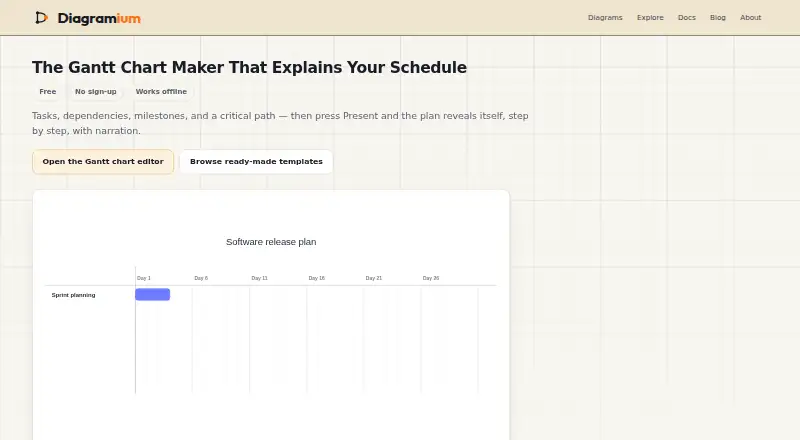
Diagramium is a web-based Gantt chart maker for building and presenting project schedules. Charts can show tasks, dependencies, milestones, progress, a highlighted critical path, and a marker for today. Schedules can use calendar dates or project days and be viewed on daily, weekly, or monthly time scales. Present mode reveals tasks one step at a time, with optional AI voice narration, subtitles, and speaker notes for each step. The browser editor works offline after loading. Charts are stored in browser storage; Diagramium says chart content is not uploaded, the app sets no cookies, and it uses no third-party analytics. PNG, SVG, and PDF exports are available without an account. Animated GIF, video, and animated SVG exports require a free account using Google sign-in. Clearing site data can permanently delete diagrams stored in the browser if they have not been exported. Anyone can use the service without an account, while account creation requires age 13 or the higher minimum where the user lives. The About page names developers, product managers, teachers, analysts, and support teams among its intended users.
Who it suits
Diagramium suits developers, product managers, teachers, analysts, and support teams who need to create or present project schedules. It also works for users who want to build charts without creating an account.
What it does well
- Charts include dependencies and milestones
- Daily, weekly, and monthly time scales
- Works offline after the editor loads
- PNG, SVG, and PDF exports need no account
- Charts stay in browser storage
What to know first
- Clearing site data can erase unexported charts
- Animated exports require a free Google sign-in
- Account creation has a minimum age requirement
Limits
The Guest plan is free and requires no account; it includes chart building, presenting, and PNG or PDF export. Animated GIF, video, and animated SVG exports require a free account. Charts stored in browser storage can be permanently lost if site data is cleared before export.
Plans
| Plan | Billed and limits | Price |
|---|---|---|
| Guest | No account needed · Build and present charts · PNG or PDF export without an account | Free |
| Free account | Sign in with Google; no payment · Animated exports (GIF, video, animated SVG) require a free account | Free |
As diagramium.com lists them, read 8 Oct 2026. The maker's own page has the final word.
Getting started
- Open the Gantt chart maker website in a browser.
- Create a chart without an account, or sign in with Google for animated exports.
- Add tasks, dependencies, milestones, and progress to the schedule.
- Choose calendar dates or project days and a daily, weekly, or monthly scale.
- Export as PNG, SVG, or PDF; sign in for animated GIF, video, or animated SVG.
Overview
Diagramium is a browser-based Gantt chart maker for building project schedules and presenting them step by step. It suits people who need a lightweight way to map tasks and dependencies without creating an account. Its free access and account-free exports are strong advantages, but charts live in browser storage, so export anything you cannot afford to lose.
Key features
Schedules can include tasks, dependencies, milestones, progress, a highlighted critical path, and a Today marker. Calendar dates or project days let teams choose whether to anchor a plan to real dates or track work relative to its start; Daily, Weekly, and Monthly scales cover different planning horizons. This is a focused scheduling toolkit rather than a broad project-management suite.
Present mode reveals tasks step by step, with optional AI voice narration, subtitles, and speaker notes for each step. That makes the chart usable as a structured walkthrough for a class or project update, not just a static schedule.
The editor works offline after it has loaded, and the maker says charts remain on the device and in exported files. PNG, SVG, and PDF exports are available without an account; animated GIF, video, and animated SVG require a free Google-sign-in account. That split is practical for static sharing, though users wanting animation must accept the sign-in step.
Privacy protections include no diagram-content upload, no cookies, and no third-party analytics. The policy does describe anonymous gallery engagement counts and export-format totals. Charts are saved in browser storage, however, and clearing site data can permanently erase diagrams that have not been exported. Account creation is optional; it uses Google sign-in through Supabase, and the policy says Diagramium neither sees nor stores a Diagramium password.
Pricing
Both plans cost nothing. Guest needs no account and includes chart building, presentations, and PNG or PDF export. It is the simplest fit for occasional scheduling and static output, but does not include the animated export formats.
Free account also costs nothing, with no payment, and adds animated GIF, video, and animated SVG exports. It is the better choice when a presentation needs motion; the trade-off is signing in with Google. There is no paid tier described here.
Platforms
Diagramium runs on the web. The browser editor can continue working offline once loaded, but charts are stored in browser storage, making export important for backup and transfer.
Who it's for
The maker names developers, product managers, teachers, analysts, and support teams as intended users. It is especially suited to individuals or groups sharing a schedule as an exported image, PDF, or narrated step-by-step presentation. It is less suitable for anyone who needs durable cloud storage or expects a full project-management workspace.
Pros and cons
- Pros: No-account chart creation and PNG or PDF export keep the basic workflow accessible.
- Pros: Dependencies, milestones, progress, and critical-path highlighting support more informative schedules than a simple task list.
- Pros: Stepwise presentation with narration, subtitles, and speaker notes can turn a schedule into a guided briefing.
- Cons: Unexported charts can be lost when browser site data is cleared, so local storage is a real backup risk.
- Cons: Animated exports require Google sign-in, unlike the static formats.
- Cons: The web-only platform may not suit people seeking a native desktop or mobile app.
Alternatives
For broader customer-journey mapping choices, browse Customer Journey Mapping Software; for more Gantt-focused options, see Gantt Chart Software.
CX Impact is worth considering if you want a free, MIT-licensed project whose code is available across Linux, macOS, web, and Windows; AI agent and model usage depends on your plan. Milkymap offers journey-mapping tools on iOS and web, with a free single-user basic plan and a €9 a month single-user Pro plan for consultants.
Custellence is a web option for journey maps: its free plan caps use at one workspace, two users, and two maps, while its $199 a month Collaborate plan removes those limits. Customer Journey App has a free web plan for one user and three journey maps, with manual mapping, templates, several export formats, and ten version snapshots.
Funnelytics may fit Shopify users who want a free app with read-only store access, or teams considering its $39 a month Map Pro plan. IteroJM offers a free web plan capped at one journey map, persona, metric, and manager seat. JourneyIQ provides a free starter plan for one journey and five stages, including three AI scans per month. JourneyTrack has a 30-day free basic period with three journeys, one workspace, three editors, and unlimited viewers.
Verdict
Choose Diagramium if you need a free, browser-based Gantt chart maker with task dependencies, clear exports, and a presentation mode that can guide an audience through the plan. Its chief drawback is the dependence on browser storage: export charts you need to keep. Look elsewhere if persistent shared storage, a native app, or a broader project-management system matters more than account-free scheduling.
Verdict
Diagramium supports schedule creation and step-by-step presentations, with several exports available to guests. Export charts you want to keep, since clearing site data can remove locally stored diagrams.
Questions
Is Diagramium free?
Yes. The Guest plan costs nothing and requires no account. A free account is also available with Google sign-in.
Which exports are available without an account?
PNG, SVG, and PDF exports are available without an account.
Which exports require an account?
Animated GIF, video, and animated SVG exports require a free account created with Google sign-in.
Can I use the editor offline?
The browser editor works offline after it has loaded.
Where are charts stored?
Charts are stored in browser storage. Diagramium says chart content is not uploaded; clearing site data can permanently delete diagrams that have not been exported.
Who makes Diagramium?
The About page directs questions and feedback to a sign-in-required contact form or [email protected].
Facts from Diagramium's own pages
- Account and sign-in
- Creating an account is optional and uses Google sign-in through Supabase; the policy says Diagramium does not see or store a Diagramium password. · diagramium.com, 8 Oct 2026
- Age requirement
- Anyone may use the service without an account; creating an account requires age 13 or the higher minimum where the user lives. · diagramium.com, 8 Oct 2026
- Data storage
- Charts are stored in browser storage, and clearing site data can permanently delete locally stored diagrams that have not been exported. · diagramium.com, 8 Oct 2026
- Exports
- PNG and SVG exports are available without an account; PDF is also listed in the FAQ as an account-free export, while animated GIF, video, and animated SVG require a free account. · diagramium.com, 8 Oct 2026
- Integrations
- The privacy policy identifies Google sign-in as an optional independent service and says the app itself talks only to Diagramium's website and its database provider. · diagramium.com, 8 Oct 2026
- Intended users
- The About page names developers, product managers, teachers, analysts, and support teams among its intended users. · diagramium.com, 8 Oct 2026
- Offline use
- The browser editor works offline after it has loaded, and the maker says charts stay on the device and in exported files. · diagramium.com, 8 Oct 2026
- Presentations
- Present mode reveals tasks step by step and supports optional AI voice narration, subtitles, and per-step speaker notes. · diagramium.com, 8 Oct 2026
- Privacy
- The privacy policy says diagram content is not uploaded, the app sets no cookies, and it uses no third-party analytics; it also describes anonymous gallery engagement counts and export-format totals. · diagramium.com, 8 Oct 2026
- Purpose
- The Gantt chart maker creates project schedules with tasks, dependencies, milestones, progress, a critical-path highlight, and a Today marker. · diagramium.com, 8 Oct 2026
- Scheduling
- Charts can use calendar dates or project days, with Daily, Weekly, and Monthly time-axis scales. · diagramium.com, 8 Oct 2026
- Support
- The About page directs questions and feedback to a sign-in-required contact form or [email protected]. · diagramium.com, 8 Oct 2026
Where Diagramium stands on Freedom251
- Gantt Chart Software#4 of 46
- Customer Journey Mapping Software#5 of 23