
Devin Desktop
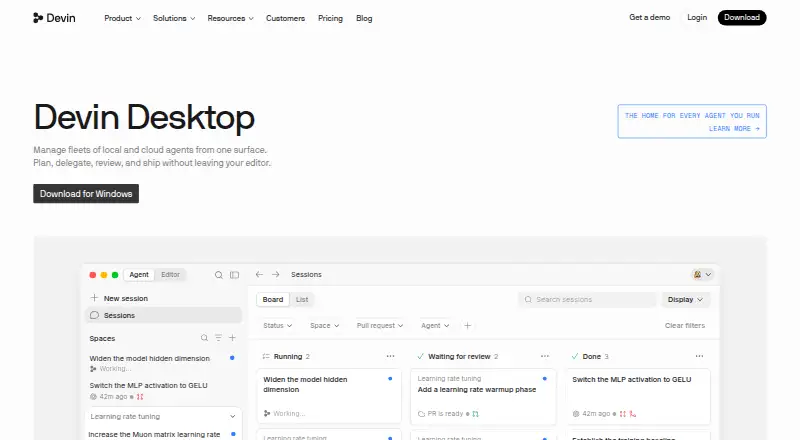
What Devin Desktop is
Devin Desktop is a command center for coordinating local and cloud coding agents, paired with a full IDE. The IDE includes syntax highlighting, autocomplete, and debugging tools. Spaces share context and Git worktrees across agents, while Agent Client Protocol support enables work across models and agents. Users can review agent diffs before pushing. The product lists integrations with Slack, Linear, Notion, Figma, Sentry, Stripe, Vercel, Datadog, and Atlassian, as well as editor extensions and language servers. Devin CLI runs locally in a terminal. Desktop downloads are available for macOS, Windows, and Linux, with specified builds for Mac and Windows. The company says Devin Desktop is the new name for Windsurf, carrying over its IDE, extensions, workflows, settings, and in-progress work. The Free plan includes a light agent quota, limited model availability, and unlimited inline edits and Tab completions. Pro costs $20 per month; paid usage allowances refresh daily and weekly, and extra usage is available at API pricing.
Who it suits
Devin Desktop may suit developers coordinating coding agents alongside a full IDE, especially those who want shared context across agents and review of changes before pushing. It is available for macOS, Windows, and Linux.
What it does well
- Includes syntax highlighting, autocomplete, and debugging tools.
- Spaces share context and Git worktrees across agents.
- Review agent diffs before pushing.
- Free plan includes unlimited inline edits and Tab completions.
- Available on macOS, Windows, and Linux.
What to know first
- Free plan has limited model availability and a light quota.
- Pro costs $20 per month.
- Paid usage allowances refresh daily and weekly.
- Extra usage is charged at API pricing.
Limits
The free plan has a light agent quota and limited model availability, though inline edits and Tab completions are unlimited. Pro usage allowances refresh daily and weekly; extra usage is available at API pricing. Teams supports up to 200 users, with a $40 monthly charge for each full developer seat in addition to the $80 monthly team plan fee.
Plans
| Plan | Billed and limits | Price |
|---|---|---|
| Free | Light quota to code with agents · Limited model availability · Unlimited inline edits and Tab completions | Free |
| Pro | $20 per month · Increased quotas · Full model availability · Devin Cloud access · Extra usage at API pricing | $20 a month |
| Max | $200 per month · Everything in Pro · Significantly higher quotas | $200 a month |
| Teams | $80/month for team plan + $40/mo per full dev seat · Up to 200 users · Sharing and collaboration · Centralized billing · Admin analytics · Priority support | $80 a month |
| Enterprise | Let's talk · Highest priority support · Dedicated account management · SAML/OIDC SSO · Centralized admin controls · Dedicated deployment option | On request |
As devin.ai lists them, read 2 Oct 2026. The maker's own page has the final word.
Getting started
- Open the Devin Desktop website.
- Choose a download for macOS, Windows, or Linux.
- Select the Mac build for Apple Silicon or Intel, or the Windows build for x64 or arm64.
- Install the app on a system that meets the listed platform requirements.
- Start with the free plan or choose a paid plan.
Devin Desktop is a desktop command center that combines local and cloud coding agents with a full IDE. It suits developers who want agent coordination, editor tooling, and code review in one application, including teams that need centralized administration. The main trade-off is metered agent usage: serious or frequent use may require a paid tier and API-priced extra usage.
Overview
Devin Desktop brings agent mode, multiple model choices, codebase indexing, a built-in terminal, extensions, and language servers into one coding environment. Its IDE covers syntax highlighting, autocomplete, and debugging, so it can serve as a primary editor rather than merely a launcher for agents.
Spaces share context and Git worktrees across agents, which is useful when several tasks run in parallel and need a common project state. Support for the Agent Client Protocol allows work across models and agents. Reviewing agent-generated diffs before pushing adds an important checkpoint for developers who want to inspect changes before they reach a repository.
Integrations include Slack, Linear, Notion, Figma, Sentry, Stripe, Vercel, Datadog, and Atlassian. Devin Desktop is the new name for Windsurf; the company says the IDE, extensions, workflows, settings, and in-progress work carry over, making the transition particularly relevant to existing Windsurf users.
Key features
- Coordinated agent work: Local and cloud agents can be managed alongside the IDE, while Spaces keep context and Git worktrees aligned across agents.
- Integrated development tools: Syntax highlighting, autocomplete, debugging, codebase indexing, a terminal, extensions, and language servers support a complete coding workflow.
- Model flexibility: Multiple model choices and Agent Client Protocol support make the environment suitable for projects using more than one model or agent.
- Review control: Diff review before pushing gives developers a practical opportunity to catch unwanted agent changes.
- Service connections: The broad set of listed integrations can connect coding work with planning, design, monitoring, payments, and deployment services.
Pricing
Free — free: The free tier includes a light quota for coding with agents, limited model availability, and unlimited inline edits and Tab completions. It is a sensible way to evaluate the editor and agent workflow, but the light quota and restricted model selection make it less suitable for sustained agent-heavy work.
Pro — $20 a month: Pro raises quotas, provides full model availability, and adds Devin Cloud access. Allowances refresh daily and weekly; usage beyond the allowance is charged at API pricing. This is the clearest fit for individual developers who need regular agent work and broader model access, provided they can monitor overage costs.
Max — $200 a month: Max includes everything in Pro with significantly higher quotas. Its price is difficult to justify for occasional use, but it targets individuals whose workloads routinely exceed Pro allowances.
Teams — $80 a month: The team plan costs $80 per month plus $40 per month for each full developer seat and supports up to 200 users. Sharing and collaboration, centralized billing, admin analytics, and priority support address organizational needs, while the separate per-seat charge matters when budgeting for larger groups.
Enterprise — custom pricing: Enterprise adds highest-priority support, dedicated account management, SAML/OIDC SSO, centralized enterprise administration, and a dedicated deployment option. It is aimed at organizations with formal identity, control, and deployment requirements rather than individual buyers.
Platforms
Downloads are available for Windows, macOS, and Linux. Mac users can choose Apple Silicon or Intel builds; Windows offers x64 and arm64 builds. The download requirements include Windows 10 64-bit, supported macOS versions receiving Apple security updates, and Linux with glibc 2.28 or newer plus glibcxx 3.4.25 or newer. Devin CLI runs locally in the terminal, extending local-agent work beyond the desktop interface.
Who it's for
Choose Devin Desktop if you want agents, model choice, editor features, shared workspaces, and review controls in one application. Pro fits an individual with recurring agent usage; Max is for a much heavier solo workload. Teams suits organizations needing collaboration and billing controls, while Enterprise is the appropriate route for SSO and dedicated deployment. Developers who want a conventional editor without agent quotas or API-priced overages may prefer a simpler alternative.
Pros and cons
Pros
- One environment for agents and coding: The full IDE, terminal, indexing, and extensions reduce the need to split work between separate tools.
- Parallel-work coordination: Shared Spaces, context, and Git worktrees help organize multiple agent tasks.
- Review before publishing: Diff inspection provides a concrete safeguard before changes are pushed.
- Broad deployment coverage: Windows, macOS, and Linux builds include current desktop CPU variants.
Cons
- Free usage is constrained: The light quota and limited model availability restrict the free tier for intensive agent work.
- Overages add variable cost: Paid allowances refresh daily and weekly, with extra usage billed at API pricing.
- Teams pricing scales with seats: The $80 monthly team fee is supplemented by $40 per full developer seat.
- Max is expensive: The $200 monthly price is primarily defensible for users who need substantially higher quotas.
Alternatives
Pick CodeDroid if you want a free, open-source option with no paid plans or stated usage limits across desktop, mobile, and web platforms. Neovim is the better choice for a free, highly portable editor under the Apache 2.0 license with Vim-licensed exceptions. Choose Visual Studio Code for a free editor from Microsoft on Linux, macOS, web, and Windows. Micro favors a free, dependency-free static binary on the three major desktop platforms. NumenText is a free open-source terminal IDE for Linux, macOS, self-hosted environments, and Windows. Zed is worth considering for a freemium editor with a free Personal plan and 2,000 accepted edit predictions. IntelliJ IDEA fits Java and Kotlin developers who want free core functionality, with a paid Ultimate subscription available. Kate is a straightforward free text editor for Linux, Windows, and macOS.
For broader comparisons, see our AI Code Editors, AI Code Generators, and Go IDEs lists.
Verdict
Devin Desktop is best for developers who want coordinated local and cloud agents inside a capable, cross-platform IDE, with shared workspaces and a review step before pushing code. Choose it when integrated agent workflows justify recurring quotas; look elsewhere if you need unlimited predictable usage or a simpler free editor without model and overage considerations.
Verdict
Devin Desktop combines agent coordination with a desktop IDE and supports several operating systems. The free plan has usage and model limits; Pro costs $20 per month, with extra usage priced at API rates.
Questions
Is Devin Desktop free?
Yes. The Free plan costs nothing and includes a light agent quota, limited model availability, and unlimited inline edits and Tab completions.
How much does Pro cost?
Pro costs $20 per month. It includes increased quotas, full model availability, Devin Cloud access, and extra usage at API pricing.
Which operating systems are supported?
Devin Desktop is offered for macOS, Windows, and Linux. Downloads include Apple Silicon and Intel Mac builds and x64 and arm64 Windows builds.
Does it support multiple models and agents?
Yes. The product supports work across models and agents through the Agent Client Protocol, and model choice is listed as multiple models.
What is the Teams plan price?
The team plan is $80 per month, plus $40 per month for each full developer seat. It supports up to 200 users.
What does Enterprise include?
Enterprise lists SAML/OIDC SSO, centralized admin controls, a dedicated deployment option, highest priority support, and dedicated account management. Its price is listed as “Let’s talk.”
Facts from Devin Desktop's own pages
- Agent protocols
- The page says Devin Desktop supports work across models and agents through the Agent Client Protocol. · devin.ai, 2 Oct 2026
- Code review
- The product page says users can review agent diffs before pushing. · devin.ai, 2 Oct 2026
- Desktop downloads
- Downloads are offered for macOS, Windows, and Linux; the page lists Apple Silicon and Intel builds for Mac and x64 and arm64 builds for Windows. · devin.ai, 2 Oct 2026
- Enterprise security
- The Enterprise plan lists SAML/OIDC SSO, centralized enterprise admin controls, and a dedicated deployment option. · devin.ai, 2 Oct 2026
- IDE
- The included IDE has syntax highlighting, autocomplete, and debugging tools. · devin.ai, 2 Oct 2026
- Integrations
- Listed integrations include Slack, Linear, Notion, Figma, Sentry, Stripe, Vercel, Datadog, and Atlassian, plus editor extensions and language servers. · devin.ai, 2 Oct 2026
- Local agent
- The download page says Devin CLI runs locally in the terminal. · devin.ai, 2 Oct 2026
- Platform requirements
- The download page lists Windows 10 64-bit, supported macOS versions with Apple security updates, and Linux glibc 2.28 or newer with glibcxx 3.4.25 or newer. · devin.ai, 2 Oct 2026
- Product transition
- The company describes Devin Desktop as the new name for Windsurf, with its IDE, extensions, workflows, settings, and in-progress work carried over in the update. · devin.ai, 2 Oct 2026
- Purpose
- Devin Desktop is a command center for managing local and cloud coding agents alongside a full IDE. · devin.ai, 2 Oct 2026
- Spaces
- Spaces share context and Git worktrees across agents. · devin.ai, 2 Oct 2026
- Team limit
- The Teams plan supports up to 200 users and charges $40 per month for each full developer seat in addition to the team plan fee. · devin.ai, 2 Oct 2026
- Usage limits
- Paid plan usage allowances refresh daily and weekly, and extra usage can be purchased at API pricing. · devin.ai, 2 Oct 2026
Where Devin Desktop stands on Freedom251
- Go IDEs#4 of 24
- AI Code Editors#6 of 26
- Agentic Ides#6 of 21
- AI Code Generators#19 of 54