NumenText
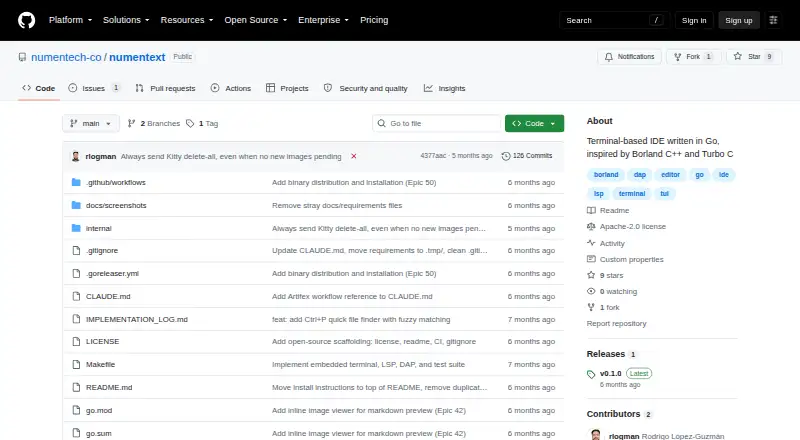
What NumenText is
NumenText is a free, open-source IDE for working in a terminal, written in Go. Its non-modal, menu-driven editor has multiple tabs, syntax highlighting for more than 20 languages and familiar shortcuts such as Ctrl+S, Ctrl+C and F5. Build and run support covers C, C++, Go, Rust, Python, JavaScript, TypeScript, Java and Kotlin. An LSP client provides autocomplete, go-to-definition, hover information and diagnostics, while its DAP client supports breakpoints and step-by-step debugging. The test runner parses output from go test, pytest, cargo test, Maven and Gradle; configurable formatters and linters are also included. Other tools include a PTY terminal, regex search and replace, Markdown preview, a binary hex viewer and editor, bookmarks, TODO/FIXME scanning and Git diff gutter markers. Vi and Helix keybinding modes are available alongside the default mode. The project provides macOS and Linux binaries and describes the application as a single binary with no runtime dependencies. It is licensed under Apache License 2.0.
Who it suits
It suits developers who want an IDE in the terminal without adopting Vim or modal editing. The listed supported platforms are macOS and Linux.
What it does well
- Non-modal, menu-driven editing with familiar shortcuts.
- Syntax highlighting for more than 20 languages.
- LSP and DAP tools are included.
- Test runner supports five named test tools.
- Apache License 2.0.
What to know first
- Supported platforms listed are macOS and Linux.
- Building from source requires Go 1.25 or later.
- SSH use has clipboard and latency limitations.
- Latest listed release is v0.1.0.
Limits
Building from source requires Go 1.25 or later. Over SSH, clipboard shortcuts depend on local clipboard utilities that may be unavailable on the remote machine, and OSC 52 passthrough is not supported.
Plans
| Plan | Billed and limits | Price |
|---|---|---|
| NumenText | Open-source terminal IDE · Apache License 2.0 | Free |
As github.com lists them, read 5 Oct 2026. The maker's own page has the final word.
Getting started
- Open the NumenText GitHub project page.
- On macOS or Linux, follow the README's Homebrew or shell installer instructions, or use a prebuilt binary for amd64 or arm64.
- If building from source, use Go 1.25 or later.
- For remote use, cross-compile the binary and run it on the remote machine over SSH.
NumenText is a terminal-based IDE for developers who want an editor, language tooling, debugging, and tests in one keyboard-driven environment. Its appeal is a familiar, non-modal default rather than a Vim-first workflow; the trade-off is a project whose latest release is v0.1.0.
Overview
Inspired by Borland C++ and Turbo C, NumenText centers on a menu-driven, multi-tab editor with shortcuts such as Ctrl+S, Ctrl+C, and F5 to run. It is more than a terminal text editor: LSP and DAP clients, a test runner, and an integrated terminal bring common development tasks into the same interface.
The Apache License 2.0 and free price make it straightforward to try without a subscription decision. Its terminal-first design is a clear fit for developers who prefer that environment, but it is not the right choice for someone who needs a desktop IDE workflow or a mature release history.
Key features
Editing and language tools
Syntax highlighting covers more than 20 languages, while build and run shortcuts support C, C++, Go, Rust, Python, JavaScript, TypeScript, Java, and Kotlin. The LSP client adds autocomplete, go-to-definition, hover information, and diagnostics, and auto-detects several language servers. That gives the editor useful coding context without requiring modal editing; Vi and Helix keybinding modes are available if preferred.
Debugging, tests, and terminal
The DAP client supports breakpoints and stepping over, into, and out of code. The unit test runner parses output from go test, pytest, cargo test, Maven, and Gradle, and configurable formatters and linters add quality checks. Together, these features make NumenText more compelling than a basic terminal editor for developers working in the supported ecosystems, though they do not remove the need for each language's tools and servers.
The integrated terminal supports PTY and command block mode. Other included utilities—regex search and replace, Markdown live preview, a binary hex viewer/editor, bookmarks, TODO/FIXME scanning, and Git diff gutter markers—round out the workflow without changing its terminal-based character.
Installation and remote work
NumenText is described as a single binary with no runtime dependencies. macOS and Linux users can install through Homebrew or a shell installer, or use prebuilt amd64 and arm64 binaries; building from source requires Go 1.25 or later. Remote use over SSH is possible by cross-compiling and running the binary on a remote machine, but clipboard shortcuts depend on local clipboard utilities, OSC 52 passthrough is not supported, and modifier keys and latency can be limiting.
Pricing
NumenText costs nothing and is open source under Apache License 2.0. There is no paid tier or trial to weigh against the free plan. That makes it a low-commitment option for individual developers and teams willing to use terminal software, rather than a product whose value depends on a subscription.
Platforms
The supported platforms are macOS and Linux. The project also describes self-hosted and remote use through running its binary over SSH, but that setup comes with clipboard, modifier-key, and latency limitations. Although Windows appears among the broader platform labels, the documented installation options and supported platforms are focused on macOS and Linux.
Who it's for
NumenText suits developers who want IDE functions in a terminal and do not want to learn Vim or another modal editing style. Its language tooling and test support make it especially relevant to people working in the listed languages and test frameworks. Developers who depend on a graphical desktop environment, or need a more established release track, should look elsewhere.
Pros and cons
Pros
- Non-modal by default: Menu-driven editing and familiar shortcuts reduce the learning hurdle for terminal-based development.
- Broad built-in workflow: LSP, DAP, testing, PTY terminal support, and utilities such as Markdown preview and Git diff markers sit alongside editing.
- Portable, dependency-light setup: A single binary with no runtime dependencies and free Apache-licensed distribution keeps adoption costs low.
Cons
- Platform focus: Installation guidance and supported platforms center on macOS and Linux, limiting its fit for Windows-first users.
- SSH compromises: Clipboard passthrough is absent, and modifier-key behavior and latency can undermine remote workflows.
- Early release stage: The latest release is v0.1.0, making it a less reassuring choice for teams seeking a long-established IDE.
Alternatives
For a broader Go-focused comparison, browse Go IDEs. Choose CodeDroid if you want a free, open-source option spanning Android, iOS, Linux, macOS, web, and Windows. Neovim is another free choice across Linux, macOS, Windows, Android, and self-hosted setups, especially for readers who want a Vim-oriented editor.
Visual Studio Code is a free alternative for Linux, macOS, Windows, or web use. Pick Micro if you want a free editor distributed as a single static binary with no dependencies. Zed is worth considering for a free personal editor with accepted edit predictions and support for external agents or API keys.
Devin Desktop offers a free plan with a light agent-coding quota, limited model availability, and unlimited inline edits and Tab completions. IntelliJ IDEA has free core functionality for Java and Kotlin, with an Ultimate subscription at $100 a year. Kate is a free text editor for Linux, Windows, and macOS.
Verdict
Choose NumenText if you want a free, non-modal terminal IDE with language services, debugging, and test-running support built into one compact workflow. Its strongest reason to choose it is that breadth without a paid plan or modal-editing requirement. Look elsewhere if you need a Windows-centered installation path, dependable SSH clipboard behavior, or the maturity of a longer-established release.
Verdict
NumenText brings editing, language tools, debugging and testing into a terminal-based IDE. Its stated platform support is macOS and Linux, and SSH use has noted clipboard and latency limitations.
Questions
How much does NumenText cost?
The listed plan is free. It is open source under Apache License 2.0.
Which platforms are listed?
The platform list includes Linux, macOS, self-hosted, and Windows. Installation instructions and prebuilt binaries are described for macOS and Linux.
Can I use it over SSH?
Yes. The README explains how to cross-compile it and run it on a remote machine over SSH. Clipboard, modifier-key, and latency limitations apply.
What debugging and test tools does it include?
The DAP client supports breakpoints and step over, step in, and step out. The test runner parses output from go test, pytest, cargo test, Maven, and Gradle.
Who makes NumenText?
The GitHub organization is NUMEN Technologies Inc., which lists Canada as its location.
Does it have integrations or plugins?
It includes LSP and DAP integrations and an integrated PTY terminal. The maker's GitHub organization lists plugins for Jupyter, Git, HTML, and TODO.
Facts from NumenText's own pages
- Build and test
- Build and run shortcuts cover C, C++, Go, Rust, Python, JavaScript, TypeScript, Java, and Kotlin, and its test runner parses output from go test, pytest, cargo test, Maven, and Gradle. · github.com, 5 Oct 2026
- Debugging
- Its DAP client supports breakpoints and stepping with tools including dlv, debugpy, lldb-vscode, and JVM JDWP. · github.com, 5 Oct 2026
- Editing
- It offers a non-modal, menu-driven editor with familiar shortcuts such as Ctrl+S, Ctrl+C, and F5 to run. · github.com, 4 Oct 2026
- Editor
- It includes a multi-tab editor with syntax highlighting for more than 20 languages. · github.com, 5 Oct 2026
- Extensions
- The maker’s GitHub organization lists NumenText plugins for Jupyter, Git, HTML, and TODO. · github.com, 5 Oct 2026
- Headquarters
- Canada · github.com, 28 Sept 2026
- Installation
- The README gives Homebrew and shell installer instructions for macOS and Linux and provides prebuilt macOS and Linux binaries for amd64 and arm64. · github.com, 4 Oct 2026
- Integrations
- The README describes LSP and DAP integrations and an integrated PTY terminal; a screenshot caption also mentions Claude Code running inside NumenText. · github.com, 5 Oct 2026
- Intended users
- The README describes it as an option for people who want an IDE in the terminal without learning Vim or modal editing. · github.com, 5 Oct 2026
- Keyboard modes
- The editor includes Vi and Helix keybinding modes alongside its default mode. · github.com, 4 Oct 2026
- Language support
- Syntax highlighting is provided for 20+ languages, and build/run support is listed for C, C++, Go, Rust, Python, JavaScript, TypeScript, Java, and Kotlin. · github.com, 4 Oct 2026
- Language tools
- Its LSP client provides autocomplete, go-to-definition, hover information, and diagnostics, and it lists language servers including gopls, pyright, clangd, and rust-analyzer. · github.com, 5 Oct 2026
- License
- The repository identifies the project as licensed under Apache License 2.0. · github.com, 5 Oct 2026
- Maker
- The GitHub organization is NUMEN Technologies Inc. and lists Canada as its location. · github.com, 4 Oct 2026
- Other features
- The README lists regex search and replace, Markdown live preview, a binary hex viewer/editor, Git diff gutter markers, and configurable formatters and linters. · github.com, 5 Oct 2026
- Platforms
- The README gives installation instructions for macOS and Linux and says prebuilt binaries are available for both systems on amd64 and arm64. · github.com, 5 Oct 2026
- Product
- NumenText is a terminal-based IDE written in Go, designed as a menu-driven editor with familiar shortcuts. · github.com, 5 Oct 2026
- Release
- The repository's Releases page lists v0.1.0 as the latest release. · github.com, 4 Oct 2026
- Remote use
- The README explains how to cross-compile the binary and run it on a remote machine over SSH, and notes clipboard, modifier-key, and latency limitations in that setup. · github.com, 4 Oct 2026
- Remote use limit
- Over SSH, system clipboard shortcuts depend on local clipboard utilities unavailable on the remote machine, and OSC 52 clipboard passthrough is not yet supported. · github.com, 5 Oct 2026
- Runtime
- The project describes NumenText as a single binary with no runtime dependencies; building from source requires Go 1.25 or later. · github.com, 5 Oct 2026
- System requirements
- Installing from source requires Go 1.25 or later, and the project describes the application as a single binary with no runtime dependencies. · github.com, 4 Oct 2026
- Terminal
- The integrated terminal supports PTY and command block mode. · github.com, 4 Oct 2026
- Testing and quality
- It includes a unit test runner for go test, pytest, cargo test, Maven, and Gradle, plus configurable formatters and linters. · github.com, 4 Oct 2026
Where NumenText stands on Freedom251
- Go IDEs#11 of 24