Freedom251 › Database Backup Software

Databasus
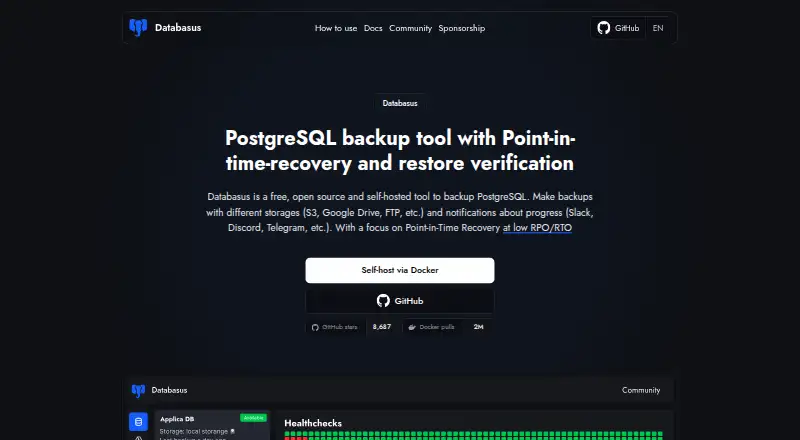
What Databasus is
Databasus is a free, open-source tool for self-hosted database backups, focused primarily on PostgreSQL. It also supports MySQL, MariaDB and MongoDB. PostgreSQL options include logical backups, physical full and incremental backups, and WAL streaming for point-in-time recovery; physical, incremental and WAL backups require PostgreSQL 17 or newer. Schedules can run hourly, daily, weekly, monthly or on cron intervals. Destinations include local storage, S3-compatible storage, Cloudflare R2, Google Drive, Azure Blob Storage, NAS, FTP, SFTP and rclone. Databasus can periodically restore a recent backup in a temporary database container and report the result. Team tools include access management, separate teams and projects, and audit logs. The maker says credentials and backup files use AES-256-GCM encryption, while database access is read-only and requires SELECT permissions. Deployment options include a Linux script, Docker, Docker Compose and Helm for Kubernetes. The listed plan is free under the Apache 2.0 license, with all described features. Minimum requirements include one CPU core, 500 MB RAM and 5 GB installation storage, plus backup storage.
Who it suits
Databasus may suit individual developers, DevOps teams and enterprises that want to manage database backups in a self-hosted setup. Its PostgreSQL recovery features require PostgreSQL 17 or newer for physical, incremental and WAL backups.
What it does well
- Supports four database systems.
- PostgreSQL WAL streaming supports point-in-time recovery.
- Can verify restores in a temporary database container.
- Offers multiple storage destinations and notification channels.
- All described features are listed as free.
What to know first
- Physical, incremental and WAL backups require PostgreSQL 17 or newer.
- Requires Docker Engine 20.10 or later.
- Minimum installation storage is 5 GB, plus backup storage.
Limits
The free plan includes all described features. PostgreSQL physical, incremental, and WAL backups require PostgreSQL 17 or newer; the documented minimum installation storage is 5 GB, with additional storage needed for backups.
Plans
| Plan | Billed and limits | Price |
|---|---|---|
| Free, open-source software | Apache 2.0 license · all described product features | Free |
As databasus.com lists them, read 30 Sept 2026. The maker's own page has the final word.
Getting started
- Open the Databasus website.
- Choose the Linux installation script, Docker, Docker Compose, or Helm for Kubernetes.
- Check that the environment meets the documented minimum requirements.
- Connect the databases to back up using read-only access with SELECT permissions.
- Choose a backup schedule and destination.
- Configure any desired notification channel.
Databasus is a self-hosted database backup tool for teams that want to manage backups in their own environment. It is strongest for PostgreSQL operations that need point-in-time recovery, while its support for MySQL, MariaDB, and MongoDB broadens its role.
Overview
Databasus is free, open-source software under the Apache 2.0 license. It pairs scheduled backups with continuous PostgreSQL WAL streaming, access controls, audit logs, encryption, and restore verification. That makes it more capable than a simple backup scheduler, but self-hosting means the operator is responsible for maintaining the service and providing backup storage.
Deployment options include an automated Linux script, Docker, Docker Compose, and Helm for Kubernetes. The documented minimum is one CPU core, 500 MB of RAM, and 5 GB of installation storage, plus separate backup storage; Docker Engine 20.10 or later and Docker Compose 2.0 or later are required. These are concrete, modest baseline requirements, but backup capacity must be provisioned separately.
Key features
PostgreSQL recovery
PostgreSQL backups can be logical, physical full, or incremental, with WAL streaming for point-in-time recovery. This range suits teams that want more recovery options than periodic logical dumps. Physical, incremental, and WAL backups require PostgreSQL 17 or newer, so older installations cannot use those capabilities.
Scheduling and destinations
Schedules can run hourly, daily, weekly, monthly, or on cron intervals. Backup destinations include local storage, S3-compatible storage, Cloudflare R2, Google Drive, Azure Blob Storage, NAS, FTP, SFTP, and rclone. The range gives operators flexibility to fit backups into existing storage arrangements, though they still need to manage the chosen destination themselves.
Notifications and verification
Slack, Discord, Telegram, Microsoft Teams, email, and custom webhooks can receive notifications. Databasus also periodically downloads the latest backup, restores it into a temporary database container, and reports the result. That verification can surface problems that a successful backup job alone would not reveal; it does not replace an operator's recovery planning.
Access and encryption
Separate teams and projects, database access management, and audit logs of access and changes make the tool more suitable for shared operational use than a single-user script. Databasus says it encrypts credentials and backup files with AES-256-GCM and uses read-only database access requiring SELECT permissions. These controls help limit access and protect stored data, but the service and storage remain under the deploying organization's care.
Pricing
The Free, open-source software plan costs nothing and is licensed under Apache 2.0. It includes all described product features, so there is no paid tier to unlock the PostgreSQL recovery options, integrations, or team features covered here. There is no free trial; the software is free rather than a trial of a paid plan.
This pricing suits individuals and teams comfortable operating their own deployment. The trade-off is not a feature cap but the work of running the service and supplying storage; Databasus is not a hosted backup service.
Platforms
Databasus is available for Linux, as self-hosted software, and through a web interface. Installation choices include an automated Linux script, Docker, Docker Compose, and Helm for Kubernetes. Those options accommodate several infrastructure setups, while the Docker Engine and Compose minimums matter for deployments using those components.
Who it's for
Individual developers can use Databasus to centralize scheduled backups across supported database engines. DevOps teams are a particularly good fit when they need PostgreSQL point-in-time recovery, multiple storage targets, notifications, or periodic restore checks—and can operate the infrastructure themselves. Its teams, projects, and audit logs also suit shared environments, though organizations seeking a managed service should look elsewhere.
Pros and cons
- Pros: PostgreSQL logical, physical, and incremental backups plus WAL-based point-in-time recovery provide a broad recovery toolkit, with PostgreSQL 17 or newer required for the physical, incremental, and WAL options.
- Pros: A wide choice of backup destinations and notification channels can fit varied storage and operations workflows.
- Pros: Periodic restore verification checks that the latest backup can be restored into a temporary database container.
- Pros: The free Apache 2.0 plan includes all described features, without a described feature-based paid tier.
- Cons: Self-hosting leaves service upkeep and backup storage to the operator.
- Cons: PostgreSQL users below version 17 cannot use physical, incremental, or WAL backups.
Alternatives
Database Backup Software is the broader directory for readers comparing backup tools across the category.
- MySQL is worth considering when replication and high-availability components for SQL and NoSQL applications are the priority.
- DBDock is another free, MIT-licensed self-hosted option, presented as an open-source CLI.
- Quemsi may suit readers who want an open-source agent they can audit, modify, or build from source.
- SqlBak may suit readers who prefer a freemium option with a free tier capped at one server, two databases, and one month of backup history.
- DBAegis may fit a small PostgreSQL setup that can work within its Community plan's one-admin, three-connection, and three-schedule limits.
- mariadb-backup is a focused alternative for physical MariaDB backups on Linux or Windows.
- Percona Backup for MongoDB is an alternative for readers seeking a free community product specifically for MongoDB backups.
- pg_probackup is a free backup and recovery utility for PostgreSQL clusters.
Verdict
Databasus is a strong choice for developers and operations teams that want a free, self-hosted backup system with broad storage integrations and especially capable PostgreSQL recovery. Its strongest reason to choose is the combination of WAL-based point-in-time recovery and restore verification; its clearest reason to look elsewhere is the need to operate the service yourself, or to support PostgreSQL versions below 17 for physical, incremental, or WAL backups.
Verdict
Databasus combines backup scheduling, storage options and restore verification in a self-hosted package. Check its PostgreSQL version requirements and documented system minimums before deployment.
Questions
How much does Databasus cost?
The free plan costs nothing and includes all described product features under the Apache 2.0 license.
Which databases does Databasus support?
It supports PostgreSQL, MySQL, MariaDB, and MongoDB, with PostgreSQL as its primary focus.
Can Databasus perform point-in-time recovery?
Yes. PostgreSQL WAL streaming supports point-in-time recovery. Physical, incremental, and WAL backups require PostgreSQL 17 or newer.
Where can backups be stored?
Destinations include local storage, S3-compatible storage, Cloudflare R2, Google Drive, Azure Blob Storage, NAS, FTP, SFTP, and rclone.
How can I install Databasus?
Installation options include an automated Linux script, Docker, Docker Compose, and Helm for Kubernetes.
Facts from Databasus's own pages
- Backup types
- For PostgreSQL it supports logical, physical full and incremental backups, and WAL streaming for point-in-time recovery; physical, incremental, and WAL backups require PostgreSQL 17 or newer. · databasus.com, 30 Sept 2026
- Deployment
- Installation options include an automated Linux script, Docker, Docker Compose, and Helm for Kubernetes. · databasus.com, 30 Sept 2026
- Encryption and database access
- Databasus says it encrypts credentials and backup files with AES-256-GCM and uses read-only database access requiring SELECT permissions. · databasus.com, 30 Sept 2026
- Intended users
- The maker describes Databasus as suitable for individual developers, DevOps teams, and enterprises. · databasus.com, 30 Sept 2026
- Maker and history
- The maker identifies Rostislav Dugin as Databasus's developer and says the project has been developed and used since 2023. · databasus.com, 30 Sept 2026
- Notification integrations
- Supported notification channels include Slack, Discord, Telegram, Microsoft Teams, email, and custom webhooks. · databasus.com, 30 Sept 2026
- Purpose
- Databasus is a free, open-source, self-hosted tool for backing up databases, with a focus on PostgreSQL point-in-time recovery. · databasus.com, 30 Sept 2026
- Restore verification
- Databasus periodically downloads the latest backup, restores it into a throwaway database container, and reports the result. · databasus.com, 30 Sept 2026
- Scheduling
- Backup schedules include hourly, daily, weekly, monthly, and cron intervals. · databasus.com, 30 Sept 2026
- Storage integrations
- Supported destinations include local storage, S3-compatible storage, Cloudflare R2, Google Drive, Azure Blob Storage, NAS, FTP, SFTP, and rclone. · databasus.com, 30 Sept 2026
- Support
- The maker directs users to its Telegram community for questions, configuration help, and release updates, and lists [email protected] as a contact. · databasus.com, 30 Sept 2026
- Supported databases
- It supports PostgreSQL, MySQL, MariaDB, and MongoDB, with PostgreSQL as its primary focus. · databasus.com, 30 Sept 2026
- System requirements
- The documented minimum requirements are one CPU core, 500 MB RAM, 5 GB installation storage plus backup storage, Docker Engine 20.10 or later, and Docker Compose 2.0 or later. · databasus.com, 30 Sept 2026
- Team features
- It provides user access management for databases, separate teams and projects, and audit logs of user access and changes. · databasus.com, 30 Sept 2026
Where Databasus stands on Freedom251
- Database Backup Software#6 of 27