Freedom251 › DHCP Management Software

DacatDHCP
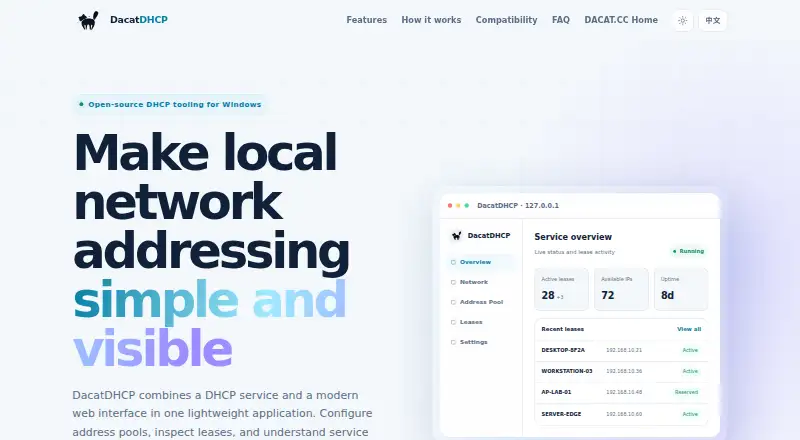
What DacatDHCP is
DacatDHCP combines an IPv4 DHCP service with a web interface for configuring address pools, viewing leases and checking service status. The service and management interface are bundled in a lightweight single-file application. Users can select a network interface and set address ranges, gateway, DNS and lease duration; the interface also shows assigned addresses and client information. The v1.0.0 release adds fixed MAC-to-IP mappings with matching logs. The main version supports Windows 10, Windows 11 and Windows Server 2016 or later on Windows amd64. Its management page works in Edge, Chrome and other modern Chromium-based browsers, but Internet Explorer 11 is no longer supported. The interface listens only on 127.0.0.1, and running the application requires administrator privileges. DacatDHCP is permanently free and open source under the Apache License 2.0. It is intended for labs, temporary LANs, small networks, troubleshooting and isolated networks. Address pools must be in the selected interface's subnet; leases are held in memory and are not restored after restart.
Who it suits
DacatDHCP suits administrators working with labs, temporary LANs, small networks, device troubleshooting or isolated networks. It is not suited to IPv6 DHCP or cross-subnet address pools.
What it does well
- Bundles DHCP service and web management in one file.
- Configures address ranges, gateway, DNS and lease duration.
- Displays assigned addresses and client information.
- Permanently free and open source under Apache 2.0.
What to know first
- Supports IPv4 only, not IPv6 or DHCPv6.
- Requires administrator privileges to run.
- Leases are not restored after restart.
- Address pools must match the selected interface subnet.
Limits
The free official version is limited to Windows amd64 and IPv4 DHCP. Address pools must be in the selected interface’s subnet; leases stay in memory and are not restored after restart.
Plans
| Plan | Billed and limits | Price |
|---|---|---|
| Official version | Official version is permanently free. · Windows amd64 · IPv4 DHCP only · local DHCP service | Free |
As dacat.cc lists them, read 4 Oct 2026. The maker's own page has the final word.
Getting started
- Visit the DacatDHCP website.
- Use the maker’s GitHub route for releases, source code, documentation, and issue feedback.
- Select the Windows amd64 release for Windows 10, Windows 11, or Windows Server 2016 or later.
- Run the application with administrator privileges.
- Open the management interface in Edge, Chrome, or another modern Chromium-based browser.
- Select a network interface and configure an address range, gateway, DNS, and lease duration.
DacatDHCP is a Windows DHCP service managed through a web interface, aimed at small or isolated networks that need a lightweight IPv4 setup. Its appeal is a bundled, free application for configuring pools and viewing leases; its in-memory lease handling and narrow network scope rule it out for many persistent or larger deployments.
Overview
DacatDHCP packages its DHCP service and management interface in a single-file application. Administrators can select a network interface, set an address range and configure gateway, DNS and lease duration from a browser. That compact arrangement suits temporary LANs, labs and troubleshooting work better than networks that need durable lease state or broader address management.
The interface listens only on 127.0.0.1, and write endpoints use CSRF and origin checks. These are useful safeguards for a local management interface, but they do not remove the need to run the application with administrator privileges. The product focuses on IPv4 and cannot serve IPv6 or DHCPv6 clients.
Key features
Pool setup and lease visibility
Network-interface selection and controls for ranges, gateway, DNS and lease duration cover the basic configuration needs of a small IPv4 DHCP service. The interface also shows assigned addresses and client information, making it useful when diagnosing which devices received leases. Recent releases add fixed MAC-to-IP mappings and matching logs, a practical aid when particular devices need predictable addresses.
Operational limits
An address pool must belong to the selected interface’s subnet. That makes DacatDHCP unsuitable for cross-subnet address pools, regardless of how simple its local setup may be. Leases stay in memory and are not restored after a restart, so a service restart loses lease state. Active IP-conflict detection is also absent; administrators needing those protections should choose another DHCP solution.
Pricing
DacatDHCP’s Official version is permanently free: free. It includes a Windows amd64 local DHCP service for IPv4, with no paid tier or trial to weigh against the free edition. The trade-off is not a reduced plan but the product’s technical limits: IPv4 only, same-subnet pools, in-memory leases and no active conflict detection.
The v1.0.0 release is published under the Apache License 2.0. Source code, releases, documentation and issue feedback are directed to GitHub.
Platforms
The main version supports Windows 10, Windows 11 and Windows Server 2016 or later, with Windows amd64 releases. Management runs in Microsoft Edge, Google Chrome and other modern Chromium-based browsers; Internet Explorer 11 is no longer supported. The application requires administrator privileges, so it is not a browser-only service that can be operated without elevated access to its host.
Who it's for
DacatDHCP is best suited to administrators setting up a lab, test environment, temporary LAN, small network or isolated troubleshooting network on Windows. Its single-file packaging and local web controls keep the job focused, while fixed mappings and lease visibility help with device-level diagnosis.
It is a poor fit for IPv6 environments, cross-subnet pools, or networks that depend on leases surviving restarts. The absence of active conflict detection also makes it a less compelling choice where address conflicts need to be caught automatically.
Pros and cons
Pros
- Permanently free and open source: there is no paid tier or trial deadline for the Windows IPv4 service.
- Compact deployment: service and management interface come together in a single-file application, which suits temporary or isolated setups.
- Useful local administration: configurable pool settings, lease and client visibility, plus fixed MAC-to-IP mappings and logs support basic network management and troubleshooting.
- Local management safeguards: the interface listens on loopback, and write endpoints use CSRF and origin checks.
Cons
- No IPv6 or DHCPv6: it cannot serve networks that require either protocol.
- Subnet restriction: pools must match the selected interface’s subnet, excluding cross-subnet setups.
- Volatile lease state: leases are lost on restart, which weakens its fit for persistent service.
- No active conflict detection: administrators do not get automatic detection of competing IP assignments.
- Windows and elevated access required: the main version targets Windows amd64 and needs administrator privileges to run.
Alternatives
DHCP Management Software is the broader category directory for comparing options. Choose Subnetly instead if you want a freemium service with a free monthly plan covering 256 IPAM addresses, 10 subnets, two DHCP pools, one private DNS zone, one public DNS zone and 100 DNS records; it also spans API, iOS, Linux, web and Windows.
ISC Stork is a free, open-source option for Linux, macOS, self-hosted and web environments, with professional support also offered at custom pricing. FluxDHCP is a free, self-hosted Linux and web alternative under the AGPL-3.0 license. SagaOS Kea Pilot is free MIT-licensed software for API, Linux, self-hosted and web environments, with no paid tiers or usage limits stated.
teemIP offers a free Community edition with open-source code, download and installation, plus GitHub, wiki and community-forum access; it supports API, Linux, self-hosted, web and Windows. Danbyte is a free, open-source, self-hosted option for API, Linux and web, with all features included and no seat license or license expiry. Jen Kea DHCP Management Console is free GPL v3 software for Linux, self-hosted and web use, requiring Ubuntu 22.04 or 24.04 or Docker, and ISC Kea with MySQL or MariaDB. OpenIPAM is a free, open-source option for API, Linux, self-hosted and web, with browser-only or self-hosted-backend use.
Verdict
Choose DacatDHCP for a small, isolated Windows network when a free, compact IPv4 service and straightforward local controls matter more than durable leases or advanced network scope. Its simple packaging and device-level lease tools are useful for labs and troubleshooting, but IPv4-only support, same-subnet pools and volatile leases make it a poor choice for dependable, persistent DHCP service.
Verdict
DacatDHCP offers a compact, free option for IPv4 DHCP administration in small or isolated network settings. Its in-memory lease handling and subnet restriction are important limitations to consider before use.
Questions
Does DacatDHCP cost anything?
The official version is permanently free.
Is DacatDHCP open source?
Yes. The v1.0.0 release is published under the Apache License 2.0, and the maker directs users to GitHub for source code.
Which systems does it run on?
The main version supports Windows 10, Windows 11, and Windows Server 2016 or later, with Windows amd64 releases.
Which browsers work with the management interface?
It supports Microsoft Edge, Google Chrome, and other modern Chromium-based browsers. Internet Explorer 11 is no longer supported.
Does DacatDHCP support IPv6?
No. It focuses on IPv4 DHCP and does not currently support IPv6 or DHCPv6.
What happens to leases when the application restarts?
Leases are held in memory and are not restored after restart.
Facts from DacatDHCP's own pages
- Browser support
- The management interface supports Microsoft Edge, Google Chrome, and other modern Chromium-based browsers; Internet Explorer 11 is no longer supported. · github.com, 4 Oct 2026
- Deployment
- It is delivered as a lightweight single-file application with its service and management interface bundled together. · dacat.cc, 4 Oct 2026
- Features
- It supports network-interface selection and configuration of address ranges, gateway, DNS, and lease duration. · dacat.cc, 4 Oct 2026
- Intended use
- The maker describes it for labs, test environments, temporary LANs, small networks, device troubleshooting, and isolated networks. · dacat.cc, 4 Oct 2026
- Lease management
- The interface can show assigned addresses and client information, and the latest release adds MAC-to-IP fixed mappings with matching logs. · github.com, 4 Oct 2026
- Lease persistence
- The v1.0.0 release notes say leases are held in memory and are not restored after restart, and that active IP-conflict detection is not provided. · github.com, 4 Oct 2026
- License
- The v1.0.0 release is published under the Apache License 2.0. · github.com, 4 Oct 2026
- Limits
- It focuses on IPv4 DHCP and does not currently support IPv6 or DHCPv6. · github.com, 4 Oct 2026
- Network scope
- The address pool must be in the same subnet as the selected network interface; the product does not support cross-subnet address pools. · github.com, 4 Oct 2026
- Permissions
- Running the application requires administrator privileges. · github.com, 4 Oct 2026
- Platform
- The main version supports Windows 10, Windows 11, and Windows Server 2016 or later, with Windows amd64 releases. · dacat.cc, 4 Oct 2026
- Purpose
- DacatDHCP combines a DHCP service with a web management interface for configuring address pools, viewing leases, and monitoring service status. · dacat.cc, 4 Oct 2026
- Security
- The management interface listens only on 127.0.0.1, and write endpoints use CSRF and origin checks. · github.com, 4 Oct 2026
- Support and source
- The maker directs users to GitHub for source code, releases, documentation, and issue feedback. · dacat.cc, 4 Oct 2026
Where DacatDHCP stands on Freedom251
- DHCP Management Software#6 of 25