Freedom251 › Daycare Management Software

CubCare
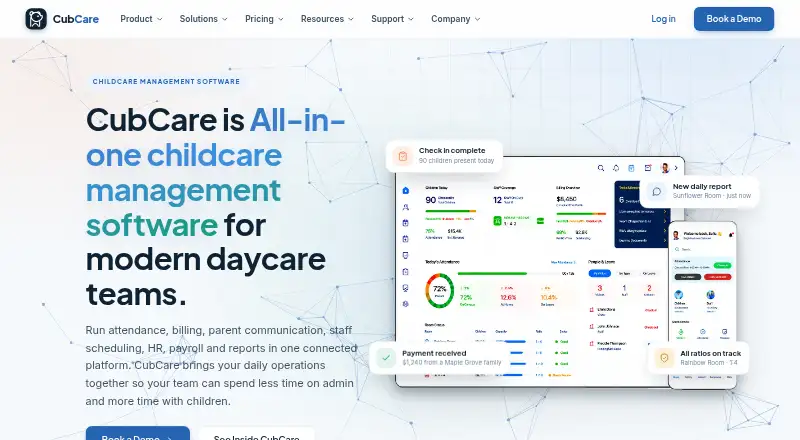
What CubCare is
CubCare is a childcare management platform for handling attendance, billing, family communication, staff scheduling, HR, payroll preparation and reporting. Centres can record room-level check-ins and check-outs, review time-stamped attendance and monitor live staff-to-child ratios. Billing tools cover invoices, subsidies, deposits, online payments, balances and automatic reminders. Staff features include time tracking, leave requests, records, certifications and paystub generation or upload. Families can use the parent app to view child reports and photos, message the centre, check invoices and pay online. Reports can be exported as PDF, Excel or CSV files for licensing and board reviews. Operators can manage multiple sites through one account and compare occupancy, revenue and staffing. CubCare is available on Android, iOS and the web. Pricing is by custom quote, based on factors including centre size, number of children, locations, onboarding and support needs; every plan includes the full feature set. The company offers help with migration, setup, team training and launch.
Who it suits
CubCare suits daycares, preschools, before and after school programs, early learning centres and multi-location operators. It may also fit centres looking to give families app access to reports, invoices and messages.
What it does well
- Tracks room attendance and live staff-to-child ratios.
- Manages invoices, subsidies, payments and reminders.
- Families can view reports, photos and invoices in the app.
- Exports reports as PDF, Excel and CSV.
- One account can manage and compare multiple sites.
What to know first
- Pricing is available only by custom quote.
- No independently verified compliance approvals are claimed.
Plans
| Plan | Billed and limits | Price |
|---|---|---|
| Custom quote | centre size · number of children · admin users · locations · onboarding needs · support needs · full feature set included | On request |
As cubcare.ca lists them, read 15 Oct 2026. The maker's own page has the final word.
Getting started
- Visit the CubCare website.
- Request a custom quote based on your centre and support needs.
- Plan migration with CubCare's onboarding assistance.
- Import child, family, and staff records and set up billing.
- Train the team, then go live using the Android, iOS, or web platform.
CubCare is an all-in-one operating system for childcare providers that need attendance, finance, staffing and family communication tied together. It suits daycares, preschools, before- and after-school programmes, early-learning centres and operators with several sites. The main qualification is commercial rather than functional: every plan is quoted around the organisation’s size and service needs.
Overview
CubCare puts room attendance, billing, parent messaging, staff administration, payroll preparation and reporting in one account. That breadth can replace a collection of specialist tools and gives managers a shared record of children, families and employees. Multi-location operators get one account for switching between sites and comparing occupancy, revenue and staffing, while a smaller centre may find the quote-led purchase harder to assess than a published subscription.
Key features
Attendance, ratios and family communication
Room-level digital check-in and check-out, including kiosk sign-in, creates time-stamped attendance records. Live staff-to-child ratios make coverage visible during the day, which is useful for managers responsible for room compliance and staffing decisions. Meal and allergy tracking adds a practical child-care record.
The parent app lets families view reports and photos, message the centre, see invoices and pay online. This connects day-to-day updates with the financial relationship instead of forcing parents between separate channels.
Billing and reporting
Centres can handle invoices, subsidies, deposits, online payments, balances and automatic reminders. That combination supports recurring administration as well as follow-up on overdue accounts. Reports can be exported for licensing and board reviews in PDF, Excel and CSV, giving operators formats suited to different oversight processes.
Staff operations and payroll
Scheduling, time tracking, leave requests, staff records and certification tracking cover the core personnel workflow. Payroll preparation includes paystub generation or upload, so CubCare supports preparation and documentation rather than presenting itself as a complete payroll service.
Security, onboarding and support
Role-based permissions, secure login and administrator-controlled access help separate responsibilities. CubCare also describes a process for data-export and deletion requests. It makes no independently verified certification, data-residency or compliance-approval claims, so organisations with formal regulatory requirements should confirm their own obligations.
Onboarding assistance can include migration planning, importing child, family and staff records, billing setup, team training and go-live support. Current customers can submit a support request for an email reply or email [email protected] directly.
Pricing
Custom quote
Custom pricing is billed by quote, with the amount depending on centre size, number of children, administrator users, locations, onboarding requirements and support needs. Every plan includes the full feature set, so there is no cheaper tier that removes attendance, billing or family tools; the trade-off is that buyers cannot compare a public monthly price or a reduced-function starter package. This approach is most plausible for organisations that need implementation help or several locations, while a small provider should request a detailed quote before committing.
Platforms
CubCare runs on Android, iOS and the web. Families can use the mobile parent app, while administrators can work from a browser or supported mobile device.
Who it's for
Choose CubCare when a daycare, preschool, before- or after-school programme or early-learning centre wants attendance, ratios, billing, staff records, payroll preparation and parent communication in one system. It is particularly well matched to multi-location operators that need site switching and cross-site comparisons. It is less compelling for a very small provider that prioritises an immediate, transparent free or fixed-price signup.
Pros and cons
Pros
- Broad operational coverage: attendance, finance, staff administration, payroll preparation, reporting and family messaging share one platform.
- Useful oversight for groups: one account can manage multiple locations and compare occupancy, revenue and staffing.
- Practical parent payments: families can review invoices and pay online in the parent app.
- Implementation help: migration, imports, billing setup, training and launch support reduce the work of changing systems.
- Exportable governance reports: PDF, Excel and CSV output supports licensing and board-review workflows.
Cons
- No published price: the quote varies by organisation size, users, sites, onboarding and support, making budgeting difficult before a sales conversation.
- No reduced-cost feature tier: every plan has the full feature set, so smaller centres cannot trade advanced scope for a simpler subscription.
- Payroll is preparation-focused: paystub generation or upload helps organise payroll, but the product does not claim to be a full payroll processor.
- Compliance assurance is limited: CubCare does not claim independently verified certifications, residency guarantees or approvals.
Alternatives
Consider cradleOS instead if a free plan for home daycares and small centres, with Android, iOS, macOS and web access, matters more than CubCare’s quote-based full suite. Kinderly is the clearer choice for a freemium model with a free Sprout tier capped at 10 active children and published limits on forms, packets, share links, website pages and storage.
Kangarootime suits organisations wanting a free starting tier limited to one programme, one school and five staff, with a paid Premium option for up to 10 schools and unlimited staff. QikKids is worth comparing when place-based bands from 0–39, 40–69 or 70–99 places fit the service.
Kriyo offers Value, Pro and Pro Plus plans; Brightwheel uses custom pricing based on programme information. Kare Day offers monthly or yearly advance-paid subscriptions, while Kidsoft provides a personalised quote based on service size and requirements after a demo.
For broader category browsing, see Daycare Management Software and Early Childhood Education Software.
Verdict
CubCare is a strong fit for childcare organisations that want one system for centre operations and parent-facing administration, especially across multiple locations. Its main reason to choose it is the unusually broad combination of attendance, ratios, billing, staffing, payroll preparation, reporting and family payments. Look elsewhere if you need a transparent public price, a free starter plan or independently verified compliance assurances before you buy.
Verdict
CubCare brings centre operations and family communication into one platform, with tools for attendance, billing, staff administration and reports. Its custom pricing depends on centre and service needs, so prospective customers will need a quote.
Questions
How much does CubCare cost?
Pricing is by custom quote. The quote depends on centre size, number of children, admin users, locations, onboarding needs, and support needs.
What platforms are available?
CubCare is available on Android, iOS, and the web.
Does CubCare include a parent app?
Yes. Families can view child reports and photos, message the centre, see invoices, and pay online through the parent app.
What does each plan include?
Every plan includes the full feature set. Pricing is customized to the centre and its onboarding and support needs.
Can operators manage multiple locations?
Yes. Operators can manage sites from one account, switch locations, and compare occupancy, revenue, and staffing.
What onboarding help is available?
CubCare offers help planning migration, importing child, family, and staff records, setting up billing, training teams, and going live.
Facts from CubCare's own pages
- App Store category
- The iOS app is categorized as Education and rated 4+ for age. · apps.apple.com, 15 Oct 2026
- App Store compatibility
- The listing supports iPhone and iPad, requires iOS/iPadOS 13 or later, and lists a 105.8 MB size. · apps.apple.com, 15 Oct 2026
- App Store developer
- Apple identifies Attul Agnivanshi Sharma as the app developer, while the website identifies the business as CubCare Corp. · apps.apple.com, 15 Oct 2026
- App Store features
- The listing describes enrollment, child and staff records, classroom assignments, schedules, attendance, staff clock-ins, activities, incidents, reports and parent updates. · apps.apple.com, 15 Oct 2026
- App Store price
- The CubCare iOS listing is free to download. · apps.apple.com, 15 Oct 2026
- App Store privacy disclosure
- Apple’s listing says photos and videos may be linked to user identity for app functionality and notes that the developer-provided privacy information is not verified by Apple. · apps.apple.com, 15 Oct 2026
- Attendance
- Educators can check children in and out by room on web or mobile, with timestamped records. · cubcare.ca, 15 Oct 2026
- Attendance and ratios
- The product offers room-level digital check-in and check-out, time-stamped records, and live staff-to-child ratios. · cubcare.ca, 30 Sept 2026
- Audience
- CubCare is built for daycares, preschools, before and after school programs, early learning centres, and multi-location operators. · cubcare.ca, 30 Sept 2026
- Billing
- The platform supports invoices, subsidies, deposits, online payments, balance tracking and automatic reminders. · cubcare.ca, 15 Oct 2026
- Compliance claims
- CubCare says it does not claim certifications, data residency guarantees or compliance approvals that have not been independently verified. · cubcare.ca, 30 Sept 2026
- Compliance disclosure
- The company does not claim independently verified certifications, data-residency guarantees or other compliance approvals on its public site. · cubcare.ca, 15 Oct 2026
- Daily reports
- Educators can record meals, naps, diapers, activities, observations and notes. · cubcare.ca, 15 Oct 2026
- Documentation
- Public documentation consists mainly of feature pages, FAQs, calculators, blog articles and support contact forms; no technical help centre or changelog is exposed. · cubcare.ca, 15 Oct 2026
- Enrollment
- The system tracks inquiries, tours, offers, waitlists and family onboarding. · cubcare.ca, 15 Oct 2026
- Family app
- Families can view their child's reports and photos, message the centre, see invoices and pay online through the parent app. · cubcare.ca, 30 Sept 2026
- Family communication
- Yes · cubcare.ca, 21 Sept 2026
- HR records
- Staff profiles hold roles, documents and certification records, with leave requests managed in the app. · cubcare.ca, 15 Oct 2026
- Incident reports
- Incident workflows route reports through teacher submission, manager review and parent sign-off, with timestamps and printable licensing copies. · cubcare.ca, 15 Oct 2026
- Limit: deployment
- No self-hosting option or on-premises installation is described publicly. · cubcare.ca, 15 Oct 2026
- Limit: developer access
- The public site exposes no API, SDK, integration directory or developer documentation. · cubcare.ca, 15 Oct 2026
- Limit: licence
- No open-source licence or source-code licence is published; paid use is governed by a separate customer agreement. · cubcare.ca, 15 Oct 2026
- Limit: payroll scope
- Payroll functionality is preparation and record keeping rather than tax filing, remittances or year-end payroll processing. · cubcare.ca, 15 Oct 2026
- Limit: pricing
- The public site provides no numerical subscription prices; buyers must request a quote and pricing is described as indicative until a written agreement. · cubcare.ca, 15 Oct 2026
Where CubCare stands on Freedom251
- Daycare Management Software#13 of 32
- Early Childhood Education Software#65 of 86