Freedom251 › Industry Management software

Brightwheel
What Brightwheel is
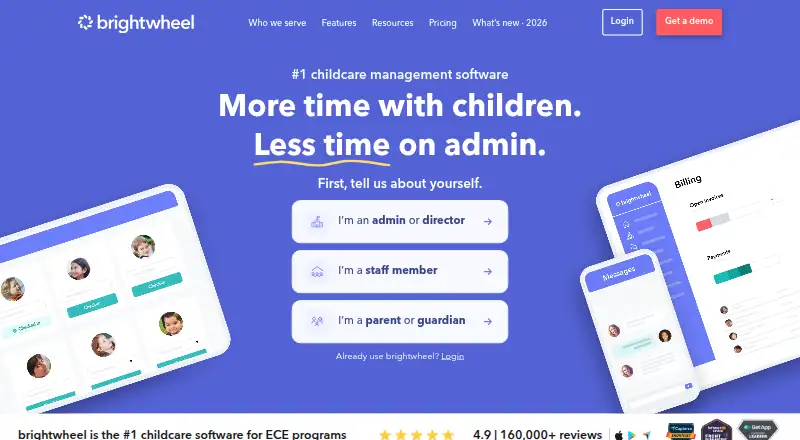
Brightwheel is a platform for early education programs that combines enrollment, billing, family messaging, lesson planning, and related tasks. Enrollment tools include admissions, waitlists, applications, and digital forms. Families can pay online through secure payment options, while invoices, payments, and reminders can be automated. Staff tools cover rosters, scheduling, time tracking, payroll, and development hours. Brightwheel is available on the web, iOS, and Android, and a mobile app is listed among its features. Support options include onboarding, a dedicated specialist, live chat, and online resources. Training materials include webinars, templates, tools, and blogs. Pricing is customized after program details are collected; no specific price is listed. The site displays more than 160,000 reviews and a 4.9 rating, along with reviews from the Apple App Store and Google Play Store.
Who it suits
Brightwheel suits early education programs that want enrollment, billing, family communication, and lesson planning in one platform. Its staff tools may also fit programs managing schedules, time tracking, payroll, and development hours.
What it does well
- Enrollment tools include admissions and digital forms.
- Invoices, payments, and reminders can be automated.
- Includes staff scheduling and time tracking.
- Available on web, iOS, and Android.
- Support includes onboarding and live chat.
What to know first
- Pricing is customized after program details are collected.
- No specific price is listed.
Plans
| Plan | Billed and limits | Price |
|---|---|---|
| Custom pricing | — | On request |
As mybrightwheel.com lists them, read 27 Sept 2026. The maker's own page has the final word.
Getting started
- Visit https://mybrightwheel.com/.
- Use the web platform or choose the iOS or Android app.
- Share program details for customized pricing.
- Contact Brightwheel about onboarding and support.
Brightwheel is an all-in-one operating platform for childcare and early education programs, combining enrollment, family-facing communication, payments, classroom planning, and staff administration. It suits centers that want one connected system across those jobs; programs needing only a single function may find its scope excessive. The central buying question is whether a customized plan matches the size and complexity of your operation.
Overview
Brightwheel connects the administrative path from admissions through attendance with the ongoing work of billing, messaging, and lessons. Enrollment tools cover applications, waitlists, admissions, and digital forms, while attendance and check-in handle a core daily routine. Families can communicate with the program and make online payments through secure payment options, giving the center one environment for both internal and family-facing work.
The platform also reaches staff operations. Rosters, scheduling, time tracking, payroll, and development hours are included among its staff tools. That breadth is valuable for programs trying to replace a patchwork of specialist systems, but it may be unnecessary for a small provider that only needs check-in or invoicing.
Brightwheel runs on the web, iOS, and Android. Its site displays more than 160,000 reviews and a 4.9 rating, with review presence in both the Apple App Store and Google Play Store. Those figures indicate substantial public adoption, while the practical fit still depends on which workflows a program intends to consolidate.
Key features
Enrollment, attendance, and classroom work
Admissions, applications, waitlists, and digital forms give programs a structured route from inquiry to enrollment. Attendance and check-in then carry that record into daily operations. Lesson planning adds a classroom-planning layer, so the product is not limited to front-office administration.
Billing and family communication
Automated invoices, payments, and reminders can reduce recurring billing work. Secure online payment options let families pay digitally, while messaging keeps communication in the same system as enrollment and attendance. Programs wanting a unified family experience will get more from this combination than centers that already have a preferred communications or payment product.
Staff management and support
Rosters, schedules, time tracking, payroll, and development hours address staffing administration in one place. Onboarding, a dedicated specialist, live chat, and online resources provide implementation and ongoing help. Webinars, templates, tools, and blogs add training material for teams that need guidance beyond the software itself.
Pricing
Brightwheel uses paid, custom pricing. The Custom pricing plan has no published rate; the provider sets the price after collecting information about the program. That approach can accommodate different center sizes and requirements, but it prevents a straightforward budget comparison before a sales discussion. There is no published free plan, trial length, seat allowance, usage quota, or renewal term to use for a lower-risk evaluation.
Custom pricing is most appropriate for programs prepared to describe their enrollment, staffing, and operational needs and to assess a tailored quote. Smaller providers seeking an immediately visible zero-cost tier or a fixed monthly commitment should look at alternatives with published free plans or plan prices.
Platforms
Brightwheel is available through a web application and mobile apps for iOS and Android. Mobile access is useful for staff and families who need communication, attendance, or payment tasks away from a desktop. The product's app-store presence also gives mobile users a direct distribution channel on both major phone platforms.
Who it's for
Brightwheel is a strong candidate for childcare centers and early education programs that want enrollment, attendance, billing, family communication, lesson planning, and staff administration connected in one platform. It is particularly suited to teams willing to exchange price transparency for a plan shaped around their program details.
It is less compelling for a home daycare or small center that wants a simple free starting point, or for a program satisfied with separate tools and unwilling to negotiate custom pricing. Those buyers may prefer a narrower product or an alternative with clearly defined limits and prices.
Pros and cons
Pros
- Broad operational coverage: Enrollment, check-in, billing, lessons, messaging, and staff workflows sit in one system, reducing the need to coordinate multiple products.
- Automated payment administration: Invoices, payments, and reminders can run automatically, while families have secure online payment options.
- Useful mobile reach: Web, iOS, and Android access supports staff and family tasks across common devices.
- Structured implementation support: Onboarding, a dedicated specialist, live chat, and training resources help programs adopt a wide feature set.
Cons
- No public price: Buyers must provide program information and evaluate a custom quote before knowing the cost.
- No published entry tier: There is no free plan or stated trial, seat cap, or quota for organizations wanting to test the service with minimal commitment.
- Potentially more platform than needed: Programs seeking one focused workflow may be paying for a broader operational suite.
Alternatives
For a broader category comparison, see Daycare Management Software, Childcare Management Software, and Early Childhood Education Software.
- cradleOS is worth choosing for a home daycare or small center that wants a free plan with digital check-in/out, records, messaging, invoicing, enrollment, and reports across Android, iOS, macOS, and web.
- Kinderly suits buyers who want a free tier capped at 10 active children, three forms, five packets, five share links, a three-page website, and 30 MB of storage, with a paid Bloom plan also offered.
- Kangarootime is the better starting point for a single program, school, and up to five staff members on its free plan; its Premium plan supports up to 10 schools and unlimited staff.
- QikKids is designed for centers comparing plans by capacity bands, including 0–39, 40–69, and 70–99 places.
- Kriyo offers paid Value, Pro, and Pro Plus plans for buyers who prefer a tiered structure.
- CubCare is an alternative for centers wanting a quote based on center size, children, admin users, locations, onboarding, and support, with the full feature set in every plan.
- Kare Day offers a paid subscription billed monthly or yearly in advance.
- Kidsoft is a paid option whose quote depends on service size and requirements and follows a demo.
Verdict
Choose Brightwheel if your early education program wants enrollment, family communication, payments, lessons, attendance, and staff administration in one mobile-ready platform, and you are comfortable assessing a customized quote. Look elsewhere if transparent pricing, a free tier, or a tightly focused tool matters more than an integrated operational suite.
Verdict
Brightwheel brings program administration, family communication, payments, and staff tools together for early education programs. Ask for pricing based on your program details before deciding whether its customized plan fits.
Questions
How much does Brightwheel cost?
Brightwheel uses customized pricing. The price is set after program details are collected.
Is there a free plan?
Brightwheel is listed as paid; no free plan is listed.
Which platforms does Brightwheel support?
Brightwheel is available on web, iOS and Android.
What program tasks does Brightwheel cover?
It includes enrollment management, family communication, attendance and check-in, billing and payments, and lesson planning.
What support and training are available?
Support includes onboarding, a dedicated specialist, live chat and online resources. Training resources include webinars, templates, tools and blogs.
Facts from Brightwheel's own pages
- All-in-one platform
- The platform combines enrollment, billing, messaging, lessons, and more. · mybrightwheel.com, 27 Sept 2026
- App store presence
- The site lists reviews from Apple App Store and Google Play Store. · mybrightwheel.com, 27 Sept 2026
- Attendance and check-in
- Yes · mybrightwheel.com, 20 Sept 2026
- Automated billing
- Invoices, payments, and reminders can be automated. · mybrightwheel.com, 27 Sept 2026
- Billing and payments
- Yes · mybrightwheel.com, 20 Sept 2026
- Custom pricing
- Pricing is customized after collecting program details. · mybrightwheel.com, 27 Sept 2026
- Enrollment tools
- Enrollment tools include admissions, waitlists, applications, and digital forms. · mybrightwheel.com, 27 Sept 2026
- Family communication
- Yes · mybrightwheel.com, 20 Sept 2026
- Lesson planning
- The platform includes lesson plans, observations, assessments, and curriculum tools. · mybrightwheel.com, 27 Sept 2026
- Mobile app
- A mobile app is listed among the product features. · mybrightwheel.com, 27 Sept 2026
- Mobile apps
- both · mybrightwheel.com, 20 Sept 2026
- Review count
- The site displays more than 160,000 reviews and a 4.9 rating. · mybrightwheel.com, 27 Sept 2026
- Secure online pay
- Families can pay online through secure payment options. · mybrightwheel.com, 27 Sept 2026
- Staff management
- Staff tools include rosters, scheduling, time tracking, payroll, and development hours. · mybrightwheel.com, 27 Sept 2026
- Support options
- Support includes onboarding, a dedicated specialist, live chat, and online resources. · mybrightwheel.com, 27 Sept 2026
- Training resources
- Brightwheel provides webinars, templates, tools, blogs, and online resources. · mybrightwheel.com, 27 Sept 2026
Where Brightwheel stands on Freedom251
- Industry Management software#4 of 22
- Early Childhood Education Software#32 of 86
- Daycare Management Software#12 of 32
- Childcare Management Software#14 of 31
- Child Care Software#10 of 18