Freedom251 › Data Preparation Software
csvkit
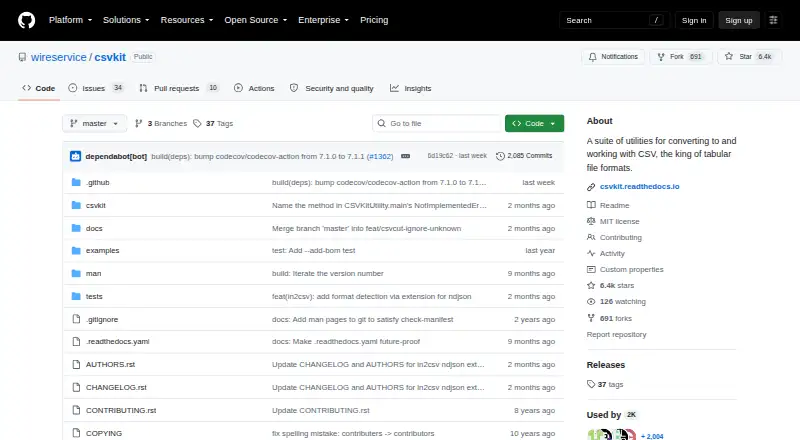
What csvkit is
csvkit is a free suite of command-line tools for converting and working with CSV files on Linux, macOS, and Windows. It can convert Excel, JSON, and fixed-width files to CSV, then select, remove, or rearrange columns. For inspection, csvlook displays rows in the terminal and csvstat produces summary statistics. Other commands find matching rows, sort data, merge related data with csvjoin, or combine subsets with csvstack. csvsql can query CSV data with SQL and import it into PostgreSQL; sql2csv exports query results, while csvjson converts CSV to JSON or GeoJSON. Because the tools accept standard input and output, they can be chained into repeatable processing workflows. By default, csvkit infers a file’s format from its first 1024 bytes and infers cell types, though both behaviors can be disabled. Installation guidance includes pip and Homebrew and recommends a virtual environment. The tutorial assumes basic command-line familiarity. The project is MIT-licensed and comes without warranty; documentation notes that larger files or faster processing may exceed its limits.
Who it suits
csvkit suits people comfortable with basic command-line use who need to inspect, convert, filter, or combine CSV data. It also supports workflows involving SQL, PostgreSQL, JSON, or GeoJSON.
What it does well
- Free, MIT-licensed software.
- Converts Excel, JSON, and fixed-width files to CSV.
- Includes column selection, sorting, and row filtering tools.
- Supports SQL queries and PostgreSQL imports.
- Commands can be connected through standard input and output.
What to know first
- May reach its limits with larger files or faster processing.
- The tutorial assumes basic command-line familiarity.
- Provided without warranty.
Plans
| Plan | Billed and limits | Price |
|---|---|---|
| csvkit | MIT-licensed software · no paid tiers stated | Free |
As github.com lists them, read 7 Oct 2026. The maker's own page has the final word.
Getting started
- Open the csvkit project website.
- Follow the pip or Homebrew installation command in the documentation.
- Use the recommended virtual environment for installation.
- Choose the csvkit command suited to your task and connect commands through standard input and output as needed.
csvkit is a free, MIT-licensed suite of command-line tools for converting and working with CSV files. It is best for people comfortable with basic command-line use who want repeatable data-cleaning and analysis workflows. Its breadth is a strong fit for everyday CSV tasks, though larger files or a need for faster processing can call for another approach.
Overview
csvkit brings common data tasks into a collection of focused commands rather than a graphical workspace. You can convert files, inspect and reshape columns, filter and sort rows, combine data, and work with SQL. Because its commands read from standard input and write to standard output, they can be chained into repeatable pipelines. That is useful for recurring work, but means the command line is central to the experience.
By default, csvkit infers the file format from the first 1024 bytes and infers cell types. Options let you disable either behavior, which matters when automatic interpretation does not suit a file. Installation instructions provide pip and Homebrew commands and recommend a virtual environment.
Key features
Convert, inspect, and reshape
in2csv converts common formats such as Excel, JSON, and fixed-width files to CSV. csvcut selects, deletes, and reorders columns; csvlook displays data in the terminal; and csvstat produces summary statistics. Together, these tools cover much of the preparation and initial profiling work that precedes deeper analysis.
Filter, combine, and query
Tools for finding matching rows and sorting data help narrow a file before further processing. csvjoin merges related data, while csvstack combines subsets. For SQL-oriented work, csvsql can query CSV data and import it into PostgreSQL, and sql2csv can export query results to CSV. csvjson converts CSV to JSON and can output GeoJSON as well.
The command-line pipeline model rewards users who want to connect these steps into a repeatable process. It is less suited to readers looking for a visual, point-and-click data-preparation interface.
Pricing
csvkit is free: its MIT-licensed plan costs free, and no paid tiers are stated. That makes the complete toolkit accessible without a subscription decision or paid upgrade tier. Its license also provides the software as is, without warranty.
Platforms
csvkit supports Linux, macOS, and Windows. It is categorized as desktop software, with installation instructions for pip and Homebrew and a recommendation to use a virtual environment.
Who it's for
csvkit suits analysts, developers, and other users who need practical CSV operations in a command-line workflow. Its tutorial assumes basic command-line familiarity, but not prior data-processing or analysis experience. Users who prefer a graphical workflow, or who routinely process larger files at higher speed, should consider other tools or loading data into SQL.
Pros and cons
- Pros: A broad set of focused tools handles conversion, inspection, column editing, filtering, sorting, combining, SQL, and JSON or GeoJSON output.
- Pros: Standard input and output make commands suitable for repeatable, connected data-processing pipelines.
- Pros: The software is free and MIT-licensed, with support for Linux, macOS, and Windows.
- Cons: The command-line approach assumes basic terminal familiarity and will not suit people who want a visual preparation interface.
- Cons: csvkit may reach its limits with larger files or faster-processing needs; SQL storage or tools such as qsv and xsv may be a better fit then.
- Cons: The project says new tools are generally no longer added because maintenance time is limited and the toolkit is being kept focused, which may matter to users seeking ongoing expansion.
Alternatives
Compare data preparation software if you want to consider a broader range of tools. Pick qsv if you want a free alternative with a web option and a free plan that includes spreadsheet imports up to 1MB, free recipes, one CKAN instance, and qsv slice from Flow; it also offers a free trial. DataCleaner is another free, open-source option, with a community edition under LGPL for Linux, macOS, and Windows.
Consider EasyMorph if its freemium model and Windows, web, API, or self-hosted options fit your setup; its Desktop Free plan is forever but restricted to 20 actions and 20 loop iterations per project. OpenRefine is a free, BSD 3-clause open-source desktop installation for Linux, macOS, and Windows, with web and self-hosted platform options. Frictionless Framework is a free, MIT-licensed alternative installed with pip, supporting Linux, macOS, Windows, and self-hosted use.
Amazon SageMaker Autopilot is a paid, pay-as-you-go web and API option with a free trial and no minimum fees or upfront commitments for on-demand pricing. Zoho DataPrep may suit users who want a web or API workflow: its free plan allows 20,000 rows per month for one user, with manual imports and exports and one month of audit retention. Tableau is another option to consider for a self-hosted setup.
Verdict
Choose csvkit if you want a free, cross-platform toolkit for turning CSV work into repeatable command-line pipelines, with conversion, profiling, SQL, and data-combination tools in one suite. Look elsewhere if you need a visual workflow or regularly process large files at high speed.
Verdict
csvkit brings a broad set of CSV operations into command-line workflows, including conversion, inspection, SQL, and file combination. Its documented performance limits are worth considering for larger files or faster processing needs.
Questions
How much does csvkit cost?
csvkit is free, with a listed plan price of $0. No paid tiers are stated.
Which operating systems does it support?
The listed platforms are Linux, macOS, and Windows.
Is csvkit open source?
Yes. csvkit is MIT-licensed.
What can csvkit do with CSV data?
Its tools convert files, edit columns, inspect and summarize data, filter and sort rows, combine data, and work with SQL. csvjson can produce JSON or GeoJSON.
Can it work with PostgreSQL?
csvsql can import CSV data into PostgreSQL, and it can query CSV data with SQL. sql2csv can export query results to CSV.
What should I know about its performance?
The documentation says csvkit may reach its limits with faster processing or larger files, and suggests loading data into SQL or considering qsv or xsv.
Facts from csvkit's own pages
- Column editing
- csvcut can select, delete, and reorder CSV columns. · csvkit.readthedocs.io, 7 Oct 2026
- Combining data
- csvjoin merges related data, while csvstack combines subsets. · csvkit.readthedocs.io, 7 Oct 2026
- Command pipelines
- The tools accept standard input and output, allowing commands to be piped together into repeatable data-processing workflows. · csvkit.readthedocs.io, 7 Oct 2026
- Data inspection
- csvlook displays CSV data in the command line, and csvstat generates summary statistics. · csvkit.readthedocs.io, 7 Oct 2026
- File conversion
- in2csv converts common formats including Excel, JSON, and fixed-width files to CSV. · csvkit.readthedocs.io, 7 Oct 2026
- Filtering and sorting
- The suite includes tools to find matching rows and sort data. · csvkit.readthedocs.io, 7 Oct 2026
- Format detection
- By default, csvkit infers CSV format from the first 1024 bytes and infers cell types, with options to disable both behaviors. · csvkit.readthedocs.io, 7 Oct 2026
- Installation
- The documentation gives pip and Homebrew installation commands and recommends using a virtual environment. · csvkit.readthedocs.io, 7 Oct 2026
- Intended users
- The tutorial assumes basic command-line familiarity and says no prior experience with data processing or analysis is assumed. · csvkit.readthedocs.io, 7 Oct 2026
- JSON and GeoJSON
- csvjson converts CSV to JSON and can also output GeoJSON. · csvkit.readthedocs.io, 7 Oct 2026
- Performance limit
- The documentation says csvkit may reach its limits for faster processing or larger files and suggests loading data into SQL or considering qsv or xsv. · csvkit.readthedocs.io, 7 Oct 2026
- Purpose
- csvkit is a suite of command-line tools for converting to and working with CSV files. · csvkit.readthedocs.io, 7 Oct 2026
- Security and warranty
- The MIT license states that the software is provided as is without warranty; the opened project pages do not state security certifications or compliance claims. · csvkit.readthedocs.io, 7 Oct 2026
- SQL and databases
- csvsql can query CSV data with SQL and import it into PostgreSQL, while sql2csv can extract query results to CSV. · csvkit.readthedocs.io, 7 Oct 2026
- Support and maintenance
- The project welcomes bug fixes and documentation updates, and maintainers offer feedback and code review for larger features; it says new tools are generally no longer added due to limited maintenance time and a desire to keep the toolkit focused. · csvkit.readthedocs.io, 7 Oct 2026
Where csvkit stands on Freedom251
- Data Preparation Software#3 of 28