Freedom251 › AI Speech Enhancement Software
CrystalSound
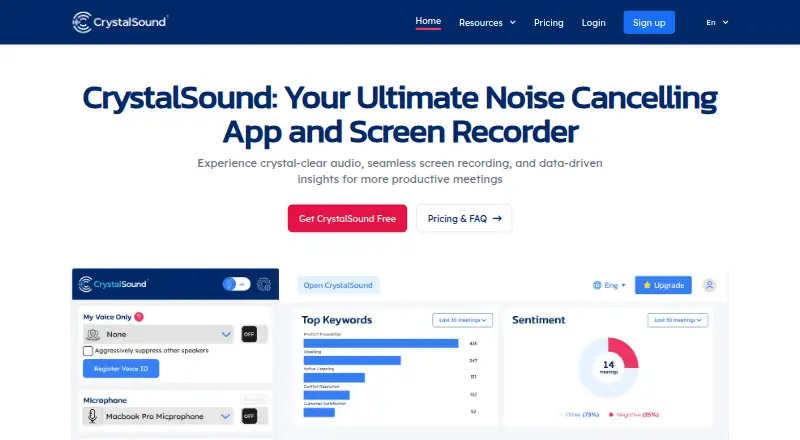
What CrystalSound is
CrystalSound is a desktop app for noise reduction, audio enhancement, and meeting recording on Windows, macOS, and Linux. Its bidirectional noise cancellation is designed to reduce background sound on both sides of a call. My Voice Only uses a registered voice profile to filter unwanted noise and other voices. CrystalSound can record screens and two-way audio, and provide meeting minutes, keywords, and meeting insights. Audio enhancement supports MP3, WAV, and FLAC files; listed voice effects include pitch shift, reverb, and robotic effects. The company says the app works with conference software and displays OBS, Discord, Loom, Slack, Teams, Skype, and Meet logos. The installation guide lists 4 GB RAM for each system, along with Windows 10 (20H1), supported recent macOS versions, or Linux with glibc 2.28 or later. Audio and VoiceID are processed locally. CrystalSound also collects app version, settings, email, operating system, usage times, and apps using its virtual speaker or microphone; paid users can disable usage tracking in settings. Starter is free and a 7-day trial is offered.
Who it suits
It suits desktop users seeking noise reduction, voice isolation, or meeting recording. Its system requirements and conference-app support are relevant when checking device fit.
What it does well
- Noise cancellation covers both sides of a call.
- My Voice Only uses a registered voice profile.
- Enhances MP3, WAV, and FLAC recordings.
- Audio and VoiceID are processed locally.
- Available for Windows, macOS, and Linux.
What to know first
- Each supported system requires 4 GB RAM.
- Elite is marked coming soon.
- Enterprise and Premium prices are not shown.
- Usage tracking collects app and device information.
Plans
| Plan | Billed and limits | Price |
|---|---|---|
| Starter | Starter plan; features and limits not listed on the page | Free |
| Elite (Coming soon) | USD/User/Year · Unlimited noise cancellation · Meeting transcription · Performance analysis · Risk analysis · Areas of improvement | $228 a year |
| Enterprise | Unlimited noise cancellation · Bi-directional noise cancellation · Secure offline screen recording · Bulk order discounts · VDI support | On request |
| Premium | USD/User/Year; price not shown on page · Unlimited noise cancellation · Cloud call recording (Preview) · Automatic titles, smart meeting minutes, and keyword and sentiment analysis unavailable | On request |
As crystalsound.ai lists them, read 4 Oct 2026. The maker's own page has the final word.
CrystalSound is a desktop app for reducing call noise, recording meetings and enhancing audio files. It best suits people who want those tools together on Windows, macOS or Linux. Its broad feature set is appealing, but uncertainty around plan limits and several prices makes it a harder choice for anyone who needs predictable costs.
Overview
CrystalSound combines call cleanup with meeting capture and post-recording tools. It can reduce background noise from both sides of a conversation, record screen and audio, and produce meeting minutes, keywords and insights. That range makes it more useful for recurring meetings than a tool focused only on cleaning a single recording.
The company says audio and VoiceID are processed locally and are not sent off-device or accessible to NamiTech. That is a meaningful privacy advantage for voice data. CrystalSound also collects app version, settings, email, operating system, usage times and which apps use its virtual speaker or microphone. Paid users can disable usage tracking in settings. The company says its Vercel and Firebase services are certified under ISO 27001, ISO 27017, ISO 27018, SOC 1, SOC 2 and SOC 3.
Key features
Bidirectional noise cancellation targets background noise from both the user and the other party, a useful distinction for calls where incoming audio is also difficult to hear. My Voice Only uses a registered voice profile to suppress unwanted noise or other people’s voices. Those capabilities make CrystalSound a stronger fit for conversations than for users who only need to polish an existing audio file.
Screen and bidirectional audio recording, meeting minutes, keywords and meeting insights extend the app into meeting documentation. Audio enhancement supports MP3, WAV and FLAC recordings, while voice effects include pitch shift, reverb and robotic effects. The effects add creative options, but the listed set is narrower than a full audio production suite.
The homepage displays logos for OBS, Discord, Loom, Slack, Teams, Skype and Meet, positioning CrystalSound for use alongside conference and creator apps. It also offers echo removal and voice isolation.
Pricing
CrystalSound uses a freemium model with a free Starter plan and a 7-day trial. Starter costs nothing, but its feature allowance and limits are not defined, so it is difficult to know whether it covers regular use or simply provides a way to try the app.
Elite (Coming soon) is priced at $228 a year, billed USD/User/Year. It includes unlimited noise cancellation, meeting transcription, performance analysis, risk analysis and areas of improvement. Per-user billing makes the annual commitment relevant for teams, and the plan’s coming-soon status means it is not a dependable choice for an immediate purchase.
Premium has custom pricing, billed USD/User/Year. Its features include unlimited noise cancellation and cloud call recording (Preview); automatic titles, smart meeting minutes, and keyword and sentiment analysis are unavailable. Enterprise also has custom pricing and includes unlimited noise cancellation, bidirectional noise cancellation, secure offline screen recording, bulk order discounts and VDI support. Its offline recording and VDI support make it the more relevant option for organizations with those requirements, while custom pricing means costs need to be established before adoption.
Subscriptions have a 30-day money-back guarantee. After that period, refunds are not issued for unused time. Readers comparing a paid plan should weigh that cutoff alongside the per-user annual term where it applies.
Platforms
CrystalSound is a desktop product for Windows, macOS and Linux. The installation guide specifies Windows 10 (20H1), supported recent macOS versions, and Linux with glibc 2.28 or later; each system requires 4 GB RAM. The three-system support is useful for mixed desktop environments, but older machines or unsupported macOS releases may not meet the stated requirements.
Who it's for
CrystalSound is a good fit for people who want to improve live call audio and keep recordings, summaries or analysis in the same desktop workflow. Its local processing claim may also matter to users who prefer audio and voice-profile processing to remain on-device. It is less suitable for buyers who need a clearly bounded free tier, published Premium or Enterprise costs, or a standalone audio editor rather than meeting-focused tools.
Pros and cons
- Pro: Bidirectional noise cancellation addresses both outgoing and incoming call noise, not just the user’s microphone.
- Pro: Meeting recording, minutes, keywords and insights bring call cleanup and meeting follow-up into one product.
- Pro: Local audio and VoiceID processing keeps those data off-device according to the company’s privacy statement.
- Pro: Windows, macOS and Linux support covers the main desktop systems, with minimum requirements stated for each.
- Con: Starter’s included features and limits are undefined, making the free plan difficult to assess before signing up.
- Con: Premium and Enterprise have custom pricing, while Elite is marked coming soon, so paid-plan comparison and availability are uncertain.
Alternatives
For a broader starting point, browse AI Speech Enhancement Software.
- LALAL.AI is a freemium option across desktop, mobile, web and API platforms, with a free tier limited to 10 minutes in the Relaxed Queue, 200 MB per file and previews rather than full downloads. Choose it when wider platform coverage matters more than CrystalSound’s meeting recording and call-focused tools.
- Auphonic offers a free plan with 2 h/month, AI-based audio algorithms and credits that do not stack. It is a better match when monthly audio production quotas are more useful than CrystalSound’s live-call and meeting workflow.
- DPDFNet is free, with Apache-2.0 licensed code and models and no stated commercial pricing or usage limits. Choose it when an open-source option matters more than CrystalSound’s meeting features.
- Riverside Magic Audio has a free plan with a one-off two hours of multi-track recordings, up to 720p video, a watermark and 44.1 kHz audio. It may suit users prioritizing that recording allowance and video capture over CrystalSound’s noise-control and meeting-insight tools.
- DeepFilterNet is free and open source under MIT or Apache-2.0 licenses. Pick it when open-source noise reduction is the priority rather than CrystalSound’s integrated recording and meeting features.
- Denoise is a mobile option for Android and iOS; its free tier lets users import, denoise and hear the full result, while saving or exporting requires Pro. Choose it when phone-based denoising is the need.
- Adobe Enhance Speech is a web option whose free plan is limited to audio, one file at a time, 30 minutes and 500 MB per file, and one hour of enhancement per day, with no strength adjustment. It is more suitable when web-based speech enhancement is preferable to a desktop meeting tool.
- Chatterbox TTS provides open-source models for research and development under the MIT license. Choose it for that use case rather than CrystalSound’s call and recording workflow.
Verdict
Choose CrystalSound if you want desktop call-noise reduction alongside meeting recording, summaries and audio enhancement, especially when local audio processing matters. Look elsewhere if clear plan limits and published prices are essential before you commit, or if you need a focused tool for standalone audio work rather than meetings.
Verdict
CrystalSound combines call noise reduction with recording and audio tools across three desktop systems. Review its requirements, tracking details, and plan availability before choosing it.
Facts from CrystalSound's own pages
- Audio enhancement
- Audio file enhancement supports MP3, WAV, and FLAC recordings. · crystalsound.ai, 4 Oct 2026
- Company and location
- The privacy statement identifies Nami Technology Joint-stock Company and lists its address in Ho Chi Minh City, Viet Nam. · crystalsound.ai, 4 Oct 2026
- Headquarters
- Ho Chi Minh City, Viet Nam · crystalsound.ai, 28 Sept 2026
- Integrations
- The homepage says CrystalSound works with conference apps and displays OBS, Discord, Loom, Slack, Teams, Skype, and Meet logos. · crystalsound.ai, 4 Oct 2026
- Minimum requirements
- The guide lists Windows 10 (20H1), supported recent macOS versions, and Linux with glibc 2.28 or later; it lists 4 GB RAM for each system. · crystalsound.ai, 4 Oct 2026
- My Voice Only
- My Voice Only uses a registered voice profile to eliminate unwanted noise or other people's voices. · crystalsound.ai, 4 Oct 2026
- Noise cancellation
- The product describes bidirectional noise cancellation that reduces background noise from both the user and the other party. · crystalsound.ai, 4 Oct 2026
- On-device privacy
- The privacy statement says audio and VoiceID are processed locally and are not sent off the device or accessible to NamiTech. · crystalsound.ai, 4 Oct 2026
- Product
- CrystalSound is an AI noise-cancellation app and screen recorder for clearer audio and more productive meetings. · crystalsound.ai, 4 Oct 2026
- Recording and insights
- The site describes screen and bidirectional audio recording, meeting minutes, keywords, and meeting insights. · crystalsound.ai, 4 Oct 2026
- Refund policy
- The pricing page offers a 30-day money-back guarantee on subscriptions and says refunds are not issued for unused time after that period. · crystalsound.ai, 4 Oct 2026
- Security standards
- The privacy statement says its Vercel and Firebase services are certified under standards including ISO 27001, ISO 27017, ISO 27018, SOC 1, SOC 2, and SOC 3. · crystalsound.ai, 4 Oct 2026
- Support
- The company lists [email protected] for help with problems and requests. · crystalsound.ai, 4 Oct 2026
- Supported systems
- The installation guide provides requirements and installation instructions for Windows, macOS, and Linux. · crystalsound.ai, 4 Oct 2026
- Tracking
- CrystalSound collects app version, settings, email, operating system, usage times, and apps using its virtual speaker or microphone; paid users can disable usage tracking in settings. · crystalsound.ai, 4 Oct 2026
- Voice effects
- The listed voice changer effects are pitch shift, reverb, and robotic effects. · crystalsound.ai, 4 Oct 2026
Where CrystalSound stands on Freedom251
- AI Speech Enhancement Software#7 of 35