Freedom251 › Gym Staff Scheduling Software

Cicini
What Cicini is
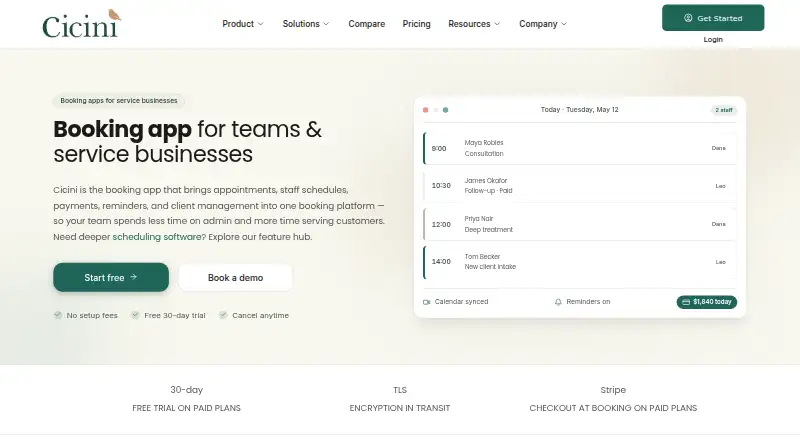
Cicini is a web-based booking and scheduling platform for service businesses. Clients can book at any hour through a custom booking page or public link, while teams coordinate staff calendars, availability rules, and shifts. The platform also combines payment processing, reminders, and client-management tools. Paid plans support Stripe checkout for full payments or service deposits; card data remains in Stripe rather than Cicini’s servers. Email reminders are available on every plan, with plan-limited SMS reminders on paid plans. Businesses can collect typed-question intake forms and share public e-sign links for policy and legal-document acknowledgements. Google Calendar sync is in beta, with new bookings sent to Google and two-way busy-time blocking to hide unavailable slots. Professional and Enterprise plans include API keys and outbound webhooks, though Professional quotas are limited and the public REST surface is still developing. Cicini says it encrypts data in transit and at rest and uses role-based access controls. A free plan is available; paid plans start at $15/mo (annual), and a 30-day trial is offered.
Who it suits
Cicini suits service businesses taking appointments, teams coordinating multiple staff, and growing organizations. Its Enterprise plan lists multi-location support, while the Free plan is limited to one team member and 30 bookings per month.
What it does well
- Clients can book around the clock through a public link.
- Email reminders are available on all plans.
- Paid plans support Stripe payments and service deposits.
- Intake forms and public e-sign links support client administration.
- Support options range from community to 24-hour priority.
What to know first
- Google Calendar sync is still in beta.
- Cicini does not claim HIPAA, PHIPA, or SOC 2 compliance.
- Free allows one team member and 30 bookings monthly.
- Paid plans start at $15/mo when billed annually.
Limits
Free allows one team member and 30 bookings per month. Starter allows three team members and 250 bookings per month, with 100 SMS reminders monthly; Professional allows eight team members, 750 bookings monthly, and 300 SMS reminders monthly. Enterprise includes 1,000 SMS reminders per month; its price is tailored to organizational size and needs.
Plans
| Plan | Billed and limits | Price |
|---|---|---|
| Free | $0/mo · paid yearly · 1 team member · 30 bookings per month · email reminders · Google Calendar sync (beta) · basic booking page · community support | Free |
| Starter | $15/mo · paid yearly · 3 team members · 250 bookings per month · 100 SMS reminders/month · online payments · gift cards · custom branding · email support (48hr) | $180 a year |
| Professional | $39/mo · paid yearly · 8 team members · 750 bookings per month · 300 SMS reminders/month · team permissions · gift cards · limited API access and webhooks · priority support (24hr) | $468 a year |
| Enterprise | Tailored to your organization's size and needs. · Unlimited bookings and team members · multi-location support · custom integrations · SSO · dedicated account manager · custom onboarding and SLA · API access and webhooks · 1,000 SMS reminders/month | On request |
As cicini.com lists them, read 4 Oct 2026. The maker's own page has the final word.
Getting started
- Visit the Cicini website.
- Choose Free, Starter, Professional, or request tailored Enterprise pricing.
- Use the custom booking page or public booking link to accept appointments.
- Set up staff calendars, availability rules, and shift coordination.
- Connect Google Calendar if its beta sync suits your workflow.
- Choose a paid plan for Stripe checkout and plan-limited SMS reminders.
Cicini is a web platform that combines appointment booking, staff calendars, client intake, reminders, and payments for service businesses. It suits solo operators and small appointment-led teams that want one system for customer bookings and workforce coordination. The main decision is whether its per-plan booking and team ceilings, beta calendar sync, and stated compliance position match your operation.
Overview
Cicini gives customers a custom booking page and public link that accept appointments around the clock. Behind that front end are multi-staff calendars, availability rules, and shift coordination, making it more useful than a simple booking widget for teams sharing schedules. The product is aimed at service businesses, multi-location operations, and growing organizations, although multi-location scheduling is not included on the standard plans.
It is built by a small team in Toronto, Canada, and runs on the web. That makes it accessible from a browser, but there is no separate mobile platform listed.
Key features
Booking, calendars, and reminders
Self-service booking can reduce back-and-forth for businesses that receive appointments directly from customers. Google Calendar sync is in beta: Cicini says new bookings push to Google and two-way busy-time blocking can hide unavailable slots. That may prevent clashes, but businesses that depend on a mature calendar integration should treat this as a developing part of the workflow.
Email reminders are included on every plan. Paid tiers add SMS reminders through Cicini's sender, subject to monthly quotas, so high-volume businesses must budget messages rather than assume unlimited texting.
Payments and client paperwork
Paid plans support Stripe checkout for full payment or a per-service deposit. Cicini says card data remains in Stripe instead of on its own servers, which keeps payment handling separated from the scheduling platform. Typed-question intake forms collect client information before an appointment, while public e-sign links let customers acknowledge published policies and legal documents.
Integrations and controls
Professional and Enterprise include API keys and outbound webhooks. Professional access has limited quotas, and Cicini's public REST surface is still maturing, so these tools are better for focused integrations than for assuming a fully established developer platform. Cicini says data is encrypted in transit and at rest and access is controlled by roles.
The company does not claim HIPAA, PHIPA, or SOC 2 compliance, and a signed BAA is on the Enterprise roadmap. Organizations with those requirements should not select Cicini without resolving that gap.
Pricing
Cicini has a free plan, paid plans from $15/mo when billed annually, and a 30-day trial.
| Plan | Price and limits | Best fit |
|---|---|---|
| Free | $0/mo, paid yearly; 1 team member, 30 bookings/month, email reminders, beta Google Calendar sync, basic booking page, community support. | A solo provider validating online booking. The one-seat and 30-booking ceilings make it unsuitable for a busy team. |
| Starter | $15/mo billed yearly ($180/year); 3 team members, 250 bookings/month, 100 SMS reminders/month, online payments, gift cards, custom branding, 48-hour email support. | Small teams that need payments and branded booking. It gives up larger-team capacity and automation headroom. |
| Professional | $39/mo billed yearly ($468/year); 8 team members, 750 bookings/month, 300 SMS reminders/month, team permissions, gift cards, limited API and webhooks, 24-hour priority support. | Growing teams needing permissions, faster support, or integration access, while accepting quotas. |
| Enterprise | Custom pricing; unlimited bookings and team members, multi-location support, custom integrations, SSO, dedicated account manager, custom onboarding and SLA, API and webhooks, 1,000 SMS reminders/month. | Larger or multi-location organizations needing tailored service and identity controls. |
Starter, Professional, and Enterprise add capabilities that the free tier omits, but SMS remains capped even on Enterprise. Annual billing is the stated term for the priced plans.
Platforms
Cicini is available on the web.
Who it's for
Cicini is a sensible fit for appointment-based service businesses, solo practitioners moving beyond manual booking, and small teams coordinating several staff calendars. Starter suits teams up to three people; Professional is more appropriate up to eight, while Enterprise is the route for unlimited staff and multiple locations. It is a weaker fit for organizations that require HIPAA, PHIPA, or SOC 2 claims, or that need a mature, high-quota public API.
Pros and cons
Pros
- Booking, staff availability, reminders, client forms, and payments share one platform.
- Free tier includes a booking page, email reminders, and beta Google Calendar sync for a solo user.
- Paid plans keep card data in Stripe while adding full-payment or deposit checkout.
- Professional and Enterprise provide role controls, API keys, and webhooks.
Cons
- Free is limited to one team member and 30 bookings per month.
- SMS reminders are quota-based, from 100 per month on Starter to 1,000 on Enterprise.
- Google Calendar sync is still in beta, and Professional integration quotas are limited.
- No claimed HIPAA, PHIPA, or SOC 2 compliance, with a BAA only on the Enterprise roadmap.
Alternatives
For a broader staff-scheduling shortlist, see Gym Staff Scheduling Software.
Connecteam is worth choosing instead if Android and iOS apps, an API platform, and a freemium model matter alongside web access.
TNC Track suits teams wanting free team-and-attendance tools with five free seats before per-seat charges.
Rosie is a better match for roster-focused operations needing up to 15 people on its free plan and auto-fill templates.
ShiftCal offers a five-person, one-site free tier and a paid plan priced per active employee.
Shifton is an alternative for teams of up to 10 seeking free shift scheduling, calendars, and time-clock functions.
Sling fits organizations that need free scheduling for up to 30 users plus time-off requests and messaging.
Emplora is aimed at web and API users wanting a free single-location plan for up to 15 employees.
Exerp is another paid option for organizations comparing service-management platforms.
Verdict
Choose Cicini if you run an appointment-led service business and want booking, staff scheduling, client paperwork, reminders, and Stripe payments together, with a low-cost path from one user to a growing team. Look elsewhere if your operation needs multi-location support below Enterprise, a mature integration surface, uncapped messaging, or formally claimed HIPAA, PHIPA, or SOC 2 compliance.
Verdict
Cicini brings appointment booking, staff scheduling, client tools, and payments into one web platform. Check the plan booking and team limits, and whether its stated compliance position fits your requirements.
Questions
Is Cicini free?
Yes. Free costs nothing and includes one team member, 30 bookings per month, email reminders, and a basic booking page.
What do the paid plans cost?
Starter is $15/mo paid yearly ($180 per year). Professional is $39/mo paid yearly ($468 per year). Enterprise pricing is tailored to the organization's size and needs.
Does Cicini offer a free trial?
Yes. A 30-day trial is listed.
What platforms does Cicini support?
The listed platform is web.
Does Cicini support Google Calendar?
Google Calendar sync is in beta. New bookings push to Google, and two-way busy-time blocking can hide slots.
What compliance does Cicini claim?
Cicini says it does not claim HIPAA, PHIPA, or SOC 2 compliance. A signed BAA is on the Enterprise roadmap.
Facts from Cicini's own pages
- API and webhooks
- Professional and Enterprise include API keys and outbound webhooks, with limited quotas on Professional; the public REST surface is still maturing. · cicini.com, 4 Oct 2026
- Booking
- Clients can book around the clock through a custom booking page and public booking link. · cicini.com, 4 Oct 2026
- Calendar integration
- Google Calendar sync is in beta; Cicini says new bookings push to Google and two-way busy-time blocking can hide slots. · cicini.com, 4 Oct 2026
- Client tools
- Users can create typed-question intake forms and publish legal documents and policies with public e-sign links for customer acknowledgements. · cicini.com, 4 Oct 2026
- Compliance limit
- Cicini says it does not claim HIPAA, PHIPA, or SOC 2 compliance, and a signed BAA is on the Enterprise roadmap. · cicini.com, 4 Oct 2026
- Headquarters
- Toronto, Canada · cicini.com, 28 Sept 2026
- Intended users
- The About page describes Cicini as built for service businesses booking appointments, teams coordinating multiple staff, multi-location operations, and growing organizations. · cicini.com, 4 Oct 2026
- Maker location
- Cicini says it is built by a small team in Toronto, Canada. · cicini.com, 4 Oct 2026
- Payments
- Paid plans support Stripe checkout for full payment or a per-service deposit, and the site says card data stays in Stripe rather than Cicini servers. · cicini.com, 4 Oct 2026
- Product
- Cicini provides online booking and scheduling for service businesses, bringing appointments, staff schedules, payments, reminders, and client management into one platform. · cicini.com, 4 Oct 2026
- Reminders
- Email reminders are available on all plans, while paid plans include plan-limited SMS reminders through Cicini’s platform sender. · cicini.com, 4 Oct 2026
- Scheduling
- The platform includes multi-staff calendars, availability rules, and shift coordination. · cicini.com, 4 Oct 2026
- Security
- Cicini says it encrypts data in transit and at rest and uses role-based access controls. · cicini.com, 4 Oct 2026
- Support
- The support center offers documentation, FAQs, video tutorials, and direct assistance; pricing lists community support on Free, 48-hour email support on Starter, and 24-hour priority support on Professional. · cicini.com, 4 Oct 2026
Where Cicini stands on Freedom251
- Gym Staff Scheduling Software#3 of 26