Freedom251 › Game Memory Editors
chromedp
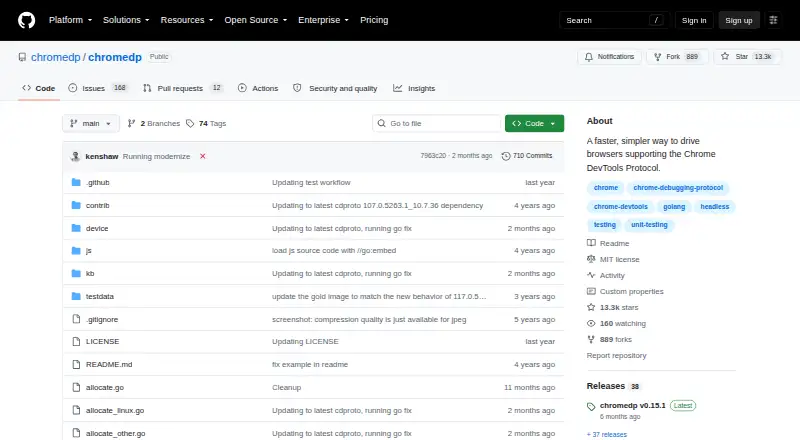
What chromedp is
chromedp is an open-source Go package for controlling browsers that support the Chrome DevTools Protocol, without an external driver. Its examples cover browser tasks such as navigating, clicking, reading page text, running JavaScript, filling and submitting forms, and waiting for elements. They also show setting cookies and HTTP headers, using a password-protected proxy, intercepting requests, and saving or restoring login sessions. For output, chromedp can capture screenshots, print pages to PDF, and save browser screencast frames as JPEG files. Separate browser contexts can serve as tabs for parallel work, although the README warns that sharing one context between goroutines can cause races. A separate remote module connects to an already running browser over WebSocket, including one in a container or hosted service. The project also offers a headless-shell Docker image. By default, Chrome starts with remote-debugging pipes, leaving no debugging port open. The README requires Go 1.27 or newer and cautions that disabling Chrome site isolation can expose a security feature, advising that this be done only for trusted pages. The repository lists an MIT license. Questions and feature ideas are directed to GitHub Discussions, bugs to the issue tracker, and chat to Discord.
Who it suits
chromedp suits Go developers who need browser automation through the Chrome DevTools Protocol and want to run it without an external driver. It can also suit teams using a remote browser or a headless environment, provided their setup meets the Go version requirement.
What it does well
- Automates navigation, clicks, forms, JavaScript, and element waits.
- Handles cookies, headers, request interception, and login sessions.
- Captures screenshots, prints PDFs, and saves screencast frames as JPEGs.
- Connects to remote browsers over WebSocket.
- Includes a headless-shell Docker image and uses debugging pipes by default.
What to know first
- Requires Go 1.27 or newer.
- The package targets browsers supporting the Chrome DevTools Protocol; browser engines are listed as one.
- Sharing one context between goroutines can cause races.
Plans
| Plan | Billed and limits | Price |
|---|---|---|
| chromedp | MIT-licensed Go package · requires Go 1.25 or newer | Free |
As github.com lists them, read 9 Oct 2026. The maker's own page has the final word.
Getting started
- Visit https://github.com/chromedp/chromedp and review the repository.
- Use Go 1.27 or newer.
- Add chromedp to a Go project for browser automation.
- For headless use, use the project's headless-shell Docker image.
- For a remote browser, connect through the separate remote module over WebSocket.
chromedp is a Go package for controlling browsers that support the Chrome DevTools Protocol. It suits developers who want browser automation inside Go applications, not people looking for a visual automation builder. Its range of browser and network tasks is useful, but the Go requirement and single-engine scope make it a specialized choice.
Overview
Rather than providing a standalone interface for recording or configuring workflows, chromedp lets Go code drive a compatible browser without an external driver. Its examples cover navigating pages, clicking elements, reading text, running JavaScript, filling and submitting forms, and waiting for elements. That makes it a capable building block for application workflows; it is a poor fit if you need automation without writing Go.
Chrome runs headlessly by default, and the project provides a headless-shell Docker image for headless environments. By default, chromedp communicates with Chrome over remote-debugging pipes, which do not open a debugging port. A separate remote module can connect over WebSocket to a browser already running in a container or hosted service, but that mode uses a debugging port and therefore calls for a deployment setup that protects it.
Key features
The examples extend beyond basic page interaction to setting cookies and HTTP headers, authenticating through a password-protected proxy, intercepting requests, and saving or restoring login sessions. HAR recording is also covered. These controls make chromedp a stronger fit for workflows that need to manage request context or preserve authenticated state, rather than just click through pages.
For outputs, it can capture screenshots, print pages to PDF, and save screencast frames as JPEG files. These options suit capture and document-generation tasks without changing the package’s code-first character.
Separate browser contexts can act as tabs for parallel work, but the README warns that sharing one context between goroutines can cause races. Parallel workloads therefore need deliberate context management; treating one context as freely shareable risks race conditions. The README also cautions that disabling Chrome site isolation can expose a security feature, and advises doing so only for pages you trust.
Pricing
chromedp is free: its plan costs nothing and provides an MIT-licensed Go package. There is no free trial because the package is already available at no charge. The free plan has no published seat or quota limits, but it does require Go 1.25 or newer according to the plan terms. That makes cost an easy decision for eligible Go projects, while the language requirement is a real barrier for teams working in other stacks.
Platforms
chromedp is listed for API use, Linux, macOS, Windows, and self-hosted deployments. It supports one browser engine, so teams needing a cross-engine automation layer should look elsewhere. The headless-shell Docker image supports headless environments, while the remote module offers a WebSocket connection to a browser that is already running.
Who it's for
Choose chromedp when your application is written in Go and needs programmable browser interaction, network controls, or capture output. It is especially relevant when Chrome can run headlessly or when you can connect to a remote browser. It is not suited to teams that need several browser engines, a graphical workflow builder, or a Go version older than the stated requirement.
Pros and cons
- Broad browser control: Examples cover page actions, network handling, session restoration, and file-like outputs such as screenshots and PDFs, giving Go applications more than basic navigation.
- No external driver: Browser control is provided through the Chrome DevTools Protocol, which avoids adding a separate driver to the workflow.
- Safer default connection: Remote-debugging pipes keep Chrome’s debugging port closed by default; WebSocket connections use a port and need more care.
- Concurrency requires discipline: Sharing a context across goroutines can cause races, limiting how casually parallel work can be structured.
- Single-engine scope: Support for one browser engine rules it out for projects that require coverage across multiple engines.
- Go dependency: The package’s Go requirement excludes teams that cannot use a sufficiently recent Go toolchain.
Alternatives
For browser automation, compare browser automation tools if you need a broader set of options beyond a Go package centered on one browser engine. The other linked products target game-memory editing rather than browser automation: DOSBox Cheat Engine is free for Linux, macOS, web, and Windows and requires DOSBox Staging 0.83 or newer; CoSMOS is free for Linux and Windows with no registration; ReClass.NET is a free MIT-licensed option for Linux and Windows; scanmem is free for Android and Linux under GPLv3, with libscanmem under LGPLv3; ArtMoney offers a free Windows edition with some features unavailable and a PRO plan at $24.90, paid once; Bit Slicer is free for macOS 10.8 or later; PINCE is a free GPLv3+ Linux reverse-engineering tool; and ProMod has a free iOS and macOS plan that allows up to six mods toggled on at a time.
Verdict
For Go developers building browser workflows, chromedp is a compelling free package: it combines Chrome DevTools Protocol control, network handling, and capture features without an external driver. Pick it when one browser engine and careful context management meet your needs. Look elsewhere if you need multiple engines, cannot meet the Go requirement, or want a no-code interface.
Verdict
Choose chromedp if you are building browser automation in Go and want Chrome DevTools Protocol control without an external driver. Look elsewhere if you need support for multiple browser engines or cannot use Go 1.27 or newer.
Questions
Is chromedp free and open source?
Yes. It is listed as free and open source, and the repository lists an MIT license.
What does chromedp do?
It is a Go package for driving browsers that support the Chrome DevTools Protocol, without an external driver. Its examples cover browser actions, network features, screenshots, PDFs, and screencast frames.
What are the requirements?
The README says the module requires Go 1.27 or newer.
Can chromedp connect to a remote browser?
Yes. A separate remote module can connect over WebSocket to an already running browser, including one in a container or hosted service.
Can it run headlessly?
The project provides a headless-shell Docker image for running chromedp in a headless environment.
Where can I get support?
The README directs questions and feature ideas to GitHub Discussions, bug reports to the issue tracker, and chat to Discord.
Facts from chromedp's own pages
- Automation
- It supports browser actions such as navigation, reading page content, running JavaScript, clicking elements, filling forms, and uploading files. · github.com, 9 Oct 2026
- Browser actions
- Its examples cover navigation, clicking, reading page text, running JavaScript, filling and submitting forms, and waiting for elements. · github.com, 4 Oct 2026
- Browser connection
- By default it starts Chrome and communicates over pipes; a separate remote module supports connecting to an already-running browser over WebSocket. · github.com, 9 Oct 2026
- Compatibility
- The current module requires Go 1.25 or newer. · github.com, 9 Oct 2026
- Concurrency
- Multiple contexts sharing one browser can run in parallel in separate tabs, but a single context should not be shared between goroutines. · github.com, 9 Oct 2026
- Headless mode
- It runs Chrome headlessly by default, and can use the chromedp/headless-shell container image in headless environments. · github.com, 9 Oct 2026
- Integration
- The project provides a headless-shell Docker image for running chromedp in a headless environment. · github.com, 4 Oct 2026
- License
- The repository identifies its license as MIT. · github.com, 9 Oct 2026
- Network
- Its examples cover setting cookies and HTTP headers, proxy authentication, request interception, session restoration, and HAR recording. · github.com, 9 Oct 2026
- Network features
- Examples show setting cookies and HTTP headers, using a password-protected proxy, intercepting requests, and saving or restoring login sessions. · github.com, 4 Oct 2026
- Output
- It can capture screenshots, print pages to PDF, emulate devices, and save screencast frames. · github.com, 9 Oct 2026
- Purpose
- chromedp is a Go package for driving browsers that support the Chrome DevTools Protocol, without an external driver. · github.com, 9 Oct 2026
- Remote browsers
- The separate remote module can connect to an already running browser, including one in a container or hosted service, over a WebSocket. · github.com, 4 Oct 2026
- Requirements
- The README says the module requires Go 1.27 or newer. · github.com, 4 Oct 2026
- Security
- By default, chromedp starts Chrome with remote-debugging pipes, so Chrome opens no debugging port. · github.com, 4 Oct 2026
- Security detail
- The default pipe connection does not open a Chrome debugging port; switching to WebSocket uses a debugging port. · github.com, 9 Oct 2026
- Security limitation
- The README says disabling Chrome site isolation can enable access to some cross-site iframe content, and advises doing so only for trusted pages because it turns off a Chrome security feature. · github.com, 9 Oct 2026
- Support
- The project directs questions and feature suggestions to GitHub Discussions and Discord, and reserves the issue tracker for bugs. · github.com, 9 Oct 2026
- What it does
- chromedp is a Go package for driving browsers that support the Chrome DevTools Protocol, without an external driver. · github.com, 4 Oct 2026
Where chromedp stands on Freedom251
- Game Memory Editors#2 of 23
- Browser Automation Tools#8 of 63