Freedom251 › Game Memory Editors
MemDBG
What MemDBG is
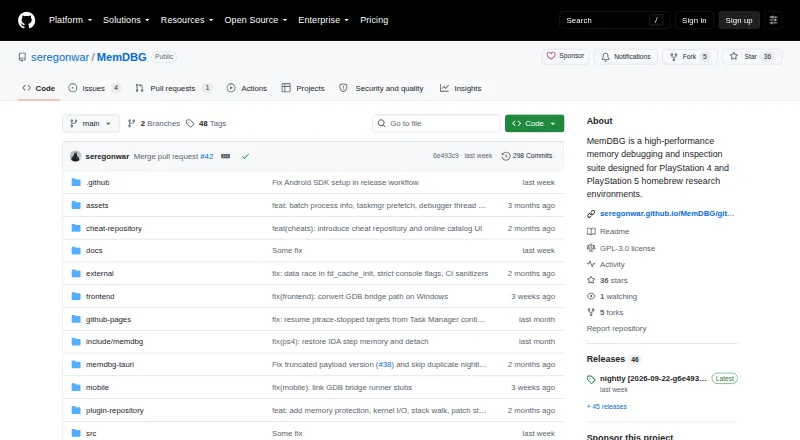
MemDBG is a free, open-source console payload and native frontend for memory inspection, scanning, debugging, trainer building, and research on PS4, PS5, and host machines. Its scans cover exact values, process-wide searches, AOB patterns, pointer chains, unknown values, and heuristic Smart Auto-Search workflows. Debugger tools include thread control, stepping, registers, breakpoints, watchpoints, stack walking, and disassembly. Trainer workflows handle .cht save and load, batchcode imports, ON/OFF values, lock intervals, and patch-to-trainer export. The frontend supports desktop-side Lua and Python plugins from repository manifests, and the project documents bridges for IDA Pro and x64dbg. It uses a versioned MDBG protocol and can expose a separate ps5debug-compatible listener for older clients. Host builds bind to loopback by default; the project recommends an allowlisted frontend IP for LAN sessions. MemDBG is intended for offline homebrew development, education, preservation, and authorized security research. It is in active pre-release development, and some macOS debugger actions may require SIP or code-signing changes.
Who it suits
It suits people doing legitimate debugging, homebrew development, reverse-engineering education, preservation, or authorized security research on systems they own or may analyze. It is not intended for online cheating, piracy, or unauthorized access.
What it does well
- Scans exact values, pointers, AOBs, and unknown values.
- Debugger includes breakpoints, watchpoints, and disassembly.
- Supports Lua and Python desktop-side plugins.
- Licensed GPL-3.0-or-later.
What to know first
- The project is in active pre-release development.
- Some macOS debugger actions may require SIP or code-signing changes.
- The iOS/iPadOS release artifact is unsigned.
Limits
The documented maximum packet and MEMORY_READ sizes are 1 MiB; batch read or write requests allow up to 64 items. The iOS/iPadOS release artifact is unsigned, and some macOS debugger actions may require SIP or code-signing changes.
Getting started
- Visit https://github.com/seregonwar/MemDBG.
- Choose the release artifact for a listed platform: Android, iOS, Linux, macOS, or Windows.
- For LAN sessions, use an allowlisted frontend IP as recommended by the project.
- When reporting a problem, open an issue with the payload/frontend version, platform, firmware, and logs.
Overview
MemDBG brings a console payload and native frontend to memory inspection and development work on PS4, PS5, and host machines. It suits people doing authorized homebrew, preservation, education, or security research who want scanning, debugging, and trainer workflows in one project. Its breadth is compelling for that narrow audience, but active pre-release development and platform-specific caveats argue against relying on it without checking fit first.
The project uses a versioned MDBG protocol and can expose a separate ps5debug-compatible listener for older trainer and debugger clients. That compatibility option may help users keep existing clients in a workflow, while the primary protocol provides a distinct path for MemDBG components.
MemDBG is GPL-3.0-or-later and free. The maintainers explicitly reject online cheating, piracy, unauthorized access, and disruptive behavior toward online services or other players; it is intended for offline work on systems users own or are authorized to analyze.
Key features
Scanning and debugging
Scanning covers exact values, process-wide searches, AOB patterns, pointer chains, unknown-value searches, and heuristic Smart Auto-Search. That range supports both targeted searches and investigations that begin without a known value. The debugger adds thread control, stepping, register inspection, breakpoints, watchpoints, stack walking, and disassembly, making the frontend useful beyond locating values.
Trainer workflows and extensions
Users can save and load .cht files, import batchcode, set ON/OFF values and lock intervals, and export patches to trainers. Desktop-side Lua and Python plugins load from repository manifests, with the public MemDBG plugin repository as the default source. These capabilities make MemDBG more than a scanner, though they also concentrate several specialized workflows in a project still in pre-release development.
Integrations and operating limits
The documented GDB remote bridge connects to IDA Pro, and an optional x64dbg plugin bridge is available. Protocol limits cap packets and MEMORY_READ requests at 1 MiB; batch reads and writes allow up to 64 items. Those limits matter for workflows built around large transfers or batches and should inform tooling expectations.
Security and support
Host builds bind to loopback by default. For LAN sessions, the project recommends an allowlisted frontend IP, a sensible safeguard for users exposing a session beyond the local machine. When reporting problems, users are asked to include payload and frontend versions, platform, firmware, and logs; that gives maintainers concrete context for diagnosing platform-specific issues.
Pricing
MemDBG is free, with no paid plan or free trial. Its open-source GPL-3.0-or-later license makes it a no-cost option for users comfortable with a project in active pre-release development. There are no published seat, quota, or renewal terms to weigh against the feature set.
Platforms
MemDBG supports Android, iOS, Linux, macOS, and Windows, alongside its console and host-machine focus. Platform coverage does not mean every setup is equally straightforward: some macOS debugger actions may require SIP or code-signing changes, and the iOS/iPadOS release artifact is unsigned. Those caveats make it a less direct choice for users who need a frictionless mobile or macOS debugging setup.
Who it's for
MemDBG is best suited to developers and researchers doing offline homebrew work, reverse-engineering education, preservation, or authorized security analysis on systems they own or may examine. Its combination of scanning, debugger controls, trainer tools, and bridges rewards users who need multiple stages of that work in one environment.
It is not the right choice for online cheating, piracy, unauthorized access, or disruption of online services and other players. Users seeking a mature, uncomplicated utility rather than an actively developed pre-release project should also look elsewhere.
Pros and cons
Pros
- Broad investigation toolkit: multiple scan methods sit alongside debugger controls, supporting work from value discovery through code inspection.
- Trainer and extension support: .cht and batchcode workflows, patch export, and Lua/Python plugins suit users who need to build on findings.
- Useful integration paths: the GDB remote bridge for IDA Pro and optional x64dbg bridge can fit established debugging setups.
- Free and open source: GPL-3.0-or-later licensing avoids a software price barrier for eligible users.
Cons
- Pre-release status: active development makes it a riskier foundation for users who need a settled, dependable workflow.
- Platform setup caveats: macOS debugger actions may need system or signing changes, while the iOS/iPadOS artifact is unsigned.
- Bounded transfers: 1 MiB packet and memory-read maxima and 64-item batch limits may constrain large or highly batched operations.
Alternatives
Game Memory Editors is a category starting point for comparing tools in this area.
Choose CoSMOS if Linux or Windows coverage and a free plan with no registration or locked features matter more than MemDBG's console-oriented scope. ReClass.NET is another free, open-source Linux and Windows option, supplied without warranty under the MIT License. For a macOS-only freeware alternative, consider Bit Slicer.
Cheat Engine Linux is a free, open-source Linux alternative. PINCE is also free and open source on Linux, under GPLv3+. Cheat Engine may suit users seeking a freemium option across Linux, macOS, and Windows. ProMod is a free option for macOS and iOS, while ArtMoney offers a freemium option on Windows.
Verdict
Choose MemDBG if you need an integrated, no-cost toolkit for authorized console or host-machine research, especially when scanning, debugging, and trainer creation belong in the same workflow. Its protocol compatibility and desktop bridges add useful connective tissue. Look elsewhere if your work depends on a mature release, if the macOS or unsigned iOS setup is a poor fit, or if your needs exceed the documented transfer and batch limits.
Verdict
MemDBG brings scanning, debugging, and trainer workflows together for authorized console and host-machine research. Its pre-release status and platform caveats are worth considering before relying on it.
Questions
Is MemDBG free and open source?
Yes. It is free and licensed under GPL-3.0-or-later.
Which platforms are listed?
Android, iOS, Linux, macOS, and Windows.
What can MemDBG inspect and debug?
It is intended for memory inspection, scanning, debugging, trainer building, and research on PS4, PS5, and host machines.
What are the documented protocol limits?
The maximum packet and MEMORY_READ sizes are 1 MiB. Batch read or write requests allow up to 64 items.
Does MemDBG support plugins and debugger integrations?
The frontend supports desktop-side Lua and Python plugins. The project documents a GDB remote bridge for IDA Pro and an optional x64dbg plugin bridge.
What license and development status does it have?
MemDBG is licensed GPL-3.0-or-later and described as being in active pre-release development.
Facts from MemDBG's own pages
- Compatibility
- MemDBG uses its versioned MDBG protocol and can expose a separate ps5debug-compatible listener for older trainer and debugger clients. · github.com, 30 Sept 2026
- Debugger
- Debugger features include process attach and detach, thread controls, stepping, registers, breakpoints, watchpoints, stack walking, and disassembly. · github.com, 30 Sept 2026
- Integrations
- The project documents a host GDB remote proxy for IDA Pro and an x64dbg plugin bridge. · github.com, 30 Sept 2026
- Intended audience
- The project describes its audience as people doing legitimate debugging, security research, education, preservation, and homebrew development on systems they own or are authorized to analyze. · github.com, 29 Sept 2026
- Intended use
- The project is designed for offline homebrew development, reverse-engineering education, preservation, and authorized security research. · github.com, 29 Sept 2026
- Intended users
- The project is designed for offline homebrew development, reverse-engineering education, preservation, and authorized security research. · github.com, 30 Sept 2026
- License and status
- MemDBG is GPL-3.0-or-later and described as being in active pre-release development. · github.com, 30 Sept 2026
- Memory scanning
- Scanning includes exact-value, process-wide, AOB, pointer-chain, unknown-value, and heuristic Smart Auto-Search workflows. · github.com, 30 Sept 2026
- Platform caveat
- Some macOS debugger actions may require SIP or code-signing changes, and the iOS/iPadOS release artifact is unsigned. · github.com, 30 Sept 2026
- Platforms
- Release artifacts are listed for Windows, macOS, Linux, iOS/iPadOS, and Android; the payload targets PlayStation 4 and PlayStation 5. · github.com, 30 Sept 2026
- Plugins
- The frontend can run desktop-side Lua and Python plugins from repository manifests, with a bundled fallback plugin repository. · github.com, 30 Sept 2026
- Protocol limits
- The documented maximum packet and MEMORY_READ sizes are 1 MiB, batch read/write requests allow 64 items, and scan values are limited to 16 bytes. · github.com, 30 Sept 2026
- Purpose
- MemDBG is a console payload and native frontend for memory inspection, scanning, debugging, trainer building, and research on PS4, PS5, and host development machines. · github.com, 30 Sept 2026
- Responsible use
- The maintainers say they do not support online cheating, piracy, unauthorized access, or disruptive behavior against online services or other players. · github.com, 29 Sept 2026
- Security guidance
- Host builds bind to loopback by default, and the README recommends using an allowlisted frontend IP for LAN sessions. · github.com, 30 Sept 2026
- Support
- The README directs users to open an issue with the payload/frontend version, platform, firmware, and logs when a firmware-specific problem occurs. · github.com, 30 Sept 2026
- Trainer tools
- Trainer workflows support .cht save/load, batchcode import, ON/OFF values, lock intervals, and patch-to-trainer export. · github.com, 30 Sept 2026
Where MemDBG stands on Freedom251
- Game Memory Editors#6 of 23