Freedom251 › Terminal File Managers
cfiles
by cfiles
What cfiles is
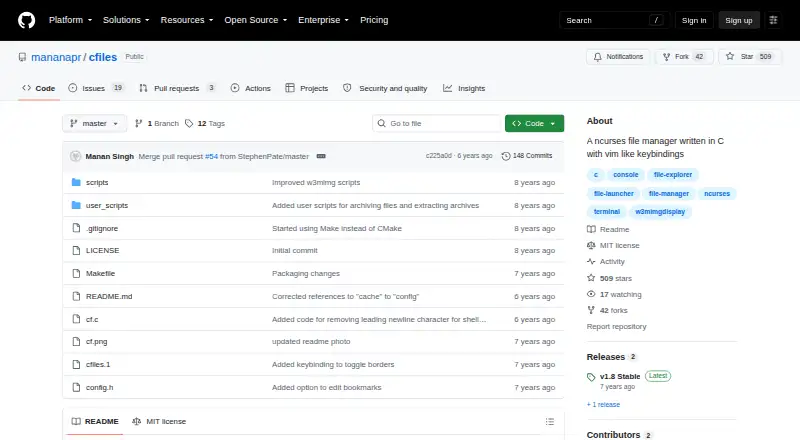
cfiles is a terminal file manager written in C that uses ncurses and vim-like keybindings. The project aims to offer a ranger-like interface while keeping the program lightweight and minimal. It supports Linux and macOS. For navigation, users can move with h, j, k and l, with additional shortcuts for the top, middle and bottom of a list and for page scrolling. The f and F keys search with fzf, and S opens a shell in the current directory.
A selection list supports copying, moving, renaming, sending files to trash and removing selected files. cfiles can also show image previews, media information, archive previews and PDF previews, using external dependencies. Users can save bookmarks and run executable external scripts from the configured cfiles directory. The README lists dependencies including ncursesw, cp and mv, fzf, w3mimgdisplay or Überzug, mediainfo, atool and poppler's pdftoppm. Preview behavior depends on the selected tool: Überzug has limitations with MP3 album art and arrow-key scrolling, while w3mimgdisplay previews may disappear after a terminal resize or workspace change. cfiles is free software under the MIT License.
Who it suits
cfiles suits Linux and macOS users who prefer keyboard-driven file management in a terminal. It is particularly relevant to users who want file operations, bookmarks, shell access and previews through a minimal interface, and who can manage its listed dependencies.
What it does well
- Free software under the MIT License.
- Runs on Linux and macOS.
- Provides vim-like navigation and scrolling shortcuts.
- Supports copying, moving, renaming and removing selected files.
- Can show image, media, archive and PDF previews.
- Allows bookmarks and executable external scripts.
What to know first
- Preview features rely on external dependencies.
- Überzug has limitations with MP3 album art and arrow-key scrolling.
- w3mimgdisplay previews may disappear after resizing or changing workspaces.
- Trash requires $HOME/.local/share/Trash/files to exist.
Plans
| Plan | Billed and limits | Price |
|---|---|---|
| cfiles | Free software under the MIT License | Free |
As github.com lists them, read 8 Oct 2026. The maker's own page has the final word.
Getting started
- Visit the cfiles GitHub repository.
- Use Linux or macOS.
- Review and install the listed dependencies, including ncursesw and fzf.
- Choose w3mimgdisplay or Überzug for image previews and install other preview dependencies as needed.
- Create $HOME/.local/share/Trash/files before using the move-to-trash operation.
Verdict
Choose cfiles if you want a free, terminal-based file manager with vim-like controls and can install its preview and search dependencies. Look elsewhere if you need previews without tool-specific limitations or cannot provide the required trash directory.
Questions
Is cfiles free?
Yes. The listed plan is free, and the software is licensed under the MIT License.
Which systems does cfiles support?
It supports Linux and macOS.
Does it have a preview pane?
Yes. It can show image previews, media information, archive previews and PDF previews using external dependencies.
What dependencies does it list?
The README lists ncursesw, cp and mv, fzf, w3mimgdisplay or Überzug, mediainfo, atool and poppler's pdftoppm.
What are the preview limitations?
Überzug cannot generate MP3 album art previews and has nonfunctional arrow-key scrolling. w3mimgdisplay previews may disappear when the terminal is resized or the workspace changes.
Where does cfiles store bookmarks and clipboard data?
They use the cfiles directory under XDG_CONFIG_HOME, or $HOME/.config if XDG_CONFIG_HOME is unset.
Facts from cfiles's own pages
- Bookmarks and scripts
- Users can store bookmarks and run executable external scripts from the configured cfiles directory. · github.com, 8 Oct 2026
- Dependencies
- The README lists ncursesw, cp and mv, fzf, w3mimgdisplay or Überzug, mediainfo, atool, and poppler's pdftoppm as dependencies. · github.com, 8 Oct 2026
- Design goal
- The project aims to provide an interface like ranger while being lightweight, fast, and minimal. · github.com, 8 Oct 2026
- File operations
- The selection list supports copying, moving, renaming, moving files to trash, and removing selected files. · github.com, 8 Oct 2026
- Founded
- 2018 · github.com, 28 Sept 2026
- Free plan
- Yes · github.com, 21 Sept 2026
- License
- The software is licensed under the MIT License, which grants permission to use, copy, modify, publish, distribute, sublicense, and sell copies subject to its terms. · github.com, 8 Oct 2026
- Linux support
- Yes · github.com, 21 Sept 2026
- Local storage
- The clipboard and bookmarks use the cfiles directory under XDG_CONFIG_HOME, falling back to $HOME/.config when XDG_CONFIG_HOME is unset. · github.com, 8 Oct 2026
- macOS support
- Yes · github.com, 21 Sept 2026
- Maker
- The license file credits Manan Singh with copyright in 2018. · github.com, 8 Oct 2026
- Navigation
- It supports h, j, k, and l navigation keys and offers top, middle, bottom, and page scrolling shortcuts. · github.com, 8 Oct 2026
- Platforms
- The README gives installation instructions for Arch Linux and macOS, and says other users can compile it with make and install with sudo make install. · github.com, 8 Oct 2026
- Preview limitation
- Überzug cannot generate previews for MP3 album art and has nonfunctional arrow-key scrolling, while w3mimgdisplay previews may disappear when resizing the terminal or changing workspaces. · github.com, 8 Oct 2026
- Preview pane
- Yes · github.com, 21 Sept 2026
- Previews and metadata
- It can show image previews, media information, archive previews, and PDF previews using listed external dependencies. · github.com, 8 Oct 2026
- Product
- cfiles is a terminal file manager written in C with vim-like keybindings and the ncurses library. · github.com, 8 Oct 2026
- Search and shell
- The f and F keys search with fzf, and S opens a shell in the current directory. · github.com, 8 Oct 2026
- Trash requirement
- The README says $HOME/.local/share/Trash/files must exist before deleting a file to trash. · github.com, 8 Oct 2026
Where cfiles stands on Freedom251
- Terminal File Managers#8 of 29
- File managers#19 of 29