Freedom251 › File Renaming Software
Bulker
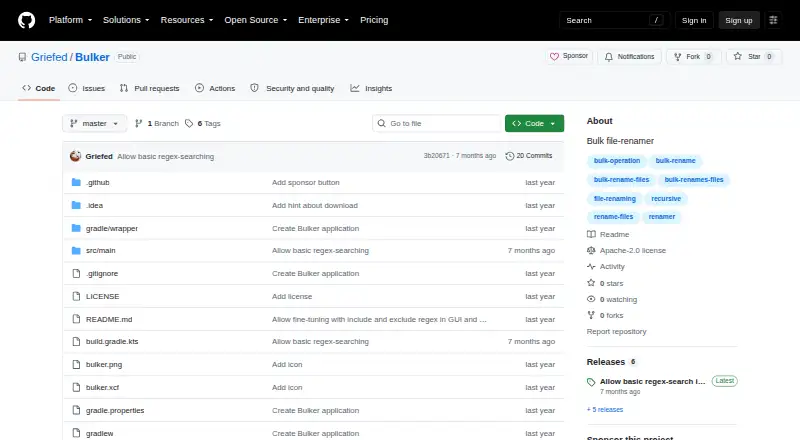
What Bulker is
Bulker is a free bulk file renamer for Linux, macOS, and Windows. Its graphical interface lets users search filenames for text, enter replacement text, and run a rename across files. Files and directories can be added by drag and drop; directory contents, including nested folders, are processed recursively. Optional include and exclude masks use regular expressions to filter which files enter the rename process. Bulker can also run from the command line with search text, replacement text, and one or more input paths. Directory inputs are checked recursively there too, but each command-line run accepts only one search value and one replacement value. The project links to an all-in-one JAR, and the latest release listed is version 1.4.0. Running the app requires Java 21, and the repository lists an Apache-2.0 license. Bulker supports regex-based renaming, but it does not provide metadata-based renaming, rename preview, folder renaming, or undo. These limits are worth checking before using it for changes that may need review or reversal.
Who it suits
Bulker suits users who need to replace filename text across files on Linux, macOS, or Windows. Its GUI and command-line modes offer different ways to supply files and directories.
What it does well
- Free, with an Apache-2.0 license.
- Processes files in nested directories recursively.
- Offers GUI and command-line workflows.
- Regex masks can filter files for renaming.
What to know first
- Running the app requires Java 21.
- No rename preview or undo.
- No metadata-based or folder renaming.
- CLI accepts one search and replacement value per run.
Getting started
- Open the project website on GitHub.
- Use the README link to find the all-in-one JAR release.
- Run the app using Java 21.
- In the GUI, add files or directories by drag and drop, then enter search and replacement text.
- Alternatively, use the command line with search, replacement, and one or more input paths.
Verdict
Bulker covers recursive, text-based bulk renaming with both graphical and command-line options. Its lack of preview and undo makes it important to check the intended file set before proceeding.
Questions
How much does Bulker cost?
Bulker is free, with a free plan.
Which operating systems does it support?
The listed platforms are Linux, macOS, and Windows.
Does Bulker support regular expressions?
Yes. It supports regex-based renaming, and optional include and exclude masks use regular expressions.
Can I use Bulker from the command line?
Yes. Provide search text, replacement text, and one or more file or directory paths. A run accepts one search value and one replacement value.
What does it require to run?
The README says to run the app using Java 21 and links to an all-in-one JAR release.
Is Bulker open source?
The repository lists an Apache-2.0 license.
Facts from Bulker's own pages
- CLI limitation
- The CLI accepts only one search value and one replacement value per run. · github.com, 9 Oct 2026
- Command line
- Bulker can also run from the command line with search, replacement, and input arguments. · github.com, 9 Oct 2026
- Download
- The README directs users to download the latest all-in-one JAR from GitHub Releases. · github.com, 9 Oct 2026
- Filtering
- Optional include and exclude masks use regular expressions to filter files in the rename process. · github.com, 8 Oct 2026
- Filters
- Optional include and exclude masks use regular expressions to filter files for renaming. · github.com, 9 Oct 2026
- GUI
- The GUI lets users enter search and replacement text and run a bulk rename. · github.com, 9 Oct 2026
- GUI workflow
- The GUI lets users search filenames for text, replace it, and run a bulk rename. · github.com, 8 Oct 2026
- Input paths
- The CLI accepts file or directory paths and allows multiple input arguments. · github.com, 9 Oct 2026
- Integrations
- The README describes drag-and-drop input for files and directories and credits a Java Swing drag-and-drop list implementation. · github.com, 8 Oct 2026
- License
- The repository identifies its license as Apache-2.0. · github.com, 9 Oct 2026
- Maker
- The GitHub profile describes Griefed as a Minecraft modpack maker and Raspberry Pi and Docker enthusiast. · github.com, 9 Oct 2026
- Multiple inputs
- The command line accepts multiple input paths, and directory inputs are checked recursively. · github.com, 8 Oct 2026
- Purpose
- Bulker is described as a bulk file renamer. · github.com, 9 Oct 2026
- Recursive folders
- Bulker adds files from directories recursively, including files in contained directories. · github.com, 8 Oct 2026
- Recursive input
- Files in dropped directories are added recursively, including files in contained directories. · github.com, 9 Oct 2026
- Release
- The latest release page opened identifies version 1.4.0 and is titled “Allow basic regex-search in GUI.” · github.com, 9 Oct 2026
- Runtime
- The release instructions say to run Bulker using Java 21. · github.com, 9 Oct 2026
Where Bulker stands on Freedom251
- File Renaming Software#8 of 31