Freedom251 › Fuzz Testing Software
boofuzz
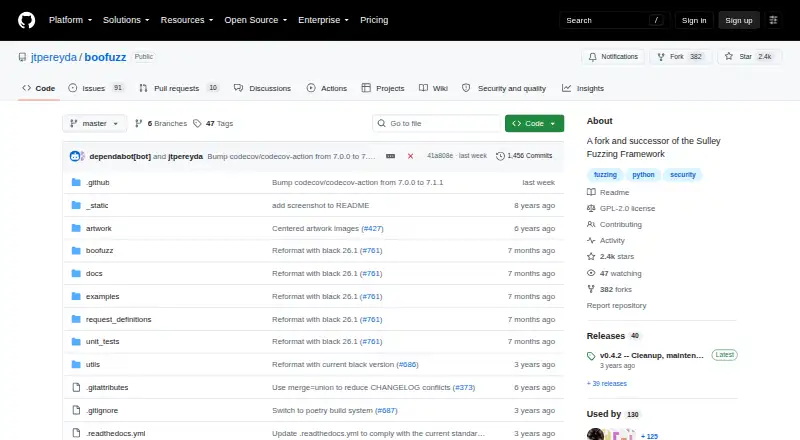
What boofuzz is
boofuzz is a Python framework for fuzzing network protocols and a fork and successor to Sulley. It installs as a Python library with `pip install boofuzz` and requires Python 3.9 or later. Its workflow generates test data, detects failures, resets targets after failure, and records test data. It supports varied communication media, including serial, Ethernet and IP-layer communication, and UDP broadcast; documented connections include TCP, UDP, SSL, raw sockets, and serial. Run data is stored in a SQLite database in the boofuzz-results directory, and saved runs can be reopened in the web interface with `boo open`. Test results can also be exported as CSV. The process monitor detects crashes and restarts applications on Windows or Linux, but it must run on the target machine. The optional network monitor needs Pcapy and Impacket, which are not installed automatically. Public FTP and HTTP protocol libraries are available, though their implementations do not approach full protocol coverage. The project is GPL-2.0 licensed and provides online quickstarts and API documentation.
Who it suits
boofuzz suits Python developers building network protocol fuzzing scripts who need failure detection, target reset, and saved run data. Its monitoring tools require additional setup in some cases.
What it does well
- Supports TCP, UDP, SSL, raw sockets, and serial.
- Saves run data in SQLite.
- Exports test results as CSV.
- Process monitor can detect crashes and restart applications.
- Free and GPL-2.0 licensed.
What to know first
- Requires Python 3.9 or later.
- Process monitor must run on the target machine.
- Network monitor dependencies are not installed automatically.
- FTP and HTTP libraries lack full protocol coverage.
Limits
The process monitor must run on the target machine. The optional network monitor requires Pcapy and Impacket, which are not included in the boofuzz installation. The public FTP and HTTP protocol libraries provide partial protocol coverage.
Plans
| Plan | Billed and limits | Price |
|---|---|---|
| Free and open source | Python library for building fuzzer scripts · GPL-2.0 license | Free |
As github.com lists them, read 5 Oct 2026. The maker's own page has the final word.
Getting started
- Visit the boofuzz GitHub repository or online documentation.
- Install Python 3.9 or later.
- Install the library with `pip install boofuzz`.
- Build a fuzzer script for a supported communication medium.
- Optionally install Pcapy and Impacket for the network monitor.
- Reopen a saved run database with `boo open`.
Overview
boofuzz is a free, open-source Python framework for constructing and running network-protocol fuzzers, and the successor to Sulley. It is best suited to developers comfortable writing Python who need to exercise network or serial targets through configurable communications. Its strongest case is a flexible, recorded fuzzing workflow; teams should look elsewhere if they need complete protocol libraries or monitoring managed away from the target.
Key features
The workflow combines hybrid input generation, failure detection, target reset after a failure, and test-data recording. That gives developers a repeatable way to drive malformed inputs, identify crashes, restart a target, and retain evidence for triage. Extensibility is a stated goal, including the ability to extend instrumentation and failure detection, which suits teams adapting the framework to unusual devices or protocols rather than using a fixed scanner.
Connections cover TCP, UDP, SSL, raw sockets, and serial, alongside Ethernet and IP-layer communications and UDP broadcast. This breadth is valuable when one test program must address both conventional network services and embedded or device-facing links. It does not remove the need to write an appropriate fuzzer script and configure the target connection yourself.
Each run is saved to a SQLite database in the boofuzz-results directory. Results can be exported as CSV, and the web interface can reopen a saved database with boo open. Those records make it practical to compare or review runs later instead of relying on transient console output.
The process monitor detects crashes and restarts applications on Windows or Linux, but it must run on the target machine. That arrangement can provide useful automatic recovery when you control the host, while distributed or tightly managed environments may find the deployment requirement inconvenient. A network monitor is optional and requires Pcapy and Impacket; boofuzz does not install those dependencies automatically.
Public FTP and HTTP protocol libraries are available, but their implementations do not approach full protocol coverage. They are useful starting points, not substitutes for validating the protocol behavior your application actually exposes.
Pricing
Free and open source — free. The plan is a Python library for building fuzzer scripts and is released under the GPL-2.0 license. There is no free trial because the software is free, and no paid tier, seat charge, usage quota, or renewal term is stated. This is a strong fit for security engineers, researchers, and development teams able to operate their own fuzzing infrastructure. The trade-off is that the cost model does not include hosted execution or managed monitoring; setup and target-side operation remain the user's responsibility.
Platforms
boofuzz is offered for API, Linux, self-hosted deployments, and Windows. It requires Python 3.9 or later and installs as a Python library with pip install boofuzz. Its documented execution mode is local, so teams should plan for a Python-capable environment and access to the machine being fuzzed.
Who it's for
Choose boofuzz when you need scriptable protocol fuzzing across network, serial, Ethernet/IP, or UDP-broadcast targets and want crash handling plus durable run records. It is particularly suitable for Python developers who need to extend instrumentation or failure detection for a specialized target.
It is a weaker fit for teams seeking a turnkey service, broad ready-made protocol coverage, or monitoring isolated from the target host. The incomplete FTP and HTTP libraries and the manual optional-monitor dependency setup make framework expertise important.
Pros and cons
Pros
- Broad communications support: TCP, UDP, SSL, raw sockets, serial, Ethernet/IP, and UDP broadcast cover varied network and device targets.
- Complete test loop: generation, failure detection, reset, crash triage, and recording are combined in one workflow.
- Useful run history: SQLite databases, CSV export, and the boo open web interface support later analysis.
- Extensible Python base: developers can adapt instrumentation and failure detection instead of being confined to fixed checks.
- No license fee: the GPL-2.0 project can be used without a subscription or usage charge.
Cons
- Python 3.9 or later is required: teams using another language or older runtimes must add a compatible environment.
- Monitoring is target-side: the process monitor must run on the Windows or Linux target, which complicates controlled or remote setups.
- Extra network-monitor setup: Pcapy and Impacket are optional dependencies and are not installed automatically.
- Protocol libraries are incomplete: the public FTP and HTTP implementations do not provide full coverage, so substantial script work may remain.
- Self-managed operation: the free plan provides the library, not hosted fuzzing or managed infrastructure.
Alternatives
ClusterFuzz is the better choice for teams wanting an open-source platform spanning Linux, macOS, Windows, web, and self-hosted environments, with production deployment built around Google Cloud services.
AFL++ suits users who prefer a free fuzzer under AGPL-3.0-or-later with Android, Linux, macOS, Windows, and self-hosted support.
cargo-fuzz is a focused alternative for teams working in its Linux, macOS, or Windows environments and choosing its MIT/Apache 2.0 licensing.
Fuzzinator offers a free option across Linux, macOS, Windows, and web, with no paid plans or usage limits stated.
Mayhem is the alternative when a hosted paid product is acceptable: its API free plan allows up to 50 scans per month, while paid API plans cost $236 a month.
EvoMaster is a free open-source option for API, Linux, macOS, self-hosted, and Windows environments without paid external services. The other EvoMaster listing presents the same no-cost, open-source positioning.
Accessibility Test Framework for Android is a free Android-focused framework for readers whose priority is accessibility testing rather than protocol fuzzing.
Browse more options in Fuzz Testing Software.
Verdict
boofuzz is a strong choice for Python-capable security and development teams that need adaptable protocol fuzzing, crash recovery, and persistent test records across network and serial transports. Choose it for control and extensibility at no license cost; look elsewhere if you need complete protocol suites, hosted execution, or monitoring that does not have to run on the target machine.
Verdict
boofuzz offers a broad set of communication options and a workflow for recording and responding to failures. Users should account for its Python requirement, monitoring setup, and incomplete public protocol libraries.
Questions
How much does boofuzz cost?
The Free and open source plan is free.
Is boofuzz open source?
Yes. The repository identifies its license as GPL-2.0.
What does boofuzz support?
It supports network protocol and serial fuzzing, including Ethernet and IP-layer communication, UDP broadcast, TCP, UDP, SSL and raw sockets.
Which operating systems are supported?
The listed platforms include Linux, Windows and self-hosted environments. The process monitor detects crashes and restarts applications on Windows or Linux.
What does installation require?
boofuzz requires Python 3.9 or later and installs with `pip install boofuzz`.
Where can users get help?
The project directs usage questions to Stack Overflow and bug reports or suggestions to GitHub issues.
Facts from boofuzz's own pages
- Communications
- It supports arbitrary communications media, including serial, Ethernet and IP layer, and UDP broadcast fuzzing. · boofuzz.readthedocs.io, 4 Oct 2026
- Community support
- The project directs bug reports and improvement ideas to GitHub issues or pull requests and suggests Stack Overflow for usage questions. · github.com, 5 Oct 2026
- Connections
- Documented connection options include TCP, UDP, SSL, raw sockets, and serial connections. · boofuzz.readthedocs.io, 5 Oct 2026
- Documentation
- The project provides online documentation with quickstarts and API documentation. · boofuzz.readthedocs.io, 4 Oct 2026
- Extensibility
- The project describes extensibility as a goal and supports extending instrumentation and failure detection. · github.com, 5 Oct 2026
- Fuzzer workflow
- It provides data generation, failure detection instrumentation, target reset after failure, and test data recording. · github.com, 5 Oct 2026
- Fuzzing workflow
- Its core capabilities include data generation, failure detection, target reset after failure, and recording test data. · boofuzz.readthedocs.io, 4 Oct 2026
- Installation
- Boofuzz installs with pip as a Python library used to build fuzzer scripts. · github.com, 5 Oct 2026
- License
- The GitHub repository identifies the project license as GPL-2.0. · github.com, 4 Oct 2026
- Monitoring
- The process monitor detects crashes and restarts applications on Windows or Linux, and must run on the target machine. · github.com, 4 Oct 2026
- Optional dependency
- The network monitor requires Pcapy and Impacket, which are not installed automatically with boofuzz. · github.com, 4 Oct 2026
- Protocol libraries
- The documentation links free, open-source FTP and HTTP protocol libraries and says their implementations do not provide full protocol coverage. · boofuzz.readthedocs.io, 5 Oct 2026
- Protocol suites
- The documentation lists public boofuzz FTP and HTTP protocol libraries and says their implementations do not approach full protocol coverage. · boofuzz.readthedocs.io, 4 Oct 2026
- Protocol support
- It supports arbitrary communication media and includes serial, Ethernet and IP-layer, and UDP broadcast fuzzing. · github.com, 5 Oct 2026
- Purpose
- Boofuzz is a network protocol fuzzing framework and a fork and successor to Sulley. · github.com, 5 Oct 2026
- Python requirement
- The installation guide requires Python 3.8 or later and recommends pip. · boofuzz.readthedocs.io, 5 Oct 2026
- Results
- Boofuzz records test data and can export test results as CSV. · github.com, 5 Oct 2026
- Run logs
- Each run's log data is saved to a SQLite database in the boofuzz-results directory. · boofuzz.readthedocs.io, 5 Oct 2026
- Security and license
- GitHub identifies the repository license as GPL-2.0. · github.com, 5 Oct 2026
- Support
- The project directs users to Stack Overflow for usage questions and GitHub issues for bugs and suggestions. · github.com, 4 Oct 2026
- Target monitoring
- The process monitor detects crashes and restarts applications on Windows or Linux, and must run on the target machine. · boofuzz.readthedocs.io, 5 Oct 2026
- Web interface
- The quickstart says users can reopen the web interface on a saved run database with the boo open command. · boofuzz.readthedocs.io, 5 Oct 2026
Where boofuzz stands on Freedom251
- Fuzz Testing Software#3 of 26