Freedom251 › Customer Service Gamification Software

BoardQ
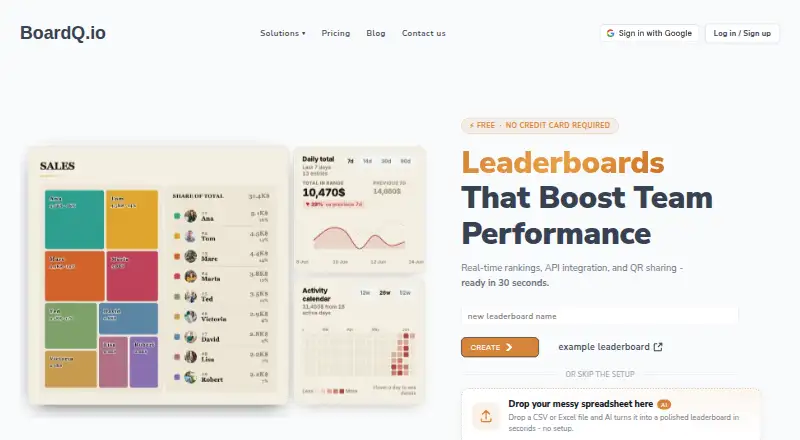
What BoardQ is
BoardQ creates live leaderboards and scoreboards for teams, events, games, classrooms and competitions. It sends score changes to connected screens in real time using WebSocket. Organizers can share boards by QR code or embed them in websites and apps with an iframe; custom columns can show multiple KPIs alongside a score. The maker lists HubSpot and Zendesk integrations, with Google Sheets marked beta. Sheets sync maps columns to participant names and scores and reflects edits on the board. Webhook connections are described for Salesforce, Pipedrive, Zapier and Make. Its REST API accepts JSON POST requests authenticated with a bearer token and is included on the free plan. Listed uses include sales contests, support teams, classroom quizzes, trivia, sporting events, tournaments and fitness challenges. The free Basic plan costs nothing and allows up to two leaderboards. Premium costs $8.99 a month for up to 20; Enterprise costs $89 a month for up to 200. BoardQ is available on web and through an API, with no mobile app listed.
Who it suits
BoardQ suits organizers who need live scores displayed on screens or embedded in a site, including teams, classrooms and event hosts. It may also fit businesses using sales or support contests and teams connecting leaderboard data to spreadsheets or other services.
What it does well
- Real-time updates go to connected screens.
- Boards can be shared by QR code or embedded.
- REST API is available on the free plan.
- Google Sheets sync reflects spreadsheet edits.
- Custom columns can show several KPIs.
What to know first
- Basic allows up to 2 leaderboards.
- No mobile app is listed.
- Premium costs $8.99 a month.
- Enterprise costs $89 a month.
Limits
Basic is free and allows up to two leaderboards. Premium supports up to 20, while Enterprise supports up to 200.
Plans
| Plan | Billed and limits | Price |
|---|---|---|
| Basic | $0/mo · up to 2 leaderboards · real-time updates · all themes · custom columns · website embed · CSV/Excel export · branding · photo uploads · API access · PNG export · dashboard widgets · Google Sheets · custom CSS · collaborators · email support | Free |
| Enterprise | $89/mo · up to 200 leaderboards · real-time updates · all themes · custom columns · website embed · CSV/Excel export · branding · photo uploads · API access · PNG export · dashboard widgets · Google Sheets · custom CSS · collaborators · priority support 24/7 | $89 a month |
| Premium | $8.99/mo · up to 20 leaderboards · real-time updates · all themes · custom columns · website embed · CSV/Excel export · branding · photo uploads · API access · PNG export · dashboard widgets · Google Sheets · custom CSS · collaborators · email support | $8.99 a month |
As boardq.io lists them, read 15 Oct 2026. The maker's own page has the final word.
Getting started
- Visit the BoardQ website.
- Use the free Basic plan or choose a paid plan.
- Create a leaderboard for a team, event, game, classroom, or competition.
- Share it with a QR code or embed it with an iframe.
- For API use, send JSON POST requests authenticated with a bearer token.
Overview
BoardQ turns score data into live leaderboards and scoreboards for teams, events, games, classrooms, and competitions. It suits organizers who want standings displayed on shared screens or inside an existing site, without asking viewers to install an app. Its free plan covers a small operation; the two-board limit and the lack of a mobile app set boundaries as needs grow.
Key features
WebSocket broadcasts keep connected screens current as scores change, which is useful for contests and events where participants need to follow standings in real time. QR-code sharing and iframe embeds let organizers make boards accessible through a scan or an existing website or app. That is a practical distribution model, though it is not a substitute for a dedicated mobile app.
Custom columns allow multiple KPIs to appear alongside the score. Sales or support teams can therefore track more than one measure in a contest instead of reducing performance to a single ranking. The REST API accepts JSON POST requests authenticated with a bearer token. API access is available on Basic as well as Premium, so small teams can connect score updates without upgrading just to gain API access.
Native integrations include HubSpot and Zendesk. Google Sheets integration is marked beta; its sync maps sheet columns to participant names and scores and reflects edits on the board, but it is reserved for Enterprise. Webhook connections are described for Salesforce, Pipedrive, Zapier, and Make. These options help connect BoardQ to existing workflows, but the beta status and Enterprise gate make Sheets a less straightforward choice for teams that depend on it.
Pricing
Basic costs nothing and allows up to 2 leaderboards. It includes real-time updates, all themes, custom columns, website embeds, and CSV and Excel export. This is a useful no-cost starting point for a single event or a small program, but the cap leaves little room for multiple teams or recurring contests.
Premium costs $8.99 a month, with monthly billing shown; a yearly option advertises Save 20%. It raises the limit to 20 leaderboards and adds custom branding, photo uploads, API access, PNG export, and email support. It is the sensible step up for an organization managing several boards or wanting branded displays, although API access alone is not a reason to leave Basic.
Enterprise costs $89 a month, also with monthly billing shown and a yearly option advertising Save 20%. It supports up to 200 leaderboards and adds advanced dashboard widgets, Google Sheets integration, custom CSS and backgrounds, multiple collaborators, and priority support 24/7. This is aimed at larger or more customized programs; it is a substantial price jump from Premium, so the larger board allowance, collaboration, or Enterprise-only features should matter to the buyer.
Basic and Premium include email support, while Enterprise adds 24/7 priority support. No trial length or renewal terms are stated.
Platforms
BoardQ is available on web and through an API. There is no mobile app, so teams that need a native app experience should look elsewhere; viewers can still access embedded or QR-shared boards in a browser.
Who it's for
BoardQ fits sales contests, support teams, classroom quizzes, trivia, sporting events, tournaments, and fitness challenges where visible rankings help make performance or results clear. Its real-time displays and custom columns suit programs with shared metrics, while Basic provides a low-commitment way to begin. It is a weaker fit for anyone who needs a native mobile app, more than two boards without paying, or Google Sheets sync below Enterprise.
Pros and cons
- Pros: Basic combines live updates, custom columns, embeds, exports, and API access at no cost, making it useful for small leaderboard needs.
- Pros: QR sharing and iframe embeds make standings easy to surface on screens and existing sites or apps.
- Pros: Premium and Enterprise expand capacity to 20 and 200 boards, respectively, and add branding or collaboration features for larger programs.
- Cons: Basic is capped at two boards, which can constrain organizations running several teams or events.
- Cons: Google Sheets is beta and its integration is an Enterprise feature, limiting its appeal to smaller teams that rely on spreadsheet sync.
- Cons: BoardQ has no mobile app, and Enterprise is a marked increase over Premium for buyers who need its higher limits or extras.
Alternatives
For customer-service programs, Customer Service Gamification Software is a useful category to compare. For sales-focused contests, see Sales Gamification Software.
Choose Freshdesk instead if the priority is customer-service software: its free program covers 1-2 agents for 6 months, and it offers a free trial. MaestroQA may suit teams seeking quality-assurance tooling, with a free plan that includes 100 Agent Runs per month and unlimited Q&A. AmplifAI Quality Assurance is another option to consider for quality assurance.
LiveAgent is worth comparing when ticketing, live chat, a knowledgebase, a customer portal, contact forms, and automation rules matter more than a dedicated leaderboard; its Small business plan is $15 a month, billed annually. Unity Contact Center is another contact-center option. EvaluAgent may be a better fit for automated quality assurance, coaching workflows, performance dashboards, and custom scorecards. Genesys Workforce Engagement Management is a broader workforce-engagement alternative with Android, iOS, macOS, web, and Windows platforms. OneContact Gamification is another web-based gamification alternative.
Verdict
Choose BoardQ if you need live, shareable leaderboards for a small-to-large contest program and value multiple KPIs, embeds, or API connections. Its free Basic plan is a credible starting point, while Premium offers a clear capacity step-up. Look elsewhere if a native mobile app is essential, if Google Sheets is central but Enterprise pricing is not justified, or if your main need is a full customer-service or quality-assurance platform rather than scoreboards.
Verdict
BoardQ provides a free entry point for small leaderboard needs and paid plans with higher board limits. Check its platform availability and integration needs, particularly where Google Sheets is concerned because that integration is listed as beta.
Questions
Is BoardQ free?
Yes. Basic is free and includes up to two leaderboards.
What do the paid plans cost?
Premium is $8.99 a month and Enterprise is $89 a month. The yearly option advertises a 20% saving.
Which platforms does BoardQ support?
BoardQ is available on web and through an API. No mobile app is listed.
Can I use the API on the free plan?
Yes. The REST API is listed as available on Basic. It accepts JSON POST requests authenticated with a bearer token.
Which integrations are listed?
HubSpot and Zendesk are native integrations. Google Sheets is listed as beta, and webhook connections are described for Salesforce, Pipedrive, Zapier, and Make.
Facts from BoardQ's own pages
- API
- The REST API accepts JSON POST requests authenticated with a bearer token and is listed as available on the free plan. · boardq.io, 4 Oct 2026
- API authentication
- There are board-level keys for score operations and account-level keys for creating boards programmatically. · boardq.io, 15 Oct 2026
- API board creation
- The API can create boards with optional type, visibility, custom unit, description and up to 200 seeded results. · boardq.io, 15 Oct 2026
- Company launch
- Robertas Ankudovicius said on LinkedIn that he launched BoardQ.io more than a year earlier and built it for team and event leaderboards. · linkedin.com, 15 Oct 2026
- Company traction
- The same LinkedIn post said BoardQ had reached its tenth customer subscription at the time of posting. · linkedin.com, 15 Oct 2026
- Criticism: human factors
- A Reddit commenter responding to the maker’s launch post warned that leaderboard gamification may fail without research into organizational and human factors. · reddit.com, 15 Oct 2026
- CRM and help-desk connections
- BoardQ documents webhook-based connections for HubSpot, Salesforce, Pipedrive, Zendesk, Freshdesk, Intercom and similar tools. · boardq.io, 15 Oct 2026
- Custom columns
- Rows can show several KPI fields alongside the ranking score. · boardq.io, 15 Oct 2026
- Data processors
- The privacy policy names Stripe, hosting, analytics, transactional email, OpenAI AI import and connected Google, HubSpot, Salesforce and Zendesk services as processors. · boardq.io, 15 Oct 2026
- Documentation depth
- Public documentation includes concepts, accepted score fields, endpoint examples, authentication, board creation and JavaScript and curl samples. · boardq.io, 15 Oct 2026
- Embedding
- A leaderboard can be placed on another site or app with an iframe snippet. · boardq.io, 15 Oct 2026
- Exports
- The service exports leaderboard data to CSV and Excel and can render a PNG board image. · boardq.io, 15 Oct 2026
- Free plan limit
- The Basic plan includes up to 2 leaderboards, while Premium allows up to 20 and Enterprise up to 200. · boardq.io, 4 Oct 2026
- Google data handling
- The policy says Google Sheets access is read-only for selected spreadsheets and is not used for advertising or sold. · boardq.io, 15 Oct 2026
- Google Sheets
- Google Sheets synchronization maps chosen name and score columns and mirrors edits to the board. · boardq.io, 15 Oct 2026
- Integrations
- The maker lists HubSpot, Zendesk, and Google Sheets (Beta) as native integrations, and describes webhook connections with Salesforce, Pipedrive, Zapier, and Make. · boardq.io, 4 Oct 2026
- License
- BoardQ terms reserve intellectual-property rights to BoardQ or its licensors and prohibit copying, selling or sublicensing the site material. · boardq.io, 15 Oct 2026
- Limit: delayed support
- One testimonial reports that support took about two hours to respond. · boardq.io, 15 Oct 2026
- Limit: integration depth
- An independent comparison says the advertised CRM connections have no marketplace app, OAuth or managed package and rely on webhooks. · leaderboarded.com, 15 Oct 2026
- Limit: mobile app
- The comparison reports that BoardQ has no native app or marketplace listing for its CRM integrations. · leaderboarded.com, 15 Oct 2026
- Limit: pricing at scale
- The same comparison says BoardQ’s low price advantage narrows or reverses when needs extend beyond a basic ranking. · leaderboarded.com, 15 Oct 2026
- MCP integration
- BoardQ offers a remote MCP server and an npx command for using leaderboards from Claude or Claude Code. · boardq.io, 15 Oct 2026
- No student accounts
- For classroom use, students can view boards through links or QR codes without creating accounts. · boardq.io, 15 Oct 2026
- Policy date
- The privacy policy page states it was last updated March 13, 2023. · boardq.io, 4 Oct 2026