Freedom251 › Cash Flow Management Software

Bankflow
What Bankflow is
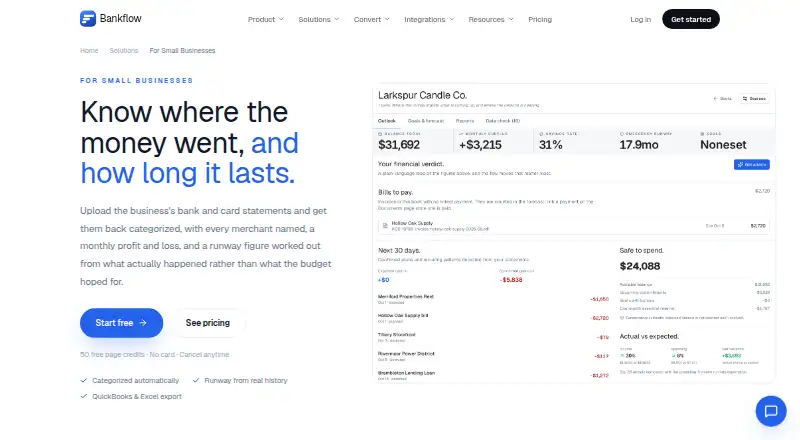
Bankflow turns bank and card statements into categorized transactions, monthly profit and loss, and cash runway figures for small businesses. It accepts PDF, CSV, and Excel statement files in batches, without requiring users to select a bank or template first. Transactions are categorized automatically and merchant names are resolved; users can save corrections as rules for future statements. The cash flow view tracks monthly income and spending and estimates runway at the current burn rate, with essentials-only spending, or with no income. Users can model changes such as losing a client or facing a large one-off expense against their own history. Statements can also be forwarded to a private import address, without giving Bankflow mailbox login access. Exports include Excel, CSV, OFX, and QBO, with accounting layouts or imports for QuickBooks, Xero, Sage, MYOB, and NetSuite. Developer API access and webhooks are included on every plan, including Free, and API usage draws from the credit balance. The Free plan includes 50 one-time credits; paid plans start at $14.99/mo for 300 monthly credits. All plans include live chat and email support. Bankflow says stored data is encrypted at rest and uploaded files are not permanently stored beyond the account.
Who it suits
Bankflow suits small businesses that want to turn statement files into categorized transactions, profit and loss figures, and cash runway estimates. It can also suit teams that need exports or accounting imports, scenario planning, or API access without connecting a bank account.
What it does well
- Imports PDF, CSV, and Excel statements in batches.
- Automatically categorizes transactions and resolves merchant names.
- Models runway under three spending and income scenarios.
- Offers Excel, CSV, OFX, and QBO exports.
- API access and webhooks are included on every plan.
What to know first
- Bank synchronization is not available.
- The Free plan is limited to 50 one-time credits.
- Oversized pages and unusually heavy documents can use more than one credit.
Limits
The Free plan includes 50 credits once, roughly one credit per page. Paid plans start at $14.99/mo for 300 credits a month; oversized pages and unusually heavy documents can use more than one credit. Paid-plan credits reset each billing cycle, while top-up credits roll over for six months.
Plans
| Plan | Billed and limits | Price |
|---|---|---|
| Free | 50 credits one-time · 1 client workspace · all features | Free |
| Starter | 300 credits a month · Unlimited client workspaces · all features | $14.99 a month |
| Pro | 1,000 credits a month · Unlimited client workspaces · all features | $39.99 a month |
| Business | 3,000 credits a month · Unlimited client workspaces · all features | $99.99 a month |
As bankflow.app lists them, read 15 Oct 2026. The maker's own page has the final word.
Getting started
- Open Bankflow's small business website.
- Create an account and choose the Free plan or a paid plan.
- Upload PDF, CSV, or Excel statements in batches, or forward statement emails to your private import address.
- Review automatically categorized transactions and save any corrections as rules.
- Use the cash flow view, scenario modeling, or available exports and integrations.
Bankflow turns bank and card statements into a working picture of a small business’s finances. It is strongest for owners and finance teams willing to import files in exchange for categorized transactions, cash-runway views and scenario analysis. Its central compromise is that it analyzes statements rather than keeping accounts synchronized.
Overview
Bankflow combines statement processing with cash-flow analysis: import files, review transactions, then examine monthly profit and loss and cash runway. Batch imports accept PDF, CSV and Excel files without requiring a bank or template selection first, which suits businesses handling statements from different sources. But file-based intake means someone must keep supplying current statements; businesses that need live bank feeds should look elsewhere.
Key features
Imports, categorization and intake
Automatic categorization and merchant-name resolution take on part of the transaction cleanup. Users can turn corrections into rules for later statements, helping recurring transactions stay consistent across imports. Forwarding statement emails to a private import address offers a second route in, and Bankflow says it does not ask for mailbox login access.
Cash flow and what-if analysis
The cash-flow view tracks monthly income and spending and shows runway at current burn, essentials-only burn, and with no income. Those distinct views make it easier to consider both ordinary operations and a sharper downturn. Scenario planning lets users model events such as losing a client or taking on a large one-off expense against their own history. It is a practical planning feature, though the usefulness of any forecast depends on the statement history being brought into the account.
Exports, integrations and API
Exports include Excel, CSV, OFX and QBO, while accounting layouts or imports cover QuickBooks, Xero, Sage, MYOB and NetSuite. That range gives businesses routes to move processed information into existing accounting workflows. Developer API access and webhooks are included even on Free, a notable option for teams building their own intake or downstream processes; API usage still draws from the plan’s credits.
Security and data control
Bankflow says browser communications use TLS 1.2 or later, stored data is encrypted at rest, and production-system and customer-data access is restricted to authorized personnel. It also says uploaded files are not permanently stored beyond the account and financial data is not used for advertising. Users can delete documents or wipe application data in Settings. These are useful controls for handling financial records, though businesses should still assess them against their own security requirements.
Pricing
Bankflow is freemium, with plans metered by credits that roughly correspond to pages. The Free plan costs nothing and provides 50 credits as a one-time balance. That is enough to try statement processing, but it is not a recurring monthly allowance. Free also includes API access, webhooks, and live chat and email support.
Starter costs $14.99 a month for 300 credits a month; Pro costs $39.99 a month for 1,000 credits a month; and Business costs $99.99 a month for 3,000 credits a month. The larger allowances suit progressively heavier statement volumes, while the lower tiers give up capacity rather than the listed core workflow. Every plan includes live chat and email support. No seat limits are stated.
Paid-plan credits reset each billing cycle. Oversized pages and unusually heavy documents can consume more than one credit, so page counts are a guide rather than a guaranteed document allowance. Top-up credits roll over for six months. For occasional or low-volume processing, Free avoids a subscription; for recurring work, Starter is the lowest-cost paid entry, with Pro and Business useful when the monthly workload warrants their larger balances.
Platforms
Bankflow is available on the web and through an API. It does not synchronize with banks and has zero bank connections, so the API and file imports should not be mistaken for live account feeds.
Who it's for
Bankflow suits small businesses that receive bank or card statements as files and want to turn them into categorized transactions, cash-flow views and accounting exports. It is also relevant to developers who want API access without paying for a higher plan, provided they account for credit consumption. It is a weaker fit for teams that expect bank synchronization, or for anyone whose statement volume would make the credit allowance impractical.
Pros and cons
- Pro: Batch PDF, CSV and Excel imports work without a bank or template selection, reducing setup friction across varied statements.
- Pro: Corrections can become categorization rules, which helps make repeated imports more consistent.
- Pro: Runway views cover current burn, essentials-only burn and a no-income case, while scenarios can test specific events against business history.
- Pro: API access and webhooks are included on Free, and exports and accounting options cover several common formats and platforms.
- Con: No bank synchronization means statements must be supplied as files or forwarded by email.
- Con: Free is a one-time 50-credit balance, not a monthly free allowance, and heavier documents can use credits faster than one per page.
Alternatives
Cash Flow Management Software is the broader category to explore if Bankflow’s file-based approach or credit model does not fit.
Consider Caflou if you want a freemium option with Android and iOS apps as well as web and API access. Cash Pocket is a free option with Android and iOS apps. onbalance is another free option, available on Android and iOS. Bokeping may suit a solo user who wants its free plan’s CSV bank import, financial statements and accountant access, with a 20-per-month limit for each sales and purchase record type. Trezy is worth considering if you want web-based cash-flow tracking with one bank account, transaction history and AI categorization on its free plan; its Starter plan costs $12.50 a month. BankSummary offers a free web plan for up to two accounts. Cashvue is free to use while it is in public beta. Finoya is an alternative for accountants and fractional CFOs, with a plan priced at $39 a month per client and the first five clients free for life.
Verdict
Choose Bankflow if your small business can work from statement files and needs a single workflow for transaction categorization, runway analysis, scenario planning and exports. Its useful planning tools and API access even on Free make it more than a basic statement converter. Look elsewhere if automatic bank synchronization is essential, or if a one-time free credit balance and paid monthly quotas do not suit your processing volume.
Verdict
Pick Bankflow if you want statement based cash flow analysis, categorized transactions, and exports without bank synchronization. The Free plan provides a one-time credit balance, while teams processing more statements can choose a paid plan starting at $14.99/mo.
Questions
Does Bankflow have a free plan?
Yes. Free includes 50 credits as a one-time balance, roughly one credit per page.
How much do paid plans cost?
Starter costs $14.99 a month for 300 credits a month. Pro is $39.99 a month for 1,000 credits a month, and Business is $99.99 a month for 3,000 credits a month.
Which platforms does Bankflow support?
The listed platforms are API and web.
Does Bankflow connect to bank accounts?
Bank synchronization is not available. Users can import statement files or forward statement emails to a private import address.
Which accounting tools and file formats are supported?
Exports include Excel, CSV, OFX, and QBO. Bankflow also lists accounting layouts or imports for QuickBooks, Xero, Sage, MYOB, and NetSuite.
Who makes Bankflow, and what support is included?
Support is provided by the Bankflow team through live chat and email on every plan.
Facts from Bankflow's own pages
- Accounting exports
- Exports include CSV, XLSX, JSON, OFX, QBO and other accounting-system formats. · bankflow.app, 15 Oct 2026
- API
- A versioned REST API at api.bankflow.app accepts authenticated document uploads and returns normalized transaction data. · bankflow.app, 15 Oct 2026
- API availability
- API keys, the v1 API and webhooks are included on every plan, including Free. · bankflow.app, 15 Oct 2026
- Auto-categorization
- Transactions are automatically assigned categories and can be refined with user rules. · bankflow.app, 15 Oct 2026
- Automated intake
- Users can forward bank statement emails to a private import address, and Bankflow says it does not request mailbox login access. · bankflow.app, 4 Oct 2026
- Cash flow
- The cash flow view shows monthly income and spending plus runway at current burn, essentials-only burn, and with no income. · bankflow.app, 4 Oct 2026
- Cash-flow analytics
- Dashboards provide inflow, outflow, net-position, trend, category and merchant analysis. · getapp.com, 15 Oct 2026
- Categorization
- Transactions are categorized automatically, merchant names are resolved, and users can turn corrections into rules for future statements. · bankflow.app, 4 Oct 2026
- Community listing
- Launch Llama's listing recorded 41 community upvotes and an August 31, 2026 update. · tools.launchllama.co, 15 Oct 2026
- Compliance limitation
- Bankflow states that it has not completed its own SOC 2 audit; listed provider attestations cover infrastructure providers. · bankflow.app, 15 Oct 2026
- Data retention
- Source documents can be deleted after processing, while parser working text is automatically removed after 30 days. · bankflow.app, 15 Oct 2026
- Documentation
- Public documentation covers getting started, installation, settings, connected accounts, dashboard use and API reference material. · bankflow.app, 15 Oct 2026
- Exports and integrations
- Bankflow lists Excel, CSV, OFX, and QBO exports, plus accounting layouts or imports for QuickBooks, Xero, Sage, MYOB, and NetSuite. · bankflow.app, 4 Oct 2026
- Import workflows
- Users can upload files, forward emails, use client upload links or connect cloud-folder workflows. · bankflow.app, 15 Oct 2026
- Input formats
- The service accepts PDF, CSV, XLSX and JSON statements, plus photographed receipts and invoices. · bankflow.app, 15 Oct 2026
- Installation
- Bankflow is a progressive web app installable from browsers on Windows, macOS, Linux, Chromebook, iOS and Android without an app-store download. · bankflow.app, 15 Oct 2026
- Integrations
- Document outputs are supported for QuickBooks, Xero, Sage, NetSuite, MYOB, Wave, FreshBooks, GnuCash and Moneydance. · bankflow.app, 15 Oct 2026
- Invoice integrations
- Invoices and receipts can be sent to QuickBooks and Xero as bills or CSV data. · bankflow.app, 15 Oct 2026
- License
- The terms state that Bankflow and its underlying technology are owned by the company and protected by intellectual-property law. · bankflow.app, 15 Oct 2026
- Limit: bank connectivity
- Independent directory descriptions note that Bankflow does not connect directly to bank accounts and instead processes uploaded or forwarded statements. · capterra.com, 15 Oct 2026
- Limit: credit usage
- Credits are consumed per processed page, and documents with no extracted transactions still consume credits. · bankflow.app, 15 Oct 2026
- Limit: service availability
- The terms disclaim guaranteed uninterrupted access and say outages or maintenance may occur. · bankflow.app, 15 Oct 2026
- Maker
- Launch Llama identifies Alan Mark as Bankflow's maker, and Mark describes Bankflow as a side project he started. · tools.launchllama.co, 15 Oct 2026
- Merchant intelligence
- Bankflow normalizes merchant names and identifies recurring charges and duplicate merchants. · capterra.com, 15 Oct 2026
Where Bankflow stands on Freedom251
- Cash Flow Management Software#1 of 29