Freedom251 › Cash Flow Management Software

BankSummary
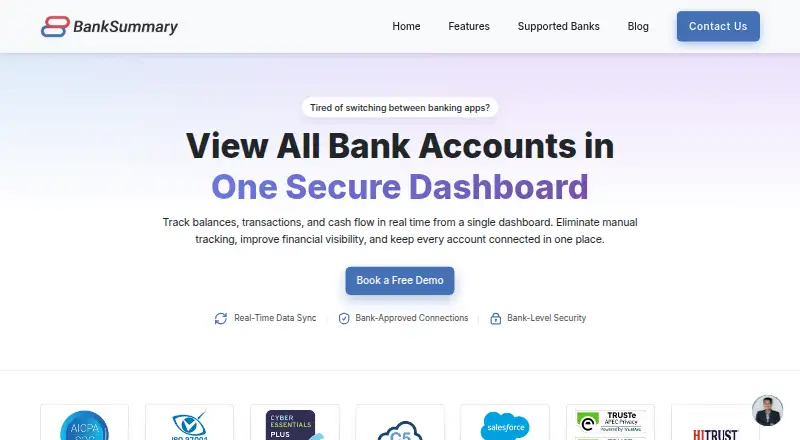
What BankSummary is
BankSummary brings connected bank accounts into one web dashboard for viewing balances and transaction activity. It connects to more than 12,000 financial institutions across the United States and Canada through Plaid. Supported account types include checking, savings, credit cards, investments, mortgages, and loans.
The dashboard provides balance tracking, transaction search, spending insights, financial forecasting, and automated reports. Transactions are categorized automatically, and users can rename categories. Reports can be downloaded as CSV, DOC, or PDF files. BankSummary also connects with accounting tools, spreadsheets, and ERP systems through export or automatic synchronization options.
Bank connections are read-only: BankSummary can view balances and transaction history but cannot initiate payments, transfer funds, or change bank accounts. Its security information says data in transit and at rest is protected with AES-256 encryption, access uses multi-factor authentication, and bank login credentials are not stored on its servers. The listed security frameworks and programs include SOC for Service Organizations, ISO 27001, Cyber Essentials Plus, C5, Salesforce BCR, TRUSTe APEC Certified Privacy, and HITRUST CSF.
BankSummary is a web service for individuals and families, freelancers, small businesses, and finance and accounting teams. The free plan costs nothing and supports up to two accounts; no credit card is required. A free trial is also available.
Who it suits
BankSummary suits individuals, families, freelancers, and organizations that want balances and transactions from connected accounts in one browser dashboard. Finance and accounting teams may also use its reports and connections to accounting tools, spreadsheets, and ERP systems.
What it does well
- Connects to over 12,000 US and Canadian financial institutions.
- Supports checking, savings, credit, investment, mortgage, and loan accounts.
- Automatically categorizes transactions, with editable category names.
- Reports download as CSV, DOC, or PDF.
- Connects with accounting tools, spreadsheets, and ERP systems.
- Read-only bank access and AES-256 data encryption are described.
What to know first
- The free plan supports up to two accounts.
- Bank coverage described is limited to US and Canadian institutions.
- The product is available on the web.
Limits
The free plan supports up to two accounts and costs nothing. No credit card is required for that plan.
Plans
| Plan | Billed and limits | Price |
|---|---|---|
| Free plan | Up to 2 accounts · No credit card required | Free |
| Free | Free · Up to 2 accounts · No credit card required | Free |
As banksummary.co lists them, read 8 Oct 2026. The maker's own page has the final word.
Getting started
- Visit the BankSummary website in a browser.
- Create an account and connect supported bank accounts through Plaid.
- Use the free plan for up to two accounts, or review the available free trial.
- View balances and transaction activity from the unified dashboard.
- Export reports or connect accounting tools, spreadsheets, or ERP systems.
BankSummary is a browser-based dashboard that brings balances and transaction activity from connected accounts into one view. It suits individuals, families, freelancers, small businesses, and finance teams that need shared visibility rather than payment controls. The strongest case is broad account coverage, reporting, and read-only security; the main constraint is the free plan’s two-account ceiling.
Overview
BankSummary uses Plaid to connect with more than 12,000 financial institutions in the US and Canada. It supports checking, savings, credit-card, investment, mortgage, and loan accounts, allowing a household or business to see more than a single bank balance. A unified dashboard combines balance tracking, transaction activity, cash position, and inflow/outflow views.
This is an information and analysis service, not a banking control panel. Connections are read-only: the service can view balances and transaction history, but cannot initiate payments, transfer funds, or change linked bank accounts. Bank login credentials are not stored on BankSummary’s servers, which makes the restricted access model better suited to oversight than money movement.
Key features
Transaction search and spending insights help users investigate where money is going, while financial forecasting adds a forward-looking view. Transactions are categorized automatically, and categories can be renamed when the defaults do not fit a user’s bookkeeping. Automated reports extend the dashboard beyond day-to-day checking.
Reports can be downloaded as CSV, DOC, or PDF files. BankSummary also connects with accounting tools, spreadsheets, and ERP systems through export or automatic synchronization options. Those connections make it more useful to a freelancer or finance team that needs to move summarized data into existing workflows, although the service remains focused on visibility rather than transaction execution.
Security protections include AES-256 encryption for data in transit and at rest and multi-factor authentication for access. The service lists SOC for Service Organizations, ISO 27001, Cyber Essentials Plus, C5, Salesforce BCR, TRUSTe APEC Certified Privacy, and HITRUST CSF frameworks. Customer support is offered 24/7 through a page form or live session.
Pricing
BankSummary has a freemium model and offers a free trial. The Free plan costs free, requires no credit card, and includes bank synchronization, a cash-position view, and inflow/outflow tracking for up to two accounts. That is enough for a simple personal overview or a limited test of the service, but the cap is restrictive for households with multiple banks, cards, loans, or investments. Paid-plan prices are not published, so users who need more than two accounts must evaluate custom pricing.
The free offer is therefore best for a narrow account set or an initial evaluation. A growing household, freelancer with separate business and personal accounts, or finance team will likely outgrow it quickly and need a paid arrangement.
Platforms
BankSummary runs on the web, with no installation required. Browser access is practical for users switching between computers or reviewing finances with a larger screen, but there is no listed native mobile platform.
Who it's for
Individuals and families get a consolidated picture across deposits, cards, investments, mortgages, and loans. Freelancers and small businesses can use categorization, exports, and accounting or spreadsheet synchronization to support review and reporting. Finance and accounting teams benefit from shared read-only visibility and downloadable reports when they need oversight without payment permissions. It is not the right choice for anyone seeking bill payment, transfers, or account changes inside the product.
Pros and cons
- Pros: Connections to more than 12,000 US and Canadian institutions cover a wide range of accounts; read-only access limits the service’s ability to move money; CSV, DOC, and PDF reports support different reporting needs; automatic categorization with renameable categories reduces sorting work; encryption, multi-factor authentication, and listed security frameworks address access and data protection.
- Cons: The free plan allows only two accounts, which is a low ceiling for multi-account households or businesses; browser-only access excludes users seeking a native app; no payment, transfer, or bank-account editing functions are available; paid pricing is custom, making the cost of expansion unclear.
Alternatives
For a wider shortlist of cash-management products, see Cash Flow Management Software.
- Caflou is worth considering if you need Android, iOS, API, and web access alongside a freemium plan.
- Cash Pocket is a free Android, iOS, and web option with no subscriptions, in-app purchases, or other fees stated.
- onbalance is a free Android and iOS app with no paid tiers or plan limits stated.
- Bankflow fits users who prefer credit-based pricing, including a free one-time 50-credit plan and a $14.99 a month Starter plan with 300 credits monthly.
- Bokeping suits users wanting API or web access, a free plan with CSV bank import and financial statements, and a free trial.
- Trezy is a web alternative whose free plan covers one bank account, cash-flow tracking, transaction history, and AI categorization.
- Cashvue is a free web service while it remains in public beta.
- Finoya is aimed at accountants and fractional CFOs, with self-hosted and web platforms and a $39 a month plan priced per client.
Verdict
Choose BankSummary if you want a browser-based, read-only overview spanning many account types, with categorization, forecasting, exports, and integrations in one service. Its security controls and broad Plaid coverage strengthen the case for financial visibility. Look elsewhere if two accounts are not enough, if you need native mobile access, or if payments and transfers are part of the job.
Verdict
Choose BankSummary if you want a browser based view of balances and transactions across supported accounts, with reports and financial insights in the same service. Its free plan is limited to two accounts, so people managing more accounts may need another plan.
Questions
How much does BankSummary cost?
Its free plan costs nothing and supports up to two accounts. A free trial is also available.
Which banks and account types does it support?
BankSummary connects through Plaid to over 12,000 financial institutions in the US and Canada. Listed account types include checking, savings, credit cards, investments, mortgages, and loans.
Can BankSummary move money or change bank accounts?
No. Its access is read-only: it can view balances and transaction history but cannot initiate payments, transfer funds, or change bank accounts.
What platforms can I use it on?
BankSummary is available through a web browser, and no installation is needed.
Can I export reports or connect other tools?
Reports can be downloaded in CSV, DOC, or PDF format. BankSummary also connects with accounting tools, spreadsheets, and ERP systems through export or automatic sync.
How does BankSummary describe its security?
It says data in transit and at rest is protected with AES-256 encryption, access uses multi-factor authentication, and bank login credentials are not stored on its servers.
Facts from BankSummary's own pages
- Account types
- Supported account categories include checking, savings, credit cards, investments, mortgages, loans and credit unions. · banksummary.co, 15 Oct 2026
- Alerts
- The supported-banks page describes automated weekly summaries, spending alerts and balance notifications. · banksummary.co, 15 Oct 2026
- Authentication
- Dashboard access requires multi-factor authentication. · banksummary.co, 15 Oct 2026
- Bank API connectivity
- Bank links use secure, bank-approved, read-only APIs through Plaid. · banksummary.co, 15 Oct 2026
- Bank coverage
- BankSummary says it connects to more than 12,000 financial institutions in the United States and Canada through Plaid. · banksummary.co, 15 Oct 2026
- Browser access
- The FAQ says no installation is needed and users can access BankSummary through a browser. · banksummary.co, 8 Oct 2026
- Categorization
- Transactions are automatically categorized, and users can rename categories. · banksummary.co, 15 Oct 2026
- Company founding
- LinkedIn lists Bank Summary as founded in 2013. · linkedin.com, 15 Oct 2026
- Company headquarters
- LinkedIn lists Bank Summary headquarters in Los Angeles, California. · linkedin.com, 15 Oct 2026
- Company ownership
- BankSummary identifies Differenz System Pvt Ltd as its developer and support company. · banksummary.co, 15 Oct 2026
- Company size
- LinkedIn lists Bank Summary as privately held with 51–200 employees. · linkedin.com, 15 Oct 2026
- Credentials
- BankSummary says it does not store online-banking usernames or passwords and receives tokenized access instead. · banksummary.co, 15 Oct 2026
- Encryption
- The security center states that data in transit and at rest uses AES-256 encryption. · banksummary.co, 15 Oct 2026
- Features
- The homepage lists balance tracking, transaction search, spending insights, financial forecasting, a unified dashboard, and automated reports. · banksummary.co, 8 Oct 2026
- Forecasting
- Financial forecasting is intended to predict cash flow and reveal possible shortfalls. · banksummary.co, 15 Oct 2026
- Independent comparison
- G2 places Bank Summary in cash-flow management comparisons and says buyers commonly compare alternatives on reliability and ease of use. · g2.com, 15 Oct 2026
- Independent listing
- SaaSHub lists BankSummary as a web-based finance tool and shows zero user reviews. · saashub.com, 15 Oct 2026
- Independent listing status
- Microlaunch describes Bank Summary as submitted for review and centralizing transactions from multiple banks. · microlaunch.net, 15 Oct 2026
- Infrastructure
- The dashboard is described as Salesforce-native and bank connections are supplied by Plaid. · banksummary.co, 15 Oct 2026
- Installation
- The FAQ says no installation or download is required because the service runs in a browser. · banksummary.co, 15 Oct 2026
- Integrations
- The features page says BankSummary works with accounting tools, spreadsheets and ERP systems through exports or synchronization. · banksummary.co, 15 Oct 2026
- Intended users
- The homepage describes use by individuals and families, freelancers, small businesses, and finance and accounting teams. · banksummary.co, 8 Oct 2026
- Limit: account cap
- The free plan is limited to two connected accounts. · banksummary.co, 15 Oct 2026
- Limit: geographic coverage
- The supported-banks page specifies coverage across the United States and Canada. · banksummary.co, 15 Oct 2026
Where BankSummary stands on Freedom251
- Cash Flow Management Software#3 of 29