Freedom251 › Form Builder Software

Axonator
by Axonator
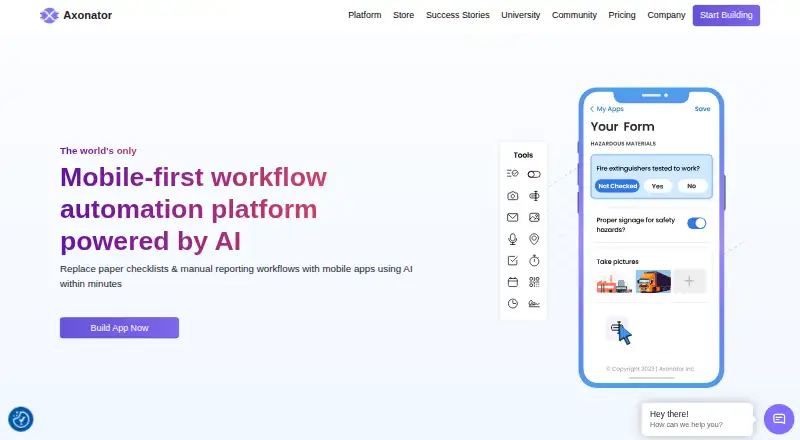
What Axonator is
Axonator is a no-code, mobile-first platform for automating field workflows. It provides mobile forms and workflow tools for collecting operational data, then offers report and dashboard builders to turn that data into analytics. Commando AI can create forms, suggest fields from prompts, and convert spreadsheets or PDF reports into mobile checklists. Integrations named by Axonator include Salesforce, QuickBooks, IBM Maximo, and SAP; other connections can be configured using API keys and workflows. The mobile app is available on iOS and Android, where workforce users can submit forms and complete or reject assigned tasks. Security features described include 256-bit SSL, encrypted cloud databases, logical separation of customer data, SSO, multifactor authentication, and role-based access controls. Incremental backups use AES-256 encryption and can be restored on request within the retention period. The free tier has a 50-submission daily cap; Pro allows 200 submissions daily and Enterprise 1,500. Pro costs $29 a month and Enterprise costs $49 a month, both billed per user monthly. Axonator was founded in 2011.
Who it suits
Axonator suits field teams in quality control, safety, maintenance, and production that need mobile forms, workflow automation, and operational reporting. Its listed mobile apps support workers completing assigned tasks in the field.
What it does well
- Mobile apps are available for iOS and Android.
- Commando AI can turn spreadsheets into mobile checklists.
- Integrates with Salesforce, QuickBooks, IBM Maximo, and SAP.
- Includes role-based access controls and multifactor authentication.
What to know first
- Free tier caps daily submissions at 50.
- Pro requires at least three users.
- Enterprise requires at least ten users.
- Paid plans limit apps and daily submissions.
Limits
The free plan allows up to 50 submissions per day. Pro allows 200 submissions per day, and Enterprise allows 1,500. The listed Pro and Enterprise plans also require minimums of three and ten users, respectively.
Plans
| Plan | Billed and limits | Price |
|---|---|---|
| Pro Plan | per user/month · Minimum 3 users · Unlimited forms · 200 fields shown on plan card · 3 apps/account · 200 submissions/day · 5 exports/day · External API calls · Email and Zoom support | $29 a month |
| Enterprise Plan | per user/month · Minimum 10 users · Unlimited forms · 500 fields shown on plan card · 5 apps/account · 1,500 submissions/day · 10 exports/day · External API calls · Email and Zoom support · Dedicated account manager | $49 a month |
| Basic | Maximum 6 users (1 App Builder, 5 App Users) · Unlimited forms · 200 fields across all forms · 1 app per account · 50 submissions/day · 1 export/day | Free |
As axonator.com lists them, read 19 Oct 2026. The maker's own page has the final word.
Getting started
- Visit https://axonator.com/.
- Choose the free plan or review the Pro and Enterprise plans.
- Start with the free trial if you want to try the service before choosing a plan.
- Use the web platform or the Android or iOS app.
- Build mobile forms and workflows for field data collection.
Axonator is a no-code platform for building mobile field forms, routing work and reporting on operational data. It is a strong fit for quality, safety, maintenance and production teams managing recurring work in the field. Its broad toolkit is balanced by per-user costs, seat minimums and daily submission limits.
Overview
Axonator brings data collection and follow-up processes together: teams can capture information in forms, move tasks through workflows and turn the resulting operational data into reports or dashboards. That makes it better suited to ongoing field operations than to a simple standalone survey.
Conditional logic, approvals, file uploads and templates support structured collection and review. The 200-response limit is a constraint to account for when designing forms that may receive longer answers. Android and iOS apps let workforce users submit forms and complete or reject assigned tasks; web access is also supported.
Key features
- Mobile forms and workflows: Teams can build forms for field data and use workflow tools to automate processes. Conditional logic and approvals help structure submissions and review, while task completion and rejection are available in the mobile apps.
- Reports and dashboards: Built-in builders turn operational data into reports and analytics dashboards, a useful link between field work and oversight.
- Commando AI: It can create forms, suggest fields from prompts, and convert spreadsheets or PDF reports into mobile checklists. This can help teams turn existing material into a starting point for field collection.
- Integrations and security: Named integrations include Salesforce, QuickBooks, IBM Maximo and SAP; other third-party connections can use API keys and workflow configuration. Security measures include 256-bit SSL, encrypted cloud databases, logical customer data separation, SSO, multifactor authentication and role-based access. Encrypted AES-256 incremental backups can be restored on request within the retention period.
Pricing
Axonator has a free tier and a free trial. The plan comparison gives the free tier a daily cap of 50 submissions and free email support. Its Basic plan has custom pricing and is capped at six users: one app builder, five app users, one app per account, unlimited forms and 200 fields across forms. That may suit a small team with modest app needs, but the single-app limit is restrictive for multiple distinct workflows.
Pro Plan: $29 a month, billed $29/user/month, with a three-user minimum. It includes unlimited forms, three apps per account, 200 submissions per day, 400 fields across forms, five data exports per day and email and Zoom support. The per-user rate and minimum mean a team pays for at least three seats; the submission and export caps matter for busy operations.
Enterprise Plan: $49 a month, billed $49/user/month, with a ten-user minimum. It raises the allowances to five apps, 1,500 submissions per day, 2,000 fields across forms and ten exports per day, with email and Zoom support. This is the tier for larger teams that need more capacity, but the ten-seat floor makes it a poor match for small groups.
Platforms
Axonator supports Android, iOS and web. The mobile apps are suited to field staff submitting forms and handling assigned tasks; web access extends the platform beyond mobile use.
Who it's for
Quality control, safety, maintenance and production crews are the clearest fit, particularly where field submissions need approvals, task routing and operational reporting. Teams should compare expected user counts and daily submission volume with the plan floors and caps before committing. It is less compelling for a small group that needs several apps, or for high-volume work that exceeds the available daily limits.
Pros and cons
- Pro: Forms, approvals, task handling and reporting sit in one field-operations platform, reducing the need to separate collection from follow-up and analysis.
- Pro: Commando AI can turn prompts and existing spreadsheets or PDF reports into form-building inputs or checklists.
- Pro: Named business integrations and a range of stated access, encryption and backup protections support operational use.
- Con: Pro requires at least three users and Enterprise at least ten, which can raise the entry cost for smaller teams.
- Con: Daily submissions and data exports are capped by plan, while Basic allows only one app per account.
Alternatives
For a narrower form-building need, compare Form Builder Software; for automating processes beyond field operations, browse Workflow automation tools.
- Typeform is worth considering for a free form plan with up to 10 responses per month.
- Forminit offers a free tier with one form, 100 monthly submissions and 100 MB of file storage.
- Jotform has a free Starter plan with five forms and 100 monthly submissions.
- Paperless Forms provides a free plan with three forms, 25 fields per form and 100 monthly submissions.
- Wufoo has a free plan with five forms, 100 entries per month, ten fields per form and one user.
- Microsoft PowerPoint is another freemium option.
- Google Drive includes up to 15 GB of storage with a Google Account.
- uCalc has a free SDK Community plan for hobbyists, students, nonprofits, solo developers and small businesses under its stated revenue threshold.
Verdict
Choose Axonator if your field team needs mobile data capture tied to approvals, task workflows and operational reporting. Its strongest case is the combination of these tools with mobile apps and AI-assisted form creation. Look elsewhere if your team is too small for paid seat minimums or needs submission volumes beyond the plan caps.
Verdict
Axonator combines mobile data collection with workflow and reporting tools for field operations. The free tier is available, while paid plans have user minimums and submission caps.
Questions
Is Axonator free?
Yes. Axonator offers a free plan, and a free trial is also available.
How much do the paid plans cost?
The listed Pro plan is $29 a month, billed at $29/user/month. Enterprise is $49 a month, billed at $49/user/month.
Which platforms does Axonator support?
Axonator is available on Android, iOS and the web.
What integrations does Axonator name?
It names Salesforce, QuickBooks, IBM Maximo and SAP. Third-party connections can use API keys and workflow configuration.
What are the daily submission limits?
The Free, Pro and Enterprise plans have daily caps of 50, 200 and 1,500 submissions, respectively.
Who makes Axonator?
The maker is Axonator. The company says its journey began in 2011 and lists headquarters in Austin, Texas, USA, and Pune, Maharashtra, India.
Facts from Axonator's own pages
- Additional location
- The official documentation footer lists Pune, Maharashtra, India as another location. · axonator.com, 19 Oct 2026
- AI app building
- Its Commando AI can create forms and suggest form fields from prompts, and convert spreadsheets or PDF reports into mobile checklists. · axonator.com, 11 Oct 2026
- AI builder
- Commando AI can generate forms, suggest fields and convert spreadsheets or PDFs into mobile checklists. · axonator.com, 19 Oct 2026
- API
- Workflows can call REST APIs and Axonator provides an API key based method for third-party connections. · axonator.com, 19 Oct 2026
- API data flow
- The API supports pushing data to and pulling data from external systems, including compatible legacy systems. · axonator.com, 19 Oct 2026
- Backup
- Axonator says its incremental backups are encrypted using AES-256 and can be restored on request within the retention period. · axonator.com, 11 Oct 2026
- Company founding
- LinkedIn lists Axonator Inc as founded in 2011. · linkedin.com, 19 Oct 2026
- Company history
- Axonator says its journey started in 2011. · axonator.com, 11 Oct 2026
- Company size
- LinkedIn lists Axonator Inc as a privately held company with 51–200 employees. · linkedin.com, 19 Oct 2026
- Conditional logic
- Yes · axonator.com, 22 Sept 2026
- Data views
- The web application supports list, map and board views for form data. · axonator.com, 19 Oct 2026
- Documentation
- The knowledge base covers builders, mobile and web containers, workflows, reporting, dashboards, integrations, permissions, offline mode and app versioning. · axonator.com, 19 Oct 2026
- Documentation gap
- The help center marks several troubleshooting, glossary, dashboard and video tutorial areas as articles coming soon. · axonator.com, 19 Oct 2026
- Field capture
- Supported mobile capture includes photos, audio, GPS locations, maps, QR or barcodes and signatures. · play.google.com, 19 Oct 2026
- Forms and workflows
- The platform provides mobile forms and workflow tools for collecting field data and automating processes. · axonator.com, 11 Oct 2026
- Founded
- 2011 · axonator.com, 28 Sept 2026
- Free plan
- Yes · axonator.com, 22 Sept 2026
- Google Play distribution
- The Android listing shows 5K+ downloads and an Everyone content rating. · play.google.com, 19 Oct 2026
- Headquarters
- LinkedIn lists headquarters in Austin, Texas, United States. · linkedin.com, 19 Oct 2026
- Integrations
- Official integration examples include Salesforce, SAP, IBM Maximo, QuickBooks, Google Sheets, Google Drive, Office 365, Zapier and Airtable. · axonator.com, 19 Oct 2026
- Intended users
- Axonator highlights quality control, safety, maintenance, and production crews as teams its mobile-first platform serves. · axonator.com, 11 Oct 2026
- iOS requirements
- The App Store listing requires iOS 13 or later, iPadOS 13 or later, macOS 11 with Apple silicon for Mac, or visionOS 1.0 or later. · apps.apple.com, 19 Oct 2026
- Limit: concurrent builder edits
- When multiple users edit the App Builder, only the most recently saved and published component version is visible to everyone. · axonator.com, 19 Oct 2026
- Limit: custom feature scope
- Axonator says users cannot create entirely new builder feature types beyond its mobile form, workflow, template and analytical report builders. · axonator.com, 19 Oct 2026
Where Axonator stands on Freedom251
- Form Builder Software#3 of 70
- Form builders#11 of 69
- Workflow automation tools#56 of 133