Freedom251 › Startup Manager Software

Autorun Organizer
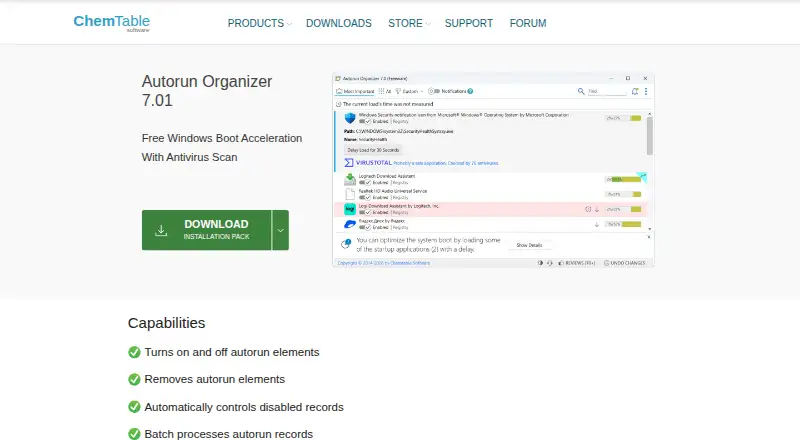
What Autorun Organizer is
Autorun Organizer is a free Windows utility for managing programs that launch when the system starts. It can enable or disable autorun entries, remove them, or suspend launches, and it supports batch processing and automatic control of disabled records. Its overview rates startup programs based on how often entries are disabled or deleted and includes a visual Windows boot-time diagram. The utility checks startup programs through VirusTotal, which the product page describes as covering more than 60 antivirus programs. It can alert users to new auto-start entries, search quickly, detect erroneous records, and update itself. Listed requirements are Windows 11, 10, 8, or 7 in 32-bit or 64-bit, at least 256 MB of RAM, 50 MB of disk space, and administrator rights. When the installer’s data-transfer option is enabled, application and startup-entry details are sent to the server for frequency displays and VirusTotal analysis. The license permits free distribution if the package is not modified.
Who it suits
It suits Windows users who want to review and manage startup programs, including batches of entries. Users should also consider the data transfer that occurs when the installer option is enabled.
What it does well
- Enables, disables, removes, or suspends startup entries.
- Shows a visual Windows boot-time diagram.
- Checks startup programs through VirusTotal.
- Alerts users to new auto-start entries.
What to know first
- Available only for Windows.
- Requires administrator rights.
- Enabled data transfer sends application and startup-entry details.
Plans
| Plan | Billed and limits | Price |
|---|---|---|
| Free | Startup entry management · Startup delay controls · VirusTotal scanning | Free |
| Autorun Organizer | Windows 11/10/8/7 · 32-bit and 64-bit | Free |
As chemtable.com lists them, read 20 Sept 2026. The maker's own page has the final word.
Getting started
- Visit the Autorun Organizer website.
- Download and install the Windows utility.
- Use a Windows 11, 10, 8, or 7 system with at least 256 MB RAM and 50 MB of disk space.
- Run it with administrator rights.
- During installation, choose whether to enable the data-transfer functions.
Autorun Organizer is a Windows utility for managing programs that launch at startup, with entry checks and boot-time context alongside the controls. It suits people who want to review and adjust several startup items without paying; the data-transfer option is an important privacy trade-off to weigh before installing.
Overview
The utility combines startup editing with batch processing, a rating of startup entries, and a visual diagram of Windows boot time. That makes it more informative than a tool limited to switching entries on or off, while still leaving the decision about what to disable to the user. It is free, but enabling its data-transfer functions sends startup-related information to a server.
Key features
Startup controls and boot context
Users can enable or disable autorun entries, remove them, or suspend program launches. Batch processing and automatic control of disabled records are useful when reviewing multiple items, reducing repetitive changes. The startup rating reflects how often entries are disabled or deleted, and the boot-time diagram gives a visual overview of startup timing. These provide context for decisions, rather than a guarantee that a particular change will improve a system.
Scanning and monitoring
VirusTotal integration checks startup programs through a service the product describes as covering more than 60 antivirus programs. New-entry notifications, quick search, erroneous-record detection, and self-updating round out the tool. The scanning feature has a privacy cost: with the installer’s data-transfer option enabled, autorun applications, paths, and locations are sent for VirusTotal analysis. The option also sends a list of applications to a server to display how often entries are disabled or delayed.
Pricing
Autorun Organizer is free. The Free plan costs nothing and includes startup entry management, startup delay controls, and VirusTotal scanning. The Autorun Organizer plan is also free and specifies Windows 11, 10, 8, or 7 in 32-bit and 64-bit versions. There is no paid tier to weigh against a reduced free allowance in these plans.
The license agreement permits free distribution provided the distribution package is not modified. For questions about the privacy policy or license agreement, ChemTable Software gives [email protected] as its contact.
Platforms
Autorun Organizer runs on Windows 11, 10, 8, and 7, in either 32-bit or 64-bit versions. It requires at least 256 MB of RAM, 50 MB of disk space, and administrator rights. It is not a fit for readers who need a macOS or web-based startup manager.
Who it's for
This is a sensible choice for Windows users who want to review startup entries in batches, see boot-time context, and check programs through VirusTotal without a purchase. It is less suitable for anyone who does not want application and startup data sent to a server when the transfer functions are enabled, or who needs startup controls on another platform.
Pros and cons
- Pros: Startup entries can be disabled, removed, or suspended, with batch processing for managing several records.
- Pros: A startup rating and boot-time diagram add context to entry management.
- Pros: VirusTotal scanning, new-entry notifications, and erroneous-record detection extend the tool beyond basic startup controls at no charge.
- Cons: Enabling data transfer sends an application list and startup paths and locations to a server.
- Cons: Windows support ends at Windows 11, 10, 8, and 7, and installation requires administrator rights.
Alternatives
For other options, browse Startup Manager Software or PC Optimization Software.
- BootRacer may suit readers who want a freemium Windows option; its Free plan is for non-commercial use, while Premium plans cover one or two PCs.
- Argente Uninstall Manager is another freemium Windows choice, with a Free plan for one PC forever and paid tiers for one, three, or ten PCs.
- AutoRun Manager is a free Windows alternative with MIT-licensed startup configuration.
- Corionis Service Manager.NET is a free option for Windows x86/x64 that notes testing from Windows 7 through Windows Server 2016 and requires Microsoft .NET Framework 4.7.2.
- HiBit Startup Manager is a free Windows alternative that also covers startup monitoring, Windows services, and scheduled tasks.
- NSSM is a free, public-domain Windows service helper with 32-bit and 64-bit binaries.
- Quick Startup is a free Windows alternative for managing startup entries, delaying auto-start programs, and adding, editing, or deleting startup items.
- Microsoft Quick Assist is free and spans Windows, macOS, and web, but its macOS and web versions are only for Microsoft Support interactions.
Verdict
Choose Autorun Organizer if you want free Windows startup controls with batch processing, boot-time context, and VirusTotal checks in one utility. Its main reason to look elsewhere is the data-transfer trade-off, especially if sending application and startup details to a server is unacceptable; it is also not an option for non-Windows platforms.
Verdict
Autorun Organizer offers startup-entry controls, batch processing, and a boot-time overview at no charge. Check its Windows requirements and data-transfer option before installing.
Questions
How much does Autorun Organizer cost?
The listed Free plan costs nothing.
Which Windows versions does it support?
The listed requirements cover Windows 11, 10, 8, and 7, in 32-bit or 64-bit versions.
What can I do with startup entries?
You can turn them on or off, remove them, or suspend program launches. The utility also supports batch processing and automatic control of disabled records.
What does the VirusTotal check do?
Autorun Organizer checks startup programs through VirusTotal, which the product page describes as covering more than 60 antivirus programs.
What information is sent when data transfer is enabled?
It sends an application list for disabling and delaying frequency displays, and sends startup applications, paths, and locations for VirusTotal analysis.
Who makes Autorun Organizer?
The listed maker is Autorun Organizer. ChemTable Software says it was founded in 1999 and develops software products for Microsoft Windows.
Facts from Autorun Organizer's own pages
- Batch processing
- It can batch process autorun records and automatically control disabled records. · chemtable.com, 30 Sept 2026
- Company history
- ChemTable Software says it was founded in 1999 and develops software products for Microsoft Windows. · chemtable.com, 30 Sept 2026
- Data transfer
- When the installer option for data-transfer functions is enabled, Autorun Organizer sends a list of applications to the server to display disabling and delaying frequency, and sends autorun applications, paths, and locations for VirusTotal analysis. · chemtable.com, 30 Sept 2026
- Founded
- 1999 · chemtable.com, 23 Sept 2026
- Free plan
- Yes · chemtable.com, 20 Sept 2026
- License
- The license agreement says the program may be freely distributed if its distribution package is not modified. · chemtable.com, 30 Sept 2026
- Other features
- It can notify users about new Windows auto-start entries, search quickly, detect erroneous records, and update itself to newer versions. · chemtable.com, 30 Sept 2026
- Purpose
- Autorun Organizer is presented as a Windows boot acceleration utility with antivirus scanning. · chemtable.com, 30 Sept 2026
- Startup management
- It can turn autorun elements on or off, remove them, and suspend program launches. · chemtable.com, 30 Sept 2026
- Startup overview
- It provides a rating of startup programs based on how often entries are disabled or deleted and a visual Windows boot time diagram. · chemtable.com, 30 Sept 2026
- Support
- The company lists [email protected] as the contact for questions about its privacy policy and license agreement. · chemtable.com, 30 Sept 2026
- System requirements
- The listed requirements are Windows 11, 10, 8, or 7 (32-bit or 64-bit), at least 256 MB RAM, 50 MB of disk space, and administrator rights. · chemtable.com, 30 Sept 2026
- VirusTotal integration
- It checks startup programs through VirusTotal, which the product page describes as covering more than 60 antivirus programs. · chemtable.com, 30 Sept 2026
Where Autorun Organizer stands on Freedom251
- Startup Manager Software#3 of 30
- PC Optimization Software#51 of 97
- PC optimisers#55 of 104