Freedom251 › Startup Manager Software

Corionis Service Manager.NET
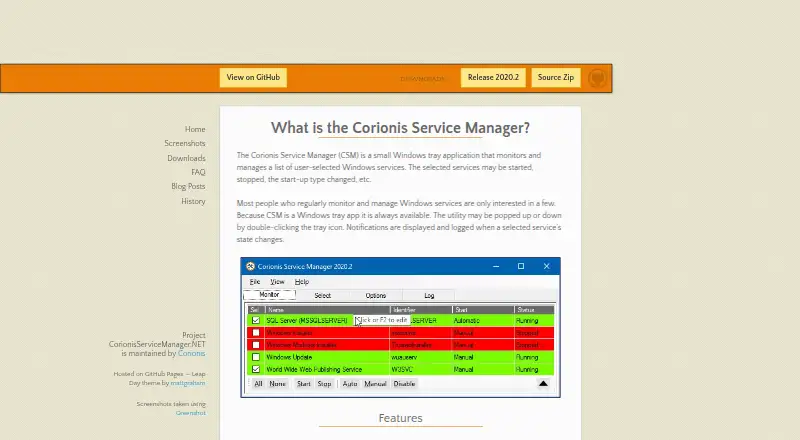
What Corionis Service Manager.NET is
Corionis Service Manager.NET (CSM) is a free Windows tray application for monitoring and managing Windows services selected by the user. It can start or stop selected services and change their startup type. When a monitored service changes state, CSM displays and logs a notification; file logging is optional. Users can reorder the service list by dragging items and edit the displayed names. An optional updater can be set to check daily, weekly, or monthly. CSM installs for the current user, and each user on a system may install a separate copy. Monitoring works without administrator privileges, but management controls are disabled unless those privileges are available. The maker says it was tested on Windows 7 through Windows Server 2016, on 32- and 64-bit systems, and requires Microsoft .NET Framework 4.7.2. This version is a complete rewrite of the original, written in Microsoft C# and .NET. The release is MIT licensed and provided free without warranty or guarantee. Its FAQ explains that there is no restart button because CSM cannot reliably determine when a service has fully shut down and is safe to start again.
Who it suits
CSM suits Windows users who want a tray-based way to monitor selected services and manage them when they have administrator privileges. It is also an option for users comfortable with the stated Windows and .NET requirements.
What it does well
- Free and MIT licensed.
- Can start, stop, and change service startup types.
- Displays state-change notifications with optional file logging.
- Monitored services can be reordered and renamed.
- Updater checks can be scheduled.
What to know first
- Service management requires administrator privileges.
- Requires Microsoft .NET Framework 4.7.2.
- No restart button is provided.
- Provided without warranty or guarantee.
Limits
The Free plan costs nothing. Service management controls require administrator privileges; without them, monitoring remains available but those controls are disabled.
Plans
| Plan | Billed and limits | Price |
|---|---|---|
| Free | Windows x86/x64; Windows 7 through Windows Server 2016 tested; Microsoft .NET Framework 4.7.2 | Free |
As corionis.github.io lists them, read 5 Oct 2026. The maker's own page has the final word.
Getting started
- Open the Corionis Service Manager.NET website.
- Install CSM for your current Windows user; each user can install a separate copy.
- Ensure Microsoft .NET Framework 4.7.2 is available.
- Select the Windows services you want to monitor.
- Use administrator privileges to enable service management controls.
Corionis Service Manager.NET (CSM) is a free Windows tray utility for watching a hand-picked set of Windows services and changing their basic settings. It is best for administrators and technically inclined Windows users who want a compact, persistent view of service state rather than a full systems-management suite. The focused feature set is useful, but the lack of a restart command and dependence on elevated rights limit it for some workflows.
Overview
CSM keeps selected services in a tray interface instead of asking you to repeatedly open a management console. It reports state changes and can record them, giving you a simple way to notice when an important service stops or starts. Monitoring works without administrator privileges, so a standard user can observe service health; start, stop and startup-type controls remain disabled until the application has the necessary elevation.
This release is a complete rewrite in Microsoft C# and .NET. The download is MIT licensed and free, but supplied without a warranty or guarantee. Bug reports are directed to issues on the project's GitHub site, making that issue tracker the stated support route.
Key features
Monitoring and service controls
You choose which services to follow, then can start or stop them and change their startup type when running with administrator privileges. CSM displays notifications when a selected service changes state and can optionally write those events to a file. That combination suits operators who need a lightweight audit trail without leaving a larger administration tool open.
There is no restart button. CSM deliberately avoids presenting one because it cannot accurately establish that shutdown has finished before starting the service again. A restart therefore requires separate manual steps and a judgment about when it is safe to proceed.
Organization and updating
Drag-and-drop ordering and editable display names let you arrange a service list around your own priorities, which is valuable when several monitored services have unhelpful names or need a specific review order. The optional updater can check for releases daily, weekly or monthly, so you can choose between prompt notices and fewer update checks.
Pricing
| Plan | Price | Includes |
|---|---|---|
| Free | free | Windows x86/x64; Windows 7 through Windows Server 2016 tested; Microsoft .NET Framework 4.7.2 |
There is one free plan and no paid tier to unlock additional service controls. The practical cost is the Windows and framework requirement, plus the need for administrator privileges whenever you want to manage rather than merely monitor services.
Platforms
CSM supports Windows 32-bit and 64-bit systems and uses Microsoft .NET Framework 4.7.2. The maker says it was tested from Windows 7 through Windows Server 2016. Installation is per user: each account on a machine can install its own copy, which is useful on shared systems but does not create a single machine-wide configuration.
Who it's for
Choose CSM if you need selected-service monitoring in the Windows tray, configurable state logging and occasional start, stop or startup-type changes. It is particularly suitable for users who can run with administrator privileges when intervention is required, while still wanting monitoring from a regular account.
Look elsewhere if restarting services is a central task, if you need support beyond GitHub issue reports, or if your computers do not meet the stated Windows and .NET requirements.
Pros and cons
Pros
- Focused monitoring: State-change notifications and optional file logging provide a practical record for selected services.
- Useful list control: Drag-and-drop ordering and custom display names make a personal service watchlist easier to scan.
- Free and flexible licensing: The MIT license and 0.00 USD price remove subscription or seat-cost decisions.
- Per-user installation: Separate users can install their own copy on the same Windows system.
Cons
- No restart action: Restarting requires manual shutdown and startup because CSM does not estimate a safe transition point.
- Elevation required for management: Standard users can monitor, but the controls are unavailable without administrator privileges.
- Narrow platform scope: It targets Windows and requires Microsoft .NET Framework 4.7.2.
- Limited support commitment: The software is provided without warranty or guarantee, with bug reporting routed to GitHub issues.
Alternatives
For a broader startup-focused directory, see Startup Manager Software.
- Microsoft Quick Assist is a free cross-platform support tool; choose it for remote assistance rather than local Windows-service monitoring.
- Argente Uninstall Manager offers a free Windows plan for one PC and paid tiers; pick it when uninstall management is the priority.
- BootRacer is a Windows freemium utility with a free non-commercial plan and Premium options; choose it for boot-time analysis.
- AutoRun Manager is free, MIT-licensed Windows startup-configuration software, better suited to startup entries than live service-state watching.
- Autorun Organizer is a free Windows startup manager with delay controls and VirusTotal scanning; choose it for startup-entry administration.
- Autoruns is free with no installation or use limit, making it a stronger choice for exhaustive startup and autorun inspection.
- HiBit Startup Manager adds startup monitoring plus Windows services and scheduled-task management for users wanting a wider startup toolkit.
- NSSM is a free, public-domain Windows service helper with 32-bit and 64-bit binaries; choose it when wrapping applications as services matters more than tray monitoring.
Verdict
CSM is a sensible choice for Windows users who want a free, focused tray watchlist with service-state notifications, logs and basic administrator-level controls. Its main reason to choose it is that narrow, configurable monitoring without licensing cost. Its main reason to look elsewhere is the missing restart command and the requirement for elevation whenever you need to manage services.
Verdict
CSM offers focused monitoring and service controls in a free Windows tray application. Its management functions depend on administrator privileges, and the maker does not provide a warranty or guarantee.
Questions
How much does Corionis Service Manager.NET cost?
The Free plan costs nothing.
Which operating systems does it support?
It is for Windows. The maker says it was tested on Windows 7 through Windows Server 2016 and supports 32-bit and 64-bit systems.
What can I do with selected services?
You can start or stop them and change their startup type. CSM also displays and logs notifications when their state changes.
Do I need administrator privileges?
You can monitor services without administrator privileges. The management controls are disabled unless you have administrator privileges.
Can CSM restart a service?
No. CSM has no restart button because it cannot accurately determine when a service has finished shutting down and is safe to start again.
What license does the release use?
The download page identifies the release as MIT licensed and says it is provided free without warranty or guarantee.
Facts from Corionis Service Manager.NET's own pages
- Implementation
- This version is a complete rewrite of the original CSM, written in Microsoft C# and .NET. · corionis.github.io, 5 Oct 2026
- Installation
- CSM installs for the current user, and each user on a system may install their own copy. · corionis.github.io, 5 Oct 2026
- License and warranty
- The download page identifies the release as MIT licensed and says the software is free and provided without warranty or guarantee. · corionis.github.io, 5 Oct 2026
- Notifications and logs
- CSM displays and logs notifications when a selected service's state changes, with optional logging to a file. · corionis.github.io, 5 Oct 2026
- Organization
- Monitored services can be reordered by drag and drop, and their displayed names can be edited. · corionis.github.io, 5 Oct 2026
- Platform and requirement
- The maker says CSM was tested on Windows 7 through Windows Server 2016, supports 32- and 64-bit systems, and uses Microsoft .NET Framework 4.7.2. · corionis.github.io, 5 Oct 2026
- Privileges
- Administrator privileges are required to manage services; monitoring is available without them, but management controls are disabled. · corionis.github.io, 5 Oct 2026
- Purpose
- CSM is a Windows tray application for monitoring and managing user-selected Windows services. · corionis.github.io, 5 Oct 2026
- Restart limitation
- The FAQ says CSM has no restart button because it cannot accurately determine when a service has finished shutting down and is safe to start again. · corionis.github.io, 5 Oct 2026
- Service controls
- Selected services may be started or stopped, and their startup type may be changed. · corionis.github.io, 5 Oct 2026
- Support
- The maker directs users who find a bug to create an issue on the project's GitHub site. · corionis.github.io, 5 Oct 2026
- Updates
- The optional updater can be configured to check daily, weekly, or monthly. · corionis.github.io, 5 Oct 2026
Where Corionis Service Manager.NET stands on Freedom251
- Startup Manager Software#6 of 30