Freedom251 › Extended Reality Software

AR.js Studio
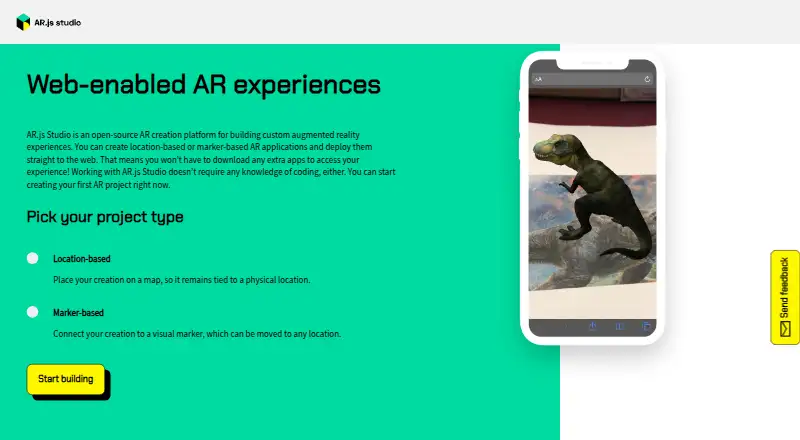
What AR.js Studio is
AR.js Studio is a free, open-source web authoring platform for making augmented reality experiences without coding. It supports location-based projects that place content at GPS coordinates and marker-based projects that attach content to an image. Location projects can use a map pin or entered coordinates for up to 10 locations. Marker projects can use a premade marker or a custom image; the maker recommends simple, high-contrast designs that are not rotationally symmetric. Uploadable content includes 3D objects in GLTF, GLB, or ZIP formats, images in JPG, PNG, or GIF formats, and MP4 videos. Maximum upload sizes are 50 MB for 3D objects, 15 MB for images, and 25 MB for videos. Published experiences are accessed on the web without viewers needing another app. Publishing requires a GitHub login and depends on a privately hosted OAuth server that may not remain available. The documented fallback involves forking Studio and hosting the app and Gatekeeper separately. The public repository is MIT licensed.
Who it suits
AR.js Studio suits people who want to create and share web AR projects without coding. It offers both location-based and image-marker-based approaches.
What it does well
- Create location-based or marker-based AR projects
- No coding required
- Supports 3D objects, images, and videos
- Viewers can access published experiences without another app
- Free and MIT licensed
What to know first
- Publishing requires a GitHub login
- Publishing may fail if its OAuth server is unavailable
- 3D object uploads are limited to 50 MB
- Location projects allow up to 10 locations
Limits
Uploads are limited to 50 MB for 3D objects, 15 MB for images, and 25 MB for videos. Location projects support up to 10 locations. Publishing may fail if the privately hosted OAuth server is unavailable.
Plans
| Plan | Billed and limits | Price |
|---|---|---|
| AR.js Studio | Open-source authoring platform | Free |
As ar-js-org.github.io lists them, read 5 Oct 2026. The maker's own page has the final word.
Getting started
- Open the AR.js Studio website in a web browser.
- Choose a location-based or marker-based project.
- Add locations or choose a marker, then upload supported content.
- Name the project and log in to GitHub to publish it.
AR.js Studio is a free, open-source visual editor for making location- and marker-based augmented-reality experiences in a browser. It is aimed at creators who want to publish a web AR project without writing code or asking viewers to install an app. The main attraction is its zero-cost, visual workflow; the main caveat is a publishing process tied to GitHub and a privately hosted OAuth service.
Overview
AR.js Studio focuses on two practical AR formats. Location projects place content at GPS coordinates, letting you drop pins on a map or enter coordinates for as many as 10 locations. That is a useful scale for a small trail, exhibit, or local promotion, but not a natural fit for a large, many-stop deployment. Marker projects attach content to a black-and-white visual marker, either a supplied design or your own image. Because the marker can be moved, this approach is better when the same experience must work in different physical settings.
Both formats are delivered through the web, so viewers can open the experience without downloading a separate application. That lowers friction for public demonstrations and classroom or event use. AR.js Studio is also open source under the MIT license, with the AR.js Organisation credited for development and Nicolò Carpignoli for the original idea.
Key features
The visual editor supports 3D objects in .gltf, .glb, and .zip formats, plus .jpg, .png, and .gif images and .mp4 video. Upload ceilings are 50 MB for 3D objects, 15 MB for images, and 25 MB for video. Those limits accommodate ordinary web assets but require compression or optimization for heavier models and long, high-resolution footage.
GLTF projects can involve companion files. When the uploader requests related files, the recommended package is the separate glTF export with its .bin file and texture files zipped together. Marker quality matters as much as the uploaded media: rotationally asymmetric, simple, high-contrast artwork gives the tracker a clearer visual reference than a busy or symmetrical design.
Publishing asks for a project name and GitHub sign-in. The flow is convenient when the service is operating, but it depends on an externally hosted OAuth server that is privately maintained and not guaranteed to remain available. The documented fallback is technical: fork Studio, host the app and a Gatekeeper server yourself, and configure GitHub OAuth credentials. That option preserves control for capable developers, while nontechnical creators may be blocked if the hosted flow fails.
Pricing
| Plan | Price | What you get |
|---|---|---|
| AR.js Studio | free | Open-source authoring platform with a visual editor, image tracking, and web publishing |
There is no paid tier or trial period. The free plan suits educators, hobbyists, prototypes, and small campaigns that can work within the 10-location and upload-size limits. It offers no commercial service tier or expanded quota to move up to, so organizations needing larger location sets or a managed publishing dependency should evaluate another platform.
Platforms
AR.js Studio runs on the web. Projects are authored in the browser and delivered as web experiences, allowing viewers to access them without installing an additional app.
Who it's for
Choose it if you want a no-code starting point for a focused GPS or marker-based experience, especially when keeping the audience on a web link is important. It is a sensible match for individual creators and small teams comfortable preparing their own media files and, if necessary, following a self-hosting setup.
Look elsewhere for a managed publishing service, extensive location networks, or a workflow that cannot tolerate an external OAuth dependency. The 10-location ceiling and fixed upload limits also make it less suitable for large, asset-heavy productions.
Pros and cons
Pros
- Free and open source: the MIT-licensed project removes subscription cost and permits self-hosting.
- Two useful anchoring modes: GPS placement handles site-specific work, while movable markers support repeatable installations.
- App-free audience access: web deployment avoids requiring viewers to install another application.
- Broad media support: 3D, image, and video uploads cover common AR content types.
Cons
- Publishing can be fragile: GitHub login relies on a privately hosted OAuth server that may become unavailable.
- Self-hosting is technical: the fallback requires a fork, separate hosting, a Gatekeeper server, and GitHub OAuth configuration.
- Defined scale limits: location projects allow up to 10 coordinates, with 50 MB, 15 MB, and 25 MB caps for 3D, image, and video uploads.
Alternatives
MyWebAR is a better fit when you want Android, iOS, desktop, and web reach plus a free Creator plan with 100 views per year, 100 MB of storage, and five projects.
MAKAR suits teams that need a broader project-management and publishing feature set, although its free plan limits projects, storage, and publications and excludes WebAR.
TotalAR is preferable for a managed service with scan quotas, TAR codes, and an upgrade path from its Basic Free plan.
8th Wall is an alternative free web-oriented platform with no-login access, though its hosted platform is retired.
BlippBuilder is worth considering if you want to create and test for free and are prepared to pay for publishing.
WorldCAST offers a free Creator plan with unlimited monthly views, commercial use, QR generation, and basic analytics.
Elysium is a free option for iOS and web worlds, including private scenes, public scenes, and 10 GB of asset storage on its Personal plan.
Lens Studio is a free desktop application for Windows 11 or macOS 12 and newer with at least 8 GB of RAM.
Browse more tools in Augmented Reality Software and AR Creation Software.
Verdict
AR.js Studio is a strong choice for a free, no-code web AR prototype or small location- or marker-based project. Its visual editor, flexible media inputs, and app-free delivery are the reasons to choose it. Look elsewhere when publishing reliability, larger project scale, or a fully managed platform matters more than open-source control and zero cost.
Verdict
AR.js Studio offers a no-code route to location and marker-based web AR, with support for several media types. Publishing depends on GitHub authentication and an external OAuth server, with a documented self-hosting workaround if publishing fails.
Questions
Is AR.js Studio free?
Yes. The listed plan is free, and the product has a free plan.
Which platforms does it support?
AR.js Studio is available on the web.
Does publishing require an account?
Publishing requires logging in to GitHub and naming the project.
What kinds of AR projects can I make?
You can create location-based projects tied to GPS coordinates or marker-based projects anchored to a black-and-white image.
What content can I upload?
Supported uploads include GLTF, GLB, and ZIP 3D objects; JPG, PNG, and GIF images; and MP4 videos. Maximum sizes are 50 MB, 15 MB, and 25 MB respectively.
Is AR.js Studio open source?
Yes. Its public repository is identified as MIT licensed.
Facts from AR.js Studio's own pages
- 3D model guidance
- The maker's GLTF instructions recommend using the separate glTF export with its .bin and texture files, zipped together, when the upload prompts for related files. · github.com, 4 Oct 2026
- Creator and development
- The repository credits the idea to Nicolò Carpignoli and development to the AR.js Organisation. · github.com, 5 Oct 2026
- Deployment
- Experiences can be deployed to the web so viewers do not need to download an extra app to access them. · ar-js-org.github.io, 4 Oct 2026
- Integration
- The publishing flow integrates with GitHub, and the maker says GitHub login is required to publish. · ar-js-org.github.io, 5 Oct 2026
- License
- The Studio repository is distributed under the MIT License. · github.com, 5 Oct 2026
- Location-based AR
- A location-based creation is placed on a map and tied to a physical location. · ar-js-org.github.io, 4 Oct 2026
- Location projects
- Location-based projects place AR content at GPS coordinates, and users can drop a pin or enter coordinates for up to 10 locations. · ar-js-org.github.io, 5 Oct 2026
- Maker
- The repository credits the AR.js Organisation with development and Nicolò Carpignoli with the original idea. · github.com, 4 Oct 2026
- Marker-based AR
- A marker-based creation is connected to a visual marker that can be moved to any location. · ar-js-org.github.io, 4 Oct 2026
- Marker guidance
- The maker recommends markers that are rotationally asymmetric, simple, and high contrast. · github.com, 4 Oct 2026
- Marker projects
- Marker-based projects use a black-and-white image to anchor AR content, with a premade marker or an uploaded custom image. · ar-js-org.github.io, 5 Oct 2026
- Product
- AR.js Studio is an open-source authoring platform for creating web augmented reality experiences without coding. · ar-js-org.github.io, 4 Oct 2026
- Project types
- Users can create location-based or marker-based AR applications. · ar-js-org.github.io, 4 Oct 2026
- Publishing
- The publish flow asks users to name the project, publish it to a repository, and log in to GitHub. · ar-js-org.github.io, 5 Oct 2026
- Publishing dependency
- The project README says GitHub publishing relies on an OAuth server hosted privately and notes it is not guaranteed to remain available. · github.com, 4 Oct 2026
- Publishing limitation
- The maker warns that publishing may fail because the external OAuth server is privately hosted and is not guaranteed to remain available. · github.com, 5 Oct 2026
- Purpose
- AR.js Studio is an open-source platform for creating location-based or marker-based augmented reality experiences for the web without coding. · ar-js-org.github.io, 5 Oct 2026
- Self-hosting workaround
- The maker documents a workaround for failed publishing that involves forking the project, hosting the app and Gatekeeper elsewhere, and configuring GitHub OAuth credentials. · github.com, 5 Oct 2026
- Supported content
- The maker lists 3D objects (.gltf, .glb, .zip), images (.jpg, .png, .gif), and videos (.mp4) as uploadable content. · ar-js-org.github.io, 5 Oct 2026
- Upload limits
- The listed maximum upload sizes are 50 MB for 3D objects, 15 MB for images, and 25 MB for videos. · ar-js-org.github.io, 5 Oct 2026
- Web deployment
- The maker says experiences can be deployed to the web and accessed without downloading an extra app. · ar-js-org.github.io, 5 Oct 2026
- Who it is for
- The maker describes the project as intended to remove the coding-knowledge barrier so people can create, deploy, and share AR projects. · ar-js-org.github.io, 5 Oct 2026
- Workaround
- The README describes forking Studio and configuring a separately hosted Gatekeeper server if GitHub publishing fails. · github.com, 4 Oct 2026
Where AR.js Studio stands on Freedom251
- Extended Reality Software#4 of 26
- Augmented Reality Software#5 of 19
- AR Creation Software#7 of 25