Freedom251 › Software Uninstaller Tools
AppCleaner
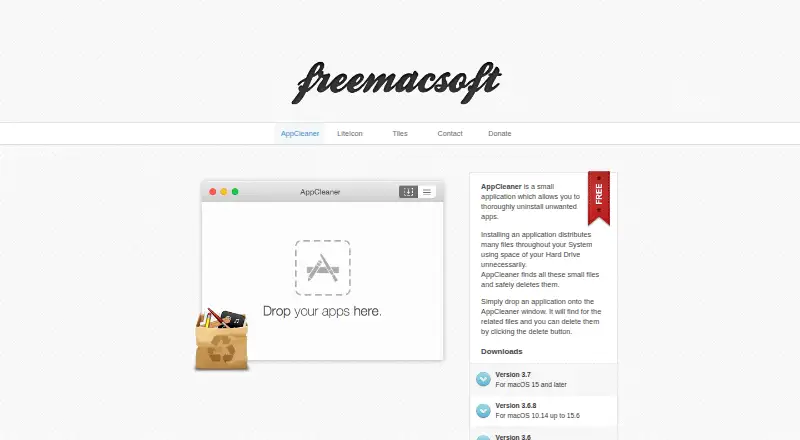
What AppCleaner is
AppCleaner is a free macOS utility for uninstalling applications and finding files associated with them across the system. To remove an app, users drop it onto the AppCleaner window, review the related files found, and choose delete. Version 3.7 improves searches for related files in Application Scripts and asks for Full Disk Access, warning that some files may remain if access is not granted. The utility can search for files associated with system apps, but it cannot remove those apps. The download page lists version 3.7 for macOS 15 and later, version 3.6.8 for macOS 10.14 up to 15.6, version 3.6 for macOS 10.13, and version 3.4 for macOS 10.10 up to 10.12. Version 3.6 added native Apple M1 support. AppCleaner can detect apps inside disk images and offer to remove the disk image file instead. Its login item appears in System Settings, and a preference can hide protected apps. Version 3.7 also updated the Sparkle in-app updater to address a security issue; release notes say updates have been served over HTTPS since version 3.2.
Who it suits
AppCleaner suits Mac users who want to remove applications and inspect related files as part of the uninstall process. Users should select a download that matches their macOS version and consider the Full Disk Access prompt.
What it does well
- Free macOS application uninstaller.
- Shows related files before deletion.
- Offers downloads for several macOS generations.
- Can detect apps inside disk images.
- Version 3.6 added native Apple M1 support.
What to know first
- Some files may remain without Full Disk Access.
- System apps can be searched, but not removed.
- Supported macOS versions vary by download.
Limits
Version 3.7 warns that some files may fail to be removed without Full Disk Access. AppCleaner can find related files for system apps, but it cannot remove those apps.
Plans
| Plan | Billed and limits | Price |
|---|---|---|
| AppCleaner | macOS app uninstaller · supported macOS versions vary by download | Free |
As freemacsoft.net lists them, read 5 Oct 2026. The maker's own page has the final word.
Getting started
- Visit https://freemacsoft.net/appcleaner/.
- Choose the download version for your macOS generation.
- Open AppCleaner and drop an application onto its window.
- Review the related files it finds.
- Grant Full Disk Access when prompted, then click delete to remove the selected files.
AppCleaner is a free Mac utility for uninstalling applications and reviewing files they leave across the system. It suits Mac users who want a focused removal workflow; version compatibility and Full Disk Access determine how completely it can work.
Overview
Uninstalling with AppCleaner is a deliberate three-step process: drop an application into its window, review the related files it finds, then click delete. That review step gives users a chance to inspect what will be removed rather than treating cleanup as an entirely automatic operation.
The utility can search for files associated with system apps, but it cannot remove the apps themselves. Version 3.7 improves searches in Application Scripts, a specific gain for finding related files in that location. AppCleaner can also detect apps in disk images and offer to remove the disk image file instead.
Key features
- Related-file cleanup: AppCleaner looks for files an app has distributed across the system and lets users review them before deletion. The workflow is useful for targeted cleanup, though version 3.7 warns that some files may not be removed without Full Disk Access.
- System-app search: Users can search for files related to system apps, but those apps are protected from removal. This helps locate related files without making AppCleaner a way to uninstall built-in apps.
- Version-specific behavior: Version 3.7 adds a launch setting for choosing the default view. The login item uses the modern API and appears in System Settings. A preference can hide protected apps.
- Security and updates: Version 3.7 updates the Sparkle in-app updater to fix a security issue; release notes say updates have been served over HTTPS since version 3.2.
Pricing
AppCleaner is free: its plan costs nothing. There is no paid tier to weigh against the core removal workflow, making it a straightforward option for Mac users who want this focused utility without a software cost.
Platforms
AppCleaner is for macOS, but choosing the matching download matters. The download page lists version 3.7 for macOS 15 and later, version 3.6.8 for macOS 10.14 up to 15.6, version 3.6 for macOS 10.13, and version 3.4 for macOS 10.10 up to 10.12. Version 3.6 added native Apple M1 support. Version 3.7 is also described as adding macOS 27 (Golden Gate) support.
Version 3.7 prompts users for Full Disk Access and warns that some files may fail to be removed without it. Users who do not grant that access should not expect every related file to be removable.
Who it's for
AppCleaner is a good fit for Mac users who want to remove an unwanted application while checking the associated files before deleting them. It is less suitable for anyone who needs to uninstall system apps, or who wants to avoid granting Full Disk Access while expecting the broadest possible file removal.
Pros and cons
- Pro: The drop, review, and delete workflow gives users a chance to inspect related files before removal.
- Pro: Version-specific downloads cover several macOS generations, including native Apple M1 support in version 3.6.
- Pro: The utility is free, with no paid plan required for its stated uninstall workflow.
- Con: Version 3.7 warns that some files may remain without Full Disk Access, so its cleanup can depend on a system permission.
- Con: Related-file search does not make system apps removable.
- Con: Users must select a compatible version for their macOS release rather than treating one download as universal.
Alternatives
These alternatives cover Windows as well as macOS; choose based on the platform and workflow you need.
- Jharu is another free option that supports macOS and Windows, so it is worth considering if cross-platform availability matters.
- IObit Uninstaller is a free-plan Windows option with batch uninstall, drag-and-drop removal, and automatic leftover cleanup; choose it for those Windows-specific capabilities.
- Argente Uninstall Manager offers a free Windows plan for one PC; choose it if a one-PC Windows uninstaller is what you need.
- Bulk Crap Uninstaller is free for private and commercial use under Apache 2.0 and supports Windows 10 or newer; it suits readers looking for a Windows desktop tool with those terms.
- Geek Uninstaller has a free personal-use Windows edition with no support, as well as a PRO plan; consider it for a Windows-focused alternative.
- HiBit Uninstaller is a free Windows alternative for readers seeking an option on that platform.
- Soft Organizer offers a free plan for personal and educational use alongside Pro licenses; consider it if those Windows use terms fit.
- Wise Program Uninstaller has a free Windows plan that includes uninstalling apps, handling stubborn or unlisted apps, removing browser extensions, and analyzing software health; choose it for those stated functions.
- Software Uninstaller Tools is the broader category to browse when you want more options.
Verdict
Choose AppCleaner if you use a compatible Mac and want a free, focused way to remove applications while reviewing their related files. Its main advantage is that inspect-before-delete workflow; look elsewhere if you need Windows support, expect to remove system apps, or do not want to grant Full Disk Access while pursuing the most complete removal possible.
Verdict
AppCleaner offers a straightforward drop, review, and delete workflow for Mac applications and related files. Its usefulness depends on choosing the version for the macOS release in use, and some file removal may require Full Disk Access.
Questions
Is AppCleaner free?
Yes. The AppCleaner plan is free.
Which operating system does AppCleaner support?
It is for macOS. The download page lists versions for macOS 15 and later, macOS 10.14 up to 15.6, macOS 10.13, and macOS 10.10 up to 10.12.
How does uninstalling an app work?
Drop the application onto the AppCleaner window, review the related files it finds, and click delete.
Does AppCleaner need Full Disk Access?
Version 3.7 prompts for Full Disk Access and warns that some files may not be removed without it.
Can AppCleaner remove system apps?
No. It can search for related files of system apps, but the system apps cannot be removed.
Who makes AppCleaner?
The maker’s site is freemacsoft.net and lists [email protected].
Facts from AppCleaner's own pages
- Apple silicon
- Version 3.6 added native Apple M1 support. · freemacsoft.net, 5 Oct 2026
- Contact
- The maker's site lists [email protected]. · freemacsoft.net, 5 Oct 2026
- Current version
- The download page lists version 3.7 for macOS 15 and later. · freemacsoft.net, 5 Oct 2026
- Disk images
- Version 3.6.4 added detection of apps in disk images and offers to remove the disk image file instead. · freemacsoft.net, 5 Oct 2026
- Downloads
- The download page lists versions for macOS 15 and later, macOS 10.14 up to 15.6, macOS 10.13, and macOS 10.10 up to 10.12. · freemacsoft.net, 5 Oct 2026
- File search
- The 3.7 release improved the search for related files in Application Scripts. · freemacsoft.net, 5 Oct 2026
- Free plan
- Yes · freemacsoft.net, 21 Sept 2026
- Full Disk Access
- Version 3.7 prompts for Full Disk Access and warns that some files may fail to be removed without it. · freemacsoft.net, 5 Oct 2026
- Launch setting
- Version 3.7 added a setting to choose the default view at launch. · freemacsoft.net, 5 Oct 2026
- Leftover scan
- Yes · freemacsoft.net, 21 Sept 2026
- Login item
- The login item uses the modern API and appears in System Settings. · freemacsoft.net, 5 Oct 2026
- macOS 27 support
- Version 3.7 added support for macOS 27 (Golden Gate). · freemacsoft.net, 5 Oct 2026
- Older macOS versions
- The download page also lists version 3.6.8 for macOS 10.14 up to 15.6, version 3.6 for macOS 10.13, and version 3.4 for macOS 10.10 up to 10.12. · freemacsoft.net, 5 Oct 2026
- Protected apps
- A preference can hide protected apps, and Apple apps were protected on El Capitan due to System Integrity Protection. · freemacsoft.net, 5 Oct 2026
- Purpose
- AppCleaner is a small application for thoroughly uninstalling unwanted apps. · freemacsoft.net, 5 Oct 2026
- Related files
- It finds files distributed throughout the system by an app and lets users delete them. · freemacsoft.net, 5 Oct 2026
- Removal workflow
- Users can drop an application onto the AppCleaner window, review related files, and click the delete button. · freemacsoft.net, 5 Oct 2026
- Search
- Version 3.7 improves the search for related files in Application Scripts. · freemacsoft.net, 5 Oct 2026
- Security
- Version 3.7 updated Sparkle, the in-app updater, to fix a security issue. · freemacsoft.net, 5 Oct 2026
- System apps
- AppCleaner can search for related files of system apps, but system apps cannot be removed. · freemacsoft.net, 5 Oct 2026
- Updates
- The release notes say updates were served over HTTPS starting with version 3.2. · freemacsoft.net, 5 Oct 2026
- Update security
- Version 3.2 notes say updates are served over HTTPS for extra security. · freemacsoft.net, 5 Oct 2026
Where AppCleaner stands on Freedom251
- Software Uninstaller Tools#3 of 35
- Uninstallers#12 of 35
- Uninstaller apps#15 of 36