Freedom251 › Software Uninstaller Tools
Advanced Uninstaller PRO
What Advanced Uninstaller PRO is
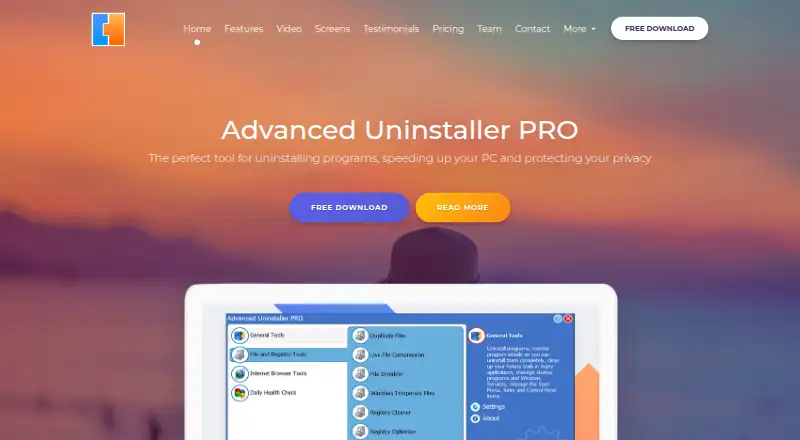
Advanced Uninstaller PRO is a Windows utility for removing programs and managing related cleanup. Its leftover scan looks for files and other items left behind after removal, and Batch Uninstall lets users remove multiple programs. Installation Monitor tracks changes made during an installation to help with a later uninstall. The utility also repairs broken registry entries, cleans broken Start Menu shortcuts, manages startup programs, and detects duplicate files.
Privacy tools delete browsing and document-opening history and shred selected files and folders to prevent recovery. Browser tools manage history, add-ons, and temporary files for Internet Explorer, Firefox, and Chrome. The free edition is described by its maker as remaining free. A separately priced Daily Health Check expansion adds virus detection, application leftover cleanup, startup management, browser extension monitoring, and temporary file deletion. Listed expansion plans include $14 a month, $29 a year, and $39 a year for two years; listed plan details also include Windows log file and memory dump removal and priority customer support. The download page lists Windows 11, 10, 8.1, 8, 7, Vista, and XP in 32-bit and 64-bit versions.
Who it suits
It suits Windows users who want to remove programs and clean up related leftovers, with tools for installation tracking, startup management, and privacy cleanup. The Daily Health Check expansion is for users who also want its added maintenance features and priority support.
What it does well
- Scans for leftovers after uninstalling programs.
- Removes multiple programs in a batch.
- Tracks changes made during software installation.
- Shreds selected files and folders to prevent recovery.
- Includes cleanup tools for Internet Explorer, Firefox, and Chrome.
What to know first
- The listed platform support is Windows only.
- Daily Health Check features require a paid expansion.
Limits
The free edition does not include the separately priced Daily Health Check expansion. Listed expansion plans include $14 a month, $29 a year, and $39 a year for two years.
Plans
| Plan | Billed and limits | Price |
|---|---|---|
| Daily Health Check — 1 year | 1 Year of Unlimited Use · Startup virus detection · Application leftover cleanup · Priority customer support · Windows log files removal · Windows memory dump | $29 a year |
| Daily Health Check — 2 years | 2 Years of Unlimited Use · Startup virus detection · Application leftover cleanup · Priority customer support · Windows log files removal · Windows memory dump | $39 a year |
| Daily Health Check — 1 YEAR PLAN | Shown alongside $29.00 · 1 Year of Unlimited Use · Startup Virus Detection · Application Leftover Cleanup · Priority Customer Support · Windows Log Files Removal · Windows Memory Dump | $10.15 a year |
| Daily Health Check — 2 YEARS PLAN | Shown alongside $39.00 · 2 Years of Unlimited Use · Startup Virus Detection · Application Leftover Cleanup · Priority Customer Support · Windows Log Files Removal · Windows Memory Dump | $15.60 a year |
| Daily Health Check — 30 DAYS | Shown alongside $14.00 · 1 Month of Unlimited Use · Startup Virus Detection · Application Leftover Cleanup · Priority Customer Support · Windows Log Files Removal · Windows Memory Dump | $9.10 a month |
As advanceduninstaller.com lists them, read 23 Sept 2026. The maker's own page has the final word.
Getting started
- Visit the Advanced Uninstaller PRO website.
- Download the Windows edition for your system.
- Choose the free edition or a Daily Health Check plan.
- Install the utility and use Installation Monitor to track software installations.
Verdict
Choose Advanced Uninstaller PRO if you want Windows uninstall and cleanup tools, including leftover scanning and installation monitoring. Consider whether you need Daily Health Check features such as virus detection and priority support, which are part of its paid expansion.
Questions
Is Advanced Uninstaller PRO free?
Yes. The maker says the free edition will always remain free.
What does Daily Health Check add?
It adds virus detection, application leftover cleanup, startup management, browser extension monitoring, and temporary file deletion. Listed plan details also include Windows log file removal, memory dump removal, and priority customer support.
What does a Daily Health Check plan cost?
Listed plans are $14 a month, $29 a year, and $39 a year for two years.
Which Windows versions are listed?
The download page lists Windows 11, 10, 8.1, 8, 7, Vista, and XP in 32-bit and 64-bit versions.
Which browsers have related tools?
The maker describes tools for Internet Explorer, Firefox, and Chrome.
Who makes Advanced Uninstaller PRO?
Innovative Solutions says it was founded in Bucharest, Romania, in 1997 by software engineers Dan Armano and Daniel Statescu.
Facts from Advanced Uninstaller PRO's own pages
- Batch uninstall
- Yes · advanceduninstaller.com, 23 Sept 2026
- Browser tools
- The maker describes tools for managing browsing history, add-ons, and temporary files for Internet Explorer, Firefox, and Chrome. · help.advanceduninstaller.com, 7 Oct 2026
- Company
- Innovative Solutions says it was founded in Bucharest, Romania, in 1997 by software engineers Dan Armano and Daniel Statescu. · innovative-sol.com, 7 Oct 2026
- Daily Health Check
- The paid Daily Health Check expansion adds virus detection, application leftover cleanup, startup management, browser extension monitoring, and temporary file deletion. · advanceduninstaller.com, 7 Oct 2026
- Free edition
- The maker says Advanced Uninstaller PRO is free and will always remain free, with advanced features available through the separately priced Daily Health Check expansion. · advanceduninstaller.com, 7 Oct 2026
- Free plan
- Yes · advanceduninstaller.com, 23 Sept 2026
- Installation Monitor
- Its Installation Monitor tracks changes made during software installation to help completely remove programs later. · advanceduninstaller.com, 7 Oct 2026
- Install monitoring
- Yes · advanceduninstaller.com, 23 Sept 2026
- Leftover scan
- Yes · advanceduninstaller.com, 23 Sept 2026
- PC maintenance
- The product can repair broken registry entries, clean broken Start Menu shortcuts, manage startup programs, and detect duplicate files. · advanceduninstaller.com, 7 Oct 2026
- Privacy and data
- The privacy policy says the site collects data such as name and email, and that sensitive payment information is transmitted using SSL and stored in payment gateway providers' databases rather than on its servers. · advanceduninstaller.com, 7 Oct 2026
- Privacy tools
- It can delete browsing and document-opening history and shred selected files and folders to prevent recovery. · advanceduninstaller.com, 7 Oct 2026
- Purpose
- Advanced Uninstaller PRO is a Windows utility for quickly and completely uninstalling programs. · advanceduninstaller.com, 7 Oct 2026
- Paid from
- 39 · advanceduninstaller.com, 23 Sept 2026
- Support
- The contact page says replies are sent within two business days, and the pricing page lists priority customer support with Daily Health Check plans. · advanceduninstaller.com, 7 Oct 2026
- Windows compatibility
- The download page lists Windows 11, 10, 8.1, 8, 7, Vista, and XP, in both 32-bit and 64-bit versions. · advanceduninstaller.com, 7 Oct 2026
Where Advanced Uninstaller PRO stands on Freedom251
- Software Uninstaller Tools#2 of 35
- Uninstaller apps#14 of 36
- Uninstallers#17 of 35