Freedom251 › Software Uninstaller Tools

Absolute Uninstaller
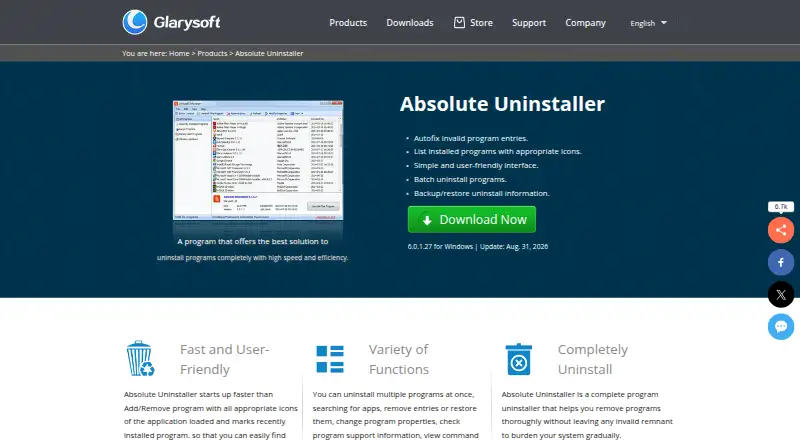
What Absolute Uninstaller is
Absolute Uninstaller is a Windows utility for removing installed applications and leftover junk files. It expands on the standard Add/Remove program with batch uninstall and a searchable list of installed software. The list shows application icons and marks recently installed programs, while search helps locate an entry. Users can also remove or restore entries, change program properties, inspect command lines, and export the program list.
The utility can back up certain programs in case something goes wrong and can automatically fix invalid program entries. It is offered as freeware at no cost, with no free trial. The listed plan supports Windows 11, 10, 8, 7, 2000, XP, and Vista in 32- and 64-bit versions. The product page lists version 6.0.1.27, updated August 31, 2026. Glarysoft describes its focus as developing utility software for Windows systems. It directs technical questions and bug reports to email and says it usually replies within one or two business days. Glarysoft also says it analyzed the latest version using 30 antivirus engines and found it virus-free. Its privacy policy says some products may gather anonymous computer, IP address, other-software, and feature-use information to understand usage and improve products.
Who it suits
Absolute Uninstaller suits Windows users who want to remove several applications, clear leftover files, and manage installed program entries from one list. Its backup, restore, invalid-entry repair, and export controls may also suit people who want additional options when maintaining that list.
What it does well
- Batch uninstall handles multiple applications.
- Scans for leftover junk files during removal.
- Searchable program list marks recently installed applications.
- Can back up certain programs and restore entries.
- Automatically fixes invalid program entries.
- Exports the installed program list.
What to know first
- Available for Windows only.
- No free trial; the product is freeware.
Plans
| Plan | Billed and limits | Price |
|---|---|---|
| Absolute Uninstaller | Free · Freeware · Windows 11, 10, 8, 7, 2000, XP, Vista · 32/64-bit | Free |
As glarysoft.com lists them, read 9 Oct 2026. The maker's own page has the final word.
Getting started
- Open the Absolute Uninstaller product page.
- Download the freeware for a supported Windows version.
- Install and open the program to view the installed application list.
- Search for applications or select entries to remove, restore, or manage.
Overview
Absolute Uninstaller is a free Windows utility for removing applications and cleaning up leftover files. It suits Windows users who want batch removal and a few extra controls for keeping the installed-program list tidy. Its strengths are practical housekeeping tools; its reach is limited to Windows.
Key features
Batch uninstall lets you queue multiple programs for removal, which is useful when clearing out several unwanted apps at once. A leftover scan aims to catch junk files after removal, while backup for certain programs offers a way to recover from mistakes. These tools address common frustrations with Windows’ built-in Add/Remove program, though the backup applies only to certain programs.
The program list shows icons and marks recently installed software, and search helps locate a specific entry. Absolute Uninstaller can also remove or restore entries, change program properties, show command lines, export the list, and automatically fix invalid entries. That makes it more than a basic remover: it offers useful visibility and list management for users who maintain their installed software. Glarysoft lists version 6.0.1.27, updated August 31, 2026.
Pricing
Absolute Uninstaller is freeware at no cost, with no trial required. The named plan covers the Windows application, including batch uninstall and leftover scanning. There is no paid tier to unlock additional capabilities, so it fits users who want these removal and management tools at no cost. The trade-off is a Windows-only option rather than a choice for people managing apps on other platforms.
Platforms
Absolute Uninstaller supports Windows. Its plan names Windows 11, 10, 8, 7, 2000, XP, and Vista, in 32-bit and 64-bit editions. Windows users on those systems are the intended audience; macOS users need a different tool.
Who it's for
Choose Absolute Uninstaller if you regularly remove Windows programs in batches, want a cleanup scan for leftovers, or need controls such as restoring entries and exporting the program list. It is less compelling if you only need a basic one-at-a-time uninstall, use another operating system, or want support through a channel other than email. Glarysoft says it usually responds to technical questions and bug reports within one or two business days.
Pros and cons
Pros
- Batch uninstall and leftover scanning combine two useful cleanup steps in one free Windows utility.
- Backup for certain programs and automatic repair of invalid entries can help when managing program removals goes wrong.
- Search, recent-install markers, command-line display, and list export give users more ways to inspect and manage installed software.
Cons
- Windows support excludes anyone looking for a cross-platform uninstaller.
- Backup is limited to certain programs, so it is not a universal safeguard for every removal.
- Technical questions and bug reports go to email, with a typical response time of one or two business days.
Alternatives
For a broader comparison, browse the Software Uninstaller Tools list. Windows users who want another free option with batch uninstall, Windows app removal, drag-and-drop uninstall, and automatic leftover cleanup should consider IObit Uninstaller. Mac users should choose AppCleaner, a free macOS uninstaller whose supported versions vary by download. Argente Uninstall Manager offers a free plan for one PC forever, with a lower donation reminder frequency. Bulk Crap Uninstaller is another free Windows option for private and commercial use under Apache 2.0; version 6 supports Windows 10 or newer. Geek Uninstaller has a free plan for personal use and a paid Pro plan at $24.95 a month. HiBit Uninstaller is a free Windows alternative. InstallerClean is free for 64-bit Windows 10 version 1607 or later and requires administrator privileges. Jharu is a free option for macOS and Windows.
Verdict
Absolute Uninstaller is a sensible pick for Windows users who want batch removal, leftover-file cleanup, and installed-program list controls without paying. Its extra management features give it a clear role beyond basic removal, but Windows-only support and limited backup coverage narrow its appeal. Look elsewhere if you need an uninstaller for macOS or a tool with a broader platform fit.
Verdict
Pick Absolute Uninstaller if you use Windows and want batch removal, leftover-file cleanup, and controls for managing program entries. It is not an option for users on other platforms, and Glarysoft directs technical questions and bug reports to email support.
Questions
How much does Absolute Uninstaller cost?
The plan is listed as free. It is freeware, and there is no free trial.
Which Windows versions are listed?
Windows 11, 10, 8, 7, 2000, XP, and Vista are listed, in 32- and 64-bit versions.
Can it remove multiple programs at once?
Yes. Batch uninstall is listed, and the utility can also remove leftover junk files.
What can I do with entries in the program list?
Users can search the list, remove or restore entries, change program properties, view command lines, and export the list.
Who makes Absolute Uninstaller?
Glarysoft makes the utility and says it specializes in utility software for Windows systems.
How can I contact support?
Glarysoft directs technical questions and bug reports to email and says it usually responds within one or two business days.
Facts from Absolute Uninstaller's own pages
- Additional controls
- The product can remove or restore entries, change program properties, show command lines, and export the program list. · glarysoft.com, 9 Oct 2026
- Backup
- It allows users to back up certain programs in case of mistakes. · glarysoft.com, 9 Oct 2026
- Batch uninstall
- It supports uninstalling multiple applications from the system with a single click. · glarysoft.com, 9 Oct 2026
- Free plan
- Yes · glarysoft.com, 23 Sept 2026
- Integrations
- The opened Absolute Uninstaller product pages do not state integrations with third-party products or services. · glarysoft.com, 9 Oct 2026
- Invalid entries
- It can automatically fix invalid program entries. · glarysoft.com, 9 Oct 2026
- Latest version
- The product page lists version 6.0.1.27, updated August 31, 2026. · glarysoft.com, 9 Oct 2026
- Maker focus
- Glarysoft says it specializes in developing utility software for Windows systems. · glarysoft.com, 9 Oct 2026
- Privacy
- Glarysoft's privacy policy says some products may collect anonymous computer, IP address, other-software, and feature-use information to understand product usage and improve products. · glarysoft.com, 9 Oct 2026
- Program list
- It lists installed programs with their icons and marks recently installed programs. · glarysoft.com, 9 Oct 2026
- Purpose
- Absolute Uninstaller is an enhanced Windows Add/Remove program that removes applications and leftover junk files. · glarysoft.com, 9 Oct 2026
- Search
- Users can search for applications in the program list. · glarysoft.com, 9 Oct 2026
- Security claim
- Glarysoft states that it analyzed the latest version with 30 antivirus engines and found it virus-free. · glarysoft.com, 9 Oct 2026
- Support
- Glarysoft directs users to email technical questions and bug reports and says it usually responds within one or two business days. · glarysoft.com, 9 Oct 2026
Where Absolute Uninstaller stands on Freedom251
- Software Uninstaller Tools#1 of 35
- Uninstaller apps#17 of 36
- Uninstallers#21 of 35