
Geek Uninstaller
What Geek Uninstaller is
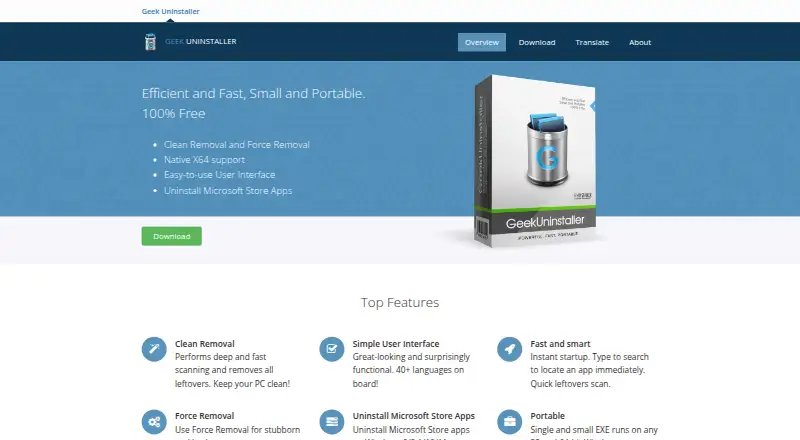
Geek Uninstaller is a Windows utility for removing unwanted software, with a free portable edition and a paid offering associated with Uninstall Tool. After a standard uninstall, it scans for leftover files and registry items. Force Removal is intended for programs that are stubborn or cannot be removed normally. The free edition can also uninstall Microsoft Store apps on Windows 8, 8.1, 10, and 11, and runs as a single EXE on 32-bit and 64-bit Windows. It supports Windows 7 through 11 and requires administrator permissions. Its interface is translated into more than 40 languages. The free plan costs nothing, is for personal use, and includes no support; it does not offer batch uninstall or installation monitoring. Paid listings have different terms: Geek Uninstaller PRO is listed at $24.95 a month with a lifetime license, while Uninstall Tool Standard License is $24.95, paid once and Portable License is $39.95, paid once. Uninstall Tool adds installation monitoring, startup management, batch removal, thorough removal, and technical support. A 30-day free trial is listed for Uninstall Tool.
Who it suits
It suits Windows users who want a portable utility for removing programs and scanning for leftovers. The free edition is limited to personal use, while users needing batch removal or installation monitoring can consider the listed paid options.
What it does well
- Portable free EXE runs on 32-bit and 64-bit Windows.
- Scans for leftover files and registry items.
- Force Removal targets programs that resist normal removal.
- Can uninstall Microsoft Store apps on Windows 8 through 11.
- Interface translated into more than 40 languages.
What to know first
- Free plan is for personal use only.
- Free edition includes no support.
- Free edition lacks batch uninstall and installation monitoring.
- Requires administrator permissions.
Limits
The free plan is limited to personal use and has no support, batch uninstall or installation monitoring. Uninstall Tool's free trial lasts 30 days.
Plans
| Plan | Billed and limits | Price |
|---|---|---|
| Geek Uninstaller Free | Personal use only · No support · ZIP 3.04 MB or 7Z 2.11 MB | Free |
| Geek Uninstaller PRO | life-time license; from $24.95 · Real-time installation monitor · Start-up programs management · Batch removal · Thorough and complete removal · Technical support · Portable license available | $24.95 a month |
| Uninstall Tool Standard License | one-time payment · Per-PC license · Volume discounts available · Lifetime technical support | $24.95, paid once |
| Uninstall Tool Portable License | one-time payment · Single user · Multiple PCs · USB portable mode · Lifetime technical support | $39.95, paid once |
As geekuninstaller.com lists them, read 28 Sept 2026. The maker's own page has the final word.
Getting started
- Visit https://geekuninstaller.com/.
- Use the free edition's ZIP or 7Z download.
- Run the portable EXE on a supported Windows computer with administrator permissions.
- For Uninstall Tool, start the 30-day free trial or choose a listed license.
Geek Uninstaller is a compact Windows remover for people who want portable cleanup of individual programs, including stubborn installations. It is strongest when a normal uninstall leaves debris or fails altogether; readers needing batch administration, installation tracking, or included support should look beyond the free edition.
Overview
The free utility runs directly from one small EXE on 32-bit or 64-bit Windows, so it does not add a conventional installation to the machine being serviced. It requires administrator permissions and supports Windows 7, 8, 8.1, 10, and 11. More than 40 interface languages make it approachable across regions, while the personal-use restriction limits its suitability for business deployment.
After a program's standard uninstaller finishes, Geek Uninstaller performs a deeper check for leftover files and registry items. Its Force Removal function targets broken or stubborn programs that cannot be removed through the usual route. It can also uninstall Microsoft Store applications on Windows 8, 8.1, 10, and 11. This is a focused toolkit for one-off cleanup rather than a full software-management console.
Key features
Leftover scanning and Force Removal
Post-uninstall scanning is valuable when an application's own remover leaves configuration files or registry entries behind. Force Removal gives you a practical escape route for damaged installations and programs that refuse a normal uninstall. Neither feature changes the fact that each removal is handled individually: batch uninstall is not included.
Portable operation
The free edition's small, portable executable is useful for technicians or users who want to carry the utility and run it only when needed. It works on both 32-bit and 64-bit Windows and does not require a permanent installation. There is no real-time installation monitoring, so it cannot record changes as software is installed for later rollback.
Paid management additions
The paid product, Uninstall Tool, adds real-time installation monitoring, startup-program management, batch removal, thorough and complete removal, and technical support. Those additions matter to people maintaining many applications or monitoring a changing PC; they are less compelling if you only occasionally remove one program.
Pricing
Geek Uninstaller Free costs nothing for personal use. It includes the portable removal utility, but no support; downloads are a 3.04 MB ZIP or 2.11 MB 7Z archive. It is the sensible starting point for occasional home cleanup, not a commercial-use license.
Geek Uninstaller PRO is shown at $24.95 a month, described as a billed lifetime license and priced from $24.95. It adds the Uninstall Tool feature set: real-time installation monitoring, startup-program management, batch removal, thorough removal, technical support, and a portable license option. A 30-day free trial lets you evaluate it before committing. Because the billing wording combines a monthly figure with a lifetime-license description, confirm the purchase terms before paying.
Uninstall Tool Standard License costs $24.95, paid once as a one-time payment for one PC, with volume discounts and lifetime technical support. It fits a single maintained workstation. Uninstall Tool Portable License costs $39.95, paid once; it is for one user across multiple PCs, supports USB portable mode, and includes lifetime technical support. Choose it when moving between machines is central to your workflow. The EULA says a single-user license normally installs on one computer unless the purchased license states otherwise. Activated copies contact CrystalIDEA's license-verification service at startup and send an encrypted license key, hardware identifier, software version, and operating-system version.
Platforms
Geek Uninstaller supports Windows 7, 8, 8.1, 10, and 11 in 32-bit and 64-bit editions, with administrator permissions required. Platform support is Windows; the listed platform support specifically includes Windows 11.
Who it's for
Pick the free edition for personal, occasional removal where portability, leftover scanning, and a remedy for failed uninstallers matter more than automation. Pick Uninstall Tool when batch removal, installation monitoring, startup management, portability between multiple PCs, or technical support justifies paying. It is not a strong fit for users who need macOS support, commercial rights in the free edition, or a large-scale unattended management workflow.
Pros and cons
- Pros: Portable EXE operation avoids a permanent install; leftover scanning checks files and registry entries; Force Removal handles broken uninstallers; Microsoft Store app removal covers Windows 8 through 11; more than 40 languages improve accessibility.
- Cons: The free plan is personal-use only and has no support; it lacks batch uninstall and installation monitoring; paid plan naming and billing descriptions differ, so buyers should verify terms; the standard paid license is per PC.
Alternatives
Software Uninstaller Tools is the broader comparison for readers choosing among dedicated uninstallers.
- IObit Uninstaller is a better match if you want a free Windows option with batch uninstall, Windows app removal, drag-and-drop uninstall, and automatic leftover cleanup.
- Absolute Uninstaller suits readers seeking free Windows freeware across older systems, including Windows XP and Vista, without a trial requirement.
- AppCleaner is the alternative for macOS users rather than Windows users.
- Argente Uninstall Manager offers a free one-PC-forever tier and paid tiers for one or three PCs.
- Bulk Crap Uninstaller is worth considering for free private or commercial Windows use under the Apache 2.0 license, with version 6 supporting Windows 10 or newer.
- HiBit Uninstaller is another free Windows uninstaller.
- InstallerClean targets 64-bit Windows 10 version 1607 or later and requires administrator privileges.
- Jharu is a free option spanning macOS and Windows.
Verdict
Choose Geek Uninstaller Free if you want a small, portable Windows tool for personal cleanup, especially when leftovers or a failed uninstaller are the problem. Choose Uninstall Tool when batch work, monitoring, startup management, or support will save time. Look elsewhere if you need commercial rights in the free tier, macOS coverage, or a clearer single-plan billing model.
Verdict
Geek Uninstaller's free edition covers portable Windows removal and leftover scanning, but omits batch uninstall and installation monitoring. Compare the paid listings carefully, since their names and billing terms differ.
Questions
Is Geek Uninstaller free?
Yes. Geek Uninstaller Free is listed as free and is for personal use.
What does Geek Uninstaller cost?
Geek Uninstaller PRO is listed at $24.95 a month with a lifetime license. Uninstall Tool Standard License is $24.95, paid once, and its Portable License is $39.95, paid once.
Which Windows versions does the free edition support?
It supports 32-bit and 64-bit Windows 11, 10, 7, 8 and 8.1, and requires administrator permissions.
Can it remove Microsoft Store apps?
Yes. It can uninstall Microsoft Store apps on Windows 8, 8.1, 10 and 11.
What does Uninstall Tool add?
It adds real-time installation monitoring, startup-program management, batch removal, thorough removal and technical support.
Who makes Uninstall Tool?
Uninstall Tool is developed by CrystalIDEA Software based on Thomas Koen's code.
Facts from Geek Uninstaller's own pages
- Batch uninstall
- No · geekuninstaller.com, 23 Sept 2026
- Clean removal
- It performs deep scanning after standard uninstall and removes leftover files and registry items. · geekuninstaller.com, 28 Sept 2026
- Compatibility
- The free edition supports 32-bit and 64-bit Windows 11, 10, 7, 8 and 8.1 and requires administrator permissions. · geekuninstaller.com, 28 Sept 2026
- Forced uninstall
- Yes · geekuninstaller.com, 23 Sept 2026
- Force removal
- Force Removal is intended for stubborn or broken programs that cannot be removed normally. · geekuninstaller.com, 28 Sept 2026
- Founded
- 2012 · geekuninstaller.com, 19 Oct 2026
- Free plan
- Yes · geekuninstaller.com, 23 Sept 2026
- Install monitoring
- No · geekuninstaller.com, 23 Sept 2026
- Languages
- The interface is translated into more than 40 languages. · geekuninstaller.com, 28 Sept 2026
- Leftover scan
- Yes · geekuninstaller.com, 23 Sept 2026
- License limits
- The EULA says a single-user license may be installed on one computer unless the purchased license expressly provides otherwise. · crystalidea.com, 28 Sept 2026
- License validation
- Activated Uninstall Tool copies connect at startup to CrystalIDEA's license-verification service and transmit an encrypted license key, hardware identifier, software version and operating-system version. · crystalidea.com, 28 Sept 2026
- Microsoft Store apps
- It can uninstall Microsoft Store apps on Windows 8, 8.1, 10 and 11. · geekuninstaller.com, 28 Sept 2026
- Portability
- The free edition is a single small EXE that runs on 32-bit and 64-bit Windows. · geekuninstaller.com, 28 Sept 2026
- Portable version
- Yes · geekuninstaller.com, 23 Sept 2026
- Privacy analytics
- CrystalIDEA says its website uses self-hosted Plausible Analytics with no cookies, no personal-data collection and aggregate-only statistics. · crystalidea.com, 28 Sept 2026
- Pro features
- Uninstall Tool adds real-time installation monitoring, startup-program management, batch removal, thorough removal and technical support. · crystalidea.com, 28 Sept 2026
- Pro relationship
- Geek Uninstaller Pro is called Uninstall Tool and is developed by CrystalIDEA Software based on Thomas Koen's code. · geekuninstaller.com, 28 Sept 2026
- Purpose
- Geek Uninstaller is a fast utility for removing unwanted software from Windows. · geekuninstaller.com, 28 Sept 2026
- Support
- Uninstall Tool support includes documentation, FAQs, release notes, GitHub issue tracking and email contact. · crystalidea.com, 28 Sept 2026
- Trial
- Uninstall Tool can be tried free for 30 days. · crystalidea.com, 28 Sept 2026
Where Geek Uninstaller stands on Freedom251
- Uninstaller apps#9 of 36
- Software Uninstaller Tools#9 of 35
- Uninstallers#9 of 35