Freedom251 › Presentation software

Apache OpenOffice Impress
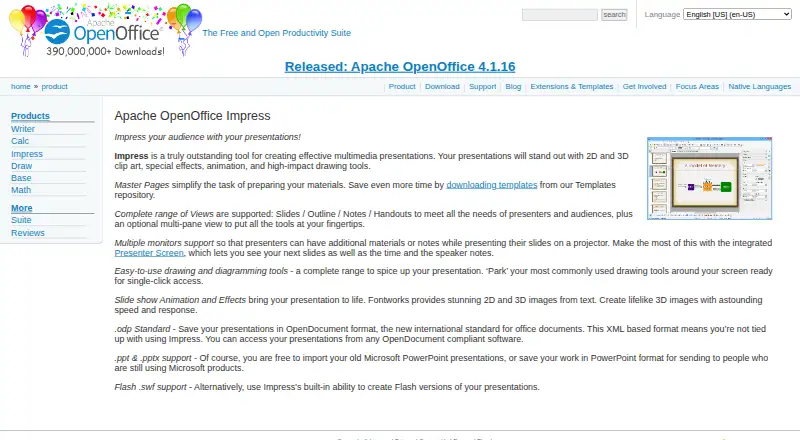
What Apache OpenOffice Impress is
Apache OpenOffice Impress is a desktop tool for creating multimedia presentations, available for Windows, GNU/Linux, and macOS. It can save in OpenDocument format and import or save PowerPoint .ppt and .pptx files. Slides can use drawing tools, animation, special effects, and 2D and 3D clip art. For presenting, multiple-monitor support and Presenter Screen can show upcoming slides, time, and speaker notes. The available views include Slides, Outline, Notes, and Handouts, with an optional multi-pane view. Impress can also create Flash .swf versions of presentations. Users can download templates, and third-party tools can add functions through the OpenOffice extensions framework. The project releases it under Apache License 2.0 and permits domestic, commercial, educational, and public-administration use. The listed support includes volunteer forums and mailing lists, documentation, and professional services from consultants. Impress is free to download and use, with no license fees, and may be installed on as many computers as desired. Real-time collaboration is not supported, while track changes is listed.
Who it suits
Impress suits people who want desktop presentation software with PowerPoint file exchange and offline editing. Its listed permitted uses include home, commercial, education, and public-administration settings.
What it does well
- Imports and saves PowerPoint .ppt and .pptx files.
- Presenter Screen can display notes, time, and upcoming slides.
- Offers Slides, Outline, Notes, and Handouts views.
- Free to use with no license fees.
- Available for Windows, GNU/Linux, and macOS.
What to know first
- Real-time collaboration is not supported.
- Flash .swf output may not suit every workflow.
Limits
The free plan has no license fees and can be installed on as many computers as you like. Real-time collaboration is not supported.
Plans
| Plan | Billed and limits | Price |
|---|---|---|
| Apache OpenOffice Impress | Free to download and use; no license fees; install on as many computers as you like | Free |
As openoffice.org lists them, read 7 Oct 2026. The maker's own page has the final word.
Getting started
- Visit the Apache OpenOffice Impress website.
- Choose a download for Windows, GNU/Linux, or macOS.
- Install the desktop application on your computer.
- Create a presentation or import a PowerPoint .ppt or .pptx file.
- Use the free plan; it has no license fees and permits installation on as many computers as you like.
Apache OpenOffice Impress is a free desktop application for building multimedia presentations and presenting them with speaker-focused controls. It is best suited to individuals, schools, public bodies, nonprofits and businesses that want an offline, license-free authoring tool with broad file compatibility. Choose it when local editing and presenter features matter more than simultaneous online editing.
Overview
Impress combines slide authoring, visual effects and presentation delivery in one desktop package. It runs on Windows, GNU/Linux and macOS, and its Apache License 2.0 permits domestic, commercial, educational and public-administration use. You can install it on as many computers as you like without license fees, which makes it straightforward to deploy across classrooms, offices or personal machines.
The trade-off is its desktop-first workflow. Editing works offline and includes change tracking, but there is no real-time collaboration. Teams that need several people editing the same deck concurrently should look elsewhere.
Key features
Build and format decks
Slides, Outline, Notes and Handouts views support different stages of preparation: arranging content, checking structure, writing speaker material and preparing printed takeaways. An optional multi-pane view can keep several of these tasks visible together. Drawing tools, 2D and 3D clip art, animation and special effects give authors room to create visual presentations without adding separate graphics software.
Impress saves in OpenDocument format and can import or save PowerPoint .ppt and .pptx files. That is useful when exchanging decks with Microsoft Office users, although moving between formats can still require a final formatting check. Flash .swf export is also included for workflows that still require that format. Downloadable templates provide starting points, while the OpenOffice extension framework allows third-party tools to add functions.
Present and manage files
Presenter Screen and multiple-monitor support can display upcoming slides, elapsed time and speaker notes while the audience sees the current slide. Those controls are particularly useful for lectures, training sessions and formal talks where pacing and notes matter. Impress is a desktop application with offline editing, so it remains usable without a network connection.
The package also includes data-editing and database capabilities: HSQLDB, dBase, Microsoft Access, MySQL, PostgreSQL and Adabas D are supported, with a visual query builder and CSV result export. These tools may suit users who want presentation and basic data work in the same desktop suite, but they do not change Impress's focus on slide creation.
Pricing
| Plan | Price | What you get |
|---|---|---|
| Apache OpenOffice Impress | free | Free to download and use, no license fees, installation on as many computers as you like |
There is no free trial because the product itself is free, and no renewal charge or seat quota is attached to the plan. The zero-cost license is compelling for organizations deploying across many machines. In return, you accept a self-managed desktop workflow rather than hosted collaboration. Community forums, mailing lists and documentation provide volunteer support, while listed consultants offer professional services when a project needs paid assistance.
Platforms
Impress is available for Windows, macOS and Linux as a desktop application. The platform coverage suits mixed-device organizations, but it does not provide a web or mobile editing environment. Offline editing is supported on each desktop platform.
Who it's for
Impress fits governments, educational institutions, businesses, nonprofits, IT organizations and free/open-source advocates that need a presentation tool without per-user licensing. It is a sensible choice for individuals who prepare talks locally, exchange files with PowerPoint users and value control over installation and storage.
It is less suitable for distributed teams that expect browser-based co-authoring, live commenting or synchronized edits. Organizations should also maintain their own update and security processes: the project acknowledges that security-relevant bugs can occur and accepts vulnerability reports through its security team.
Pros and cons
- Pro: The 0.00 USD plan allows unlimited installations, removing seat-cost barriers for schools, offices and public deployments.
- Pro: PowerPoint import and export, plus OpenDocument saving, make it practical for mixed-format file exchange.
- Pro: Presenter Screen, multiple-monitor support, notes and timing information strengthen live delivery.
- Pro: Offline editing, templates and extensions support self-contained desktop workflows.
- Con: No real-time collaboration means teams cannot edit a deck together in the same live session.
- Con: Desktop-only availability excludes users who need browser or mobile authoring.
- Con: Moving between presentation formats may require checking layout and effects before delivery.
Alternatives
For a broader starting point, browse Presentation software. If your priority is database work rather than slides, Database Client Software is the more relevant category, while Word Processing Software suits document-focused projects.
- Outerbase Studio is a free, open-source database GUI that runs across web, desktop, mobile and self-hosted environments; choose it for database management rather than presentations.
- CloudBeaver offers a one-year free academic license after student or teacher verification; pick it when that database-focused academic arrangement fits better.
- DBeaver has a free Community edition under Apache License 2 for database work; choose it instead for personal projects centered on databases.
- DbGate is a freemium database application from the Sprinx group; consider it when you need that database-oriented alternative.
- MySQL provides a GPL-licensed Community Edition for SQL and NoSQL applications, replication and high availability components; choose it for database infrastructure.
- SQLPro Studio offers a free student year with approval and a paid lifetime option; pick it for its database workflow if those terms suit you.
- Beekeeper Studio has a free Community plan with common databases, unlimited connections and no tab limits; choose it for accessible database administration.
- DataGrip includes a free non-commercial plan with AI Free and forum or bug-tracker support; choose it for non-commercial database development.
Verdict
Apache OpenOffice Impress is a strong fit for anyone who wants a no-cost, install-anywhere desktop presentation tool with PowerPoint exchange and capable presenter controls. Its main reason to choose it is unrestricted offline use under a permissive license. Look elsewhere if real-time collaboration, browser access or mobile editing is central to your workflow.
Verdict
Impress covers presentation creation, file exchange, and presenter tools across the three listed desktop platforms. Choose it with the understanding that it does not offer real-time collaboration.
Questions
How much does Apache OpenOffice Impress cost?
It is free to download and use, with no license fees.
Which operating systems does it support?
It runs on Windows, GNU/Linux, and macOS.
Can it work with PowerPoint files?
Yes. It can import and save .ppt and .pptx files.
Is Apache OpenOffice Impress open source?
Apache OpenOffice is released under Apache License 2.0.
Can people edit a presentation together in real time?
No. Real-time collaboration is not supported.
What support options are available?
The project lists volunteer forums and mailing lists, documentation, and professional services from consultants.
Facts from Apache OpenOffice Impress's own pages
- File formats
- Impress saves in OpenDocument format and can import or save PowerPoint .ppt and .pptx files. · openoffice.org, 7 Oct 2026
- Flash export
- Impress includes the ability to create Flash .swf versions of presentations. · openoffice.org, 7 Oct 2026
- Founded
- 2000 · openoffice.org, 28 Sept 2026
- Free plan
- Yes · openoffice.org, 20 Sept 2026
- Intended users
- The project identifies governments, education, businesses, nonprofits, IT businesses, and free/open-source advocates among the groups using OpenOffice. · openoffice.org, 7 Oct 2026
- License and use
- Apache OpenOffice is released under the Apache License 2.0 and may be used for domestic, commercial, educational, or public-administration purposes. · openoffice.org, 7 Oct 2026
- Platforms
- The maker says OpenOffice works on all common computers; its download page directs users to binaries organized by operating system and platform. · openoffice.org, 7 Oct 2026
- PowerPoint export
- Yes · openoffice.org, 20 Sept 2026
- PowerPoint import
- Yes · openoffice.org, 20 Sept 2026
- Presenter mode
- Yes · openoffice.org, 20 Sept 2026
- Presenter tools
- Multiple-monitor support and Presenter Screen can show upcoming slides, time, and speaker notes. · openoffice.org, 7 Oct 2026
- Purpose
- Impress is a tool for creating multimedia presentations. · openoffice.org, 7 Oct 2026
- Security
- The project says the software can contain security-relevant bugs and accepts vulnerability reports through its security team. · openoffice.org, 7 Oct 2026
- Support
- The project lists volunteer community forums and mailing lists, documentation, and professional services from listed consultants. · openoffice.org, 7 Oct 2026
- Supported platforms
- Windows,GNU/Linux,macOS · openoffice.org, 20 Sept 2026
- Templates and extensions
- Users can download templates, and the OpenOffice extensions framework allows third-party tools to add functions. · openoffice.org, 7 Oct 2026
- Views
- It supports Slides, Outline, Notes, and Handouts views, plus an optional multi-pane view. · openoffice.org, 7 Oct 2026
- Visuals
- It offers 2D and 3D clip art, special effects, animation, and drawing tools. · openoffice.org, 7 Oct 2026
Where Apache OpenOffice Impress stands on Freedom251
- Presentation software#20 of 93