Freedom251 › Database Client Software

SQLPro Studio
What SQLPro Studio is
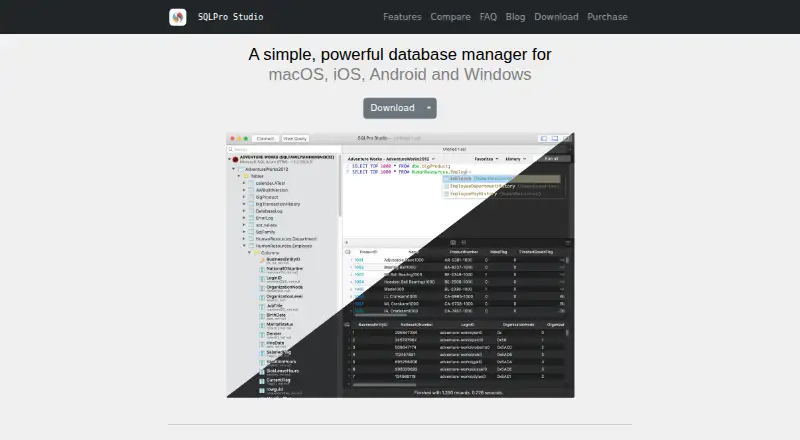
SQLPro Studio is a native application for querying and managing relational databases. It supports MySQL, MariaDB, PostgreSQL, Microsoft SQL Server, SQLite, Oracle, Snowflake, and Amazon Redshift, plus cloud connections including Amazon RDS, Azure SQL, Google Cloud SQL, Heroku Postgres, DigitalOcean Managed Databases, and Snowflake. The query editor includes syntax highlighting, autocomplete, history, error highlighting, and simultaneous multiple result sets. Users can browse and edit table data, change table structures visually, and import or export CSV, JSON, SQL, and XML. Connections can use SSH tunnels with password or key authentication and SSL/TLS encryption. The maker says credentials are stored in iCloud Keychain on Apple devices and Android Keystore on Android. Native apps are available for macOS, iOS and iPadOS, Android, and Windows; no Linux version is listed. SQLPro Studio is paid and has a 7-day trial, with no general free plan. An approved student license is free for one year and requires an educational institution email.
Who it suits
The maker describes SQLPro Studio as suited to developers, database administrators, and data analysts who regularly work with relational databases.
What it does well
- Supports eight listed relational database systems.
- Includes query history and autocomplete.
- Can edit table data and structures visually.
- Supports SSH tunnels and SSL/TLS connections.
- Exports results as CSV, JSON, XML, or SQL.
What to know first
- No Linux version is listed.
- There is no general free plan.
- A student license requires institutional email and approval.
Limits
The general offering has no free plan and the trial lasts 7 days. The student license is free for one year and requires an educational institution email and approval; a lifetime license covers one platform, while a website subscription covers multiple platforms and devices for one user.
Plans
| Plan | Billed and limits | Price |
|---|---|---|
| Student license | Free year · requires educational institution email and approval | Free |
| Lifetime | Single platform license · Android lifetime license sold through Google Play | On request |
| Monthly subscription | macOS, iOS, Android & Windows · single user | On request |
| Yearly subscription | macOS, iOS, Android & Windows · single user | On request |
As sqlprostudio.com lists them, read 8 Oct 2026. The maker's own page has the final word.
Getting started
- Visit the SQLPro Studio website.
- Choose a supported platform: macOS, iOS and iPadOS, Android, or Windows.
- Start the 7-day trial or review the monthly and yearly subscription plans.
- Eligible students can apply for the free one-year student license using an educational institution email; approval is required.
- Set up a database connection, with SSH tunneling or SSL/TLS available for supported connections.
SQLPro Studio is a native database client for writing queries, editing data, and managing relational databases on desktop and mobile. It suits developers, database administrators, and analysts who move between several database engines. Its breadth and security options are useful, but the paid model and platform limits deserve attention before you commit.
Overview
SQLPro Studio brings query work, table administration, and data transfer into one application. It supports MySQL, MariaDB, PostgreSQL, Microsoft SQL Server, SQLite, Oracle, Snowflake, and Amazon Redshift, so it can serve people responsible for mixed database estates rather than a single vendor stack. That range is a central strength, although the product does not provide a visual query builder; users must be comfortable writing SQL.
Connections cover hosted services including Amazon RDS, Azure SQL, Google Cloud SQL, Heroku Postgres, DigitalOcean Managed Databases, and Snowflake. SSH tunnels accept password or key authentication, while SSL/TLS protects connections. These controls make the client more suitable for remote administrative work than a tool focused only on local files. Connection credentials are kept in iCloud Keychain on Apple devices and Android Keystore on Android. Analytics can be disabled, and the maker says analytics omit query text and connection details; crash reports may include app state and generic device information but not queries or connection details.
Key features
The query editor combines syntax highlighting, autocomplete, error highlighting, and query history. It can display multiple result sets simultaneously, which is useful when comparing statements or checking related changes in one session. History helps recover earlier work, while error highlighting can shorten the path from a failed query to a correction. There is no visual builder, so this is a better fit for SQL-literate users than for people who prefer assembling queries through a diagram or form.
For administration, you can browse and edit table data and change table structures visually. Import and export support covers CSV, JSON, SQL, and XML, giving analysts practical ways to move results into other workflows or preserve data in common formats. These tools make the application more than a read-only query console, though the available facts do not indicate specialized modeling or reporting features.
Pricing
SQLPro Studio is paid software with a seven-day trial and no general free plan. A Student license costs free for one free year, requires an educational-institution email, and needs approval. It is the clear route for eligible students, but it is not a permanent option for general users.
The Lifetime plan has custom pricing and grants a license for one platform. The Android lifetime license is sold through Google Play, so a lifetime purchase does not automatically cover every device you use. Monthly and Yearly subscriptions also have custom pricing; both cover macOS, iOS, Android, and Windows for one user. Choose a subscription if you need the same account across those platforms, and choose lifetime only when staying on one platform outweighs the loss of cross-platform coverage. The trial is the practical way to check your databases and workflow before paying.
Platforms
Native applications are provided for macOS, iOS and iPadOS, Android, and Windows, with desktop deployment supported. There is no Linux version, which removes it from consideration for Linux-first workstations unless another platform is acceptable. The website subscription's multi-platform coverage is convenient for users who switch between desktop and mobile; the lifetime license's single-platform rule is the important counterweight.
Who it's for
SQLPro Studio is aimed at developers, database administrators, and data analysts who regularly work with relational systems. It is particularly suitable for people who need one editor across the supported engines, secure tunnels to hosted databases, and direct table editing. Students can use the approved one-year license at no charge. It is less suitable for Linux users, for teams wanting a free general-purpose client, or for anyone who depends on a visual query-building interface.
Pros and cons
Pros
- Wide engine coverage: MySQL, MariaDB, PostgreSQL, SQL Server, SQLite, Oracle, Snowflake, and Redshift reduce the need to maintain separate clients.
- Useful SQL workflow: Autocomplete, history, error highlighting, and simultaneous result sets support iterative query work.
- Practical administration: Table editing, visual structure changes, and four export formats cover common maintenance and data-movement tasks.
- Secure remote access: SSH tunneling and SSL/TLS provide appropriate connection choices for hosted databases.
- Cross-platform subscription: One user can use a website subscription on macOS, iOS, Android, and Windows.
Cons
- No Linux app: Linux-based users need another client or another operating system.
- No visual query builder: Query composition is SQL-first rather than point-and-click.
- Paid access for most users: Outside the approved student year, there is no free plan; subscription and lifetime prices are custom.
- Lifetime license is narrow: It applies to one platform, unlike the multi-platform subscription.
Alternatives
For a broader directory of database tools, see Database Client Software.
Outerbase Studio is the better starting point if you want a free, open-source Studio with Linux, web, and self-hosted availability alongside desktop and mobile options.
Choose CloudBeaver instead when Linux, web, or self-hosted deployment matters and an academic one-year license is useful.
DBeaver suits users seeking a free, open-source Community edition with Linux and self-hosted options.
DbGate is another freemium database-client alternative with Linux, web, and self-hosted platforms.
MySQL is the more focused choice for MySQL-centered SQL and NoSQL applications with a free Community Edition.
Apache OpenOffice Impress is a free office presentation application rather than a direct database-client substitute.
Beekeeper Studio offers a free Community plan with common databases, unlimited connections, and no tab limits on supported desktop platforms.
DataGrip is an alternative with a free non-commercial plan for individual development and support for Linux, macOS, and Windows.
Verdict
SQLPro Studio is a strong choice for SQL-capable professionals who need broad relational-database support, secure remote connections, and table editing in native apps across several devices. Choose it when that coverage and workflow justify paid access; look elsewhere if you require Linux, a permanent free tier, or a visual query builder.
Verdict
SQLPro Studio offers broad database support alongside query editing, table management, and several export formats. Consider its paid model, 7-day trial, and lack of a listed Linux version when assessing fit.
Questions
Is SQLPro Studio free?
There is no general free plan. A student license costs nothing year and requires an educational institution email and approval.
What does the trial include?
SQLPro Studio offers a 7-day trial.
Which platforms are supported?
Native apps are available for macOS, iOS and iPadOS, Android, and Windows. The maker lists no Linux version.
Which databases does it support?
It supports MySQL, MariaDB, PostgreSQL, Microsoft SQL Server, SQLite, Oracle, Snowflake, and Amazon Redshift.
How do the subscription and lifetime licenses differ?
A website subscription covers multiple platforms and devices for one user. A lifetime license applies to one platform.
Who makes SQLPro Studio?
It is independently developed and maintained by Hankinsoft Development, Inc. The website links to GitHub issues for support.
Facts from SQLPro Studio's own pages
- Cloud connections
- The product lists support for Amazon RDS, Azure SQL, Google Cloud SQL, Heroku Postgres, DigitalOcean Managed Databases, and Snowflake. · sqlprostudio.com, 8 Oct 2026
- Company and support
- SQLPro Studio is independently developed and maintained by Hankinsoft Development, Inc.; the site links to GitHub issues for support. · sqlprostudio.com, 8 Oct 2026
- Credential storage
- Connection credentials are stored in iCloud Keychain on Apple devices and in Android Keystore on Android. · sqlprostudio.com, 8 Oct 2026
- Database support
- It supports MySQL, MariaDB, PostgreSQL, Microsoft SQL Server, SQLite, Oracle, Snowflake, and Amazon Redshift. · sqlprostudio.com, 8 Oct 2026
- Data management
- Users can browse and edit table data, change table structures visually, and import or export CSV, JSON, SQL, and XML. · sqlprostudio.com, 8 Oct 2026
- Data sharing
- The privacy policy says crash reports may contain app state and generic device details, but do not include query text or database connection details. · sqlprostudio.com, 8 Oct 2026
- Founded
- 2015 · sqlprostudio.com, 28 Sept 2026
- Intended users
- The maker describes the product as designed for developers, database administrators, and data analysts who regularly work with relational databases. · sqlprostudio.com, 8 Oct 2026
- License terms
- A website subscription covers multiple platforms and devices for one user, while lifetime licenses apply to one platform only. · sqlprostudio.com, 8 Oct 2026
- Native apps
- SQLPro Studio is available as native apps for macOS, iOS and iPadOS, Android, and Windows; the maker lists no Linux version. · sqlprostudio.com, 8 Oct 2026
- Privacy
- The maker says app analytics exclude query text, connection details, and other personal information, and can be disabled in settings. · sqlprostudio.com, 8 Oct 2026
- Product
- SQLPro Studio is a native database management application for querying and managing relational databases. · sqlprostudio.com, 8 Oct 2026
- Query editor
- The query editor includes syntax highlighting, autocomplete, query history, error highlighting, and simultaneous multiple result sets. · sqlprostudio.com, 8 Oct 2026
- Security
- It supports SSH tunnels with password or key authentication and SSL/TLS encrypted connections. · sqlprostudio.com, 8 Oct 2026
Where SQLPro Studio stands on Freedom251
- Database Client Software#48 of 53