Freedom251 › Motion Graphics Template Libraries

Animdock
What Animdock is
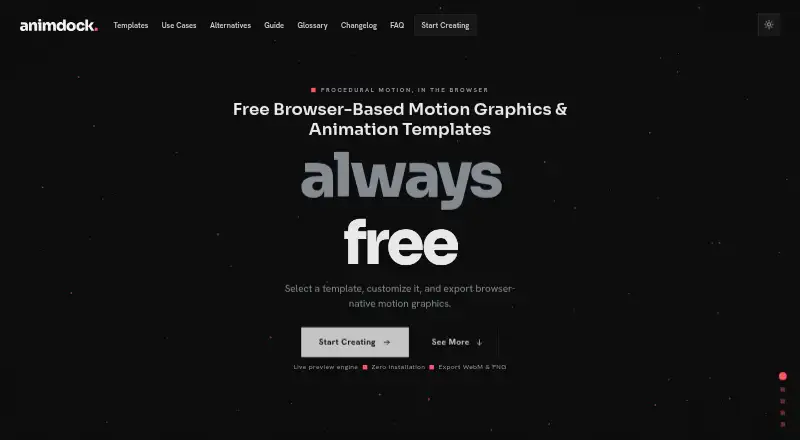
Animdock is a free web-based editor for creating procedural motion graphics and animations from templates. Users choose a template, adjust its parameters, preview the result live and export it as WebM video or a PNG still image. Its catalog includes particle effects, kinetic typography, animated backgrounds, ASCII and starfield animations, orbit effects and logo animation. Templates run through the HTML Canvas API, with rendering handled locally in the browser.
The core experience requires no account, and the editor can work locally and offline without login. Google sign-in is optional; if used, it collects an email address and basic profile information for authentication and service functions. Generated work may be used in personal projects and commercial client work, and no plugin is required. The Free plan costs nothing. Animdock is intended for motion design professionals, YouTubers, social media creators and designers looking for quick motion assets. It runs in a browser, but mobile is not supported and computer use is recommended.
Who it suits
Animdock suits motion design professionals, YouTubers, social media creators and designers who need template-based motion assets. It is intended for computer use rather than mobile devices.
What it does well
- Exports WebM video and PNG still images.
- Rendering happens locally in the browser.
- Core use does not require an account.
- Commercial client work is permitted.
- No plugin is required.
What to know first
- Mobile is not yet supported.
- Free trial is not available.
Plans
| Plan | Billed and limits | Price |
|---|---|---|
| Free | No subscription fees · no registration required · WebM and PNG exports | Free |
As animdock.com lists them, read 7 Oct 2026. The maker's own page has the final word.
Getting started
- Open https://www.animdock.com/ in a web browser on a computer.
- Use the core editor without an account, or sign in with Google if desired.
- Choose a template, such as a particle effect, kinetic typography or animated background.
- Adjust the template parameters and preview the result live.
- Export the motion graphic as WebM video or a PNG still image.
Overview
Animdock is a browser-based editor for adapting procedural motion-graphics templates, aimed at creators who need quick effects or animated text. Its free, no-account workflow is appealing for occasional assets, but the editor is for computers rather than phones.
Choose a template, adjust its parameters, preview the result live, and export. Local browser rendering and offline use keep the process self-contained; this is a focused template editor, not a wider animation workflow with a stated integration ecosystem.
Key features
The catalog spans particle effects, kinetic typography, animated backgrounds, ASCII and starfield animations, orbit effects, and logo animation. That gives motion-design professionals, YouTubers, social-media creators, and designers several ready-made starting points. It suits adapting an existing visual treatment better than building an animation workflow around broader tools.
Animdock renders templates locally through the HTML Canvas API and requires no plugin. Exports are WebM video and PNG still images, covering motion and static use. Generated graphics may be used in personal projects and commercial client work, making the free editor viable for client assets as well as personal work.
An account is not needed for the core experience; login is optional. Google sign-in collects an email address and basic profile information for authentication and service functions. Animdock says it does not sell, rent, or share personal data with third parties for marketing. Users can request account and associated-data deletion by contacting Animdock or use the platform's clear-data options.
Pricing
The Free plan costs free, with no subscription fees, no registration requirement, and WebM and PNG exports. It includes the web browser editor and a commercial license, so there is no paid tier to unlock for the stated core workflow. No free trial is offered because the plan itself is free.
This structure suits creators who want occasional template-based assets without recurring costs or an account. It does not offer a stated paid upgrade for users who need a different workflow or expanded capabilities.
Platforms
Animdock runs in a web browser, with no plugin required. The editor is not yet supported on mobile and recommends a computer, which rules it out for users who need to create or export from a phone.
Who it's for
Animdock is a good fit for creators who need a quick motion asset, want to modify a procedural template, and value local or offline browser use. Its commercial-use permission also suits designers preparing client work. Look elsewhere if mobile editing is essential or the task calls for something beyond the stated template-and-export workflow.
Pros and cons
- Pros: Free use with no subscription fees or required registration keeps the barrier to trying a template low.
- Pros: WebM and PNG exports, plus permission for commercial client work, cover motion and still assets for personal or client projects.
- Pros: Local rendering and offline use without login make the core workflow self-contained.
- Cons: Mobile is unsupported, so users must work from a computer.
- Cons: The stated workflow centers on templates and their parameters, making it a narrower choice for creators seeking a broader animation setup.
Alternatives
Motion Graphics Template Libraries is a useful place to compare options if you want to browse the category rather than settle on one editor.
Choose ProductionCrate instead if you want a wider asset-library approach across extension, iOS, macOS, web, and Windows. Its free plan allows five downloads per day from basic libraries; PRO is $49 a month, billed monthly, for full library access and up to 50 downloads.
Allavio may suit editors seeking free sample titles and selected templates for DaVinci Resolve 19 and above, rather than browser-rendered procedural effects.
Choose Jitter if web-based animation with workspace files and defined export resolution and frame-rate tiers fits better: Free includes three workspace files and 720p, 30fps exports, while Pro offers 1080p and 60fps exports.
MrAlexTech is a macOS and Windows alternative with a free MagicAnimate version and a free trial.
Pixel Film Studios offers a free Starter plan with unlimited downloads, free asset updates, free assets, and live chat support; its Monthly plan is $39.99 a month, billed monthly.
Mixkit is another free web option, with unlimited free downloads and no attribution or sign-up requirement.
Motion Master Templates is a macOS option with 114 Final Cut Pro templates for free or optional voluntary donations, for personal and commercial use.
Motion Array offers selected free video templates, songs, sound effects, and graphics through a free account with no credit card required.
Verdict
Choose Animdock if you want a free, computer-based way to adapt procedural motion templates, export WebM or PNG, and use the results commercially without registering. Its self-contained workflow is the main draw; unsupported mobile use and its template-focused scope are good reasons to choose another tool.
Verdict
Animdock offers browser-based template editing with local rendering and WebM or PNG exports. Its lack of mobile support makes it a computer-focused option.
Questions
How much does Animdock cost?
The Free plan costs nothing and has no subscription fees.
Do I need an account to use Animdock?
No account is required for the core experience. Google login is optional.
What can I export?
The FAQ lists WebM video and PNG still image exports.
Can I use Animdock graphics commercially?
Generated motion graphics may be used in personal projects and commercial client work.
Does Animdock work on mobile?
Mobile is not yet supported. The editor recommends using a computer.
What information does Google sign-in collect?
It collects an email address and basic profile information for authentication and service functions.
Facts from Animdock's own pages
- Accounts
- No account is required for the core experience, and login is optional. · animdock.com, 7 Oct 2026
- Audience
- Animdock describes its intended users as motion design professionals, YouTubers, social media creators, and designers seeking quick motion assets. · animdock.com, 7 Oct 2026
- Commercial use
- The FAQ says generated motion graphics may be used in personal projects and commercial client work. · animdock.com, 7 Oct 2026
- Data deletion
- Users can request account and associated data deletion by contacting Animdock or use the platform's clear data options. · animdock.com, 7 Oct 2026
- Data handling
- The privacy policy says Animdock does not sell, rent, or share personal data with third parties for marketing purposes. · animdock.com, 7 Oct 2026
- Device support
- The editor notice says mobile is not yet supported and recommends using a computer. · animdock.com, 7 Oct 2026
- Exports
- The FAQ lists WebM video and PNG still image export formats. · animdock.com, 7 Oct 2026
- Integrations
- Google Auth is listed for sign-in; the maker page does not state other integrations. · animdock.com, 7 Oct 2026
- Local use
- The about page says the editor can work locally and offline without login. · animdock.com, 7 Oct 2026
- Privacy
- The privacy policy says Google sign-in collects an email address and basic profile information for authentication and service functions. · animdock.com, 7 Oct 2026
- Purpose
- Animdock provides browser based procedural motion graphics and animation templates. · animdock.com, 7 Oct 2026
- Rendering
- Templates run using the HTML Canvas API, with rendering performed locally in the browser. · animdock.com, 7 Oct 2026
- Support
- The about page lists [email protected] as the current contact address. · animdock.com, 7 Oct 2026
- Templates
- The template catalog includes procedural effects and text animations such as particle effects, kinetic typography, and animated backgrounds. · animdock.com, 7 Oct 2026
- Workflow
- Users select a template, adjust its parameters, preview it live, and export the result. · animdock.com, 7 Oct 2026