Freedom251 › Motion Graphics Template Libraries
Artlist Templates
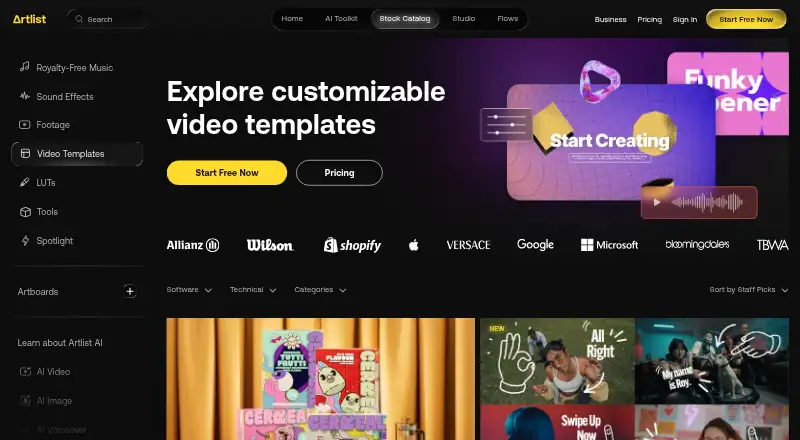
What Artlist Templates is
Artlist Templates is a catalog of customizable project files for video editing software, with animations, text placeholders, and effects. Its designs cover titles, lower thirds, transitions, slideshows, and more. Templates are available for Adobe After Effects, Adobe Premiere Pro, Final Cut Pro, and DaVinci Resolve, and are intended for professional desktop software rather than mobile editing apps. Users can preview templates, choose a version for their editor, save items to Favorites or Artboards, and share them. Downloads arrive in ZIP folders with the project file, font links, and help materials. Video templates are included in the Footage and Templates and Artlist Max subscriptions. Footage and Templates costs $31.99 a year, billed 31.99 / month (billed annually), and includes a Pro license for commercial and client work. That plan does not include AI tools; Artlist says those require Artlist Max. Free accounts can browse the catalog but cannot preview templates, and downloaded trial assets are for preview only, not licensed publication.
Who it suits
Artlist Templates suits video editors working in After Effects, Premiere Pro, Final Cut Pro, or DaVinci Resolve. It may fit creators who need customizable templates and a Pro license for commercial or client projects.
What it does well
- Templates cover titles, transitions, and slideshows.
- Supports four listed desktop editing applications.
- Downloads include project files and help materials.
- Footage and Templates includes a Pro license.
What to know first
- Templates cannot be used in mobile editing apps.
- Free accounts cannot preview templates.
- Trial downloads are not licensed for publication.
- The Footage and Templates plan excludes AI tools.
Limits
Free accounts can browse but cannot preview templates, and their downloaded trial assets are only for preview rather than licensed publication. Footage and Templates does not include AI tools; those require Artlist Max.
Plans
| Plan | Billed and limits | Price |
|---|---|---|
| Footage and Templates | 31.99 / month (billed annually) · Footage up to 8K · Video templates · LUTs · 3 channels on each social platform · Unlimited individual YouTube videos | $31.99 |
As artlist.io lists them, read 3 Oct 2026. The maker's own page has the final word.
Getting started
- Open https://artlist.io/video-templates.
- Create a free account to browse the catalog.
- Choose a template and select the version for your editing software.
- Subscribe to Footage and Templates or Artlist Max for included video templates.
- Download the ZIP folder and use its project file, font links, and help materials in your desktop editor.
Verdict
Artlist Templates offers editable designs for several desktop video editors, with a Pro license included in Footage and Templates. Free access is limited to browsing, and the plan does not include AI tools.
Questions
How much does Footage and Templates cost?
It costs $31.99 a year, billed 31.99 / month (billed annually).
Is there a free plan?
Free accounts can browse the catalog, but cannot preview templates. Downloaded trial assets are for preview only and are not licensed for published projects.
Which editors are supported?
Templates are available for Adobe After Effects, Adobe Premiere Pro, Final Cut Pro, and DaVinci Resolve.
Can I use templates in mobile editing apps?
No. Artlist says the templates are designed for professional desktop software and cannot be used in mobile editing apps.
Does the plan include a commercial license?
Footage and Templates includes a Pro license for commercial and client work, worldwide publishing, advertising, paid media, branded content, and film.
Are AI tools included?
AI tools are not included in Footage and Templates; Artlist Max is required for those tools.
Facts from Artlist Templates's own pages
- Company
- Artlist says its mission is to empower creators and brands to bring their vision to life with inspiration, AI tools, and licensed assets. · artlist.io, 3 Oct 2026
- Desktop requirement
- Artlist says its templates are designed for professional desktop software and cannot be used in mobile editing apps. · help.artlist.io, 3 Oct 2026
- Download contents
- A downloaded template arrives in a ZIP folder containing the project file, font links, and help materials. · help.artlist.io, 3 Oct 2026
- Founded
- 2016 · artlist.io, 28 Sept 2026
- License
- The Footage and Templates plan includes a Pro license covering commercial and client work, publishing worldwide, advertising, paid media, branded content, and film. · help.artlist.io, 3 Oct 2026
- Limits
- The Footage and Templates plan does not include AI tools; Artlist says users must upgrade to Artlist Max for those tools. · help.artlist.io, 3 Oct 2026
- Plan inclusion
- Video templates are included in Footage and Templates and Artlist Max subscriptions. · help.artlist.io, 3 Oct 2026
- Security
- Artlist states it is ISO 27001 certified and SOC 2 compliant, and says user data is stored in encrypted private cloud environments. · help.artlist.io, 3 Oct 2026
- Supported editors
- Templates are available for Adobe After Effects, Adobe Premiere Pro, Final Cut Pro, and DaVinci Resolve. · help.artlist.io, 3 Oct 2026
- Template types
- The catalog includes ready-made designs for titles, lower thirds, transitions, slideshows, and more. · help.artlist.io, 3 Oct 2026
- Trial access
- Free accounts can browse the catalog, but cannot preview templates; their downloaded trial assets are for preview only and are not licensed for published projects. · help.artlist.io, 3 Oct 2026
- What it is
- Artlist templates are customizable project files with animations, text placeholders, and effects for video editing software. · help.artlist.io, 3 Oct 2026
- Workflow
- Users can preview templates, download a software version, save items to Favorites or Artboards, and share them. · help.artlist.io, 3 Oct 2026