Freedom251 › Virtual Lab Software

Amrita Virtual Lab
What Amrita Virtual Lab is
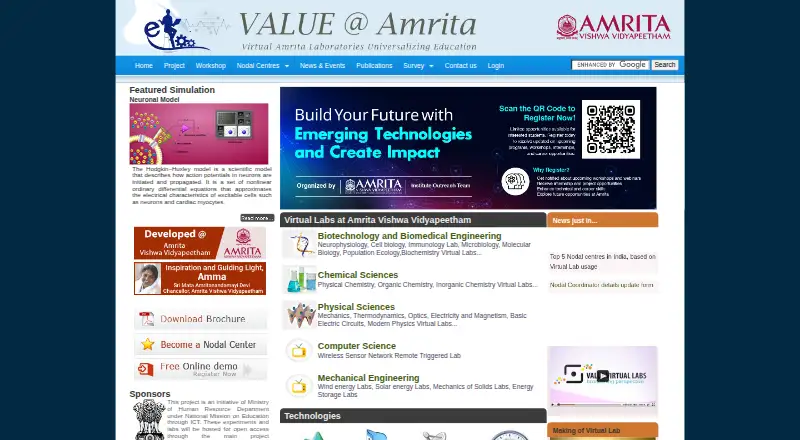
Amrita Virtual Lab provides browser-accessible laboratories and learning materials for distance learning and experimentation. On an internet-connected computer, learners can use simulations, interactive animations, and remotely triggered experiments alongside web resources, video lectures, demonstrations, procedures, lab manuals, quizzes, and other resources. The project says it has built 1,500 experiments and supports on-the-spot assessment. Subjects include computer science, engineering, biotechnology and biomedical engineering, and physical and chemical sciences. Examples range from neurophysiology simulations and physics tools such as DC circuits and virtual optics to a wireless sensor network lab. Teachers can monitor student progress and change instructional material, while the platform supports experiment authoring and LMS integration. Labs are hosted for open access through the project websites. The team also offers free online and offline classes for students and faculty at nodal centres. The Free access plan is listed as free under the Nodal Centre Program, with no registration fee for that program. Participating institutes must choose at least three experiments and have at least 300 students using the labs.
Who it suits
The labs are intended for high-school and university students, research scholars, and science and engineering faculty. Teachers and institutions seeking online experiments and progress monitoring may also find the platform relevant.
What it does well
- Browser access to simulations and remote experiments.
- Includes procedures, manuals, quizzes, and other resources.
- Teachers can monitor student progress.
- Free online and offline classes are offered.
- Labs are hosted for open access.
What to know first
- Nodal-centre institutes must select at least three experiments.
- Nodal-centre institutes need at least 300 student users.
- Some Chemical Sciences questionnaire access requires a VALUE-provided user ID.
Limits
The Free access plan is listed as free under the Nodal Centre Program, with no registration fee for that program. Participating institutes must choose at least three experiments and have at least 300 students using the virtual labs; the Chemical Sciences questionnaire requires a VALUE-provided user ID.
Plans
| Plan | Billed and limits | Price |
|---|---|---|
| Free access | free of cost under Nodal Centre Program · no registration fee for this program | Free |
As vlab.amrita.edu lists them, read 30 Sept 2026. The maker's own page has the final word.
Getting started
- Visit the Amrita Virtual Lab website using an internet-connected computer.
- Choose a subject area and browse its available labs and learning materials.
- Use a scheduled time slot for experiments that require scheduling.
- For nodal-centre services, register the institution and select at least three experiments.
- Ensure at least 300 students use the labs to meet nodal-centre participation requirements.
- For the Chemical Sciences online questionnaire, use a user ID provided by VALUE.
Amrita Virtual Lab is a browser-based learning environment for science and engineering experiments, combining simulations, remote hardware activities and course materials. It is best suited to schools, universities and independent learners who need structured practice across several disciplines. Its breadth and zero-cost access are compelling, while some institutional and activity-level access conditions require planning.
Overview
The project brings together 1,500 experiments built as simulations, interactive animations and remotely triggered experiments. Each activity can include a procedure, lab manual, pre- and post-experiment quizzes and supporting resources, with immediate assessment to check understanding. Video lectures, animated demonstrations, web resources and self-evaluation give teachers more than a standalone simulator to assign.
Labs run in a browser on an internet-connected computer. Animation and simulation make many exercises repeatable at any time, and selected activities operate real equipment remotely. That flexibility is useful when a physical laboratory is unavailable or students need to repeat a protocol, but it does not remove the need for reliable connectivity or replace every form of in-person practical work.
Key features
- Multi-discipline catalogue: Coverage spans biotechnology and biomedical engineering, chemical and physical sciences, computer science, electronics, electrical, mechanical and civil engineering, and chemical engineering. One service can therefore support several departments, although learners seeking a single tightly focused subject may find the catalogue broader than necessary.
- Interactive experiment formats: Examples include neurophysiology work on brain slicing, patch clamping, neuronal action potentials and voltage/current-clamp protocols; physics tools cover DC circuits, torsion pendulums, Faraday’s law, the Barkhausen effect and virtual optics. A wireless sensor-network lab combines indoor and outdoor elements for design, deployment and implementation practice.
- Teaching and assessment: Teachers can monitor progress, alter instructional material and use on-the-spot assessment. Procedures, manuals and quizzes help instructors place an activity inside a lesson rather than assigning an unexplained demo.
- Repeatable access: Online labs are designed for anytime, anywhere use and repeatability, letting students and research scholars revisit work beyond a scheduled class.
- Authoring and integration: Experiment authoring, assessment tools, a teacher dashboard and LMS integration support institutions building virtual work into existing courses.
- Scale and scheduling: Server-side architecture is intended to serve thousands of simultaneous learners securely, while experiments that require coordination can reserve time slots.
- Training: Free online and offline classes are offered to students and faculty through nodal centres. Introductory sessions may use Google Meet, Zoom or Microsoft Teams when experts are available.
Pricing
Amrita Virtual Lab is free. The “Free access” plan costs nothing and is free of cost under the Nodal Centre Program, with no registration fee for that program. This is an unusually low barrier for individual learners and educators supplementing a course, and there are no paid tiers or seat charges described.
The trade-off is institutional eligibility rather than price. Institutes seeking nodal-centre participation must select at least three experiments and have at least 300 students using the labs. Nodal-centre support includes services, resources, training and help integrating virtual-lab scores into the regular curriculum. Access to a Chemical Sciences online questionnaire requires a VALUE-provided user ID, so open hosting does not guarantee identical access to every activity.
Platforms
The service runs on the web, using an internet-connected computer. Browser delivery avoids installation and works across operating systems, but it is not presented as a native mobile application and depends on network access for simulations and remote experiments.
Who it's for
Undergraduate and postgraduate students, research scholars, science and engineering faculty and high-school students are the stated audience. It is a strong choice for educators needing curriculum-linked practice, institutions covering multiple departments, and learners who benefit from repeating experiments.
Pros and cons
Pros
- Free, broad access: Openly hosted labs and a zero-cost plan cover a wide range of science and engineering subjects.
- Structured learning materials: Manuals, procedures, quizzes, lectures and self-evaluation support guided coursework.
- Useful teacher controls: Progress monitoring, editable instructional material, assessment and LMS integration help instructors manage adoption.
- Repeatable and remote: Students can revisit simulations and, where supported, trigger remote hardware without being in a campus lab.
Cons
- Internet and computer dependence: Browser access requires an internet-connected computer, which limits offline or low-connectivity use.
- Nodal-centre threshold: Institutional participation requires at least three experiments and 300 student users.
- Uneven activity access: The Chemical Sciences questionnaire requires a VALUE-issued user ID.
Alternatives
Virtual Lab Software is the broader category guide for comparing additional options.
- Beyond Labz is the better fit for users wanting Android, iOS, macOS, Windows and web access, with a free instructor tier and a paid one-time Chemistry option.
- ChemCollective Virtual Lab suits educators and students seeking free installation, use and distribution across desktop, mobile and web platforms.
- Molecular Workbench is a free, open-source alternative for Linux, macOS and Windows users as well as the web.
- PraxiLabs is worth choosing when a one-month trial with three simulations and real-time guidance is preferable to a broad free catalogue.
- LabXchange offers free educational resources for learners and educators worldwide through grant funding.
- Pearson Live Response fits institutions already using MyLab and Mastering, where student access can be included.
- Science Remote Laboratory is a free web option for exploring remote labs without installation.
- Inq-ITS is the alternative for schools needing tiered, student-count-based district plans and a free trial.
Verdict
Choose Amrita Virtual Lab if you need a free, browser-based programme that combines a large multi-subject experiment library with teacher controls, assessment and repeatable access. Look elsewhere if your learners need offline use, native mobile apps, or guaranteed access to every activity without nodal-centre conditions or user credentials.
Verdict
Amrita Virtual Lab brings experiments and supporting learning materials together across a wide range of subjects. Its open-access labs and free training may be useful to learners and educators, while some activities and institutional participation have specific access requirements.
Questions
How much does Amrita Virtual Lab cost?
The Free access plan is listed as free under the Nodal Centre Program, which has no registration fee.
Where can I use the labs?
The labs are browser-accessible on an internet-connected computer and are hosted for open access through project websites.
Who is the project for?
Its listed audiences include undergraduate and postgraduate students, research scholars, science and engineering faculty, and high-school students.
What subjects does it cover?
Coverage includes computer science, several engineering disciplines, biotechnology and biomedical engineering, and physical and chemical sciences.
What does an experiment include?
Experiments can include procedures, lab manuals, pre- and post-experiment quizzes, and additional lab resources.
What are the nodal-centre requirements?
Participating institutes must choose at least three experiments and have at least 300 students using the virtual labs.
Facts from Amrita Virtual Lab's own pages
- Access model
- The virtual labs are hosted for open access through the project website. · vlab.amrita.edu, 30 Sept 2026
- Access requirement
- The Chemical Sciences page says users need to log in with a user ID provided by VALUE to access its online questionnaire. · vlab.amrita.edu, 30 Sept 2026
- Assessment
- The platform allows on-the-spot assessment of student knowledge. · vlab.amrita.edu, 30 Sept 2026
- Curriculum integration
- Nodal-centre support includes assistance integrating virtual-lab scores into the regular curriculum. · vlab.amrita.edu, 30 Sept 2026
- Disciplines
- The initiative covers computer science, electronics, electrical engineering, mechanical engineering, civil engineering, chemical engineering, biotechnology and biomedical engineering, physical sciences, and chemical sciences. · vlab.amrita.edu, 30 Sept 2026
- Example physics tools
- The project page lists DC circuit, torsion pendulum, Faraday’s law, Barkhausen effect and virtual optics simulators. · vlab.amrita.edu, 30 Sept 2026
- Example simulations
- The project page describes neurophysiology simulations for brain slicing, patch clamping, neuronal action potentials, and voltage and current clamp protocols. · vlab.amrita.edu, 30 Sept 2026
- Experiment materials
- Experiments include procedures, lab manuals, pre- and post-experiment quizzes, and additional lab resources. · vlab.amrita.edu, 30 Sept 2026
- Experiment types
- The project has built 1,500 experiments comprising simulations, interactive animations, and remotely triggered experiments. · vlab.amrita.edu, 30 Sept 2026
- Institutional use
- The site says registering an institution as a nodal centre provides services and resources and is intended to promote virtual labs in higher education. · vlab.amrita.edu, 30 Sept 2026
- Interactive learning
- The site describes virtual labs as an immersive e-learning tool with a media-rich, interactive interface that teachers can use to supplement their curriculum. · vlab.amrita.edu, 30 Sept 2026
- Lab subjects
- The site lists virtual labs in biotechnology and biomedical engineering, chemical and physical sciences, computer science, and mechanical engineering. · vlab.amrita.edu, 30 Sept 2026
- Learning format
- Labs are browser-accessible on an internet-connected computer and use animation, simulation or remotely triggered hardware. · vlab.amrita.edu, 30 Sept 2026
- Learning system
- The platform includes web resources, video lectures, animated demonstrations, and self-evaluation. · vlab.amrita.edu, 30 Sept 2026
- Nodal-centre limits
- Participating institutes must choose at least three experiments and have at least 300 students using the virtual labs. · vlab.amrita.edu, 30 Sept 2026
- Open access
- The project page says experiments and labs are hosted for open access through the project website and the main Virtual Labs website. · vlab.amrita.edu, 30 Sept 2026
- Project sponsor
- The site identifies the project as an initiative of the Ministry of Human Resource Development under the National Mission on Education through ICT. · vlab.amrita.edu, 30 Sept 2026
- Purpose
- Amrita Virtual Labs provides remote access to science and engineering laboratories through web-enabled experiments. · vlab.amrita.edu, 30 Sept 2026
- Remote lab example
- The Computer Science section describes a partly indoor and partly outdoor wireless sensor network lab for practical experience designing, deploying and implementing sensor networks. · vlab.amrita.edu, 30 Sept 2026
- Repeatability
- The demo page describes online labs as providing anytime, anywhere access and repeatability for students and research scholars. · vlab.amrita.edu, 30 Sept 2026
- Scheduling
- The platform reserves time slots for experiments that require scheduling. · amrita.edu, 30 Sept 2026
- Security and scale
- The collaborative platform provides server-side architecture intended to run virtual labs securely and serve thousands of students simultaneously. · amrita.edu, 30 Sept 2026
- Target users
- The project serves undergraduate students, postgraduate students, research scholars, science and engineering faculty, and high-school students. · vlab.amrita.edu, 30 Sept 2026
- Teacher tools
- Teachers can monitor student progress and change instructional material. · amrita.edu, 30 Sept 2026
Where Amrita Virtual Lab stands on Freedom251
- Virtual Lab Software#5 of 27