Freedom251 › Biology Learning Software
LabXchange
What LabXchange is
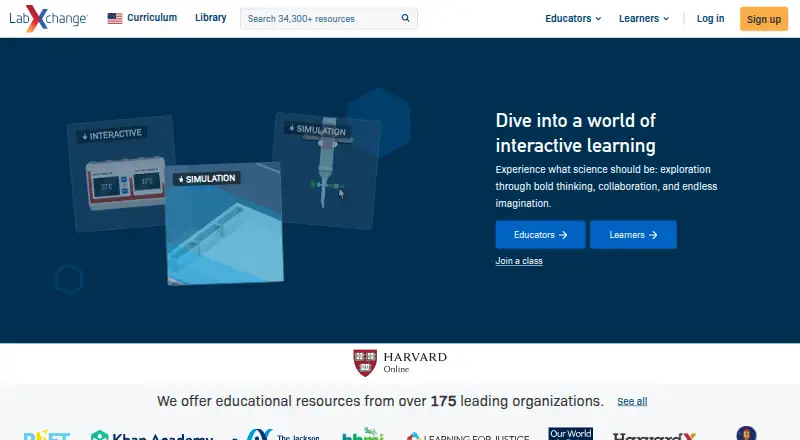
LabXchange is a free digital science education platform created at Harvard University with support from the Amgen Foundation. Learners and educators can assemble videos, assessments and simulations into customized learning paths. Its science resources include virtual experiments, interactives, worksheets, lesson plans and educator materials; some simulations include a virtual notebook with background information.
Educators can create private classes, share content and track learner progress. Public content can be shared through Google Classroom, Facebook, Twitter, Pinterest or a direct link. LabXchange says the platform is ad-free, does not sell student data or use it for commercial purposes, and stores student data on U.S. servers. It also says its security practices follow the NIST Cybersecurity Framework. Users can register directly or through third-party sign-on services such as Google or Facebook, and support requests can be sent through a form. The service is intended for organizations and people aged 13 or older. Use of LabXchange does not provide academic credit from Harvard University.
Who it suits
It suits science learners and educators who want free learning resources, virtual experiments and customizable learning paths. Educators can also use private classes to share content and follow learner progress.
What it does well
- Free science resources include simulations and lesson plans.
- Educators can create private classes and track progress.
- Public content can be shared through Google Classroom.
- The platform is ad-free.
- Student data is not used for commercial purposes.
What to know first
- Intended for organizations and people aged 13 or older.
- Use does not provide Harvard University academic credit.
- Student data is stored on U.S. servers.
Plans
| Plan | Billed and limits | Price |
|---|---|---|
| Free | High-quality educational resources for learners and educators worldwide; platform supported by grant funding | Free |
As labxchange.org lists them, read 2 Oct 2026. The maker's own page has the final word.
Getting started
- Visit the LabXchange website.
- Register directly or use a third-party sign-on service such as Google or Facebook.
- Open learning resources and combine videos, assessments and simulations into a learning path.
- Educators can create a private class, share content and track learner progress.
LabXchange is a digital science-learning platform for learners and educators who want to build lessons from a broad library of materials. Its strongest case is the combination of virtual experiments and classroom progress tools at no cost.
Overview
Created at Harvard University with support from the Amgen Foundation, LabXchange brings resources and teaching tools together in one place. Users can combine videos, assessments, and simulations into customized learning journeys; educators can also create private classes, share content, and follow learner progress. That mix makes it more useful for structured teaching than a resource library on its own.
The multi-subject collection includes simulations, interactives, worksheets, lesson plans, and educator resources. Public content can be shared through Google Classroom, Facebook, Twitter, Pinterest, or a direct link. LabXchange says it is ad-free, does not sell student data or use it commercially, follows the NIST Cybersecurity Framework, and stores student data on U.S. servers. Users may register directly or through Google or Facebook. Support requests go through a form, with a staff response promised as soon as possible.
Key features
Learning journeys and virtual labs
Learners and educators can assemble videos, assessments, and simulations into paths tailored to a learning goal. Virtual labs provide environments for working through experiments, and some include a notebook with background information. This supports guided exploration without requiring a physical lab, though the notebook is not included in every simulation.
Classroom tools
Private classes, content sharing, and progress tracking give educators a way to organize learning as well as assign resources. The sharing options also make public materials easier to distribute through common classroom and social platforms. These tools suit educators who want a free way to structure science activities, not institutions seeking academic credit: use of LabXchange does not provide credit from Harvard University.
Pricing
LabXchange is free. The Free plan costs nothing and provides educational resources for learners and educators worldwide, with grant funding supporting the platform. No paid plan is described, so it is a straightforward option for individuals and educators who need free science content and class tools rather than a tiered purchasing decision.
Platforms
LabXchange supports Windows 10+, macOS 12+, ChromeOS, Chrome, Edge, Safari, and mobile browsers. The broad browser support makes it accessible across desktop and mobile devices without limiting use to one operating system.
Who it's for
LabXchange is best suited to learners exploring multiple science subjects and educators assembling resources into lessons or private classes. Its simulations and assessment tools suit guided study, while progress tracking helps teachers monitor class activity. The Terms of Service set eligibility at age 13 or older, so it is not intended for younger users. Learners seeking Harvard credit should choose a credit-bearing course instead.
Pros and cons
- Pros: Free access to varied science resources, including simulations, worksheets, lesson plans, and educator materials.
- Pros: Learning paths, private classes, sharing, and progress tracking combine resource discovery with classroom organization.
- Pros: Public content can be distributed through Google Classroom, several social platforms, or direct links.
- Cons: Eligibility starts at age 13, which rules out younger learners under the stated terms.
- Cons: LabXchange use does not confer academic credit from Harvard University.
- Cons: Only some simulations include a virtual notebook, so that supporting context is not consistent across virtual labs.
Alternatives
For a different virtual-lab option, consider Beyond Labz, which has a free instructor-access plan and a Chemistry plan priced at $31.95, paid once. ChemCollective Virtual Lab is another free option, available at no cost to educators and students. Choose Molecular Workbench if free and open-source software is the priority. PraxiLabs offers a free plan with one month of access to three simulations and basic real-time guidance, with English and Arabic interfaces. Amrita Virtual Lab offers free access under its Nodal Centre Program, with no registration fee for that program. Pearson Live Response may fit students already using MyLab and Mastering, where access is included. Science Remote Laboratory is free to explore and requires no installation. Inq-ITS offers tiered school and district plans priced by student count, with district-wide and multi-year options.
Browse Virtual Lab Software, Science Learning Software, and Biology Learning Software for more options.
Verdict
Choose LabXchange if you want free, multi-subject science materials that can be shaped into learning paths and paired with educator tools for organizing classes and tracking progress. Its combination of simulations and teaching features is the reason to start here; look elsewhere if you need academic credit or access for learners under 13.
Verdict
LabXchange offers free science-learning content alongside tools for educators to organize classes and follow progress. Keep its age eligibility and lack of academic credit in mind.
Questions
How much does LabXchange cost?
LabXchange is free. Its platform is supported by grant funding.
What can learners and educators do with it?
They can combine videos, assessments and simulations into learning paths. Educators can create private classes, share content and track learner progress.
Which platforms and browsers does LabXchange support?
Supported options include Windows 10+, macOS 12+, ChromeOS, Chrome, Edge, Safari and mobile browsers.
Can LabXchange content be shared?
Public content can be shared through Google Classroom, Facebook, Twitter, Pinterest or a direct link.
Who created LabXchange?
It was created at Harvard University with support from the Amgen Foundation.
Does using LabXchange provide Harvard academic credit?
No. Using the platform does not provide academic credit from Harvard University.
Facts from LabXchange's own pages
- Academic credit
- Using LabXchange does not provide academic credit from Harvard University. · about.labxchange.org, 2 Oct 2026
- Content library
- The platform provides free science learning resources, including simulations, interactives, worksheets, lesson plans, and educator resources. · about.labxchange.org, 2 Oct 2026
- Educator tools
- Educators can create private classes, share content, and track learner progress. · about.labxchange.org, 2 Oct 2026
- Eligibility
- The Terms of Service state that the services are intended for organizations and people aged 13 or older. · about.labxchange.org, 2 Oct 2026
- Integrations
- Public content can be shared through Google Classroom, Facebook, Twitter, Pinterest, or a direct link. · help.labxchange.org, 2 Oct 2026
- Learning paths
- Learners and educators can combine videos, assessments, and simulations into customized learning journeys. · about.labxchange.org, 2 Oct 2026
- Privacy
- The privacy notice says users may register directly or through third-party sign-on services such as Google or Facebook. · about.labxchange.org, 2 Oct 2026
- Purpose
- LabXchange is a digital science education platform created at Harvard University with support from the Amgen Foundation. · about.labxchange.org, 2 Oct 2026
- Security
- LabXchange says its security practices follow the NIST Cybersecurity Framework and that student data is stored on U.S. servers. · trust.labxchange.org, 2 Oct 2026
- Student data
- LabXchange says it does not sell student data or use it for commercial purposes, and that the platform is ad-free. · trust.labxchange.org, 2 Oct 2026
- Support
- Users can contact support through a form, and the site says a support staff member will respond as soon as possible. · about.labxchange.org, 2 Oct 2026
- Virtual labs
- Its simulations provide virtual environments for working through experiments, and some include a virtual notebook with background information. · help.labxchange.org, 2 Oct 2026
Where LabXchange stands on Freedom251
- Biology Learning Software#5 of 24
- Virtual Lab Software#6 of 27
- Science Learning Software#6 of 25