Freedom251 › 3D Landscape Design Software

AIGardenPlanner
What AIGardenPlanner is
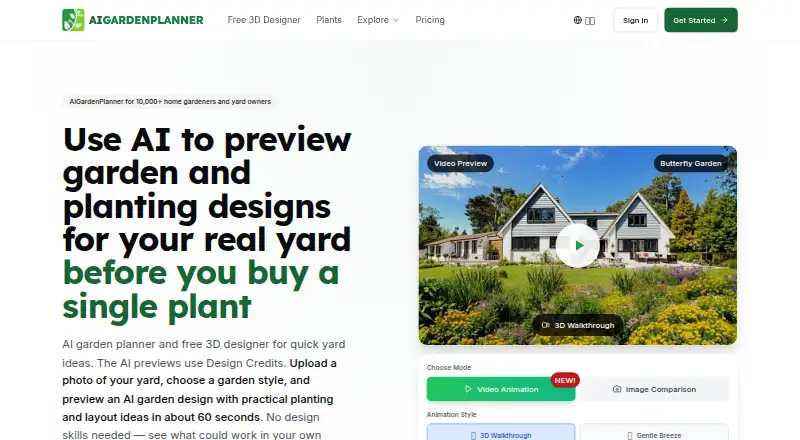
AIGardenPlanner uses AI to preview garden and planting designs from a photo of a real yard. Upload a photo, choose from more than 50 styles, and generate designs in about 60 seconds. Its free browser-based 3D editor includes more than 400 models, linked 2D and 3D views, terrain sculpting, and first-person walkthroughs. The AI Plant Advisor builds plant lists using location, climate zone, soil type, local conditions, and gardening goals, with care instructions. Plant Detector identifies plants from photos and provides profiles and health assessments for pests and diseases.
A free 3D Designer plan allows one project. Paid yearly plans include Starter, listed at $9/mo and billed as $99 for the year, with 100 credits per month, four projects, and personal use only. Professional and Business include commercial licenses; Business includes dedicated priority support. Video animations use 10 credits, Quick Tours use 5, and Full Detail tours use 30. Subscribers can cancel and retain access through the current paid period. The pricing page advertises a 30-day money-back guarantee.
Who it suits
It suits homeowners and hobby gardeners who want to preview designs or use plant advice, as well as landscaping and design businesses needing commercial licenses on Professional or Business plans.
What it does well
- Generates garden previews from yard photos in about 60 seconds.
- Offers more than 50 design styles.
- Free editor includes more than 400 models.
- Plant advice reflects location, soil, and gardening goals.
- Subscribers can cancel and keep access through the paid period.
What to know first
- Free 3D Designer plan allows one project.
- Starter is for personal use only.
- Tours and animations consume credits.
Limits
The free 3D Designer plan provides one project. Starter includes 100 credits per month and four projects, is limited to personal use, and allows two designs per batch; video animations and tours also consume credits.
Plans
| Plan | Billed and limits | Price |
|---|---|---|
| Free 3D Garden Designer | browser WebGL editor · no sign-up to start · no watermarks · no usage caps · one saved project after account creation | Free |
| 3D Designer | Free forever · One project free · Browser-based 3D editor | Free |
| Professional | $249 for the year; renews yearly unless canceled · 400 credits/mo · 50 projects · 3 per batch · Ultra Realistic Pro model · commercial license · priority support · business logo branding | $21 a month |
| Professional (yearly) | $49/mo Today you pay $249 for the year; renews yearly unless canceled · 400 credits/mo · 50 projects · 3 per batch · Commercial license · Priority support | $249 |
| Business | $499 for the year; renews yearly unless canceled · 1000 credits/mo · 1,000 projects · 4 per batch · Ultra Realistic Pro model · commercial license · dedicated priority support · business logo branding | $42 a month |
| Business (yearly) | $99/mo Today you pay $499 for the year; renews yearly unless canceled · 1000 credits/mo · 1,000 projects · 4 per batch · Commercial license · Dedicated priority support | $499 |
| Starter | $99 for the year; renews yearly unless canceled · 100 credits/mo · 4 projects · 2 per batch · AIGP Classic and Ultra Realistic models · personal use only · standard support | $9 a month |
| Starter (yearly) | $19/mo Today you pay $99 for the year; renews yearly unless canceled · 100 credits/mo · 4 projects · 2 per batch · Personal use only | $99 |
As aigardenplanner.com lists them, read 15 Oct 2026. The maker's own page has the final word.
Getting started
- Open https://aigardenplanner.com/ in a web browser.
- Choose the free 3D Designer plan or a paid plan billed yearly.
- For a photo-based design, upload a picture of your garden and select a style.
- Use the 3D editor to arrange models and shape terrain.
- Use the Plant Advisor or Plant Detector for plant guidance or identification.
AIGardenPlanner turns a photograph of an actual yard into AI design concepts, then lets you refine ideas in a browser-based 3D workspace. It is best for homeowners and garden professionals who need visual options tied to a real site; the right subscription depends on project count, monthly credits, and whether the work is commercial.
Overview
The service begins with a yard photo. You select from more than 50 styles and receive a generated design in about 60 seconds, making it a fast way to compare directions before investing time in a detailed layout. That speed is useful for early consultations and personal planning, but the result is a concept preview rather than a replacement for site measurement or local horticultural expertise.
A separate, free browser editor supports synchronized 2D and 3D views, terrain sculpting, more than 400 models, and first-person walkthroughs. This combination gives users a path from inspiration to an inspectable layout instead of leaving them with a static image. The service runs on the web, so it suits users who prefer not to install a desktop application.
Key features
AI design generation
Photo upload and style selection make visual experimentation straightforward. The roughly one-minute generation time favors rapid iteration when a homeowner or designer is comparing aesthetics for the same space.
3D planning tools
Terrain modeling is a meaningful advantage for sloped or irregular yards, while synchronized views help users understand how a plan translates between top-down placement and spatial form. Walkthroughs are useful for presenting a proposed experience, and the model library supplies objects for populating a scene. The free editor is limited to one project, so ongoing multi-site work requires a paid tier.
Plant guidance and identification
AI Plant Advisor builds plant lists from location, climate zone, soil type, local conditions, and gardening goals, and adds care instructions. Plant Detector identifies plants from photos and provides profiles plus health assessments for pests and diseases. These tools can narrow choices and support maintenance decisions, although users should still verify recommendations against local conditions.
Credits, privacy, and payments
Video animations consume 10 credits, 3D Quick Tours consume 5, and 3D Full Detail tours consume 30. Credit allowances therefore matter to anyone producing presentation material regularly. Payments are processed by Stripe, and card details are not stored on AIGardenPlanner’s servers. The privacy policy covers account, usage, and analytics data and allows occasional review of generated garden designs; it also notes that absolute security cannot be guaranteed.
Pricing
AIGardenPlanner is freemium. The 3D Designer plan costs nothing, is free forever, and includes one project with the browser-based editor. It is suitable for trying the workflow or completing a single personal concept, not for maintaining a portfolio.
Starter (yearly) costs $99 a year, shown as billed at $19/mo, with “Today you pay $99 for the year.” It renews yearly unless canceled and includes 100 credits per month, four projects, two designs per batch, standard support, and personal use only. This is the homeowner and hobby-gardener tier; the commercial restriction rules it out for client work.
Professional (yearly) costs $21 a year, shown as billed at $49/mo, with “Today you pay $249 for the year.” It renews yearly unless canceled and provides 400 credits per month, 50 projects, three per batch, a commercial license, and priority support. Landscapers and growing design businesses gain the rights and capacity Starter lacks.
Business (yearly) costs $42 a year, shown as billed at $99/mo, with “Today you pay $499 for the year.” It renews yearly unless canceled and includes 1,000 credits per month, 1,000 projects, four per batch, a commercial license, and dedicated priority support. Agencies and design firms are the clearest fit. Subscribers can cancel at any time and keep access through the paid period; a 30-day money-back guarantee is advertised.
Platforms
AIGardenPlanner is available on the web. Its editor is browser-based, so access depends on an internet-connected browser rather than a native mobile or desktop installation.
Who it's for
Homeowners and hobby gardeners should start with the free editor or Starter when one to four personal projects and modest credit use are enough. Landscapers and expanding garden-design businesses need Professional for commercial rights, larger project capacity, and priority support. Agencies and design firms benefit from Business’s 1,000-project allowance, larger credit pool, and dedicated priority support. Users seeking only plant identification or advice may find the broader design workflow more than they need.
Pros and cons
- Pros: Photo-based previews connect concepts to a real yard; the editor combines 2D, 3D, terrain, models, and walkthroughs; plant advice uses location and growing conditions; plant detection adds pest and disease assessment; commercial licensing is explicit on Professional and Business.
- Cons: The free plan permits only one project; paid creative output consumes credits; Starter is personal-use only; annual plans renew unless canceled; generated designs may be reviewed under the privacy policy.
Alternatives
Choose Planner 5D instead if you want Android, iOS, macOS, Windows, and web access, plus a Premium annual plan at $59.99 a year with floor-plan conversion and a full premium furniture catalog.
iScape is the better fit for a mobile-oriented option with a free trial, 2D and 3D design, and a limited plant and hardscape database.
Pick Arcadium 3D when two free projects or a Pro plan with unlimited objects are more useful than AIGardenPlanner’s credit system. Terragen suits users seeking a terrain-focused desktop tool on Linux, macOS, or Windows. usBIM.platform is preferable when cloud storage and online applications are the priority. World Machine, Lands Design, and Picogen are alternative terrain or landscape tools with different desktop, licensing, or rendering models.
Verdict
AIGardenPlanner is a strong choice for homeowners and landscape professionals who want rapid, photo-grounded concepts followed by editable 3D planning and plant guidance. Choose Professional or Business for commercial work; look elsewhere if you need native apps, unrestricted project creation on a free tier, or a workflow without recurring credit limits.
Verdict
AIGardenPlanner combines photo-based design previews, a 3D editor, and plant guidance in a web service. Review project limits, credit use, and plan licensing before choosing a tier.
Questions
Is AIGardenPlanner free?
Yes. The free 3D Designer plan is listed as free and includes one project with the browser-based 3D editor.
What are the paid plan prices?
The pricing note lists paid plans from $9/mo (annual). The yearly Starter plan is listed at $99 for the year; Professional at $249 for the year; and Business at $499 for the year.
Which platforms does it support?
AIGardenPlanner is web-based. Its 3D editor runs in a browser.
Can I use designs commercially?
Professional and Business include a commercial license. Starter is for personal use.
How many credits do tours and animations use?
Video animations use 10 credits, 3D Quick Tours use 5, and 3D Full Detail tours use 30.
Can I cancel a subscription?
Yes. Subscribers can cancel at any time and retain access through the current paid period. The pricing page advertises a 30-day money-back guarantee.
Facts from AIGardenPlanner's own pages
- 3D editor
- The free browser-based editor includes 400+ models, synchronized 2D and 3D views, terrain sculpting, and first-person walkthroughs. · aigardenplanner.com, 2 Oct 2026
- AI video animation
- Garden images can be animated into videos with breeze effects, 3D walkthroughs or custom animation instructions. · aigardenplanner.com, 15 Oct 2026
- Batch generation
- Batch processing supports up to 16 simultaneous generations on the Business tier. · aigardenplanner.com, 15 Oct 2026
- Cancellation
- Subscribers can cancel at any time and retain access through the current paid period. · aigardenplanner.com, 2 Oct 2026
- Cancellation and refund
- The pricing page says subscriptions can be canceled anytime with access through the paid period and advertises a 30-day money-back guarantee. · aigardenplanner.com, 15 Oct 2026
- Commercial licensing
- Professional and Business include commercial rights, while Starter is designated for personal use. · aigardenplanner.com, 15 Oct 2026
- Commercial use
- Professional and Business plans include a commercial license, while Starter is for personal use. · aigardenplanner.com, 2 Oct 2026
- Credit costs
- A garden design uses 1 credit, video animation 10, Plant Advisor 5, quick 3D tour 5, full-detail 3D tour 30 and Ultra Realistic Pro 4 credits. · aigardenplanner.com, 15 Oct 2026
- Data protection
- The privacy policy describes reasonable precautions against unauthorized access but says absolute data security cannot be guaranteed. · aigardenplanner.com, 2 Oct 2026
- Design generation
- Users can upload a garden photo, choose from 50+ styles, and generate designs in about 60 seconds. · aigardenplanner.com, 2 Oct 2026
- Device access
- The maker describes the product as mobile-first and usable on phones and tablets without an app download. · aigardenplanner.com, 15 Oct 2026
- Exports and rendering
- The editor exports PNG screenshots and, after account creation, can generate AI photorealistic renders. · aigardenplanner.com, 15 Oct 2026
- Founder
- The maker identifies Alfred van der Heide as founder and primary author. · aigardenplanner.com, 15 Oct 2026
- Free editor technology
- The free 3D editor runs in a browser with WebGL and requires no installation or plug-in. · aigardenplanner.com, 15 Oct 2026
- Garden styles
- The service advertises more than 50 garden styles and lets users create their own style. · aigardenplanner.com, 15 Oct 2026
- Headquarters
- 2724 Újlengyel, Petőfi Sándor utca 48., Hungary · aigardenplanner.com, 28 Sept 2026
- Headquarters address
- The maker publishes 2724 Újlengyel, Petőfi Sándor utca 48., Hungary as its public EU business address. · aigardenplanner.com, 15 Oct 2026
- Image enhancement
- An Ultra HD enhancer is offered for increasing design image clarity. · aigardenplanner.com, 15 Oct 2026
- Image review
- The privacy policy says generated garden designs may occasionally be reviewed for policy compliance. · aigardenplanner.com, 15 Oct 2026
- Independent feature description
- SourceForge describes location-aware planting schedules, pest and disease guidance and recommendations based on sunlight, soil moisture and local conditions. · sourceforge.net, 15 Oct 2026
- Intended users
- The maker describes Starter as suited to homeowners and hobby gardeners, Professional to landscapers and growing garden design businesses, and Business to agencies and design firms. · aigardenplanner.com, 2 Oct 2026
- License listing
- SourceForge lists the web application license as Full and records its last update as 2024-08-09. · sourceforge.net, 15 Oct 2026
- Limit: API and integrations
- ToolPilot lists no available public API and no listed third-party integrations. · toolpilot.ai, 15 Oct 2026
- Limit: desktop ergonomics
- AIChief said the best experience requires a desktop mouse and keyboard. · aichief.com, 15 Oct 2026
Where AIGardenPlanner stands on Freedom251
- 3D Landscape Design Software#6 of 30