Freedom251 › AI Code Generation Software
Aider
What Aider is
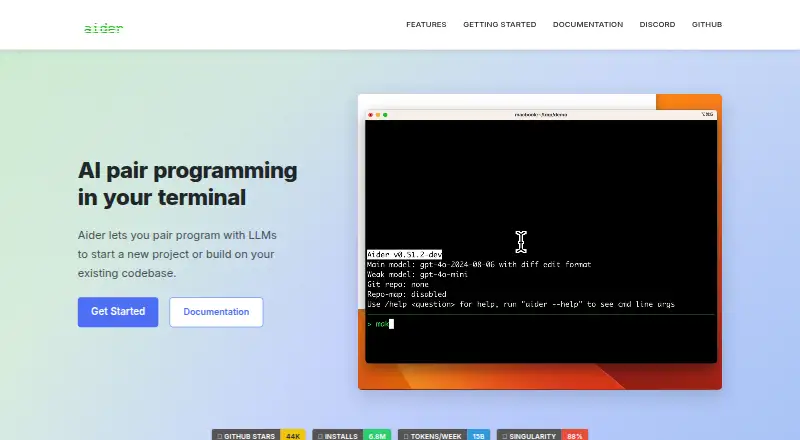
Aider is an open-source tool for pairing with large language models to start projects or work on existing codebases. It maps a repository to give models context and supports more than 100 programming languages. Aider connects to hosted and local models, with documented providers including OpenAI, Anthropic, Gemini, DeepSeek, Ollama, OpenRouter, Azure, Vertex AI, and Amazon Bedrock. Its Git integration can commit edits with descriptive messages and supports reviewing or undoing changes. Users can add images and web pages to coding chats, and Aider can watch files for AI comments in an IDE or text editor; VS Code is listed as supported. It can run linters and tests after edits and address detected problems. Installation is documented for Mac, Linux, and Windows, with aider-install able to use a separate Python environment. Aider is also listed for the web and self-hosted use. The software is free under the Apache 2.0 license, though usage of LLM providers may cost separately. Aider works with one Git repository at a time, and its FAQ says very large repositories are not optimized for quick performance and response time.
Who it suits
It suits developers who want an LLM coding partner with repository context, Git support, and terminal-based workflows. It may also fit teams choosing among hosted and local model providers.
What it does well
- Maps codebases to provide repository context.
- Supports more than 100 programming languages.
- Git tools support committing, reviewing, and undoing edits.
- Can run linters and tests after changes.
What to know first
- Works with only one Git repository at a time.
- Very large repositories are not optimized for quick responses.
- LLM provider usage may have separate costs.
Limits
Aider can work with one Git repository at a time. Its FAQ says it is not optimized for quick performance and response time in very large repositories. The software is free, but LLM provider usage may have separate costs.
Plans
| Plan | Billed and limits | Price |
|---|---|---|
| Aider | Open-source AI pair programming tool; usage of LLM providers may have separate costs | Free |
As aider.chat lists them, read 11 Oct 2026. The maker's own page has the final word.
Getting started
- Visit https://aider.chat/.
- Choose a documented installation route for Mac, Linux, or Windows.
- Use aider-install if you want installation in a separate Python environment.
- Connect a hosted or local LLM provider; provider usage may have separate costs.
- Use Aider in a Git repository and, if relevant, configure it to watch IDE or text editor files.
Aider is a coding assistant for developers who want an LLM to help build or change software in a Git repository. Its clearest appeal is control over model choice and a workflow built around repository context and Git. Developers who need to work across several repositories at once should look elsewhere.
Overview
Aider can help start a project or work in an existing codebase, using a generated repository map to give the model context beyond the file currently being changed. It supports more than 100 programming languages, making it relevant to a broad range of software projects.
The tool is open source under the Apache 2.0 license and connects to hosted and local language models. That flexibility is valuable for developers who want to choose a provider, but it also means the cost of model usage can sit outside Aider's price.
Key features
Repository-aware coding and Git
Aider combines coding chat and agent mode with a map of the codebase. It can automatically commit changes with descriptive messages, while its Git integration supports reviewing and undoing edits. That gives Git users a practical way to inspect and recover from generated changes. The trade-off is a strict one-repository-at-a-time workflow, which makes it a poor fit for work that needs a single session across multiple repositories.
Model and editor flexibility
Aider connects to hosted and local LLMs, with provider documentation for OpenAI, Anthropic, Gemini, DeepSeek, Ollama, OpenRouter, Azure, Vertex AI, and Amazon Bedrock. Users can also add images and web pages as visual context. In an IDE or text editor, Aider can watch files and respond to AI comments; VS Code is the supported IDE named for the product. This breadth suits developers who want to shape their own setup, rather than those seeking a single bundled editor-and-model service.
Automated checks
After making edits, Aider can run linters and tests and fix problems they detect. That can help catch issues within the coding workflow, though the value depends on having suitable checks in the project.
Setup, privacy, and support
The maker documents installation for Mac, Linux, and Windows; aider-install can use a separate Python environment. Documentation, troubleshooting material, and a Discord community offer routes to help. The privacy policy says programming-tool analytics may include feature usage, errors, and model names associated with a randomly generated identifier, and users can switch analytics off. It also says physical and electronic safeguards are used but cannot guarantee the security or privacy of information.
Pricing
Aider: free. The open-source AI pair programming tool costs nothing to use, but usage of LLM providers may incur separate charges. This suits developers comfortable selecting and managing a model provider; it is less suitable for anyone who wants one price to cover both the software and model usage.
Platforms
Aider is available for Linux, macOS, Windows, web, and self-hosted use. The maker documents desktop installation on Mac, Linux, and Windows, and VS Code is the supported IDE named for the product.
Who it's for
Aider is best suited to developers who use Git, want an LLM to work with repository-level context, and value choosing between hosted and local models. It is less compelling for workflows spanning multiple repositories at once. The FAQ says it works with repositories of any size, but very large repositories are not optimized for quick performance and response time, a relevant drawback for teams expecting fast responses on large codebases.
Pros and cons
- Pros: Free and open source under Apache 2.0, with hosted and local model connections, lets developers choose a provider without paying for Aider itself.
- Pros: Repository mapping, Git review and undo, and automatic commits make it more grounded in a version-controlled project than a chat limited to isolated snippets.
- Pros: Automatic linting and testing after edits can help surface and address problems in the same workflow.
- Cons: Provider usage may cost extra, so free access to Aider does not ensure free coding assistance.
- Cons: Only one Git repository can be active at a time, and very large repositories may respond more slowly.
- Cons: Analytics can include usage, errors, and model names tied to a random identifier, although analytics can be turned off.
Alternatives
For a broader shortlist, see AI Coding Assistants and AI Code Generators.
- GitHub Copilot is a freemium option with a free plan and trial across mobile, desktop, web, and extension platforms; consider it if that platform coverage or trial is a better fit.
- Claude Code is a paid product with a free plan that does not include Claude Code; choose it if you are considering its paid offering rather than Aider's free, open-source tool.
- Devin offers a limited-usage free plan for one member and paid monthly tiers; it may suit readers comparing a freemium option with explicit individual monthly plans.
- Gemini CLI has free access through Google Account authentication and a Google AI Pro plan; consider it if that access model is preferable.
- JetBrains Junie offers a free-to-start plan with five AI credits and separately billed AI usage, plus a trial; consider it if a credit-based starting plan fits better.
- Kilo Code is a freemium, open-source option with usage billed separately and extensions for VS Code, JetBrains, and CLI; choose it if those extension options better match your setup.
- Tencent CodeBuddy has freemium plans, including a tier with monthly credits, code-completion uses, project, and member caps; consider it if those limits suit your needs.
- Tongyi Lingma has freemium personal plans with monthly conversation and unit-test-agent quotas; consider it if those published caps fit your expected use.
Verdict
Choose Aider if you want a free, open-source coding assistant that brings repository context, Git operations, and automated checks into an LLM workflow—and you are willing to choose a provider and account for its possible charges. Look elsewhere if you need one session across multiple repositories or fast responses from very large repositories.
Verdict
Aider brings repository-aware coding assistance, Git operations, and automated linting and testing into a free, open-source tool. Consider the one-repository limit, large-repository performance note, and potential provider charges.
Questions
Is Aider free?
The Aider plan is free, and the software is open source under the Apache 2.0 license. LLM provider usage may have separate costs.
Which platforms are supported?
Platforms listed include Linux, macOS, self-hosted, web, and Windows. Installation is documented for Mac, Linux, and Windows.
Which models can Aider use?
Aider connects to hosted and local LLMs. Documented providers include OpenAI, Anthropic, Gemini, DeepSeek, Ollama, OpenRouter, Azure, Vertex AI, and Amazon Bedrock.
Which IDEs are supported?
VS Code is listed as a supported IDE. Aider can also watch files and respond to AI comments added in an IDE or text editor.
Can Aider work with large repositories?
It can work with repositories of any size, but very large repositories are not optimized for quick performance and response time. It can work with only one Git repository at a time.
Who makes Aider?
Aider AI LLC is the company behind Aider. The software is open source under the Apache 2.0 license.
Facts from Aider's own pages
- Coding agent
- Yes · aider.chat, 20 Sept 2026
- Chat assistance
- Yes · aider.chat, 20 Sept 2026
- Codebase context
- Aider creates a map of the codebase to give LLMs context about the repository. · aider.chat, 11 Oct 2026
- Codebase indexing
- Yes · aider.chat, 20 Sept 2026
- Git
- Aider can automatically commit edits with descriptive messages, and its git integration supports reviewing and undoing changes. · aider.chat, 11 Oct 2026
- IDE support
- Aider can watch files and respond to AI comments added in an IDE or text editor. · aider.chat, 11 Oct 2026
- Images and web pages
- Users can add images and web pages to the coding chat as visual context. · aider.chat, 11 Oct 2026
- Installation
- The maker documents installation on Mac, Linux, and Windows, and says aider-install can use a separate Python environment. · aider.chat, 11 Oct 2026
- Languages
- Aider supports more than 100 programming languages. · aider.chat, 11 Oct 2026
- Large repositories
- Aider's FAQ says it works with repositories of any size but is not optimized for quick performance and response time in very large repositories. · aider.chat, 11 Oct 2026
- License and company
- Aider AI LLC is the company behind Aider, which is open source under the Apache 2.0 license. · aider.chat, 11 Oct 2026
- Linting and testing
- Aider can automatically run linters and tests after edits and fix detected problems. · aider.chat, 11 Oct 2026
- Model integrations
- Aider connects to hosted and local LLMs, with documentation for providers including OpenAI, Anthropic, Gemini, DeepSeek, Ollama, OpenRouter, Azure, Vertex AI, and Amazon Bedrock. · aider.chat, 11 Oct 2026
- Privacy analytics
- The privacy policy says programming-tool analytics may include feature usage, errors, and model names tied to a randomly generated identifier, and users can turn analytics off. · aider.chat, 11 Oct 2026
- Repository limit
- Aider can work with only one Git repository at a time. · aider.chat, 11 Oct 2026
- Security
- The privacy policy says Aider uses physical and electronic safeguards but cannot guarantee the security or privacy of information. · aider.chat, 11 Oct 2026
- Support
- The maker points users to documentation, troubleshooting information, and a Discord community. · aider.chat, 11 Oct 2026
- Supported IDEs
- VS Code · aider.chat, 20 Sept 2026
- Terminal access
- Yes · aider.chat, 20 Sept 2026
- What it does
- Aider lets you pair program with LLMs to start a new project or build on an existing codebase. · aider.chat, 11 Oct 2026
Where Aider stands on Freedom251
- AI Code Generation Software#1 of 27
- Coding Tool#1 of 25
- AI Code Generators#4 of 54
- AI Coding Assistants#8 of 102