Freedom251 › AI Coding Assistants

Kilo Code
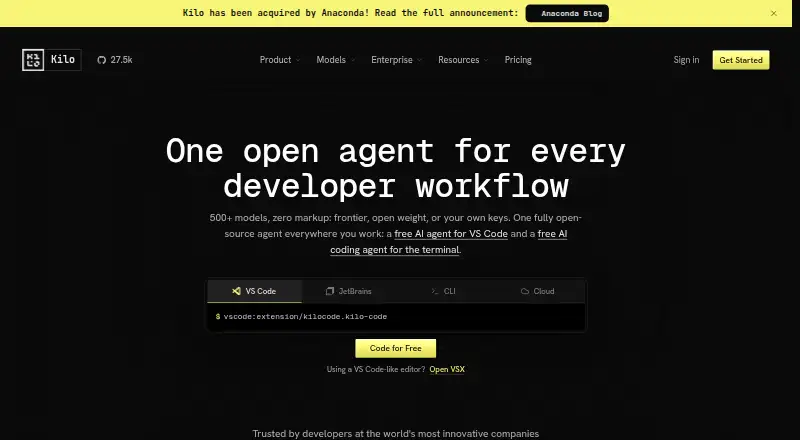
What Kilo Code is
Kilo Code is an open-source AI coding assistant available through VS Code and JetBrains extensions, a terminal CLI, and cloud agents. It can generate, refactor, and debug code, automate reviews, and deploy applications; listed capabilities also include code completion, chat assistance, codebase indexing, and terminal access. Users can choose from more than 500 models across more than 60 providers, including free, local, and bring-your-own-key options. Modes include Code, Architect, Debug, Custom, and Auto, while Auto Model routes work using Efficient, Frontier, or Free strategies. Cloud Agents run remotely, can create branches, and can optionally commit and push repository changes. The MIT-licensed source can be inspected, modified, or self-hosted. The Free option has no hosted credit requirement, but usage is billed separately; hosted inference uses provider rates without an added markup. Teams costs $15/user/month, while Enterprise pricing is custom and its 14-day trial includes Enterprise features for evaluation. Monthly AI credit subscriptions start at $19.
Who it suits
Kilo Code suits developers who want AI coding assistance in an IDE or terminal and want to choose among hosted, local, or bring-your-own-key models. Teams may value shared agent modes and centralized billing; Enterprise buyers can evaluate features through a 14-day trial.
What it does well
- Supports more than 500 models across 60+ providers.
- Free option has no hosted credit requirement.
- Hosted inference has no added provider-rate markup.
- MIT-licensed source can be inspected or modified.
- Cloud agents can create branches and push changes.
What to know first
- Usage is billed separately from free platform access.
- Cloud compute is billed based on usage.
- Slack requires a paid Slack plan and available Kilo credits.
- Enterprise pricing is custom.
Limits
The free plans are listed at $0.00 per free, but usage is billed separately where applicable. Auto Free requires no hosted credits and routes to free models where available; hosted inference and cloud compute have separate usage-based charges.
Plans
| Plan | Billed and limits | Price |
|---|---|---|
| Free | Usage is billed separately · Open-source VS Code, JetBrains, and CLI extensions · Agentic coding assistant · Code completion and generation · Works with any AI model | Free |
| Teams | $15/user/month · Usage analytics · Shared agent modes · Centralized billing · Shared BYOK · Priority support | $15 a month |
| Enterprise | Custom · SSO, OIDC & SCIM · Audit logs · Model/provider limits · SLA commitments · Dedicated support | On request |
| Auto Free | No hosted credit required · Free-model routing where available · Bring your own provider keys · Local models with Ollama or LM Studio | Free |
| Kilo Gateway | $0 /mo + usage · Pay-as-you-go hosted inference · 500+ models across 60+ providers · No markup on provider rates | Free |
| Kilo Pass Starter | Pay monthly, cancel anytime · Monthly AI credit subscription · Up to $26.60 per month in credits · Up to 50% bonus credits | $19 a month |
| Kilo Pass Pro | Pay monthly, cancel anytime · Monthly AI credit subscription · Up to $68.60 per month in credits · Up to 50% bonus credits | $49 a month |
| Kilo Pass Expert | Pay monthly, cancel anytime · Monthly AI credit subscription · Up to $278.60 per month in credits · Up to 50% bonus credits | $199 a month |
The first 8 of 14 plans, as kilo.ai lists them, read 20 Sept 2026. The maker's own page has the final word. Every plan
Getting started
- Visit https://kilo.ai/ and choose the VS Code or JetBrains extension, CLI, or cloud agent route.
- Install the extension for VS Code or a supported JetBrains editor, or use the terminal CLI.
- Choose a free model route, bring your own provider key, or use a local model.
- Select an agent mode such as Code, Architect, Debug, Custom, or Auto.
- For team features, choose Teams at $15.00 per month per user.
- Start the 14-day Enterprise trial to evaluate Enterprise features.
Overview
Kilo Code is an open-source coding assistant that pairs editor and terminal tools with remote agents and a broad choice of AI models. It suits developers who want to choose their own model or provider rather than commit to one, but separate charges for team access, inference and cloud compute make total cost worth tracking.
It can generate, refactor and debug code, automate reviews and deploy applications. Its MIT-licensed source can be inspected, modified, forked or self-hosted. Kilo says it was made in Amsterdam and was acquired by Anaconda in July 2026, with existing products, plans and support continuing unchanged at the announcement.
Key features
Assistance and model choice
Code completion, chat and agentic coding cover different levels of help, from suggestions to delegated work. Modes include Code, Architect, Debug, Custom and Auto; Auto Model routes work through Efficient, Frontier or Free strategies based on capability and cost. More than 500 models from over 60 providers are supported, including free and local models, alongside BYOK. That breadth is useful for developers who want control over model choice, though the provider’s inference charges remain separate from platform access.
Editors, terminal and cloud work
Kilo works in VS Code and JetBrains editors, including IntelliJ IDEA, PyCharm and WebStorm, and offers a CLI. Codebase indexing and terminal access support work across a project. Cloud Agents run remotely, can create branches and can optionally commit and push changes. Cloud compute is billed by the second, without rounding up or a minimum usage charge, a practical advantage for intermittent jobs; it is still a separate usage cost.
Integrations and security
Official integrations include GitHub, GitLab and DoltHub, with Bitbucket Cloud for organizations. Kilo for Slack can answer repository questions, implement changes, create branches and open pull requests, but requires a paid Slack plan and available Kilo credits. Security Agent can sync GitHub Dependabot alerts, triage findings with AI and help dismiss or remediate them. Enterprise adds privacy controls, audit logs, SSO, OIDC, SCIM and SLA commitments; Kilo’s security materials also describe encryption in transit and at rest, RBAC and paid-plan no-retention support.
Pricing
Kilo separates platform access, AI inference and cloud compute. The free tier has no hosted-credit requirement and routes to free models where available, but usage can still be billed separately when using a provider or compute. Hosted inference through Kilo Gateway is $0 /mo + usage at exact provider rates, with no inference markup. Cloud compute is usage-based.
| Plan | Price | What it suits |
|---|---|---|
| Free | free | Individual developers using open-source VS Code, JetBrains or CLI extensions, with any AI model; usage is billed separately. |
| Auto Free | free | Those using free-model routing where available, their own provider keys, or local models through Ollama or LM Studio. |
| Teams | $15 a month; billed $15/user/month | Teams needing management, usage analytics, AI adoption scoring, shared agent modes, centralized billing, shared BYOK and priority support. |
| Enterprise | Custom pricing | Organizations requiring governance, security review, model/provider limits, SSO, OIDC, SCIM, audit logs, SLA commitments and dedicated support. |
| Kilo Pass Starter | $19 a month | Users wanting a monthly AI credit subscription with up to $26.60 per month in credits and up to 50% bonus credits. |
| Kilo Pass Pro | $49 a month | Higher credit needs, with up to $68.60 per month in credits and up to 50% bonus credits. |
| Kilo Pass Expert | $199 a month | Substantial credit needs, with up to $278.60 per month in credits and up to 50% bonus credits. |
Kilo Pass plans are described as pay monthly and cancel anytime; credits are capped at the stated maximums, so they are not a flat-rate substitute for unlimited inference. Teams is the clearest paid step up for collaboration, while Free and Auto Free avoid a platform fee but do not remove separate provider or compute costs. Enterprise trials last 14 days and include Enterprise features for evaluation.
Platforms
Kilo’s supported surfaces span VS Code, JetBrains, CLI and cloud agents, as well as web, Android, iOS, Linux, macOS and Windows. The range gives developers several ways to reach the service, while the core editor workflow is centered on VS Code and JetBrains. Slack is another surface, subject to its paid-plan and credit requirements.
Who it's for
Kilo is a strong fit for developers who want agentic coding in familiar editors, the option to bring provider keys or run local models, and a path from solo use to team controls. Teams that need shared modes and billing can justify the per-user plan; organizations needing identity controls and contractual commitments should look at Enterprise. It is less suited to buyers seeking a single predictable price covering platform, model use and remote compute.
Pros and cons
Pros
- Wide model choice: Support for more than 500 models across 60+ providers, plus BYOK and local options, gives model-conscious developers flexibility.
- Open source: MIT licensing allows inspection, modification and self-hosting.
- Usage-based cloud compute: Per-second billing without rounding or a minimum avoids paying for unused compute time.
- Team and enterprise controls: Shared billing and agent modes scale into SSO, audit logs and SLA commitments at higher tiers.
Cons
- Costs are split: Platform access, inference and cloud compute are separate, so the plan price alone may not represent total spend.
- Free use depends on the route: Free models are used where available; other provider usage can be billed separately.
- Slack has prerequisites: Its coding workflow requires both a paid Slack plan and Kilo credits.
- Enterprise is not self-serve priced: Organizations must seek custom pricing rather than compare a fixed monthly rate.
Alternatives
GitHub Codespaces is worth considering when the priority is hosted development environments with usage-priced 2-core and 4-core compute; Kilo is more directly centered on model-flexible coding assistance and agents.
Replit may suit someone looking for a browser- and mobile-accessible development workspace with free daily usage, one live project and one background task at a time, rather than Kilo’s model and agent options.
Claude Code is an alternative for readers considering a paid coding assistant; its listed Pro plan is $17 a month, while Claude Code is not included in its free plan.
CodeGPT is another freemium assistant with BYOK and a stated allowance of 10 daily Economy interactions on Free, which may suit users comparing a defined free interaction limit with Kilo’s free-model routing.
Cursor is an option for those comparing a free plan with limited Agent requests or a $20 a month Pro plan; Kilo stands out for its open-source license and broad provider choice.
Devin offers a free plan with limited usage for one member and a $20 a month Pro plan for one member, making it a comparison point for those weighing per-member agent plans.
Gemini Code Assist is a free alternative for individuals with no-cost access and 1,000 model requests per day, suited to readers who prefer that stated daily allowance over Kilo’s provider flexibility.
JetBrains Junie offers five AI credits on its Free to Start plan, with AI usage billed separately, and may suit developers comparing an assistant tied to the JetBrains ecosystem.
Browse more options in AI Code Generators and AI Coding Assistants.
Verdict
Choose Kilo Code if you want an open-source coding agent that can work across editors and terminals while leaving model choice, BYOK and local use in your hands. Its breadth and team controls are compelling, but anyone who values a consolidated, predictable bill should compare alternatives before committing to paid inference or cloud-agent usage.
Verdict
Kilo Code combines coding assistance with several ways to access models, including local models and BYOK. Account for separately billed usage and cloud compute when comparing plans.
Questions
Is Kilo Code free?
The Free and Auto Free options are listed at $0.00 per free. Platform access is free, while AI usage may be billed separately; Auto Free does not require hosted credits and routes to free models where available.
What does Teams cost?
Teams costs $15.00 per month per user. It adds team management, usage analytics, shared agent modes, centralized billing, shared BYOK, and priority support.
What platforms and editors does Kilo Code support?
Kilo is available through VS Code and JetBrains extensions, a CLI, and cloud agents. Listed JetBrains editors include IntelliJ, PyCharm, and WebStorm.
Is Kilo Code open source?
Yes. Kilo's source is MIT-licensed and can be inspected, forked, modified, or self-hosted.
How is hosted AI inference priced?
Kilo Gateway is listed at $0.00 per once, with usage billed separately at exact provider rates and no inference markup. Platform access, inference, and cloud compute are priced separately.
What is included in the Enterprise trial?
The trial lasts 14 days and includes Enterprise features for evaluation. Enterprise pricing is custom; listed features include SSO, OIDC, SCIM, audit logs, model and provider limits, and SLA commitments.
Facts from Kilo Code's own pages
- Coding agent
- Yes · kilo.ai, 20 Sept 2026
- Agent modes
- Modes include Code, Architect, Debug, Custom, and Auto. · kilo.ai, 28 Sept 2026
- Auto Model
- Auto Model routes work using Efficient, Frontier, or Free strategies based on capability and cost. · kilo.ai, 28 Sept 2026
- Chat assistance
- Yes · kilo.ai, 20 Sept 2026
- Cloud agents
- Cloud Agents run Kilo remotely, can create branches, and can optionally commit and push repository changes. · kilo.ai, 28 Sept 2026
- Cloud billing
- Cloud compute is usage-based, billed per second, with no rounding up or minimum usage charge. · kilo.ai, 28 Sept 2026
- Codebase indexing
- Yes · kilo.ai, 20 Sept 2026
- Code completion
- Yes · kilo.ai, 20 Sept 2026
- Company acquisition
- Kilo says it has been acquired by Anaconda. · kilo.ai, 28 Sept 2026
- Company location
- The page states it was made in Amsterdam. · kilo.ai, 28 Sept 2026
- Company status
- Kilo Code was acquired by Anaconda in July 2026 and its existing products, plans, and support continued unchanged at the announcement. · anaconda.com, 28 Sept 2026
- Core work
- It can generate, refactor, and debug code, automate reviews, and deploy applications. · kilo.ai, 28 Sept 2026
- Enterprise trial
- The trial lasts 14 days and includes Enterprise features for evaluation. · kilo.ai, 28 Sept 2026
- Free plan
- Yes · kilo.ai, 20 Sept 2026
- Free tier limit
- The free option has no hosted credit requirement and routes to free models where available. · kilo.ai, 28 Sept 2026
- IDE and CLI
- Kilo is available as extensions for VS Code and JetBrains editors and as a terminal CLI. · kilo.ai, 28 Sept 2026
- Integrations
- Official integrations include GitHub, GitLab, DoltHub, and Bitbucket Cloud for organizations. · kilo.ai, 28 Sept 2026
- Model access
- Kilo provides access to more than 500 models across more than 60 providers and supports BYOK and local models. · kilo.ai, 28 Sept 2026
- Model support
- Kilo supports 500+ models across 60+ providers, including free, local, and BYOK options. · kilo.ai, 28 Sept 2026
- Open-source license
- Kilo's source is MIT-licensed and can be inspected, forked, modified, or self-hosted. · kilo.ai, 28 Sept 2026
- Separate billing
- Platform access, AI inference, and cloud compute are priced separately. · kilo.ai, 28 Sept 2026
- Product
- Kilo Code is an open-source AI coding assistant for IDEs, terminals, browsers, and mobile devices. · kilo.ai, 28 Sept 2026
- Security
- Kilo's security page lists SOC 2 materials, encryption in transit and at rest, SSO/SAML, SCIM, RBAC, audit logs, and paid-plan no-retention support. · kilo.ai, 28 Sept 2026
- Security Agent
- Security Agent syncs GitHub Dependabot alerts, triages findings with AI, and can help dismiss or remediate them. · kilo.ai, 28 Sept 2026
Where Kilo Code stands on Freedom251
- AI Coding Assistants#19 of 102
- Agentic Ides#7 of 21
- AI Code Generators#26 of 54