Freedom251 › Emerging AI Software

Bolt.new
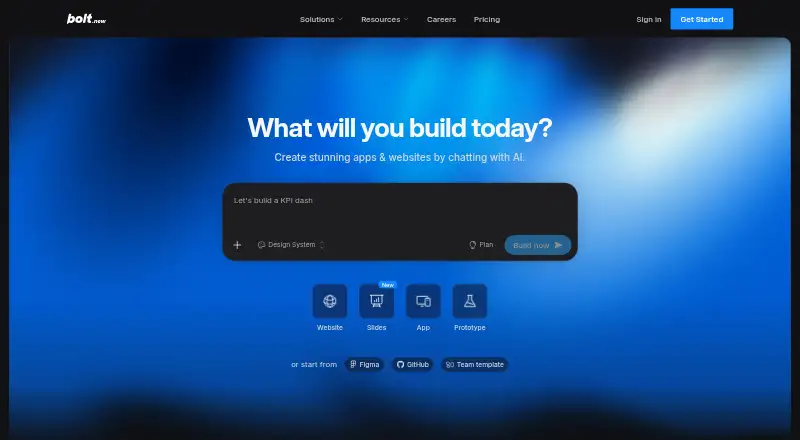
What Bolt.new is
Bolt.new turns natural-language prompts into websites and web apps, which users can refine by chatting with AI. Bolt says its agent can test, refactor, and iterate on projects to reduce errors. Bolt Cloud provides hosting, databases, user management, authentication, SEO optimization, analytics, and custom domains. Integrations listed by Bolt include Figma, GitHub, Expo, Stripe, Supabase, Netlify, Google SSO, and MCP servers. All users can publish projects to a free bolt.host subdomain; custom domains are available to paid users. The Free plan costs nothing and includes a 300,000-token daily limit, a 1-million-token monthly limit, 10MB uploads, Bolt branding, website hosting, and unlimited databases. Pro costs $25 a month; Teams costs $30 a month and per member. Bolt says project code runs in an isolated browser environment and data is encrypted at rest with AES-256 or better and in transit with TLS 1.2 or higher. It states that it is SOC 2 Type 2 certified and compliant with GDPR and CCPA. Bolt works best in Chrome and other Chromium-based desktop browsers; mobile browsers are not fully supported.
Who it suits
Bolt describes use cases for product managers, entrepreneurs, marketers, agencies, students, and builders. It may suit people who want to create web projects from prompts and refine them through AI chat.
What it does well
- Creates websites and web apps from natural-language prompts.
- Free plan includes hosting and unlimited databases.
- Paid plans support custom domains.
- Integrates with tools including Figma, GitHub, and Stripe.
- Bolt states SOC 2 Type 2 certification and GDPR and CCPA compliance.
What to know first
- Free plan has daily and monthly token limits.
- Mobile browsers are not fully supported.
- Free plan includes Bolt branding.
- Custom domains require a paid plan.
Limits
The Free plan is limited to 300,000 tokens daily and 1 million tokens monthly, 10MB uploads, Bolt branding, and up to 333k web requests. Pro starts at 10M tokens monthly, has no daily token limit, allows 100MB uploads and up to 1M web requests, and includes custom domains; Teams adds team administration and other listed team features.
Plans
| Plan | Billed and limits | Price |
|---|---|---|
| Free | 300K tokens daily · 1M tokens monthly · 10MB uploads · Bolt branding · website hosting · up to 333k web requests · unlimited databases | Free |
| Pro | per month billed monthly · No daily token limit · starts at 10M tokens monthly · 100MB uploads · up to 1M web requests · custom domains · unused tokens roll over | $25 a month |
| Teams | per month and member billed monthly · Everything in Pro · centralized billing · team access management · admin controls and provisioning · private NPM registries · design system knowledge | $30 a month |
| Enterprise | Advanced security · SSO · audit logs · compliance support · 24/7 priority support · custom workflows, integrations, and SLAs | On request |
As bolt.new lists them, read 30 Sept 2026. The maker's own page has the final word.
Getting started
- Open https://bolt.new/ in Chrome or another Chromium-based desktop browser.
- Choose the Free plan or a paid plan.
- Describe the website or web app you want to build with a natural-language prompt.
- Refine the project by chatting with AI.
- Publish to a free bolt.host subdomain, or use a paid plan to connect a custom domain.
Bolt.new turns natural-language instructions into websites and web apps, then lets you refine the result through an AI chat. It is best suited to product managers, entrepreneurs, marketers, agencies, students and other builders who value fast iteration over specifying every implementation detail up front. Its broad built-in cloud stack is compelling, but browser support and token allowances should shape your buying decision.
Overview
Bolt converts a plain-language brief into a working project and keeps the development loop conversational. Its agent is intended to test, refactor and iterate automatically, helping reduce routine correction while a project is taking shape. That is a strong fit for prototypes, internal tools and early product work; developers who need granular control from the first line of code may prefer a more conventional environment.
Bolt Cloud adds hosting, databases, user management, authentication, SEO optimization, analytics and custom domains in one service. Every plan can publish to a free bolt.host subdomain, while connecting a custom domain requires a paid plan. The result is a more complete path from idea to deployed app than a prompt-only generator, although usage ceilings still matter for sustained work.
Key features
Conversational app building
You can create websites and web apps with natural-language prompts and continue changing them in chat. Automatic testing, refactoring and iteration are designed to catch and reduce errors without making every maintenance step manual. This favors teams that need frequent changes and non-specialist contributors who can express requirements clearly.
Cloud services and integrations
Bolt Cloud combines deployment services with core application infrastructure: databases, authentication, account management, SEO tools, analytics and domain support. Documented integrations include Figma, GitHub, Expo, Stripe, Supabase, Netlify, Google SSO and MCP servers, giving projects routes into design, source control, payments, mobile development and external services.
Security and enterprise deployment
Project code runs in an isolated browser environment. Data is encrypted at rest with AES-256 or better and in transit with TLS 1.2 or higher. Bolt states SOC 2 Type 2 certification and GDPR and CCPA compliance. Enterprise BYOK deployment can run inside a customer's AWS or Azure tenant with infrastructure isolation and no shared compute, a meaningful option for organizations with strict governance requirements.
Pricing
Bolt uses a freemium model. The Free plan costs nothing and includes 300,000 tokens per day, 1 million tokens per month, 10MB uploads, Bolt branding, website hosting, up to 333k web requests and unlimited databases. It is useful for learning, prototypes and light personal projects, but the daily and monthly token caps can interrupt intensive building, and the branding remains on published work.
Pro costs $25 a month, billed monthly. It removes the daily token limit, starts at 10M tokens monthly, allows 100MB uploads and up to 1M web requests, adds custom domains and rolls unused tokens over. This is the practical choice for an individual shipping real projects who needs more headroom and a branded public site; the monthly token allowance and request quota still define capacity.
Teams costs $30 a month per member, billed monthly. It includes everything in Pro plus centralized billing, team access management, administrative controls and provisioning, private NPM registries and design-system knowledge. The per-member price makes it appropriate when several contributors need governed access, while a solo user gains little beyond Pro's allowances.
Enterprise has custom pricing. It adds advanced security, a dedicated account manager, 24/7 priority support, custom workflows, integrations and SLAs, plus data-governance and retention policies. It is aimed at organizations that need formal operational commitments rather than a self-serve subscription.
Platforms
Bolt supports Android, iOS and the web, with web apps, mobile apps, databases and backend services, and both deployment options. It works best in Chrome and other Chromium-based desktop browsers; mobile browsers are not fully supported. Plan for desktop browser access when building or administering projects, even though the resulting apps can target mobile platforms.
Who it's for
Product managers and entrepreneurs can move from an idea to a hosted prototype without assembling separate services. Marketers and agencies benefit from conversational revisions, analytics and custom domains when producing client or campaign sites. Students and independent builders can start free, provided their projects fit the token, upload and branding limits. Larger teams should consider Teams or Enterprise when access controls, private packages, governance or dedicated support are requirements.
Pros and cons
Pros
- End-to-end workflow: Prompt creation, backend services, hosting and deployment are combined rather than spread across multiple tools.
- Automatic iteration: Testing, refactoring and agent-led iteration can reduce repetitive correction during development.
- Broad integration surface: Figma, GitHub, Expo, Stripe, Supabase, Netlify, Google SSO and MCP support connect the builder to common workflows.
- Enterprise isolation: BYOK deployment in AWS or Azure avoids shared compute for organizations that need infrastructure control.
Cons
- Free usage is capped: 300,000 daily and 1-million monthly tokens constrain heavy experimentation, while Bolt branding remains.
- Browser limitation: Mobile browsers are not fully supported, so desktop Chromium access is important for building.
- Scaling still has quotas: Pro and Teams set monthly token and web-request allowances, so high-traffic or highly iterative work needs monitoring.
- Enterprise cost is variable: Organizations requiring advanced controls must negotiate custom pricing.
Alternatives
Choose Replit instead if you want a broader platform footprint, including Linux, macOS and Windows, with a free Starter plan offering daily usage, one live project and one background task at a time.
FlutterFlow is a better fit when its visual project limits and mobile-oriented workflow match your needs; its Free plan allows up to two projects, 10 Lite credits, five lifetime AI requests and two API endpoints.
Pick Lovable if its credit-based free allowance suits your cadence: five daily build credits (up to 30 monthly), 20 monthly Cloud credits and four monthly AI credits, with unlimited workspace members.
Adalo is an alternative for app building with a free plan capped at 500 records per app, one app editor and unlimited test apps.
Consider Base44 for a free allowance of 25 message credits and 100 integration credits per month, up to five apps, authentication, databases and analytics.
Bubble is worth choosing when its free Web + Mobile plan—one app editor, 50K workload units per month and six hours of server logs—fits your project.
Choose Draftbit for a local project structure with a free sandbox, three projects, two apps per project, one REST API integration per project and 5,000 one-time credits.
Dyad is the neutral alternative for builders seeking a local open-source app builder for macOS and Windows with no sign-up, their own API key and community support.
For wider comparisons, see No-Code AI App Builders, AI App Builders and No-code app builders.
Verdict
Bolt.new is a strong choice for people who want prompt-driven creation, built-in backend and hosting services, and a direct route to deployment. Choose it when rapid conversational iteration and integrated cloud features outweigh strict control over implementation. Look elsewhere if mobile-browser building, uncapped usage, or a predictable enterprise price is more important than having those capabilities in one platform.
Verdict
Bolt.new combines prompt-based project creation with hosting, databases, and integrations. Consider its browser requirements and Free plan token limits when choosing a plan.
Questions
Is Bolt.new free?
Yes. The Free plan costs nothing and includes 300,000 tokens daily and 1 million tokens monthly.
What does Pro cost?
Pro costs $25 a month, billed monthly.
Which platforms does Bolt.new support?
The listed platforms are Android, iOS, and web. Bolt says it works best in Chrome and other Chromium-based desktop browsers, and mobile browsers are not fully supported.
Can I publish a project on the Free plan?
Yes. All users can publish projects to a free bolt.host subdomain. Custom domains are available to paid users.
What does Bolt Cloud include?
Bolt Cloud provides hosting, databases, user management, authentication, SEO optimization, analytics, and custom domains.
What integrations are documented?
They include Figma, GitHub, Expo, Stripe, Supabase, Netlify, Google SSO, and MCP servers.
Facts from Bolt.new's own pages
- Bolt Cloud
- Bolt Cloud provides hosting, databases, user management, authentication, SEO optimization, analytics, and custom domains. · bolt.new, 30 Sept 2026
- Browser requirement
- Bolt works best in Chrome and other Chromium-based desktop browsers, and its documentation says mobile browsers are not fully supported. · support.bolt.new, 30 Sept 2026
- Builder capabilities
- Bolt says its agent automatically tests, refactors, and iterates on projects to reduce errors. · bolt.new, 30 Sept 2026
- Compliance
- Bolt states it is SOC 2 Type 2 certified and compliant with GDPR and CCPA. · bolt.new, 30 Sept 2026
- Deployment
- All users can publish projects to a free bolt.host subdomain; paid users can connect custom domains. · support.bolt.new, 30 Sept 2026
- Enterprise deployment
- Bolt says BYOK deployment can run inside a customer's AWS or Azure tenant with infrastructure isolation and no shared compute. · bolt.new, 30 Sept 2026
- Free plan
- Yes · bolt.new, 19 Sept 2026
- Integrations
- Bolt documents integrations including Figma, GitHub, Expo, Stripe, Supabase, Netlify, Google SSO, and MCP servers. · support.bolt.new, 30 Sept 2026
- Security
- Bolt says project code runs in an isolated browser environment and data is encrypted at rest with AES-256 or better and in transit with TLS 1.2 or higher. · bolt.new, 30 Sept 2026
- Paid from
- 25 · bolt.new, 19 Sept 2026
- Support
- The Enterprise plan includes a dedicated account manager and 24/7 priority support. · bolt.new, 30 Sept 2026
- Token limits
- The Free plan has a 300,000-token daily limit and a 1-million-token monthly limit. · bolt.new, 30 Sept 2026
- What it does
- Bolt builds websites and web apps from natural-language prompts and lets users refine them by chatting with AI. · bolt.new, 30 Sept 2026
- Who it serves
- Bolt describes use cases for product managers, entrepreneurs, marketers, agencies, students, and builders. · bolt.new, 30 Sept 2026
Where Bolt.new stands on Freedom251
- Emerging AI Software#1 of 22
- AI App Builders#4 of 39
- Ai Development Tools#3 of 26
- No-code app builders#23 of 177
- App Generation#4 of 29
- Startup App Builder#6 of 30
- No-Code AI App Builders#7 of 29
- AI Code Generation Software#7 of 27
- Full Stack Generators#7 of 26
- Coding Tool#9 of 25