Freedom251 › No-code app builders

FlutterFlow
What FlutterFlow is
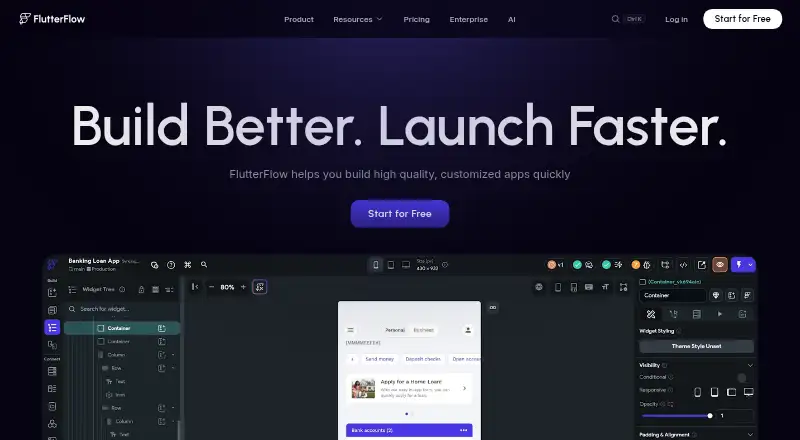
FlutterFlow is a visual development platform for building customized apps. Its design tools include more than 200 configurable UI elements and an Action Flow Editor for adding app logic. Projects can connect to Firebase, Supabase, or custom backends using REST APIs, and users can extend them with Dart functions, Flutter widgets, and Google Cloud Functions. Team features include shared editing, feedback links, branching, and reusable UI components across projects. Testing options include real-device Local Run, automated project tests, and a Debug Panel. Apps can be deployed to the App Store, Play Store, and web, and code can be exported. FlutterFlow lists integrations across AI, payments, search, notifications, databases, maps, and deployment. Its Free plan costs nothing and allows up to two projects, 10 Lite credits, and two API endpoints. Basic is listed at $39 a month; the pricing note says paid plans start at $39/user/mo.
Who it suits
FlutterFlow may suit designers, developers, and entrepreneurs building customized apps with visual tools. Its collaboration and testing features also serve teams working on shared projects.
What it does well
- More than 200 configurable UI elements
- Connects to Firebase, Supabase, or REST APIs
- Supports team editing and project branching
- Deploys apps to app stores and web
- Code export is available
What to know first
- Free plan allows up to two projects
- Free plan includes only two API endpoints
- Paid plans include email and in-app support
Limits
The free plan allows up to two projects, includes 10 Lite credits and five AI requests for the lifetime of the account, and supports up to two API endpoints. Basic costs $39 a month and includes 100 Lite credits per month.
Plans
| Plan | Billed and limits | Price |
|---|---|---|
| Free | Up to 2 projects · 10 Lite credits · 5 AI requests lifetime · Up to 2 API endpoints | Free |
| Basic | Monthly billing · Unlimited projects · Code and APK download · Custom domain publishing · 100 Lite credits/mo | $39 a month |
| Growth | Monthly billing · 2 users · 2 open branches/project · GitHub integration · 200 Lite credits/mo per seat | On request |
| Business | Monthly billing · Up to 5 users · 5 open branches/project · Up to 3 automated tests · 400 Lite credits/mo per seat | On request |
As flutterflow.io lists them, read 4 Oct 2026. The maker's own page has the final word.
Getting started
- Visit the FlutterFlow website.
- Choose the free plan or a paid plan.
- Install the macOS or Windows desktop app, if preferred.
- Create a project and build with UI elements and the Action Flow Editor.
- Connect Firebase, Supabase, or a custom backend as needed.
- Test with Local Run, automated project tests, or the Debug Panel.
- Deploy to the App Store, Play Store, or web, or export code.
FlutterFlow is a visual development platform for building customized apps across mobile, web and desktop. It is best suited to designers, developers and entrepreneurs who want visual tools alongside backend connections and room for custom code. Its breadth is a strength, but the free tier’s tight caps and paid-plan costs make it a better fit for committed projects than casual experimentation.
Overview
FlutterFlow combines visual interface design and app logic with connections to Firebase, Supabase and custom backends through REST APIs. Apps can target Android, iOS, Linux, macOS, web and Windows, and the platform supports mobile publishing. This range makes it relevant to teams planning for more than one device category, though building visually does not eliminate the need to make decisions about data, behavior and deployment.
The platform was founded by two former Google engineers to make mobile app building easier for designers, developers and entrepreneurs. Its feature set serves that broad audience, but teams that need only a simple internal tool or a narrowly defined app may not need its combination of code customization, collaboration and publishing options.
Key features
More than 200 configurable UI elements provide a substantial starting point for screens, while the visual Action Flow Editor lets users add app logic. Firebase, Supabase and REST API connections give apps access to external data and services. These tools make FlutterFlow more than a screen-layout builder; they are useful for projects that need interactive behavior and connected data, but the visual workflow may be unnecessary for teams that prefer to build entirely in code.
Custom Dart functions and Flutter widgets extend visual projects, and users can write and deploy Google Cloud Functions. That flexibility can accommodate behavior beyond the standard visual toolkit, at the cost of requiring coding skills for those customizations. Integrations cover AI, payments, search, notifications, databases, maps and deployment.
Team editing, project links for feedback, branching and shared UI components support collaboration across projects. Real-device Local Run, automated project tests and a Debug Panel offer ways to check and troubleshoot work before deployment. Apps can be deployed to the App Store, Play Store and web, and code can be exported. These capabilities support a path from visual creation toward publishing, although the free plan does not include code download.
Pricing
The Free plan costs nothing and allows up to two projects, 10 Lite credits, five lifetime AI requests and up to two API endpoints. It is suitable for a small trial, but the project, credit and endpoint caps constrain sustained work.
Basic costs $39 a month, billed monthly. It adds unlimited projects, code and APK downloads, custom-domain publishing and 100 Lite credits per month. For an individual who needs export or a custom domain, this is the practical entry point; the free plan gives up those capabilities.
Growth costs $801,552 a month, billed monthly, and includes two users, two open branches per project, GitHub integration and 200 Lite credits per seat per month. Business costs $15,018,525 a month, billed monthly, and includes up to five users, five open branches per project, up to three automated tests and 400 Lite credits per seat per month. These plans add collaboration capacity and, on Business, automated tests, but their stated prices are far above Basic. Account and billing support and community support are listed for the plans; email and in-app support are also included for paid plans.
Platforms
FlutterFlow targets Android, iOS, Linux, macOS, web and Windows, with mobile publishing to the App Store and Play Store and deployment to the web. Desktop apps are available for macOS and Windows and receive automatic updates after installation. This breadth suits projects that need several delivery targets; readers focused on just one platform may not benefit from the full range.
Who it's for
FlutterFlow is a good fit for teams that want to build customized apps visually, connect them to established backends and retain options for Dart, Flutter widgets or Google Cloud Functions. Its collaboration and testing tools also suit projects involving multiple contributors. It is less compelling for a solo user who only wants to explore, given the free tier’s small quotas, or for anyone who does not need visual development and code-level extension together.
Pros and cons
- Pros: A broad set of UI elements, visual logic tools and backend connections supports more than static screen assembly.
- Pros: Dart, Flutter widgets and Google Cloud Functions allow code-level extensions when visual tools are not enough.
- Pros: Collaboration, testing, code export and deployment options cover important stages of a shared app project.
- Cons: The free plan is capped at two projects and two API endpoints, with only 10 Lite credits and five lifetime AI requests.
- Cons: Growth and Business have very high stated monthly prices compared with Basic, despite adding seats and project workflow capacity.
Alternatives
Choose Bubble if its free Web + Mobile plan’s one app editor, 50K workload units per month and six hours of server logs better match your project; its Starter plan is $59 a month. Zoho Creator is another freemium option, with a free plan limited to one user, one app, 1,000 records and 250 MB storage. Consider Retool if its free plan or Team pricing—$10/mo per builder and $5/mo per internal user—fits your use case better.
MIT App Inventor is a free educational platform for building Android and iOS apps. Oracle APEX offers a free option included at no additional cost with supported Oracle Database editions. Clappia has a no-time-limit free plan with 100 users, 400 submissions per month and 400 workflow step executions per month. Draftbit has a free tier with one sandbox, three projects and one REST API integration per project. AgilePoint NX offers a Community Edition with 25 named users and two applications.
Browse No-code app builders, Low-Code Development Platforms, No-Code Development Platforms, No-Code AI App Builders and AI App Builders for more options.
Verdict
Choose FlutterFlow if you want a visual route to customized apps with backend connections, collaboration, code extensions and publishing across platforms. Its strongest case is the combination of visual building and room to extend beyond it. Look elsewhere if the free tier’s tight limits are all you can use, or if Growth and Business’ stated monthly prices are not justified by their added seats, branches and testing capacity.
Verdict
FlutterFlow combines visual app-building tools with backend connections, team collaboration, testing, and deployment options. The free plan has project and API-endpoint limits; paid plans start at $39/user/mo.
Questions
Is FlutterFlow free?
Yes. Its Free plan costs nothing and includes up to two projects, 10 Lite credits, five lifetime AI requests, and up to two API endpoints.
What does Basic cost?
Basic costs $39 a month with monthly billing. It includes unlimited projects, code and APK downloads, custom-domain publishing, and 100 Lite credits per month.
Which platforms can FlutterFlow apps target?
Apps can be deployed to the App Store, Play Store, and web. FlutterFlow also provides desktop apps for macOS and Windows.
Can I connect a backend or add custom code?
Apps can connect to Firebase, Supabase, or custom backends through REST APIs. Users can add custom Dart functions, Flutter widgets, and Google Cloud Functions.
Does FlutterFlow support team work and testing?
It supports team editing, feedback links, branching, and shared UI components. Testing options include real-device Local Run, automated project tests, and a Debug Panel.
Who founded FlutterFlow?
FlutterFlow says it was founded by two former Google engineers.
Facts from FlutterFlow's own pages
- API integrations
- Yes · flutterflow.io, 20 Sept 2026
- App types
- both · flutterflow.io, 20 Sept 2026
- Collaboration
- The platform supports team editing, project links for feedback, branching, and sharing UI components across projects. · flutterflow.io, 4 Oct 2026
- Company founding
- FlutterFlow says it was founded by two former Google engineers; the page does not state a founding year or headquarters. · flutterflow.io, 4 Oct 2026
- Customization
- Users can add custom Dart functions and Flutter widgets and write and deploy Google Cloud Functions. · flutterflow.io, 4 Oct 2026
- Data connections
- Apps can connect to Firebase, Supabase, or custom backends through REST API support. · flutterflow.io, 4 Oct 2026
- Deployment
- The product page says apps can be deployed to the App Store, Play Store, and web, and code can be exported. · flutterflow.io, 4 Oct 2026
- Desktop availability
- FlutterFlow provides desktop apps for macOS and Windows, with automatic updates after installation. · flutterflow.io, 4 Oct 2026
- Free plan
- Yes · flutterflow.io, 20 Sept 2026
- Free plan limits
- The Free plan allows up to two projects and includes 10 Lite credits and up to two API endpoints. · flutterflow.io, 4 Oct 2026
- Integrations
- The product page lists integrations covering AI, payments, search, notifications, databases, maps, and deployment. · flutterflow.io, 4 Oct 2026
- Intended users
- The company says FlutterFlow was founded to make building mobile apps easier for designers, developers, and entrepreneurs. · flutterflow.io, 4 Oct 2026
- Mobile publishing
- Yes · flutterflow.io, 20 Sept 2026
- Privacy and security
- FlutterFlow's privacy policy says it uses security cookies and commercially acceptable means to protect personal data, while noting it cannot guarantee absolute security. · flutterflow.io, 4 Oct 2026
- Support
- The plan comparison lists account and billing support and community support; email and in-app support are also listed for paid plans. · flutterflow.io, 4 Oct 2026
- Testing
- FlutterFlow offers real-device Local Run, automated project tests, and a Debug Panel. · flutterflow.io, 4 Oct 2026
- User authentication
- Yes · flutterflow.io, 20 Sept 2026
- Visual design
- The product offers 200+ configurable UI elements and a visual Action Flow Editor for adding app logic. · flutterflow.io, 4 Oct 2026
- What it does
- FlutterFlow describes itself as a visual development platform for building customized apps. · flutterflow.io, 4 Oct 2026
Where FlutterFlow stands on Freedom251
- No-code app builders#11 of 177
- Low Code No Code Software#3 of 26
- Low-Code Development Platforms#11 of 56
- AI App Builders#8 of 39
- No-Code Development Platforms#9 of 36
- Drag and Drop App Builder Software#9 of 34
- App Generation#8 of 29
- Startup App Builder#9 of 30
- Full Stack Generators#8 of 26
- No-Code AI App Builders#10 of 29