Freedom251 › No-code app builders

MIT App Inventor
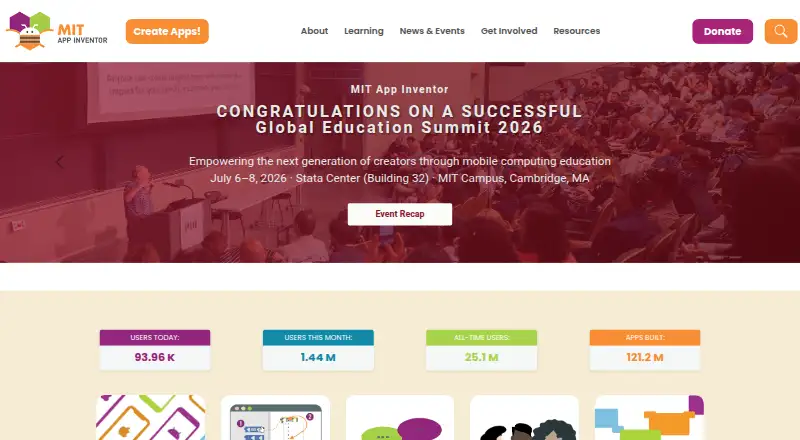
What MIT App Inventor is
MIT App Inventor is a free, web-based platform for creating, testing, and sharing mobile apps with block-based programming. Its browser workspace has a Designer for selecting app components and a Blocks Editor for programming them. Projects can include games and media, AI for images, sounds, and text, surveys and charts, maps, sensors, and internet-connected devices. The MIT AI2 Companion app supports testing during development on iOS and Android devices over Wi-Fi. Users can share projects for others to load and remix, then package completed apps for Android installation. The browser tool supports Chrome, Firefox, and Safari on most laptops and desktops, plus Chromebooks, iPads, and Android tablets. A Google account is required to log in. MIT says creators own their apps and can download or delete them from the server. The platform is free, but building and installing packaged apps is Android-only for now, even though apps can be built for Android and iOS.
Who it suits
It suits people learning to create mobile apps with block-based programming, including those who do not consider themselves coders. It is also suited to educators and learners who want to share and remix app projects.
What it does well
- Free web-based app creation platform.
- Designer and Blocks Editor separate app tasks.
- Companion app supports Wi-Fi testing on iOS and Android.
- Projects can be shared and remixed.
- Creators own their apps.
What to know first
- A Google account is required to log in.
- Packaged app building and installation is Android-only.
- MIT notes it cannot assume legal liability for users’ privacy.
Limits
Building and installing packaged apps is Android-only for now, although apps can be built for Android and iOS. The platform is free.
Plans
| Plan | Billed and limits | Price |
|---|---|---|
| MIT App Inventor | Free educational platform; apps can be built for Android and iOS; building and installing packaged apps is Android only | Free |
| Free | Browser-based app building · MIT AI2 Companion for live testing · Android and iOS app creation | Free |
As appinventor.mit.edu lists them, read 3 Oct 2026. The maker's own page has the final word.
Getting started
- Open the MIT App Inventor website in Chrome, Firefox or Safari.
- Use a Google account to log in.
- Choose app components in Designer and program them in the Blocks Editor.
- Use the MIT AI2 Companion app to test on an iOS or Android device over Wi-Fi.
- Package a completed app for Android installation.
MIT App Inventor is a free, browser-based platform for building mobile apps with visual programming blocks. It is best suited to learners and creators who want to turn app ideas into working projects without starting with conventional code.
Overview
App Inventor splits creation between a Designer for choosing app components and a Blocks Editor for programming their behavior. That division connects interface decisions with programming concepts, making it more useful for learning by building than for people seeking a conventional text-code development environment. Projects can be shared for others to load and remix, which also supports collaborative exploration.
The platform sits within Coding Learning Software, No-Code Development Platforms and No-code app builders. The no-code description has a caveat: users do program, but with blocks rather than conventional code. The project was founded in 2007 by educators and researchers at MIT and Google.
Key features
- Designer and Blocks Editor: Users select components and then program them with blocks. This gives beginners a concrete way to see how interface elements and logic fit together, though it is not a substitute for learning a text-based language.
- Live device testing: The MIT AI2 Companion app can test projects as they are built on iOS and Android devices over Wi-Fi. That feedback loop is useful for checking an idea on a phone or tablet before packaging.
- Range of project ideas: Apps can draw on games and media, AI for images, sounds and text, surveys and charts, maps, sensors, and internet-connected devices. This breadth gives learners varied ways to apply blocks beyond simple exercises.
- Sharing and remixing: Users can let others load and adapt their projects, making examples reusable for learning and experimentation. Completed apps can be packaged for Android installation.
Pricing
MIT App Inventor is free, with a plan priced at $0. There is no paid tier to unlock and no free trial; the free educational platform is the offering. It suits learners, educators and hobbyists who want to build projects without a software subscription, but the free price does not remove the Android-only limit on packaged installs.
Platforms
The browser-based environment supports Chrome, Firefox and Safari on most laptops and desktops, as well as Chromebooks, iPads and Android tablets. The platform is available across Android, iOS, Linux, macOS, web and Windows, and its Companion app supports live testing on iOS and Android over Wi-Fi. However, building and installing packaged apps is currently Android-only. That distinction matters: iOS users can participate in live testing, but cannot use App Inventor to package and install a finished app for iOS.
A Google account is required to log in. MIT says it tracks site use and project-development information and may log users’ IP address, operating system and browser software. Creators own their apps and can download or delete them from the server. MIT makes reasonable efforts to safeguard user data but does not assume legal liability for users’ privacy.
Who it's for
App Inventor is a strong fit for people learning computer science through projects, especially those who want to make mobile apps without first learning a conventional programming language. Its stated aim is to let anyone, including people who do not think of themselves as coders, create apps. Teachers and learners can draw on FAQs, tutorials, documentation and troubleshooting resources, with community experts as another support route.
It is less suitable for someone whose goal is to ship a packaged iOS app, or who specifically wants to learn text-based coding. The block-based approach lowers the barrier to making app logic, but the Android packaging restriction is decisive for cross-platform publishing.
Pros and cons
- Pro: The free plan provides a complete educational platform for app projects, avoiding a subscription cost for learners and educators.
- Pro: The Designer, Blocks Editor and Companion app connect building with device testing, so projects can be explored on actual iOS and Android devices as they develop.
- Pro: Sharing and remixing projects encourages learning from other people’s work, while support resources cover common learning and troubleshooting needs.
- Con: Packaged apps can be built and installed only on Android, so it is not the right route for delivering a finished iOS app.
- Con: A Google account is needed, and MIT’s stated tracking and logging practices may not suit users who want to avoid that data collection.
- Con: Community experts are part of the support route, which may be less direct than relying on dedicated individual support.
Alternatives
- Hopscotch is another free-start option for making games, with essential coding blocks and a free account that includes 0 monthly seeds; consider it when game creation is the priority.
- Progate offers some introductory lessons free, with a paid Plus Plan — 12 Month at $9.92, paid once; choose it when structured introductory lessons are a better fit than building mobile apps in App Inventor.
- CodeHS has a permanent free teacher plan with 100+ courses, a browser-based code editor and automatic code submission and section management; it is a better match for teachers seeking a course-oriented coding environment.
- Scratch provides a free platform for creating and sharing projects; choose it when sharing creative projects matters more than packaging mobile apps.
- freeCodeCamp is a free, open-source project under the BSD-3 license, which may suit coursework use where incorporating an open-source resource matters.
- Kodable offers monthly and yearly plans for up to 4 child profiles; consider it when a child-focused learning option with multiple profiles is the priority.
- Mimo has a Basic plan with limited course, career-path and AI Tutor access, and a Pro plan with all courses and career paths; choose it when course-based learning is a better fit than building apps.
- Codecademy offers free access to explore, with a Plus plan that includes courses, skill paths, completion certificates, mobile learning and an AI Learning Assistant; consider it for guided course and skill-path learning.
Verdict
Choose MIT App Inventor if you want a free, project-based way to learn programming concepts by making mobile apps with blocks. The combination of a visual editor, live device testing and remixable projects makes it especially useful for beginners and classrooms. Look elsewhere if you need to package an iOS app or want a text-based programming environment.
Verdict
MIT App Inventor offers a free browser-based way to design and program mobile apps with blocks. Its main platform limit is that packaged apps can currently be built and installed only for Android.
Questions
Is MIT App Inventor free?
Yes. MIT App Inventor is a free educational platform, and no free trial is listed.
Can I create iOS apps with it?
Apps can be built for Android and iOS, and the Companion app supports testing on both. Building and installing packaged apps is Android-only for now.
What devices does the browser tool support?
It supports Chrome, Firefox and Safari on most laptops and desktops, plus Chromebooks, iPads and Android tablets.
Do I need an account?
Yes. A Google account is required to log in.
Who owns the apps I create?
MIT says apps belong to their creators, who can download or delete them from the server.
Where can I get help?
The site points users to community experts and provides FAQs, tutorials, documentation and troubleshooting resources.
Facts from MIT App Inventor's own pages
- Account
- Users need a Google account to log in to MIT App Inventor. · appinventor.mit.edu, 3 Oct 2026
- Account and storage
- Users sign in with a Google account, and MIT servers store projects and track them for the account. · appinventor.mit.edu, 15 Oct 2026
- AI features
- The platform supports artificial-intelligence work with images, sounds and text, including ChatBot and ImageBot components. · appinventor.mit.edu, 15 Oct 2026
- API and SDK use
- The source tree includes a command-line YAIL build entry point and options for extensions, dangerous permissions and Companion APK creation. · github.com, 15 Oct 2026
- App capabilities
- Apps can use games and media, AI for images sounds and text, surveys and charts, maps, sensors, and internet-connected devices. · appinventor.mit.edu, 3 Oct 2026
- App sharing
- Users can share app projects for others to load and remix, and can package completed apps for installation on Android. · appinventor.mit.edu, 3 Oct 2026
- Audience
- The project’s stated vision is to enable anyone, including people who do not consider themselves coders, to create mobile apps. · appinventor.mit.edu, 3 Oct 2026
- Company type and size
- LinkedIn lists MIT App Inventor as a Cambridge, Massachusetts nonprofit in primary and secondary education with 11–50 employees. · linkedin.com, 15 Oct 2026
- Data ownership
- Apps created with App Inventor belong to their creators, who can download or delete them from the server. · appinventor.mit.edu, 3 Oct 2026
- Deployment
- Finished projects can be packaged for installation; the getting-started guide says app packaging is Android-only there, while release notes document iOS ad-hoc and App Store packaging. · appinventor.mit.edu, 15 Oct 2026
- Design and coding
- The browser-based environment provides a Designer for selecting app components and a Blocks Editor for programming them. · appinventor.mit.edu, 3 Oct 2026
- Documentation
- The official library includes component and block references, tutorials, emulator and connection troubleshooting, templates, sharing, Google Play guidance and advanced extension material. · appinventor.mit.edu, 15 Oct 2026
- Extensions
- Developers can add functionality through App Inventor extensions distributed as .aix files, with community guidance for publishing documentation and example projects. · community.appinventor.mit.edu, 15 Oct 2026
- Foundation facts
- The App Inventor LinkedIn page says the project was founded in 2007 by Hal Abelson at MIT and Mark Friedman at Google and has 15 million registered users across 195 countries. · linkedin.com, 15 Oct 2026
- Free plan
- Yes · appinventor.mit.edu, 23 Sept 2026
- History
- App Inventor was founded in 2007 by educators and researchers at MIT and Google. · appinventor.mit.edu, 3 Oct 2026
- Independent review status
- The Learning Standard states that its formal learning assessment of MIT App Inventor has not yet been completed. · thelearningstandard.org, 15 Oct 2026
- Integrations
- The documentation covers Web and XML services, Google Sheets, CloudDB, sensors, Google Play uploading and external hardware connections. · appinventor.mit.edu, 15 Oct 2026
- Licence
- The public source repository states that the code is released under the Apache License 2.0, while site educational content uses Creative Commons licences. · github.com, 15 Oct 2026
- Limit: Android connection problems
- Google Play reviews report QR-code or connect-code failures that can prevent the Companion from connecting to projects. · play.google.com, 15 Oct 2026
- Limit: beginner guidance
- The Learning Standard says the product lacks built-in step-by-step lessons, so absolute beginners may need adult help or external tutorials. · thelearningstandard.org, 15 Oct 2026
- Limit: iOS bugs
- Apple reviewers describe crashes, lag, failed connections, unreliable saving and some features still unavailable on iOS. · apps.apple.com, 15 Oct 2026
- Limit: privacy documentation
- The Learning Standard reports that its policy review found no explicit COPPA or FERPA references, no dedicated children’s section and no documented account-deletion process. · thelearningstandard.org, 15 Oct 2026
- Live testing
- Projects can be tested while building through the MIT AI2 Companion over Wi-Fi, USB on Android, Chromebook Android apps or a computer emulator. · appinventor.mit.edu, 15 Oct 2026
Where MIT App Inventor stands on Freedom251
- No-code app builders#3 of 177
- Coding Learning Software#1 of 42
- No-Code Development Platforms#2 of 36
- Diy Makers#2 of 23